
← Standards: find, write and share
How do I copy a standard's address or quote it?
Short answer
Press Main menu, choose Standards, press Rules, choose the rule document, press Copy under ENTITY URI; quote it with its tag.
Before you start
You need to be signed in to GilbApp on a computer, with a standard in a vault you can read, such as your own vault. The pictures show a made-up person on a test site; your screen shows your own name and address.
Words used here (6)
- GilbApp
- GilbApp is the app, opened in a web browser at https://gilb.com/app, where you open, fill and share your vaults.
- record
- A record is one piece of data with its own address, such as a person, a place, a thing or a note.
- entry condition
- An entry condition is something that must be true before a process may start; a process starts only when its entry conditions hold.
- exit condition
- An exit condition is what must be true before a process may finish; when it is true, the process hands back.
- agent
- An agent is your AI following one written procedure, its standing instructions, for one kind of work.
- Procedure
- A Procedure is the kind of standard that holds an agent: who you call, and the steps that agent runs, in order.
Steps
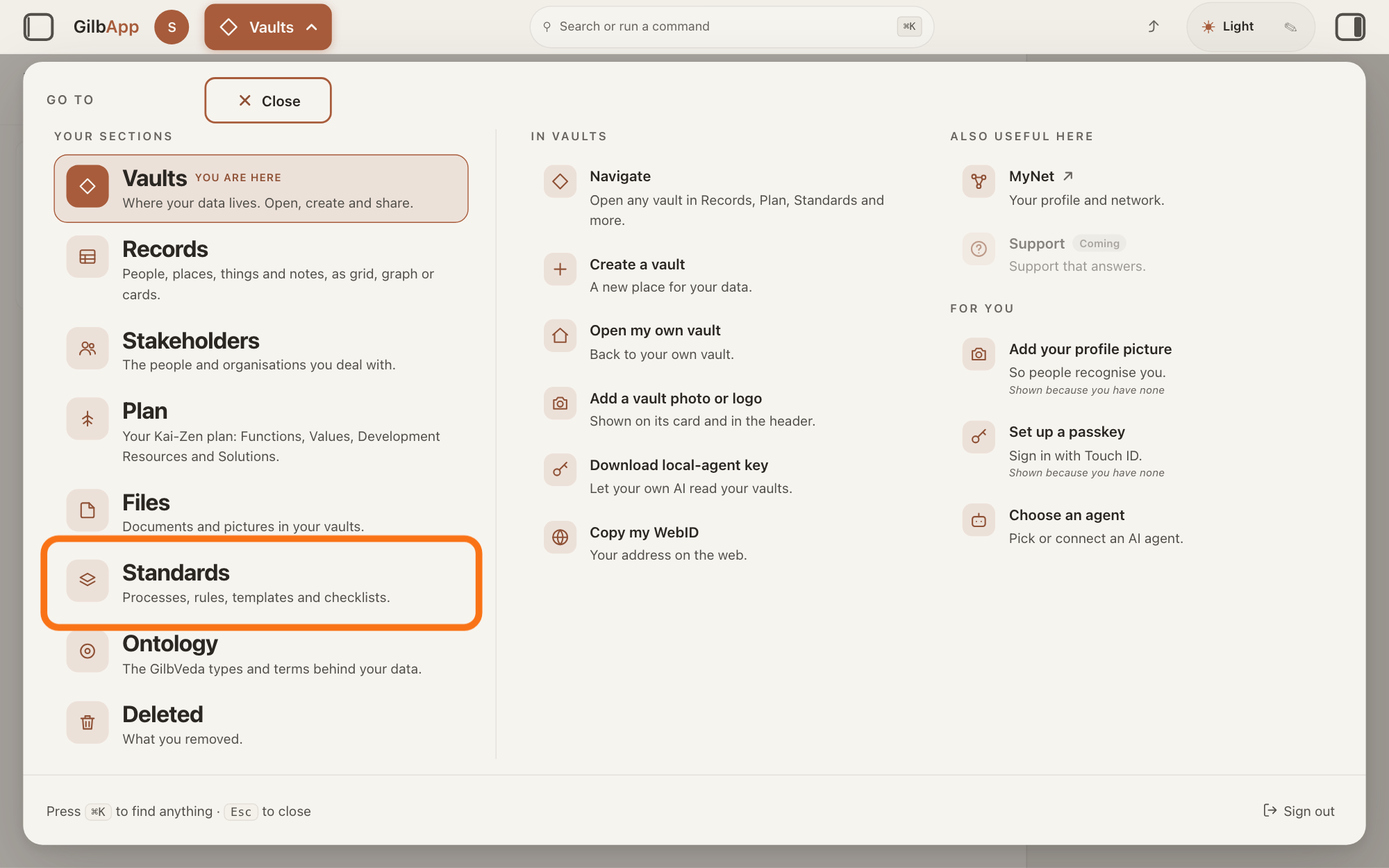
Press Main menu at the top left and choose Standards.
Press Main menu, next to your profile picture at the top left, and under YOUR SECTIONS choose Standards. The button shows the name of the section you are in, such as Vaults.
Show as text
The panel headed "GO TO" covers the screen. In the left column under "YOUR SECTIONS", the row "Standards" with the line "Processes, rules, templates and checklists." is outlined. Press it to open the Standards screen.
More about this
A panel headed GO TO opens; Standards reads Processes, rules, templates and checklists. Standards opens on the vault you picked in Vaults, or on your own vault if you picked none; a vault is the place where a person or a group keeps their records. It opens on the tab Processes, with Process chosen in the row under the tabs. A process is a standard that holds work: entry conditions, steps in order, and exit conditions; a standard is a written procedure, rule set, form or other guide that people and agents follow as they work. On the right, VAULT changes the vault, STANDARDS GROUP shows only the standards of one group, and + New group, shown only where you may write in the vault, makes a group; you need none of them here.
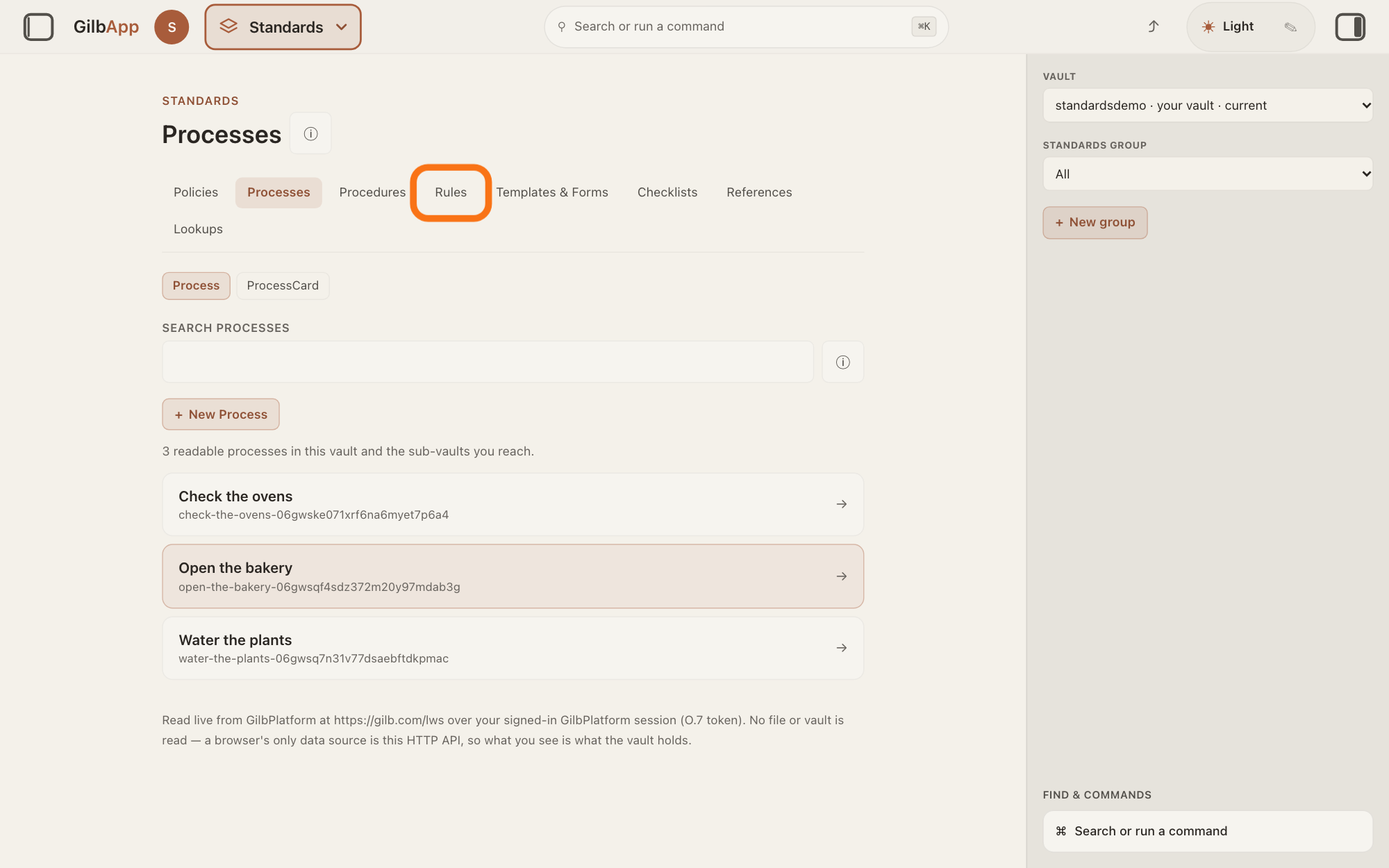
Press Rules in the row of tabs.
Press Rules, the fourth tab in the row of tabs. The screen is headed Rules and lists the rule documents, each a standard that holds rules; ⓘ beside the heading shows a line on what the tab holds.
Show as text
Near the top of the middle, in the row of tabs from "Policies" to "Lookups", the tab "Rules" is outlined. The tab "Processes" is the one open now. Press "Rules".
More about this
This answer uses a rule document; a standard of another kind, under Policies, Processes, Procedures, Templates & Forms, Checklists, References or Lookups, has the same ENTITY URI and Copy on its card.
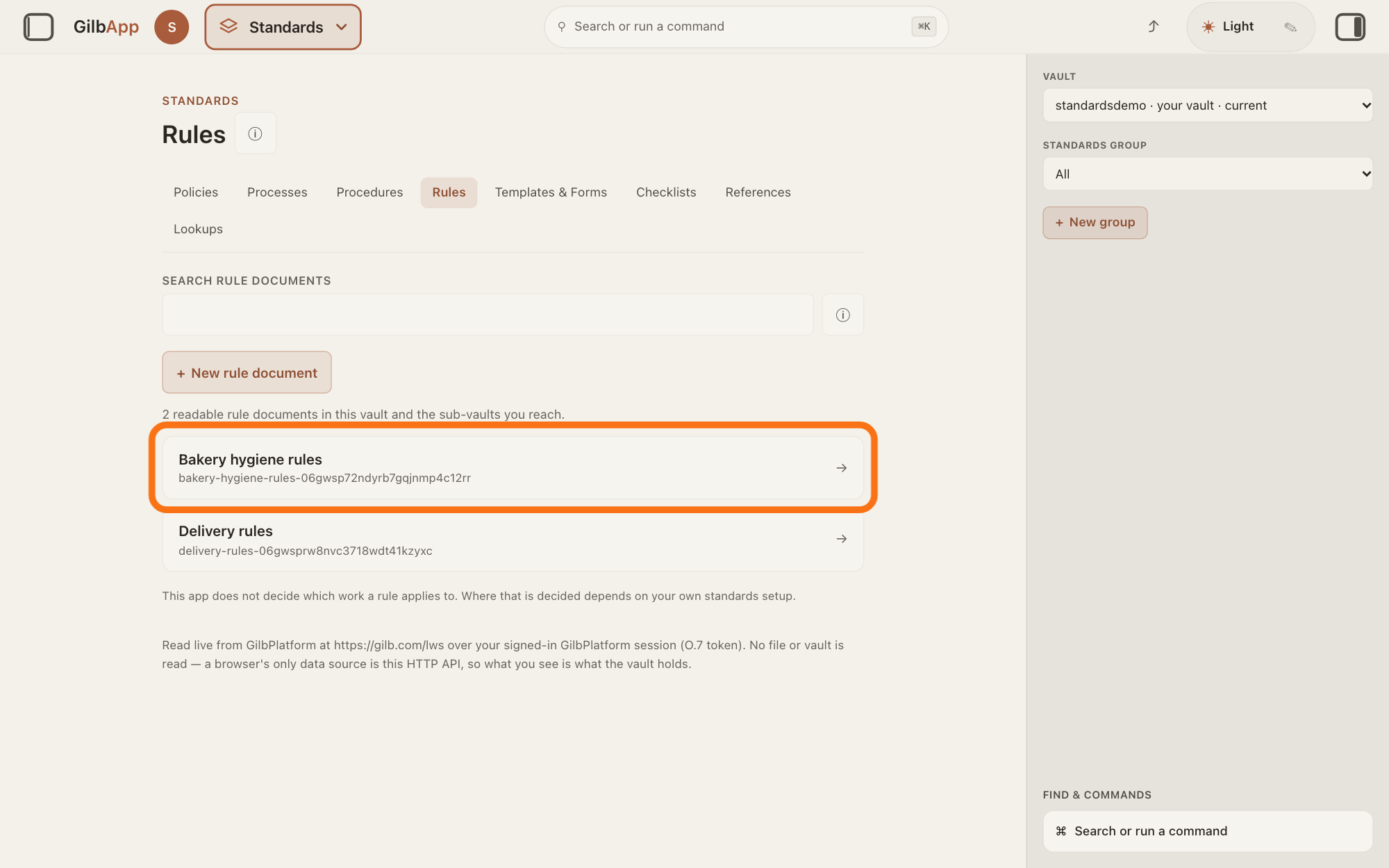
Choose the rule document in the list.
Click the rule document's row in the list. It opens: a card with RULE DOCUMENT and its title, and its rules below it.
Show as text
The screen is now headed "Rules". Under "SEARCH RULE DOCUMENTS" and "+ New rule document", two made-up rule documents are listed; the row Bakery hygiene rules is outlined. Press it.
More about this
If the list is long, type a word of its title in the box SEARCH RULE DOCUMENTS first. If the vault holds none, the screen says "No rule documents are onboarded into this vault yet. Nothing was invented — the vault holds no readable rule set." + New rule document makes a new one; you do not need it here. All rule documents goes back to the list.
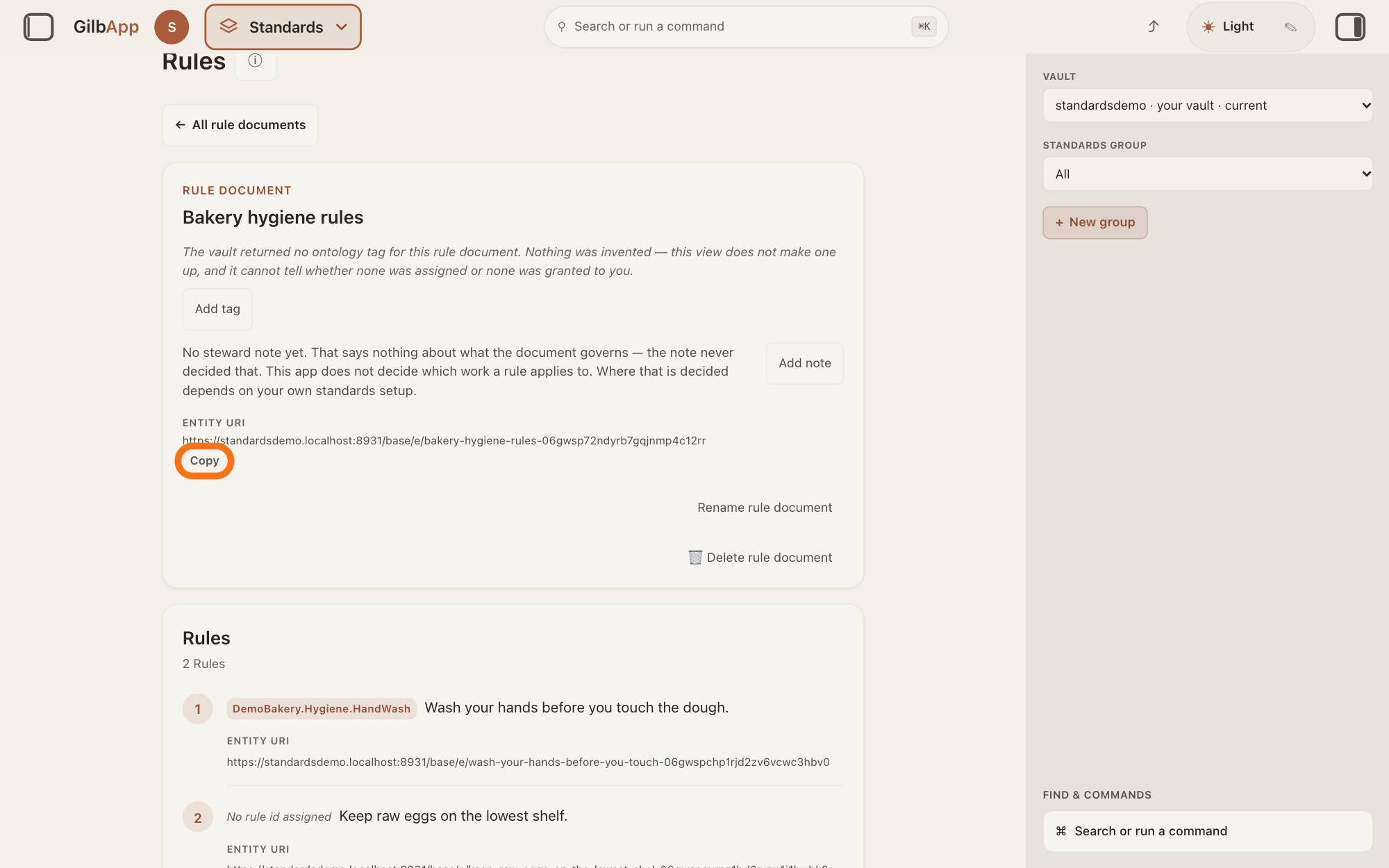
Press Copy under ENTITY URI on its card.
Press Copy under ENTITY URI on the card, below the title. The button reads Copied for a moment; paste the address with ⌘V, or Ctrl+V on Windows, where you need it, such as an e-mail or a chat with an agent.
Show as text
The rule document Bakery hygiene rules is open. In its card, under "ENTITY URI", the address of the document is shown, and the small outlined button "Copy" is just below it. Press "Copy" to copy that address.
More about this
The address is a web address that starts with the address of the standard's vault, such as https://<name>.gilb.com/vault/e/ followed by the standard's id, its own code of letters and digits. If your browser does not let GilbApp copy, the button does not change and nothing is copied: select the address with the mouse and copy it with ⌘C. The vault returned no entity URI for this rule document. means GilbApp has none to show. The card's other controls, Add tag or Edit tag, Add note or Edit note, and, if you may write in the vault, renaming and deleting, have their own answers; you do not need them here.
Choose a rule in the list under the card.
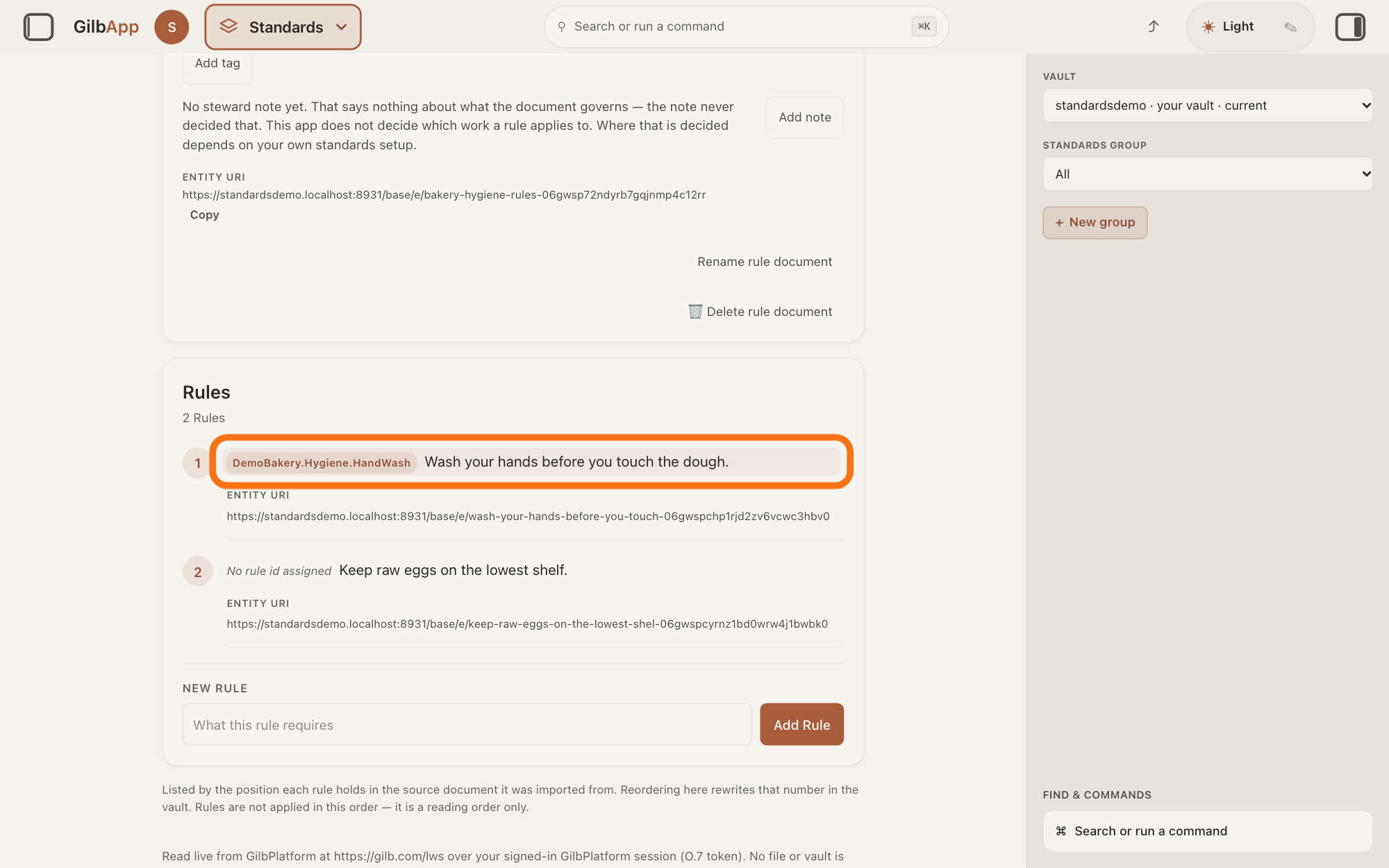
Click the words of one rule, only if you need that one rule's address. The rule opens in the pane on the right, headed Edit rule.
Show as text
Lower down, the card "Rules" says "2 Rules". Rule 1 shows the tag DemoBakery.Hygiene.HandWash and its words, and that line is outlined. Rule 2 shows "No rule id assigned". Press a rule's words to open it on the right.
More about this
Change nothing there; ✕ closes the pane. Each rule's row also shows its address after ENTITY URI, at the bottom of the row, with no Copy: a click selects the whole address, and ⌘C copies it. A rule with no tag shows No rule id assigned; its address still names it. The steps of a process open the same way. If you may write in the vault, Add Rule under the list adds a rule; you do not need it here.
Press Copy under ENTITY URI in the right pane.
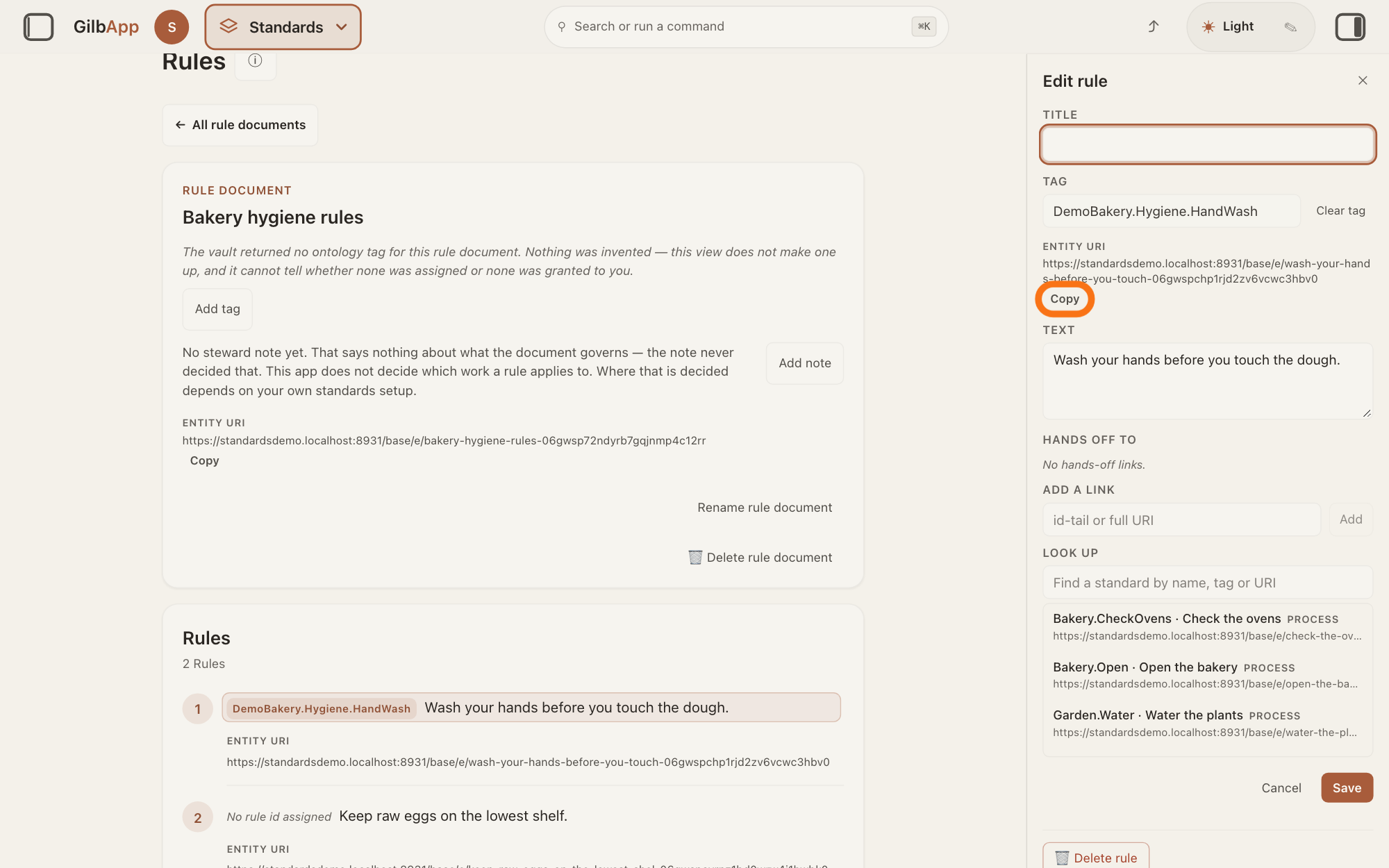
Press Copy under ENTITY URI, near the top of the pane on the right. The button reads Copied for a moment, and the rule's own address is ready to paste.
Show as text
On the right, the pane "Edit rule" is open with "TITLE", "TAG" holding DemoBakery.Hygiene.HandWash, and "ENTITY URI" with the rule's own address. The small outlined button "Copy" under that address copies it. "TEXT" holds the rule's words.
More about this
That address names this one rule, whether or not it has a tag. Press ✕ to close the pane.
Deeper
Inside GilbPlatform you may quote a standard in your work and in what your apps show their users. Keep the tag with each quote, and name the standard by its tag and its holder, for example: GilbPlatform.StandardRules, © 2026 Kai Gilb (GilbPlatform.Licence.Quote and GilbPlatform.Licence.Attribution, © 2026 Kai Gilb). A tag is the short fixed name of a standard or of one of its points, such as GilbPlatform.Licence.Quote; GilbApp shows it on the standard's card and on each rule that has one.
Do not collect quotes to rebuild a standard outside GilbPlatform. Quoting into work that leaves GilbPlatform needs Kai Gilb's written permission; the answer on asking for licence permission says more. Inside GilbPlatform means in a vault on GilbPlatform, in a GilbPlatform app, or read live from GilbPlatform by an app, agent or tool that is signed in to it or reads a vault published for reading (GilbPlatform.Licence.Inside, © 2026 Kai Gilb).
These terms are for the standards Kai Gilb publishes on GilbPlatform; they do not cover the standards customers write in their own vaults (GilbPlatform.Licence.Copyright, © 2026 Kai Gilb). The Developer Guide has its own, open terms; the answer on whether the developer guide is open to everyone tells how to credit it.
An address gives no access: someone who may not read the standard cannot read it by its address. The terms let the people they name link to a standard inside GilbPlatform (GilbPlatform.Licence.Use, © 2026 Kai Gilb); they say nothing about sending a standard's address outside GilbPlatform.
This answer is written for a computer screen. In a window narrower than 840 pixels, such as a phone, the side panes are hidden and the right pane is Detail in the bar at the bottom.
Source: GilbApp af0f04ee838a4d55887d2ff1f72edd49a4ff7ca0 (https://gilb.com/app/version.json read 2026-11-10, dirty false), read: shell/gilbAppMenuRows.ts:220-230; components/AppShell.tsx:658; components/process/standardsTabs.ts:9-25 (Rules fourth); StandardsControls.tsx:66-71, :128-145; StandardsSection.tsx:1459-1470 (Rules, the list of rule documents); RulesTab.tsx:325 (+ New rule document), :497 (none sentence), :533 (Search + rule documents, CSS capitals per StandardsSearchBox.tsx:339-344), :658 (All rule documents), :703 (eyebrow Rule document, CSS capitals per ProcessViewer.tsx:1958-1963), :777-789 (a click on a rule opens the right pane); ProcessViewer.tsx:2008-2018 (document card: Entity URI with its copy button, block), :1356-1364 (each row: Entity URI inline, no button), :1295-1309 (the rule's words are the click target); UnitIdentity.tsx:107 (The vault returned no entity URI for this + noun), :112 (title: citable whether or not a tag has been assigned), :114-121 (clipboard write; on failure nothing changes), :133-150 (label CSS capitals; Copy / Copied for 1.5 s), :65 (select-all value); components/process/DocumentTag.tsx:205 (Add tag / Edit tag); StewardNoteLine.tsx:154 (Add note / Edit note); StandardsDocumentActions.tsx:181, :287 (delete and rename, when write is allowed); lib/base/standardsFamilies.ts:281, :337-338 (Entity URI; rules: No rule id assigned); StepEditPane.tsx:207-226 (Edit + rule, ✕), :395-405 (Entity URI with Copy in the pane), :388-394 comment (process steps carry it too). GilbPlatform 4d008a55 src/routes/read.ts:10-31 (reads authorized against the reader's current access). Standards,: GilbPlatform.Licence (J 06gj9wh899wc7cbn72ek2q8pgc, 2026-11-10) rules Inside, Use (quote it, and link to it), Quote ("Keep the tag with each quote. Do not collect quotes to rebuild a standard outside GilbPlatform. Quoting into work that leaves GilbPlatform needs Kai Gilb's written permission."), Attribution ("name the standard by its tag and its holder, for example: GilbPlatform.StandardRules, © 2026 Kai Gilb"), Copyright; GilbPlatform.StandardRules.Tag (<Standard>.<Point>). Rechecked 2026-11-11 against the live builds GilbApp ebd9415e7a90de8c289eaa7bb02f40c8ee80cf79 (https://gilb.com/app/version.json, buildTime 2026-11-11.937Z) and GilbPlatform 498d29a0dec9a15d167f4b6b5d731382a6bcede0 (https://id.gilb.com/version): the diff from af0f04ee to ebd9415e changes none of the files cited here except AppShell.tsx (line 658 unchanged); the diff from 4d008a55 to 498d29a0 changes none of the platform files cited here.
Checked against GilbApp d529620.