
← Leaving, deleting and my account
How do I delete a record, and can I get it back?
Short answer
Press Main menu, choose Records, search and select the record, press 🗑 Delete record; it is kept, not erased, but GilbApp cannot restore it.
Before you start
You need to be signed in to GilbApp on a computer, with a record in a vault you can write to. The pictures show a made-up person on a test site; your screen shows your own name and address.
Words used here (3)
- record
- A record is one piece of data with its own address, such as a person, a place, a thing or a note.
- GilbApp
- GilbApp is the app, opened in a web browser at https://gilb.com/app, where you open, fill and share your vaults.
- field
- A field is one named fact on a record, such as its title or a due date; its name comes from GilbVeda.
Steps
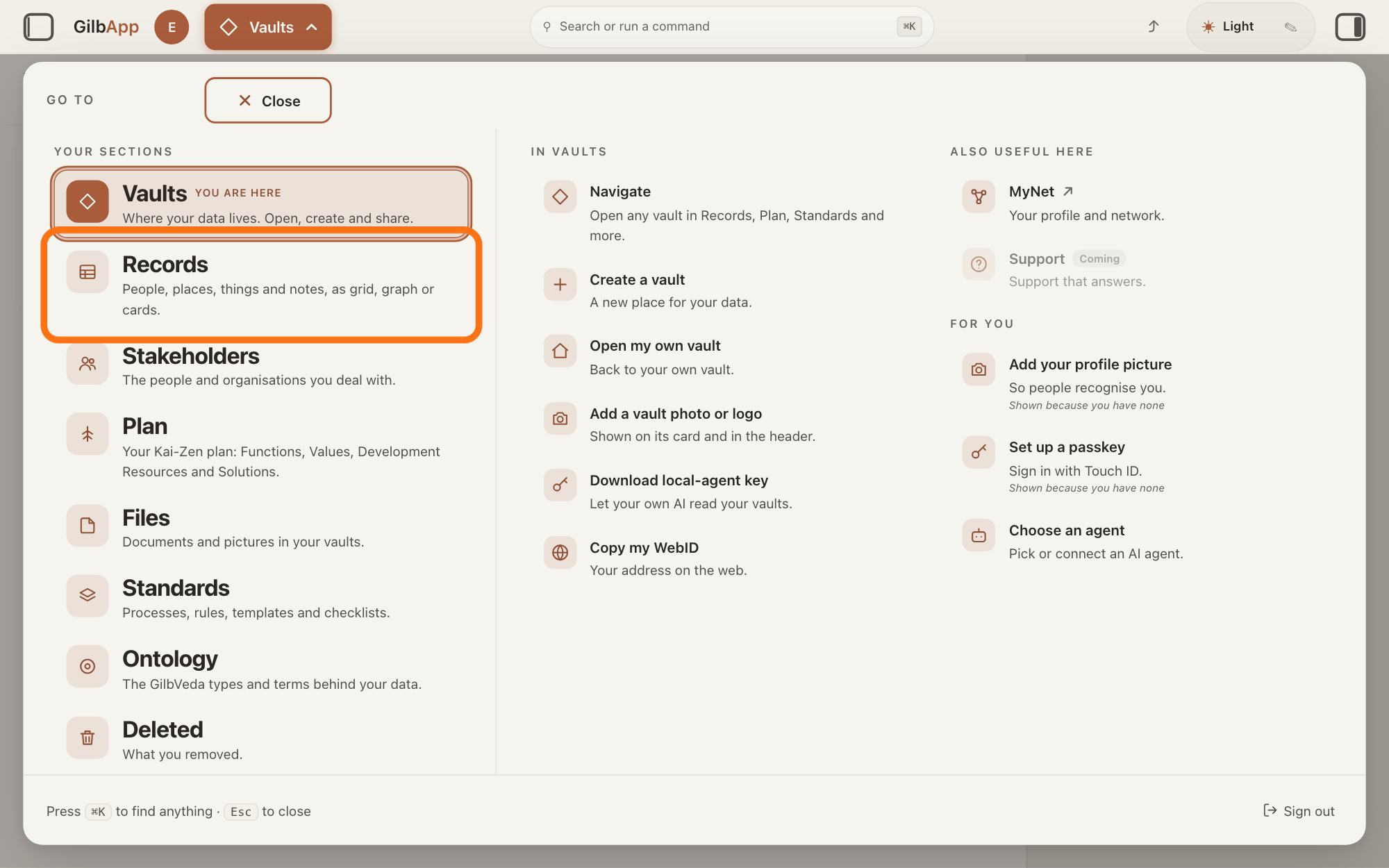
Press Main menu at the top left and choose Records.
Press Main menu, next to your profile picture at the top left, and under YOUR SECTIONS choose Records. The button shows the name of the section you are in, such as Vaults.
Show as text
The panel headed "GO TO" is open over "Your vaults". In the left column under "YOUR SECTIONS", the outlined row is "Records". Click it.
More about this
A panel headed GO TO opens; Records reads People, places, things and notes, as grid, graph or cards. A record is one piece of data with its own address, such as a person, a place, a thing or a note. Records shows the vault you picked in Vaults, or your own vault if you picked none; a vault is the place where a person or a group keeps their records. You can also press Records on a vault's card in Vaults.
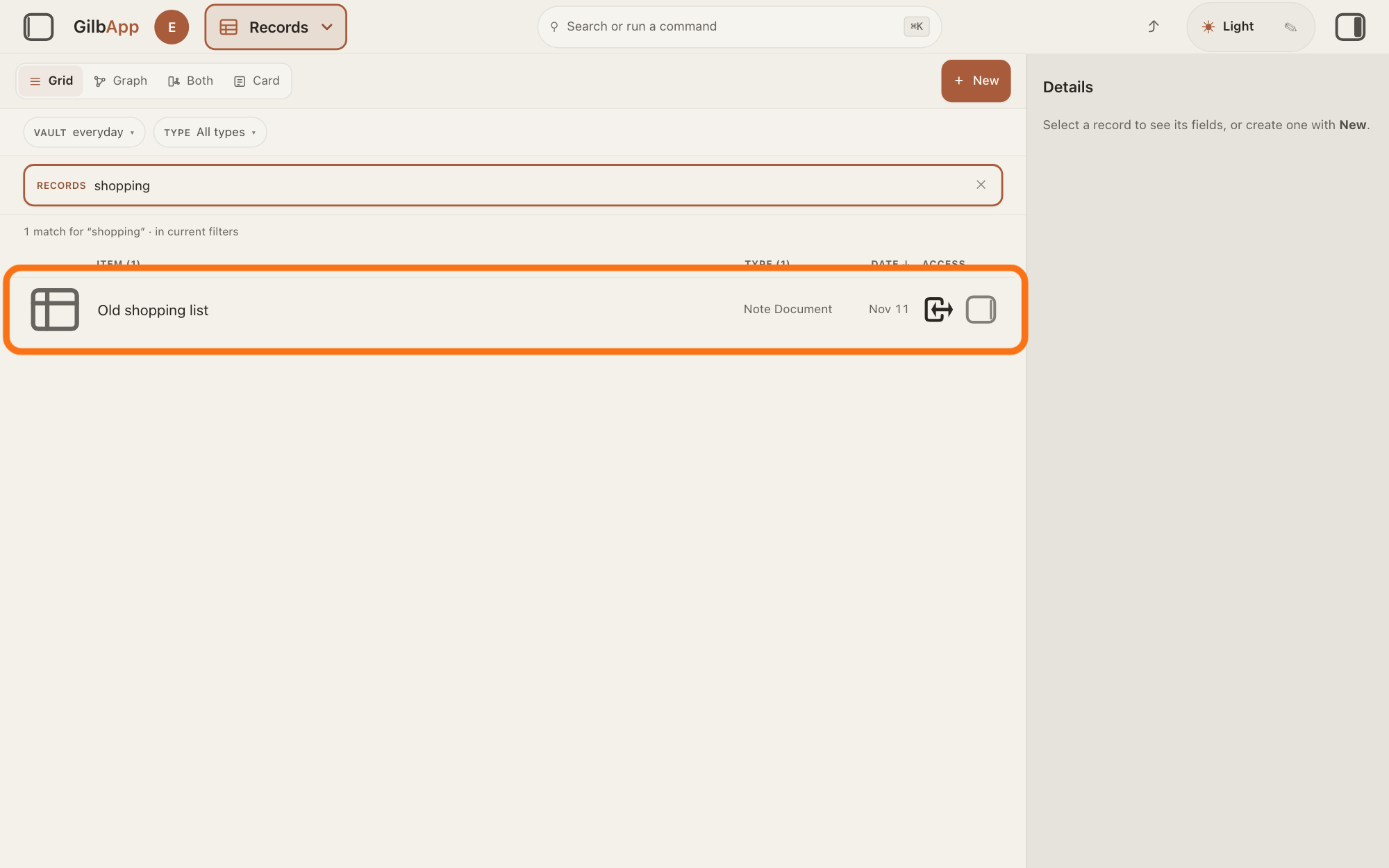
Search and select the record in the list.
Type a word of the record's name in the search box marked RECORDS above the list, and click the record in the list. The record opens in the middle of the screen with its fields, and the right pane, headed Actions, holds what you can do with it.
Show as text
In the middle, "shopping" is typed in the search box marked "RECORDS", and the line under it reads "1 match for "shopping"". The outlined row is the note Old shopping list. Click the row of the record you want to delete.
More about this
The answer on finding a record shows more about the search. A folder's row opens the folder instead. The small square button at the right end of a row, with the hover text Show card info, shows the record in the right pane and keeps the list; 🗑 Delete record is then in that pane too. If the right pane is hidden, press the square button at the far right of the top bar. Show all records, in the bar with the views, right of Card, brings the list back.
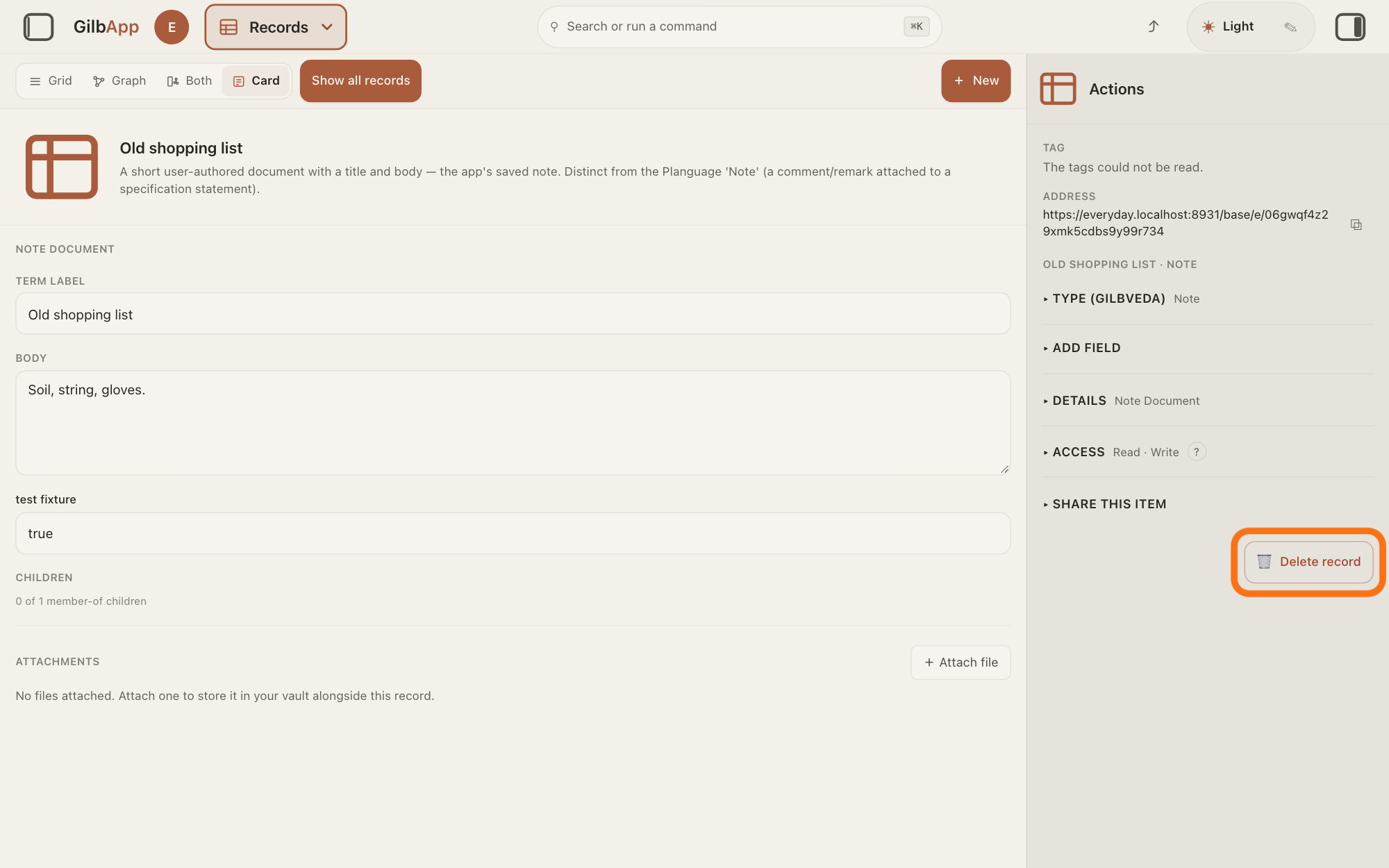
Press 🗑 Delete record.
Press 🗑 Delete record at the foot of the right pane. GilbApp deletes the record at once, with no question, and it leaves the list.
Show as text
The note is open in the middle. In the right pane headed "Actions", below the folds "TYPE (GILBVEDA)", "ADD FIELD", "DETAILS", "ACCESS" and "SHARE THIS ITEM", the outlined red button reads "Delete record" with a bin. Click it.
More about this
The links that join it to other records end with it, as far as you may end them; a field on another record that holds its address keeps it. The middle then says Select a record to see its fields, or create one with New., the right pane Select a record to use share, grant, and access actions., and Show all records, in the bar with the views, right of Card, brings the list back. If the delete fails, the record comes back in the list. The button is not there on a record you may only read. For a file that is a record's picture, the pane says instead "This file is a record’s picture, so it isn’t deleted from here. Replace it with Change picture on that record."; a process or a process step says where it can be deleted, if anywhere.
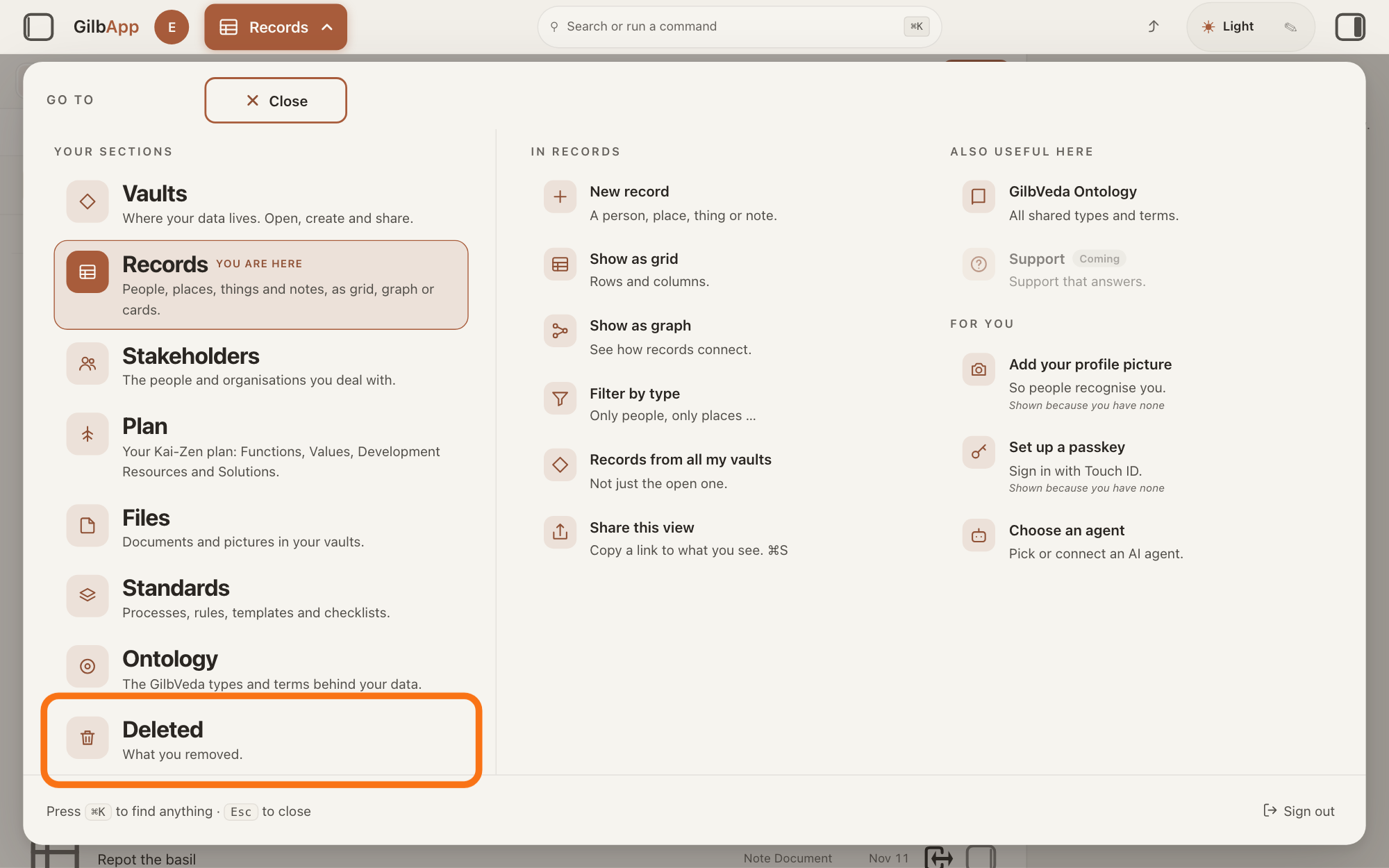
Press Main menu at the top left and choose Deleted.
Press Main menu at the top left again, and under YOUR SECTIONS choose Deleted. The screen Deleted lists what was deleted in the vault you are in, with the record you just deleted.
Show as text
The panel headed "GO TO" is open again. In the left column under "YOUR SECTIONS", the last row, outlined, reads "Deleted" with "What you removed." under it. Click it to see what you deleted.
More about this
In the panel, Deleted reads What you removed.; Show deleted files under IN FILES opens the same screen. The heading counts the rows, such as 1 item. A record's row shows its name, then You ended this node or Ended node (a node is a record; ended means deleted) and its type. The line under the list says "Ended files and records from the day this list shipped. History is kept. The list says “you” only when you ended it yourself."; with none, the screen says Nothing ended yet. The tabs In your vault and Deleted switch between the files still there and this list; VAULT and TYPE narrow the list, and the box that shows Search your vault… searches it. Pressing a row selects it. There is no button here to bring a record back.
Deeper
Also asked:
I deleted something from my plan by mistake. A card in your plan is a record: deleting it ends it, it is kept, not erased, but GilbApp has no button to bring it back. Make it again with + New in Plan; the new card gets a new address.
How do I remove a record I no longer need? Delete it: select it in Records and press 🗑 Delete record at the foot of the right pane. GilbApp deletes it at once, with no question.
What does Deleted mean: is it gone for good? Deleted means ended, not erased: GilbPlatform keeps the record's address and its history, and Deleted in Main menu lists it. GilbApp has no button to bring it back; a program can, through GilbPlatform.
When I delete a record, is it really gone? It is not erased: GilbPlatform keeps it, with its address and its history, and an ended record cannot be changed. It leaves your lists, and GilbApp cannot restore it.
What does ended mean, as in Ended files and records? Ended means deleted: the file or record is kept, with its address and history, but it leaves your lists and cannot be changed. Deleted in Main menu lists them.
Deleting ends a record; it does not erase it. GilbPlatform keeps the record's address and its history, and an ended record cannot be changed.
GilbApp has no button to bring a deleted record back. GilbPlatform can: writing the record again in full, with all its fields, at its own address makes it live again, in the vault it was in. Links the delete closed stay closed and must be made again. Programs do this through GilbPlatform's interface for developers; the developer guide's section on ended records and bringing one back, at https://appbuilder.gilb.com/base/e/06gkzpws11z7ba2q7s9qns17h0, shows how.
To have the record in GilbApp again today, create it again; the answer on creating a record shows how. The new record gets a new address, so links and addresses that pointed at the old one do not reach it.
Jackfruit, the vault agent, also ends a record when you ask it for that record, and names the record before it ends it; the answer on working with Jackfruit shows how.
This answer is written for a computer screen. In a window narrower than 840 pixels, such as a phone, the side panes are hidden and the right pane is Detail in the bar at the bottom.
Checked against GilbApp d529620.