
← Back to How do I link two records?
How do I find a record?
Short answer
Press Main menu, choose Records, and search and select the record by typing its name in the search box.
Before you start
You need to be signed in to GilbApp on a computer. The pictures show a made-up person on a test site; your screen shows your own name and address.
Words used here (4)
- record
- A record is one piece of data with its own address, such as a person, a place, a thing or a note.
- GilbApp
- GilbApp is the app, opened in a web browser at https://gilb.com/app, where you open, fill and share your vaults.
- field
- A field is one named fact on a record, such as its title or a due date; its name comes from GilbVeda.
- GilbPlatform
- GilbPlatform is the service that keeps people's and organisations' data in vaults, each at its own web address.
Steps
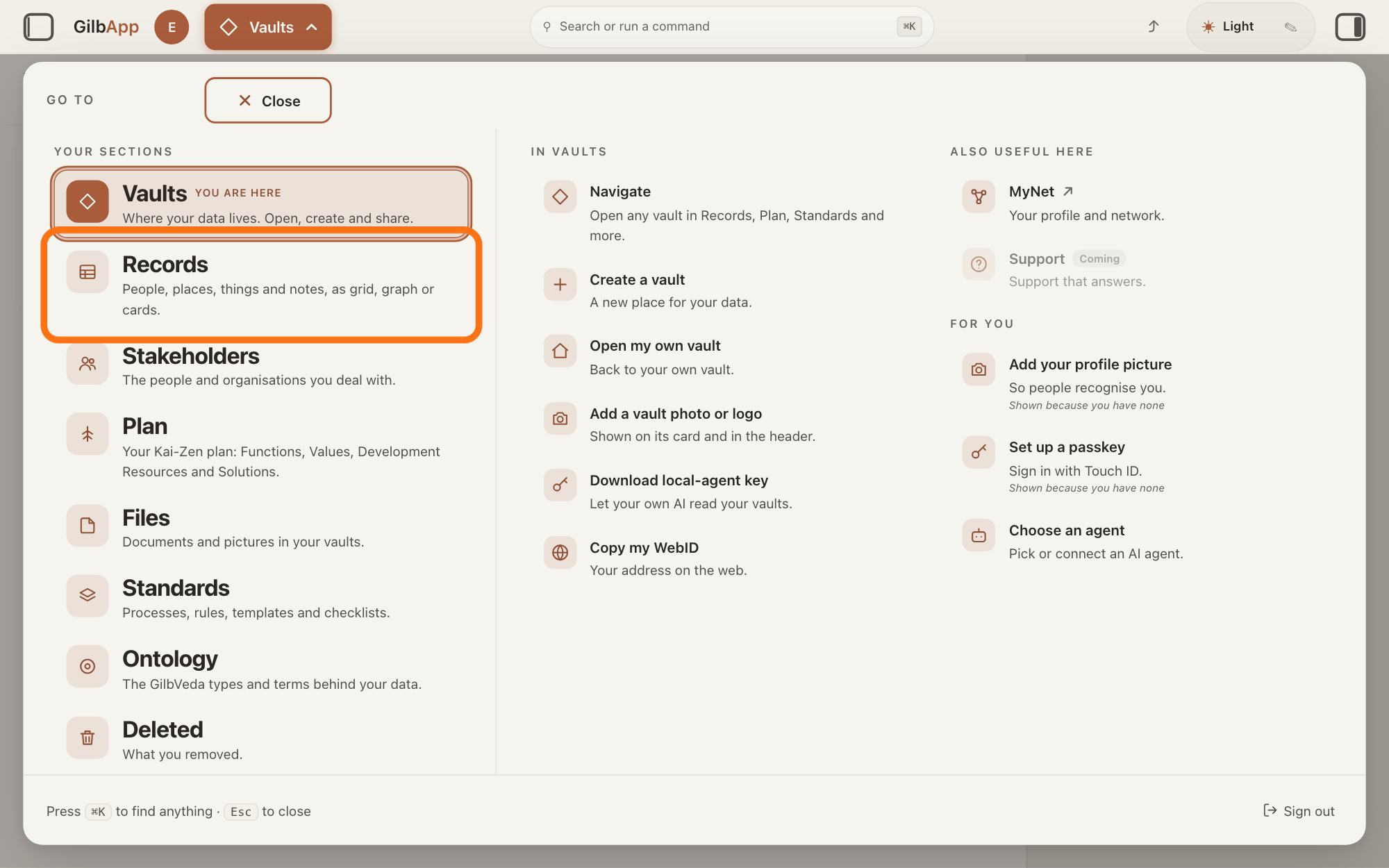
Press Main menu at the top left and choose Records.
Press Main menu, next to your profile picture at the top left, and under YOUR SECTIONS choose Records. The button shows the name of the section you are in, such as Vaults.
Show as text
The panel headed "GO TO" is open over "Your vaults". In the left column under "YOUR SECTIONS", the outlined row is "Records", just under "Vaults". Click it.
More about this
A panel headed GO TO opens; Records reads People, places, things and notes, as grid, graph or cards. A record is one piece of data with its own address, such as a person, a place, a thing or a note. Records shows the vault you picked in Vaults, or your own vault if you picked none; a vault is the place where a person or a group keeps their records. You can also press Records on a vault's card in Vaults.
Search and select the record in the list.
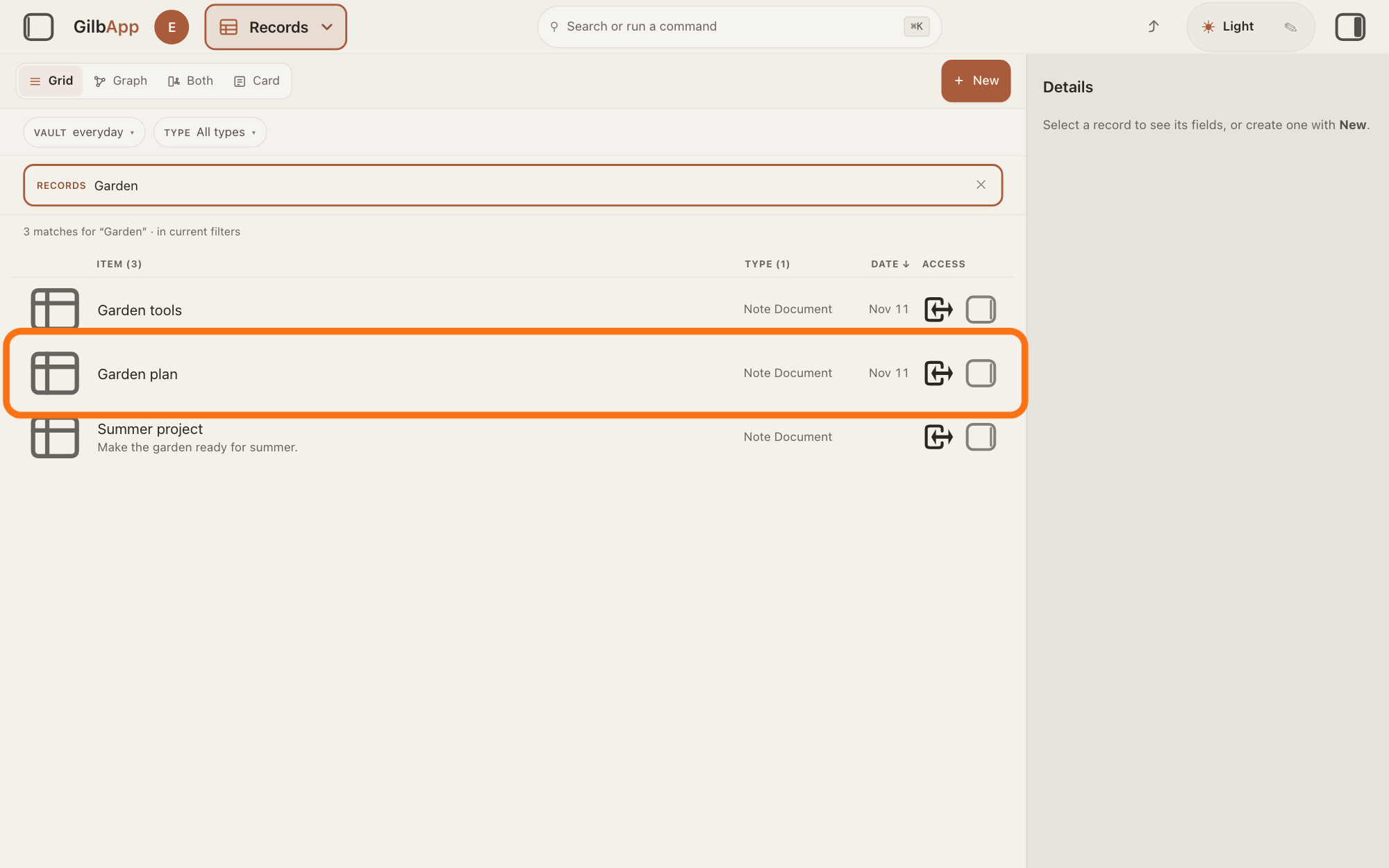
Type a word of the record's name in the search box marked RECORDS above the list, and click the record in the list. The record opens in the middle of the screen with its fields, and the right pane, headed Actions, holds what you can do with it.
Show as text
In the middle, "Garden" is typed in the search box marked "RECORDS", and the line under it reads "3 matches for "Garden" · in current filters". The outlined row is the note Garden plan. Type part of a name, then click the row you want.
More about this
The box shows Search in current filters… while a filter is on, and Search your vault… otherwise. The list changes as you type: it holds the rows already read whose name or type holds what you typed, and the records GilbPlatform finds with that whole word in any of their text, only ones you may read. A line above the list says how many match, followed by · in current filters; with none it says No matches and Nothing in the selected vaults matches with your words. ✕ in the box clears it. The small square button at the right end of a row, with the hover text Show card info, shows the record in the right pane and keeps the list. Show all records, in the bar with the views, right of Card, brings the list back.
Deeper
Also asked:
How do I find something I saved? For a record, type a word of its name in the search box marked RECORDS in Records. Search files finds files by name; Search or run a command in the top bar, or ⌘K, searches all your vaults.
Why does search not find a word that is inside a text? Search finds whole words in a record's text, not part of a word, except among the rows already loaded in the open vault. Words inside an attached file are not searched; Search files finds files by name only.
Why does search find nothing when I type the first letters of a name? Search looks for whole words. Part of a word finds a record only among the rows the list has already read in the open vault; for other vaults, type a whole word of the name.
Other sections have a box of their own. In the GO TO panel, Find a person under IN STAKEHOLDERS looks Among the stakeholders in all your vaults., Search files under IN FILES finds files By name., and Search deleted under IN DELETED finds what you removed, By name. Records you have deleted are not found in Records. In Plan the box above the list works as it does here.
To look in all your vaults at once, see the answer on searching across all your vaults. Search or run a command in the middle of the top bar, or ⌘K, also searches all your vaults and jumps to what you select.
VAULT above the box narrows which vaults it looks in, and TYPE which kinds of record it keeps; the column heads ITEM, TYPE and DATE sort the list, and the answer on sorting and filtering the list shows them. While a filter is on, the box shows Search in current filters…, keeps only records of the types you chose under TYPE, and looks only in the vaults you ticked under VAULT; with All reachable vaults ticked, as at first, it also asks your other vaults. A choice under TYPE alone does not stop that, so the list can show a matching record from another of your vaults. Part of a word finds a record only among the rows the list has already read in the open vault; a record of another vault is found only by a whole word.
With one vault chosen under VAULT, a long list of matches loads more as you scroll down, and its foot says Scroll for more while there are more; with none or several chosen the list holds only the best 20 matches from GilbPlatform, and choosing one vault under VAULT lets it load more. If GilbApp cannot reach the vault, it says Couldn’t reach your vault and "The search request didn’t get through. Check your connection and try again — nothing was changed." If the search fails another way, it says Search hit a snag.
This answer is written for a computer screen.
Source: GilbApp af0f04ee838a4d55887d2ff1f72edd49a4ff7ca0 (version.json read 2026-11-09, dirty false); unpack (no checkout). GilbPlatform 4d008a55367a6e7453920c463a8923df37de62e9 (https://id.gilb.com/version read 2026-11-09). Step 2 (fixes 10i/10j): workingSetFacets.ts:88-102 (local match: name, type key or type label, substring, rows already read), Base src/routes/search.ts:66 (default `text` = whole-token), hence a word of; RecordDetail.tsx:281 and RightRegion.tsx:954 (Card -> pane headed Actions); RecordsCenter.tsx:98-119 (Show all records right after the view tabs, only in Card or folder view; + New ml-auto, NewRecordButton.tsx:75). RegisterScopedSearch.tsx:56-107 (plane label Records CSS capitals, placeholder rule, ✕ Clear search, autofocus); RecordGrid.tsx:887-905 (debounced search-as-you-type), :959-1090 (local name match over the loaded list merged with GilbPlatform Find hits), :1196-1206 (workingSetActive = a Vault or Type choice), :101-124 (match headline), :2553-2615 (notices, · in current filters), :1693 (Show card info); recordsView.ts:76-84 (row click -> Card); RecordsCenter.tsx:106-125; searchHooks.ts:256-275 (runSearch: whole-token match by default), :381-470 (one vault chosen -> that vault; none or several -> fan-out over the chosen or every reachable vault). GilbPlatform src/routes/search.ts:1-20 (BM25 Find, only what the reader may read, fails closed without a principal), :55-63 (lifecycle default live; match text = whole token), src/read/search.ts:1-25 (matches text values on current facts). Deeper 1: gilbAppMenuRows.ts:150-153 (Find a person, Among the stakeholders in all your vaults.), :193-198 (Search files, By name.), :209-211 (Search deleted, By name.); section-menu SectionMenu.tsx:86 (In <section>, CSS capitals). CommandPalette.tsx:280-300. Deeper 3: WorkingSetFacetBar.tsx:131-145, :290; RecordGrid.tsx:2405-2445 (Item, Type, Date, Access heads, CSS capitals); searchHooks.ts:381-395; RecordGrid.tsx:1010-1060 (server hits confined by type only, merged). Deeper 3 scope sentence: run 10i ruling (a) (RecordGrid.tsx:905, :1006-1020; searchHooks.ts:387-389, :461-466). Deeper 4: searchHooks.ts:511-514 (fan-out does not page), :532 (single vault pages); fanout.ts:272 and Base src/read/local-projection.ts:558 (mergeTopN, SEARCH_PAGE_SIZE 20, read/search.ts:48; multi-token OR-match, read/search.ts:331, so more words do not narrow); RecordGrid.tsx:2384 (Scroll for more), :2553-2562. Capability rows: CapabilityTags-GilbApp row 54 (SearchListOnScreen), CapabilityTags-GilbPlatform row 52 (FindText); evidence Capability-GilbApp-GilbSupport.md:87, Capability-GilbPlatform-GilbSupport.md:117.
Checked against GilbApp d529620.