
← Back to Someone invited me. What do I do first?
How do I find and join a group?
Short answer
Press Main menu, choose MyNet, press Groups, then Find Groups, search for the group, press Join Request, then Send Request; its admin decides.
Before you start
You need to be signed in to GilbApp on a computer. The pictures show a made-up person on a test site; your screen shows your own name and address.
Words used here (3)
- GilbApp
- GilbApp is the app, opened in a web browser at https://gilb.com/app, where you open, fill and share your vaults.
- project
- A project is work to bring about a change you want, such as a new app or a better way of doing something.
- record
- A record is one piece of data with its own address, such as a person, a place, a thing or a note.
Steps
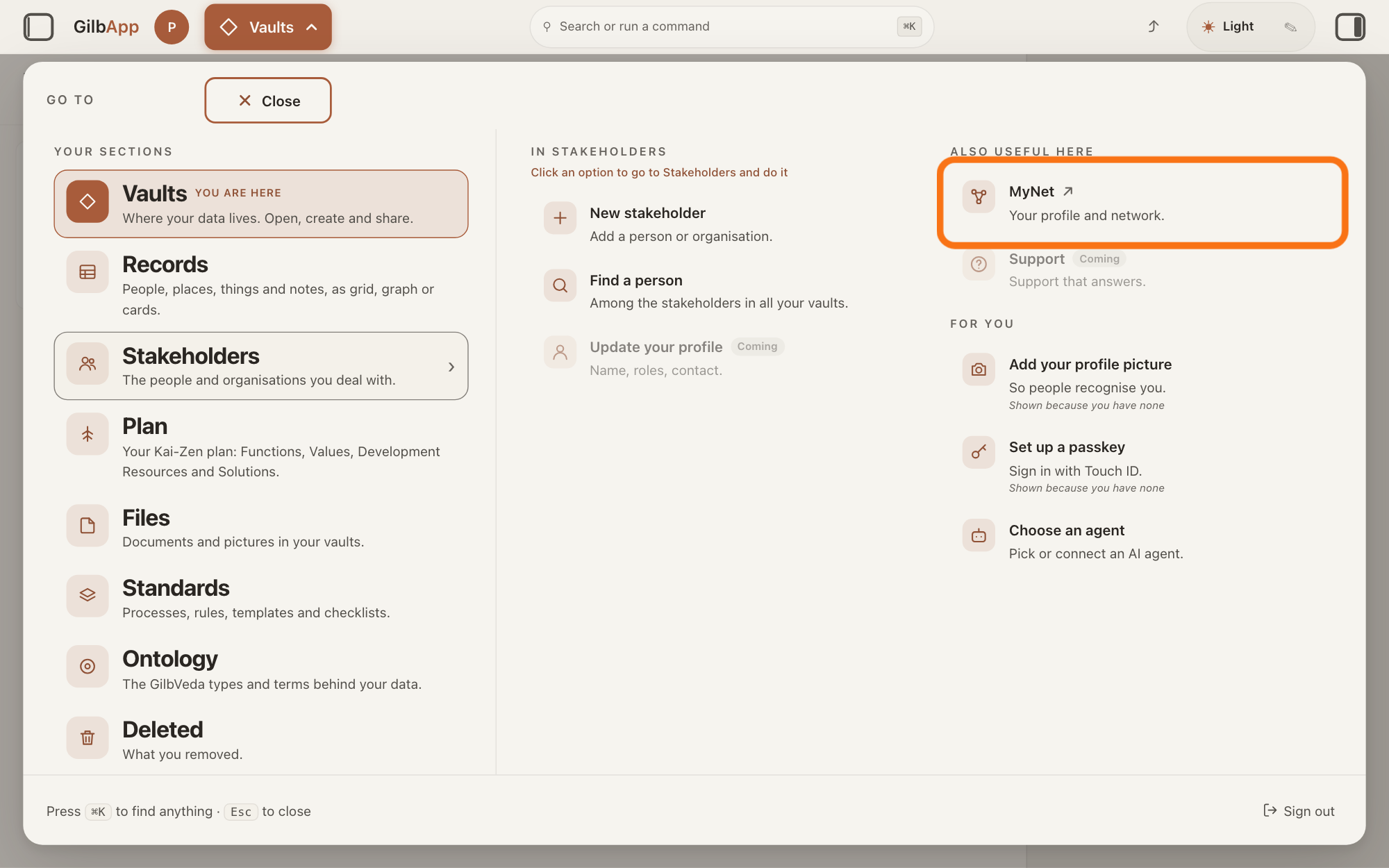
Press Main menu at the top left and choose MyNet.
Press Main menu, next to your profile picture at the top left, rest the pointer on Stakeholders and choose MyNet under ALSO USEFUL HERE. MyNet, Gilb's app for your profile and network, opens in a new tab.
Show as text
Press "Main menu" at the top left and rest the pointer on "Stakeholders". In the right-hand column "ALSO USEFUL HERE", press "MyNet ↗", "Your profile and network.", outlined in orange. MyNet opens in a new tab.
More about this
The button shows the name of the section you are in, such as Vaults. MyNet reads Your profile and network., and ↗ beside it means it opens in a new tab. MyNet may ask you to sign in first, with your e-mail address and a code, as GilbApp does. You can also type https://gilb.com/mynet in your browser's address bar. On your own card in Stakeholders, Edit in MyNet opens your profile at once.
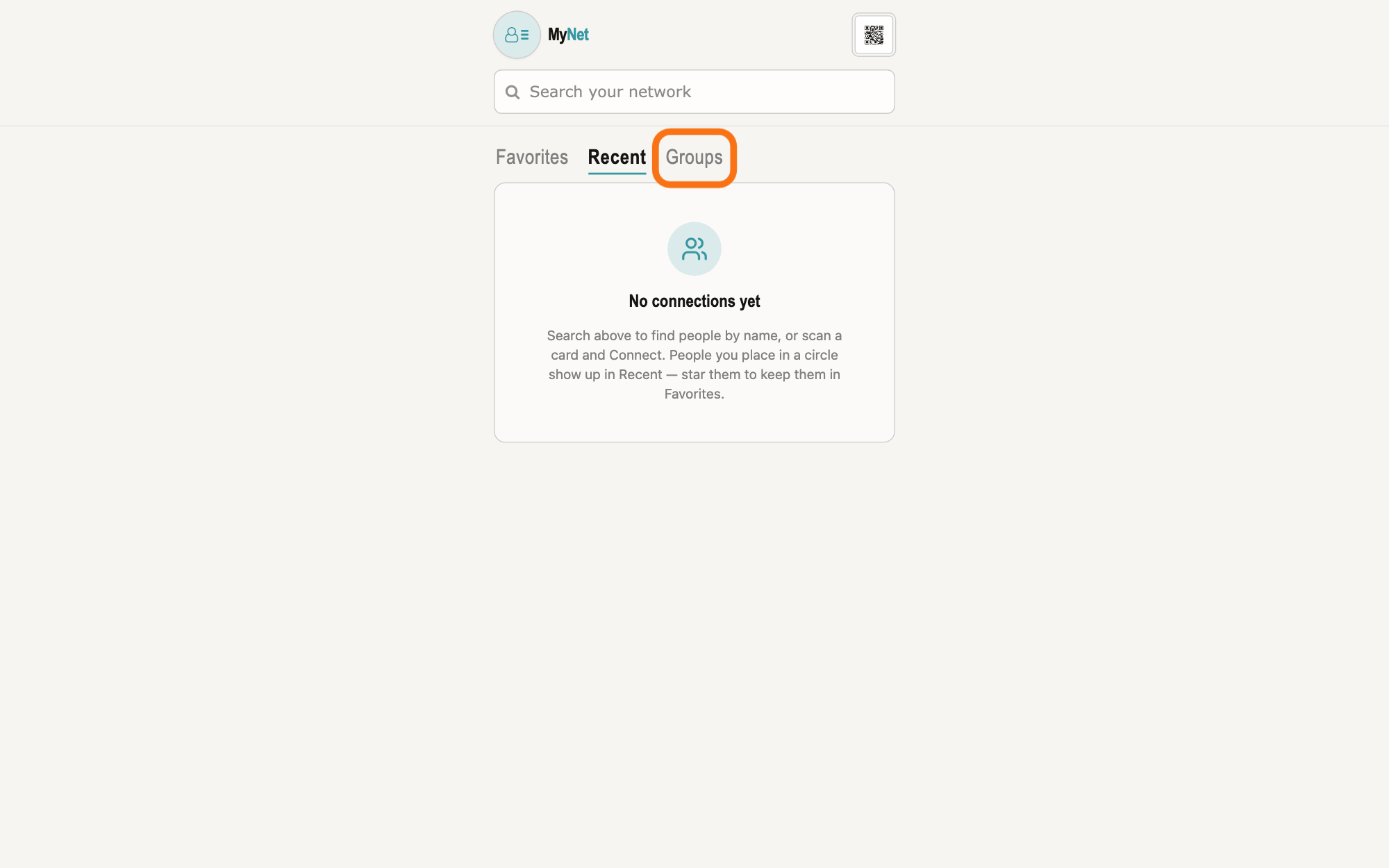
Press Groups on MyNet's home screen.
On MyNet's home screen, press Groups, right of Favorites and Recent below the box Search your network. A group is the vault of an organisation or a project, such as a club or a company, that its members share; a vault is the place where a person or a group keeps their records.
Show as text
MyNet's home screen. Under the box "Search your network" are three tabs: "Favorites", "Recent" and, at the right, the outlined "Groups". Press "Groups" to see the groups you are in and the ones you can find.
More about this
Groups shows two lists, My Groups and Find Groups, one at a time, and MyNet remembers the one you used last. The box Search your network also lists, under GROUPS, the groups you can already reach whose name matches.
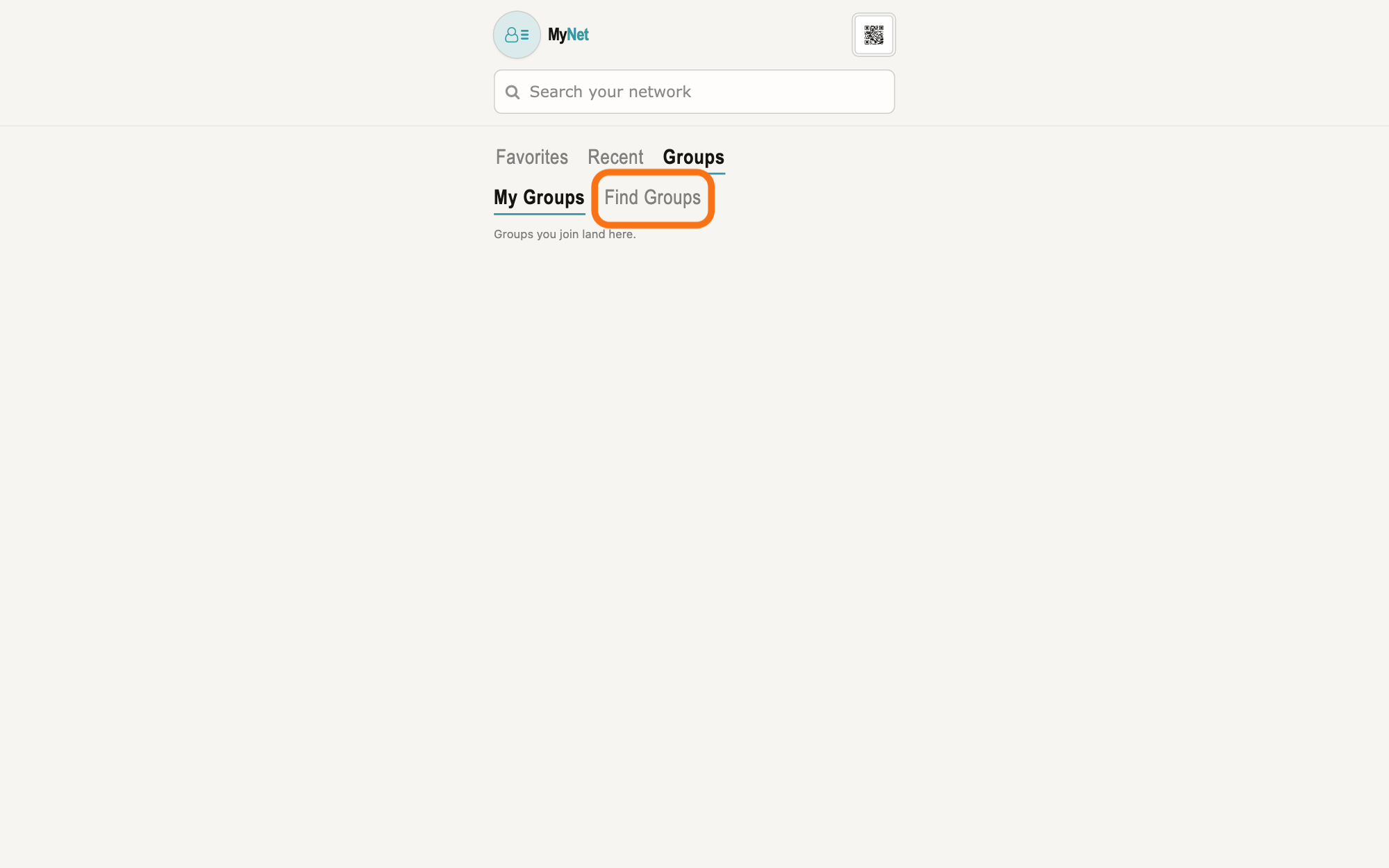
Press Find Groups.
Press Find Groups under Groups. While its box is empty, it lists every group you can ask to join.
Show as text
"Groups" is open and shows two lists under it, "My Groups" and the outlined "Find Groups". Here "My Groups" says "Groups you join land here." Press "Find Groups" to see the groups you can ask to join.
More about this
It is headed Find public groups and says Groups that are open to find. Private groups are invite only. Each group is a box with its name, its kind, Organization, Project or Group, and its About text, the group's own words about itself, cut to 3 lines. Groups you already belong to are listed under My Groups instead. Searching groups… shows while it reads; No listed groups yet. means there are none, and a line such as Could not search groups. means the search did not work.
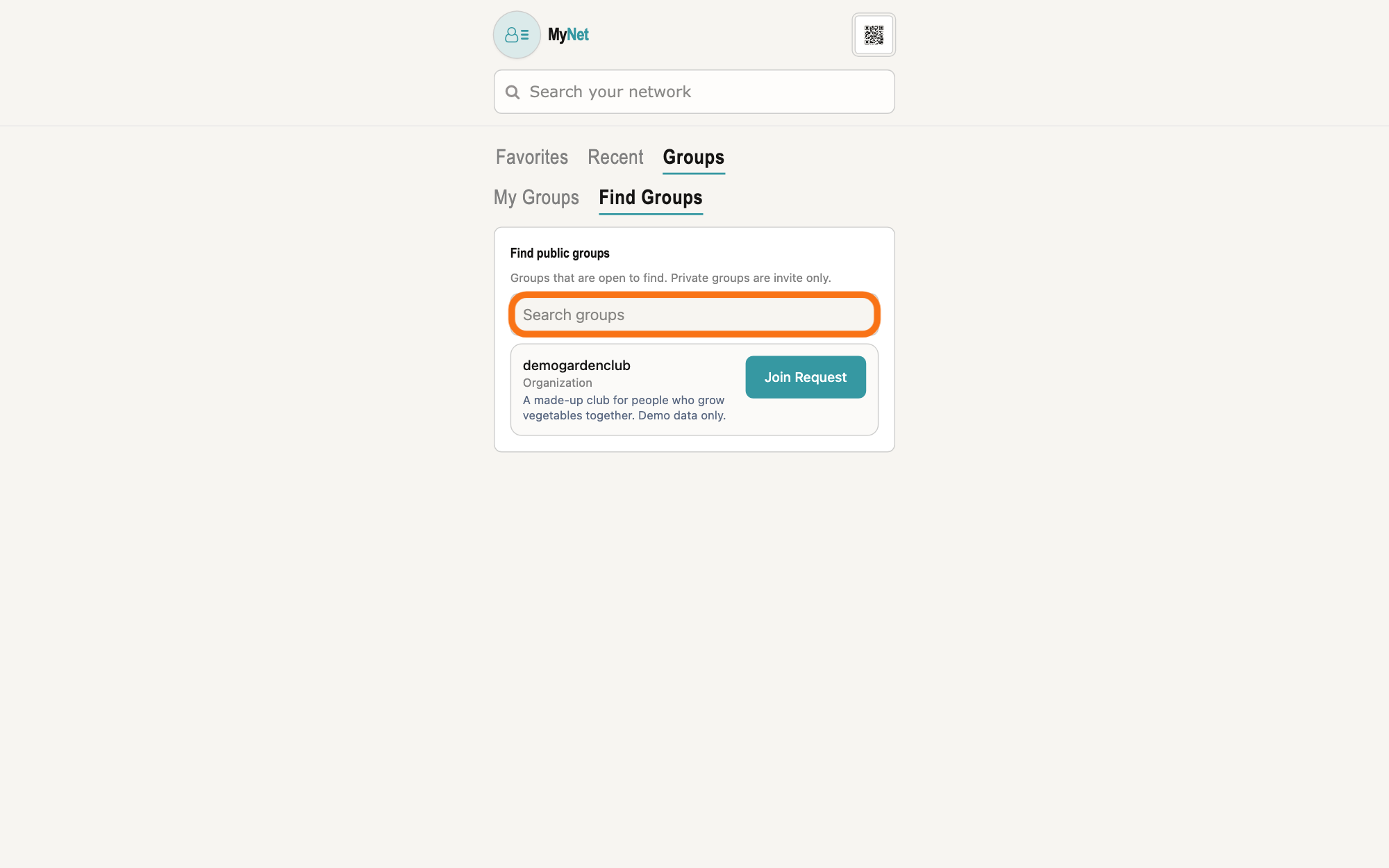
Search for the group in Search groups.
Type a word of the group's name in the box Search groups. The list narrows a moment after you stop typing.
Show as text
The card "Find public groups" says "Groups that are open to find. Private groups are invite only." Its box "Search groups" is outlined. Below it each group has its name, its kind such as "Organization", its About text and "Join Request". Type a word of the group's name in the box.
More about this
No groups match that name. means no group you can ask to join has that name; The one group that matches is already yours — see My Groups. means you belong to it already. A group is listed when its admin chose Public under Who can find this group in MyNet, or under WHO CAN FIND THIS VAULT in GilbApp, as the answer on making a vault findable by name says. A group set to Private is never listed: ask its admin to add you.
Press Join Request on the group's row.
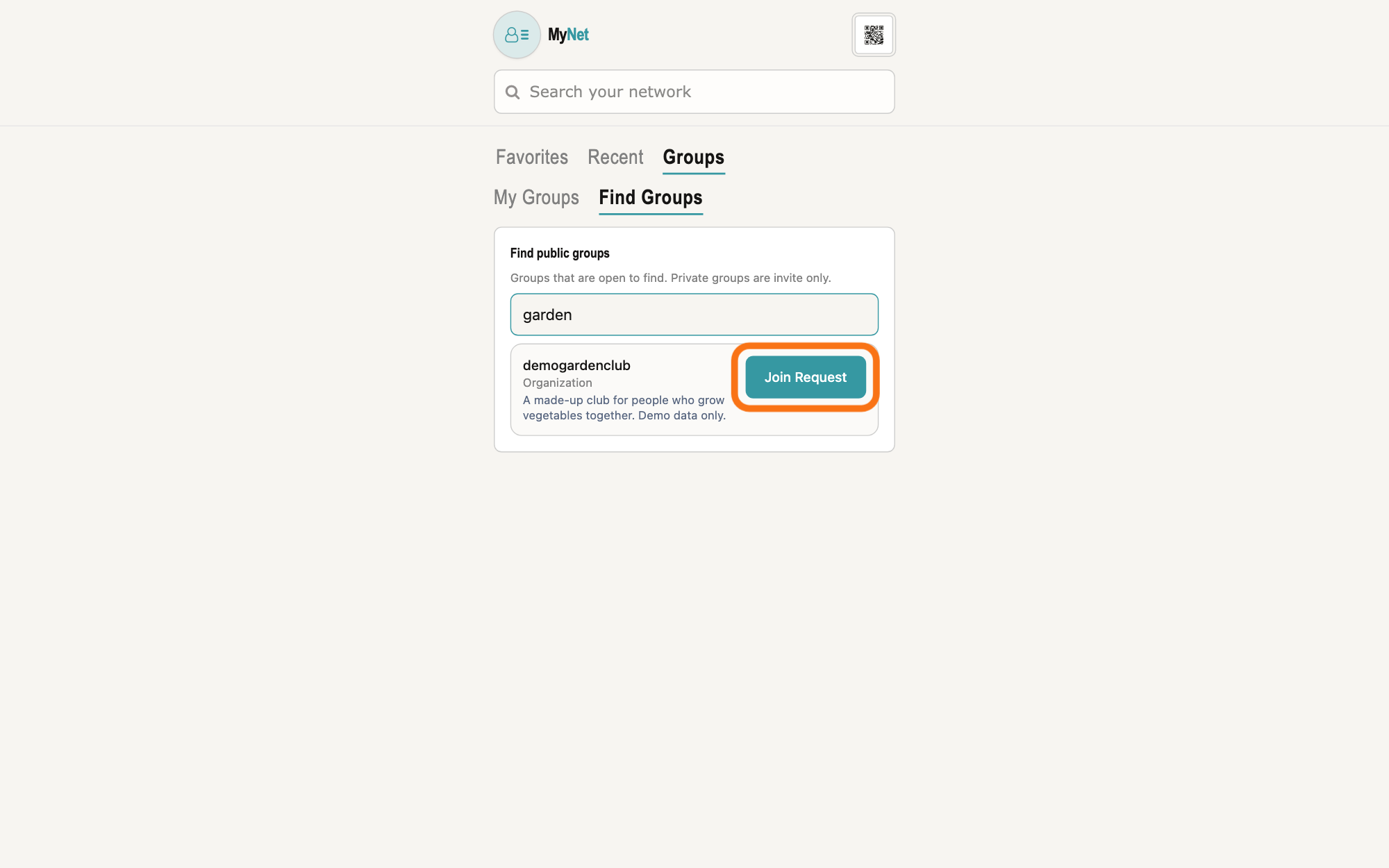
Press Join Request at the right of the group's name. A box for a message opens under it; nothing is sent yet.
Show as text
A word of the group's name is typed in the box, and the list shows the one group that matches, with its kind and About text. At the right of the group's name, the button "Join Request" is outlined. Press it to open a box for a message.
More about this
Join Request asks the group's admins to let you in; it does not add you by itself. The admins are the group's owner and the people who hold Control on the group's vault, the access level that lets a person manage who else has access. Cancel closes the box without asking.
Type a message if you want, and press Send Request.
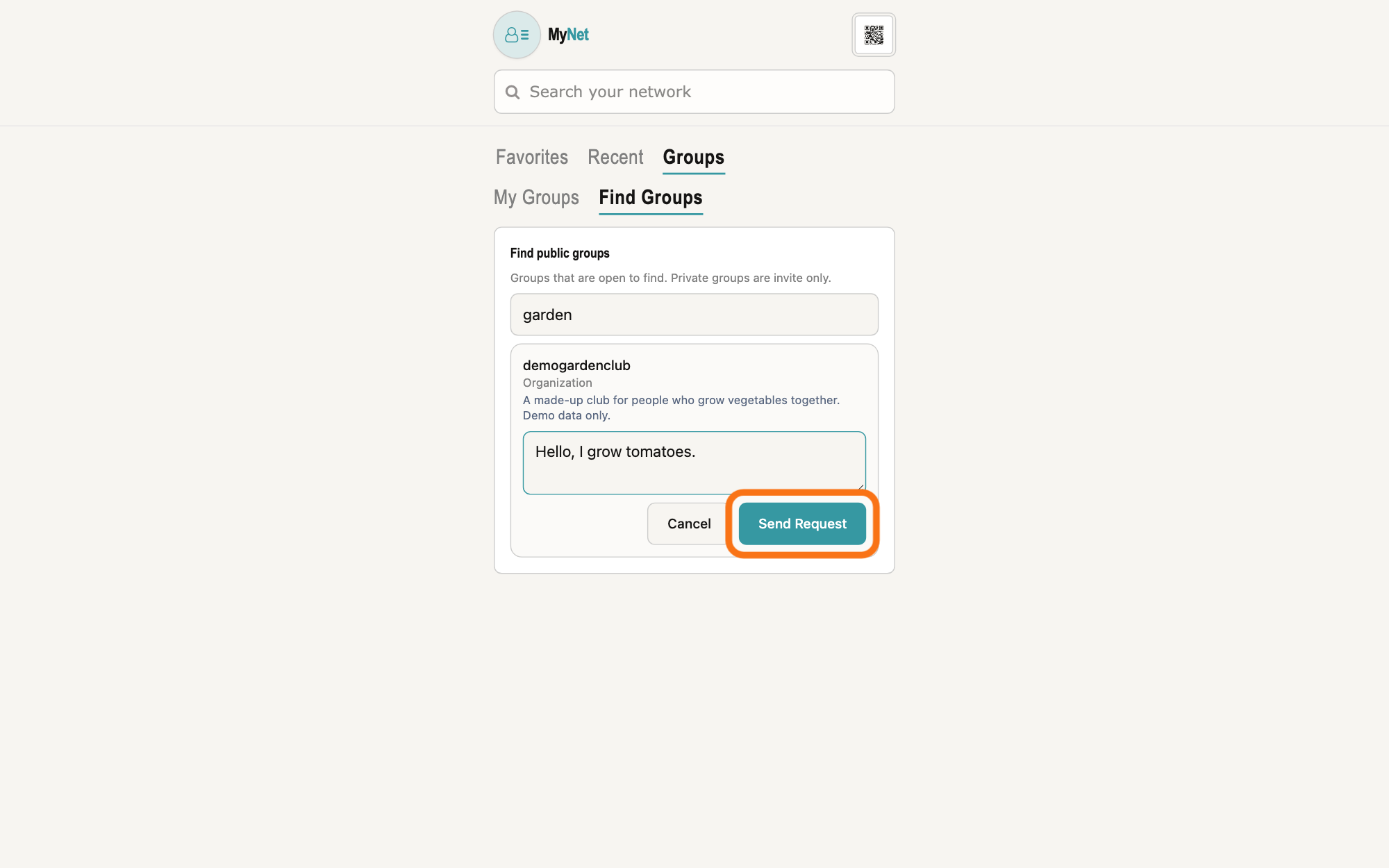
Type a few words for the admins in the box, which shows Optional message to the admin, and press Send Request. The row then shows Requested where the button was, and still shows it when you come back.
Show as text
Under the group's About text, a message box has opened with a short message typed in it. Below it are "Cancel" and, at the right, the outlined "Send Request". Press "Send Request" to ask the group's admins to let you in.
More about this
The message can be up to 2,000 characters; only you and the group's admins see it. While it is sent the button reads Sending…; if it fails, the row says why, such as Could not ask to join.. MyNet does not tell you when an admin accepts or declines. Once you are accepted, the group is listed under My Groups, where you can open it; the answer on seeing a group's members shows what is there.
If you are the group's admin, press Accept or Decline under Join requests.
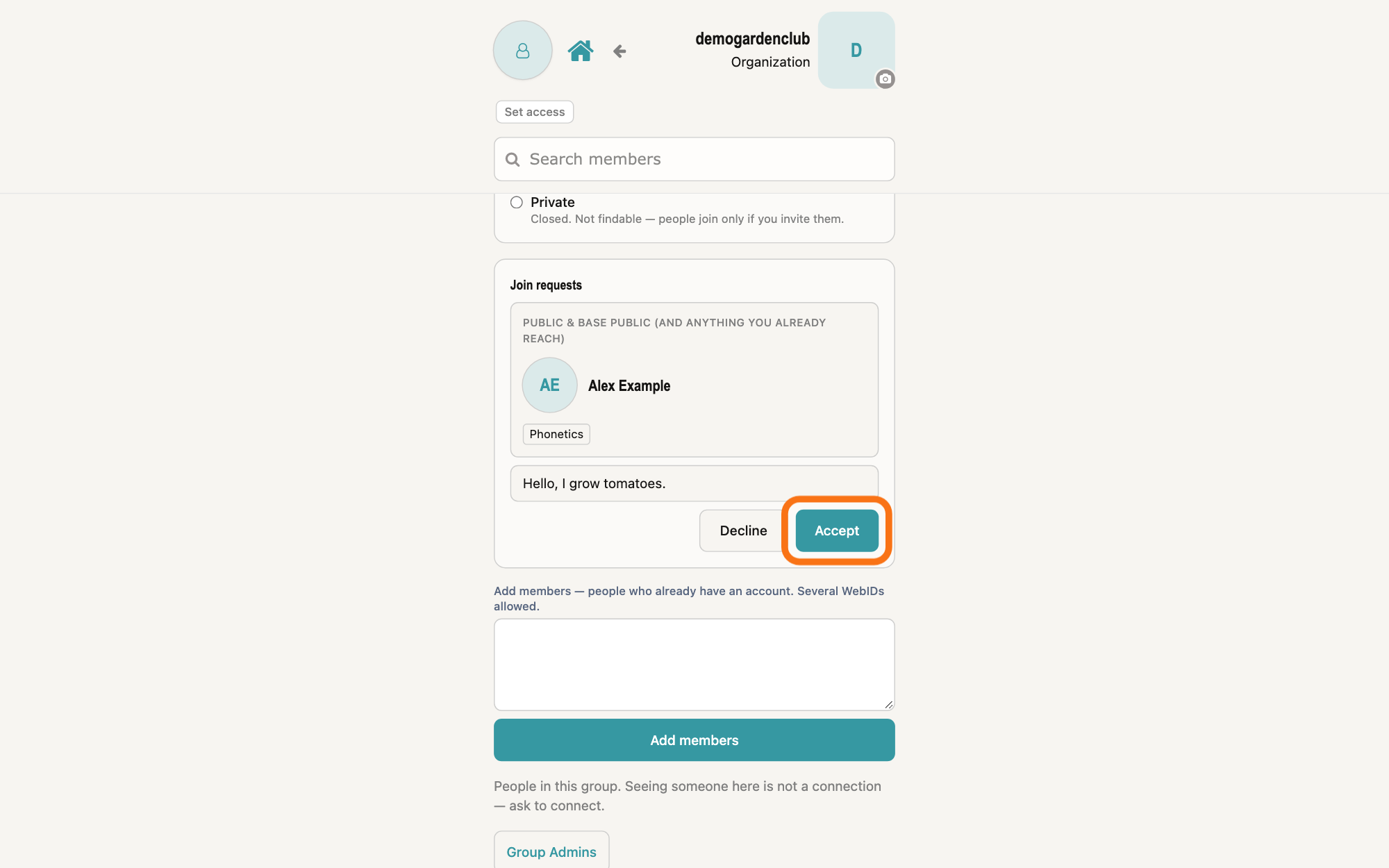
Open the group from My Groups: on its screen, Join requests lists the people who asked, each with their card and message. Press Accept to let a person in, or Decline to close the request.
Show as text
The group's screen as its admin sees it. The card "Join requests" holds the person who asked, with their picture, name, a skill and their message. Under the message are "Decline" and the outlined "Accept", which lets them in. "Add members" follows below.
More about this
Accept gives the person Read on the group's vault, which makes them a member. The card Join requests is shown only to admins, and only while there are requests. Above it, Who can find this group offers Public (Open to find. Anyone signed in can ask to join.) and Private (Closed. Not findable — people join only if you invite them.); a choice saves at once, and Could not save listing. means it did not. Admins can also add people at once with Add members, lower on the screen.
If you are the group's admin, press Add About or Edit under About this group.
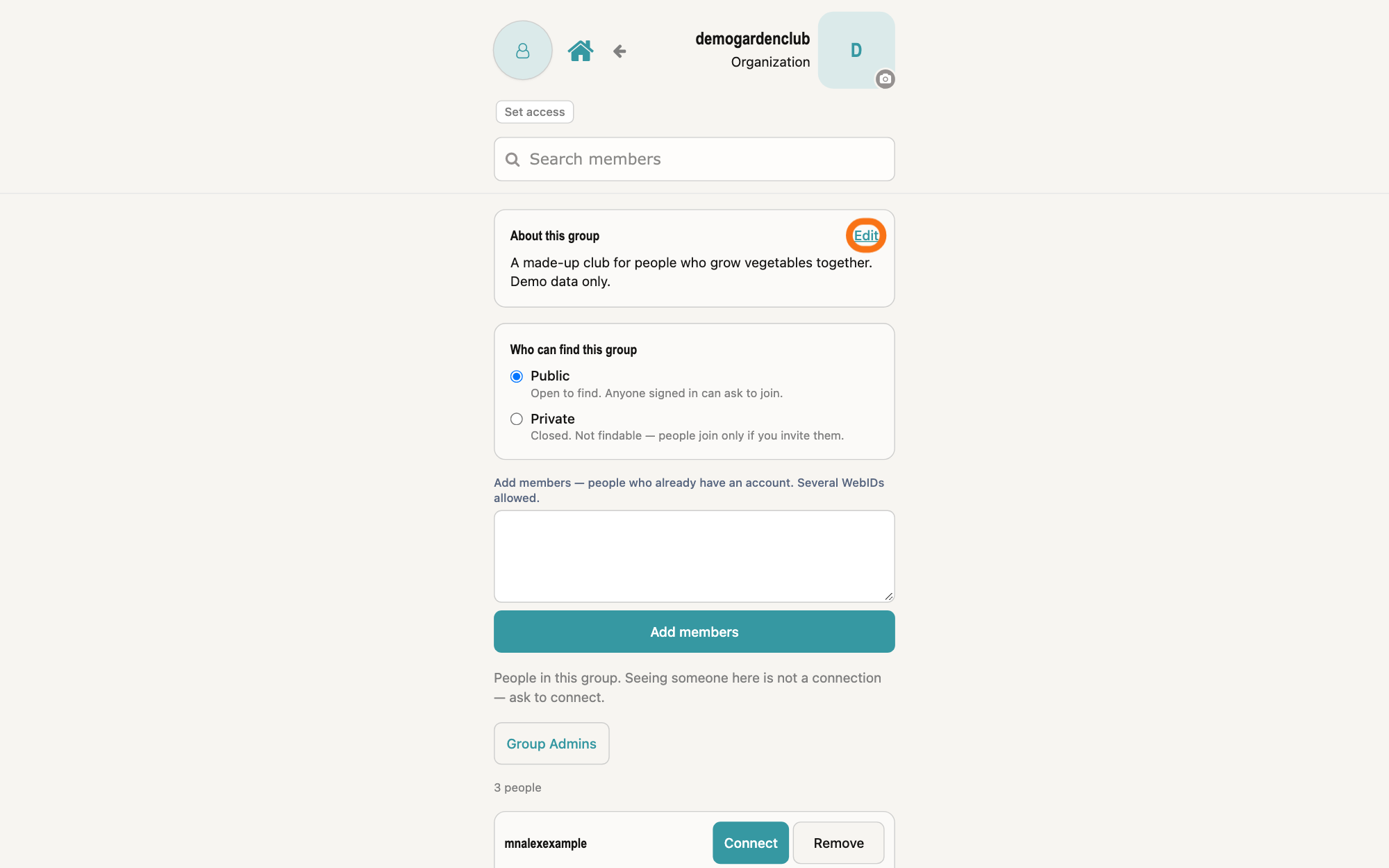
At the top of the group's screen, press Add About, or Edit when the group has an About text, type what the group is for, and press Save About. Cancel leaves it as it was.
Show as text
The top of the group's screen, with the group's name and "Organization" at the top right. The first card, "About this group", holds the group's About text, and at its top right the small link "Edit" is outlined. Press it to change the text.
More about this
The box shows What is this group for?. Everyone in the group sees the About text at the top of its screen, and while the group is set to Public it also shows under the group's name in Find Groups. To remove it, delete its text and save. If it cannot be saved, the card says Could not save the About text. While there is none, an admin sees No About text came back for this group yet. and others see no About card.
Deeper
GilbApp today has no screen to ask to join a vault, or to answer someone who asks. In MyNet, Gilb's app for your profile and network, you ask under Find Groups, and the group's admins answer on the group's screen.
Your request is kept in your own vault, private, until an admin answers it; Accept then gives you Read on the group's vault. A group set to Private is not listed in Find Groups, and only its admins can let you in.
A group's About text is shown with the group to people looking for it while the group is set to Public; there is no separate setting for who reads it.
MyNet shows the same narrow column on a computer as on a phone; the pictures show a computer window.
Source: MyNet e894951bcfda372a6218c512c15bb4b582c1a794 (https://gilb.com/mynet/version.json, built 2026-10-27, read 2026-11-10). Step 1: GilbApp af0f04ee shell/gilbAppMenuRows.ts:142-156 (Stakeholders: also mynet), components/menu/sectionMenuList.ts:305-306 ('MyNet', 'Your profile and network.', href MYNET_BASE), section-menu 0.2.4 SectionMenu.tsx:88 ('Also useful here'), :942-948 (CSS capitals), :857-876 ('↗', new tab); lib/base/granteePublicCard.ts:35-38 (https://gilb.com/mynet); OwnCardBand.tsx:13-26, :80-88 ('Edit in MyNet'). Step 2: components/connection/MyConnectionsList.tsx:76 (the last sub-list remembered), :385-435 ('Favorites', 'Recent', 'Groups', 'My Groups', 'Find Groups', one list at a time); components/profile/GroupSearchHits.tsx:1, :28-46 (reachable groups under the home search, 'Groups' in CSS capitals); pages/Contacts.tsx:432; lib/base/createNamedVault.ts:45-46 and components/profile/OrgVaultsCard.tsx (kinds Organization: 'Company, org, club, group'; Project: 'A workspace people work in together'). Step 3: components/profile/FindGroups.tsx:1-10 (empty box lists groups; joining asks the admin; groups you are in are dropped here), :43-52 ('Find public groups', 'Groups that are open to find. Private groups are invite only.', 'Search groups'), :84-114 (heading, box, 'Searching groups…', error, the empty lines), :212-240 (kind, About up to 3 lines); lib/base/orgFind.ts:29 ('Could not search groups (<status>)'). Step 4: FindGroups.tsx:55-64 (250 ms after typing), :106-114 ('No groups match that name.', 'The one group that matches is already yours — see My Groups.', 'No listed groups yet.'); lib/base/orgListing.ts:1 ('Public (findable + join request) vs private (not listed; invite only)'). Step 5: FindGroups.tsx:155-164 ('Join Request' only opens step two), :243-260 ('Requested', 'Join Request'), :286-298 ('Cancel'). Step 6: FindGroups.tsx:164-176 (your own open request read back), :263-308 ('Message to the group admin', maxLength 2000, 'Optional message to the admin', 'Sending…', 'Send Request'), :312-320 ('Could not ask to join.'); components/profile/YourGroups.tsx:1, :24-52 ('Loading your groups…', 'Groups you join land here.', 'Your groups'). Step 7: pages/OrgMembers.tsx:607-654 ('Who can find this group', 'Public' 'Open to find. Anyone signed in can ask to join.', 'Private' 'Closed. Not findable — people join only if you invite them.', 'Could not save listing.'), :657-697 ('Join requests', applicant card, message, 'Decline', 'Accept'; admins only, only when there are requests); the 'Add members' form below. Step 8: pages/OrgMembers.tsx:572 (About at the top, hidden while searching), :1046-1171 (GroupAbout: everyone who can read the group sees it, only a Control-holder changes it; 'What is this group for?', 'Could not save the About text.', 'Cancel', 'Saving…', 'Save About', 'Edit' / 'Add About', 'No About text came back for this group yet.', nothing for a non-admin with no text). GilbPlatform 4d008a55: src/baseconnect/org-find.ts:1-2 (named Organization / Project vaults, by name); src/baseconnect/org-listing.ts:1-8 (public: findable and join request; private: invite only; no listing row = private); src/baseconnect/org-join.ts:1 (applicant writes a request; admin grants Read or closes it), :82-104 (already a member refused; the request kept private, a:visibilityTier 'private', with the optional message); src/routes/connect-org-join.ts:1 (ask, list pending, accept grants Read, decline closes); src/baseconnect/org-members.ts:3-5 (a member is whoever holds a whole-vault grant, plus the owner), :49-50 (an admin is the owner or a Control-holder); src/baseconnect/org-self-description.ts:33-40 (the About is published when the group is public; no separate control); src/routes/connect-org-self-description.ts:7-27 (PUT: Control holder; GET: who may see the members; a stranger reads it through org-find), :49-52 (an empty text clears it; no length cap). GilbVeda read publicly 2026-11-10: t:OrgJoinRequest ('A person's own record, in the person's own pod, that they asked to join a named group. It is not membership.'), t:OrgSelfDescription, t:OrgDirectoryListing. GilbApp af0f04ee: no caller of /base/connect/org-join* in src; its switch under 'WHO CAN FIND THIS VAULT' writes the same listing.
Checked against GilbApp d529620.