
← Back to How do I make sure my app is secure?
How do I get security advice for my app?
Short answer
Press Main menu, choose Choose an agent, choose Kai-Zen - Master Agent of Planning, type that it should advise on security, and press Send.
Before you start
You need to be signed in to GilbApp on a computer, with your own AI, Claude Code or Grok, connected in the chat, each by its own answer. The pictures show a made-up person on a test site; your screen shows your own name and address.
Words used here (6)
- agent
- An agent is your AI following one written procedure, its standing instructions, for one kind of work.
- Kai-Zen
- Kai-Zen is the planning agent: it finds out what you want, chooses the way, hands the work to other agents and reports back.
- GilbApp
- GilbApp is the app, opened in a web browser at https://gilb.com/app, where you open, fill and share your vaults.
- Jackfruit
- Jackfruit is the vault agent: it finds, reads, writes and links records in your vaults, and makes new vaults for you.
- GilbPlatform
- GilbPlatform is the service that keeps people's and organisations' data in vaults, each at its own web address.
- project
- A project is work to bring about a change you want, such as a new app or a better way of doing something.
Steps
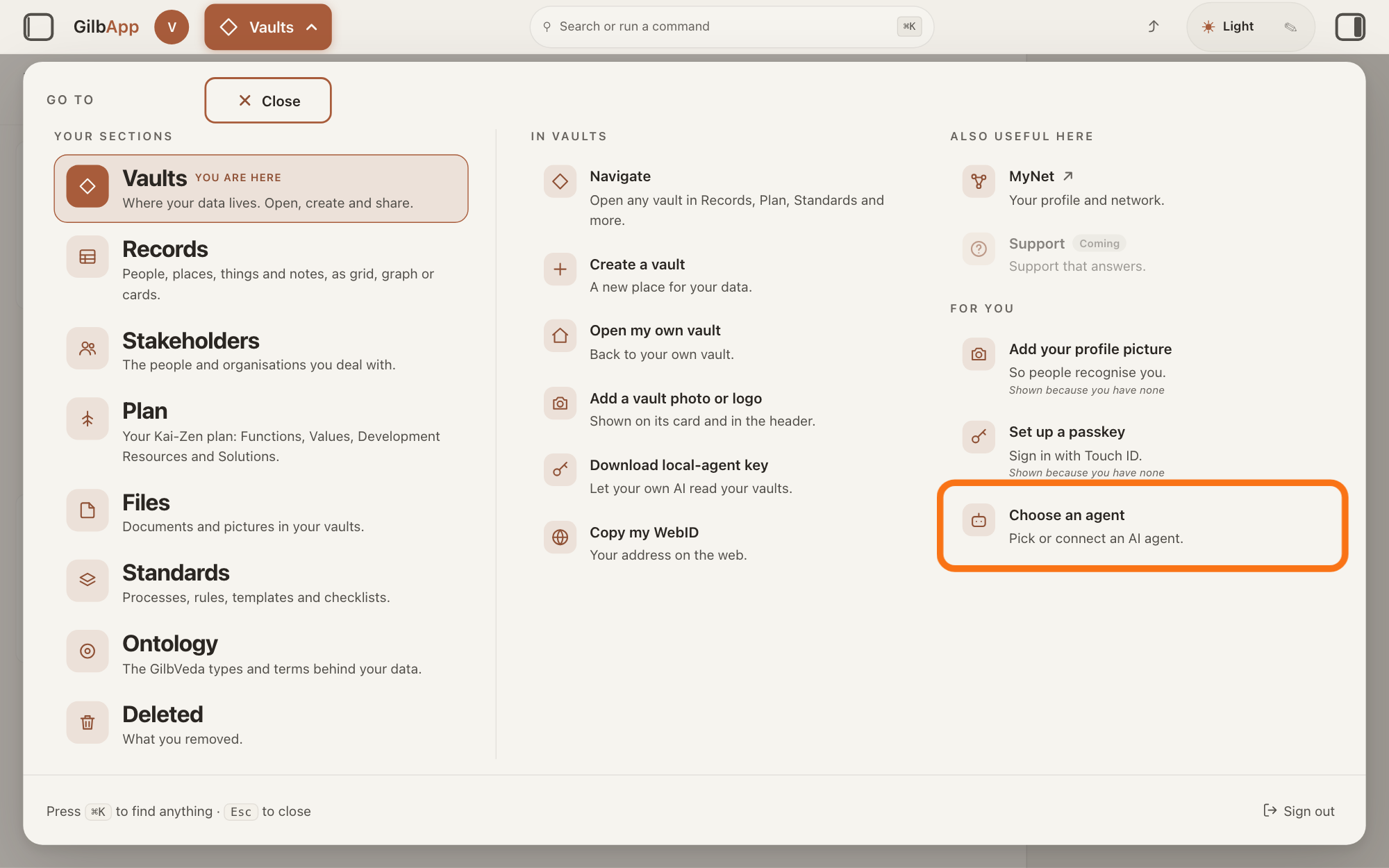
Press Main menu at the top left and choose Choose an agent.
Press Main menu, next to your profile picture at the top left, and under FOR YOU choose Choose an agent (Pick or connect an AI agent.). GilbApp opens the left pane, where you chat, and puts the cursor on the agent list at the top of it.
Show as text
The panel headed "GO TO" is open. In the right-hand column under "FOR YOU", the outlined row reads "Choose an agent" and "Pick or connect an AI agent." Click it; the chat opens in a pane on the left.
More about this
The square button at the far left of the top bar also shows or hides the left pane. You can also search for Choose an agent in Search or run a command.
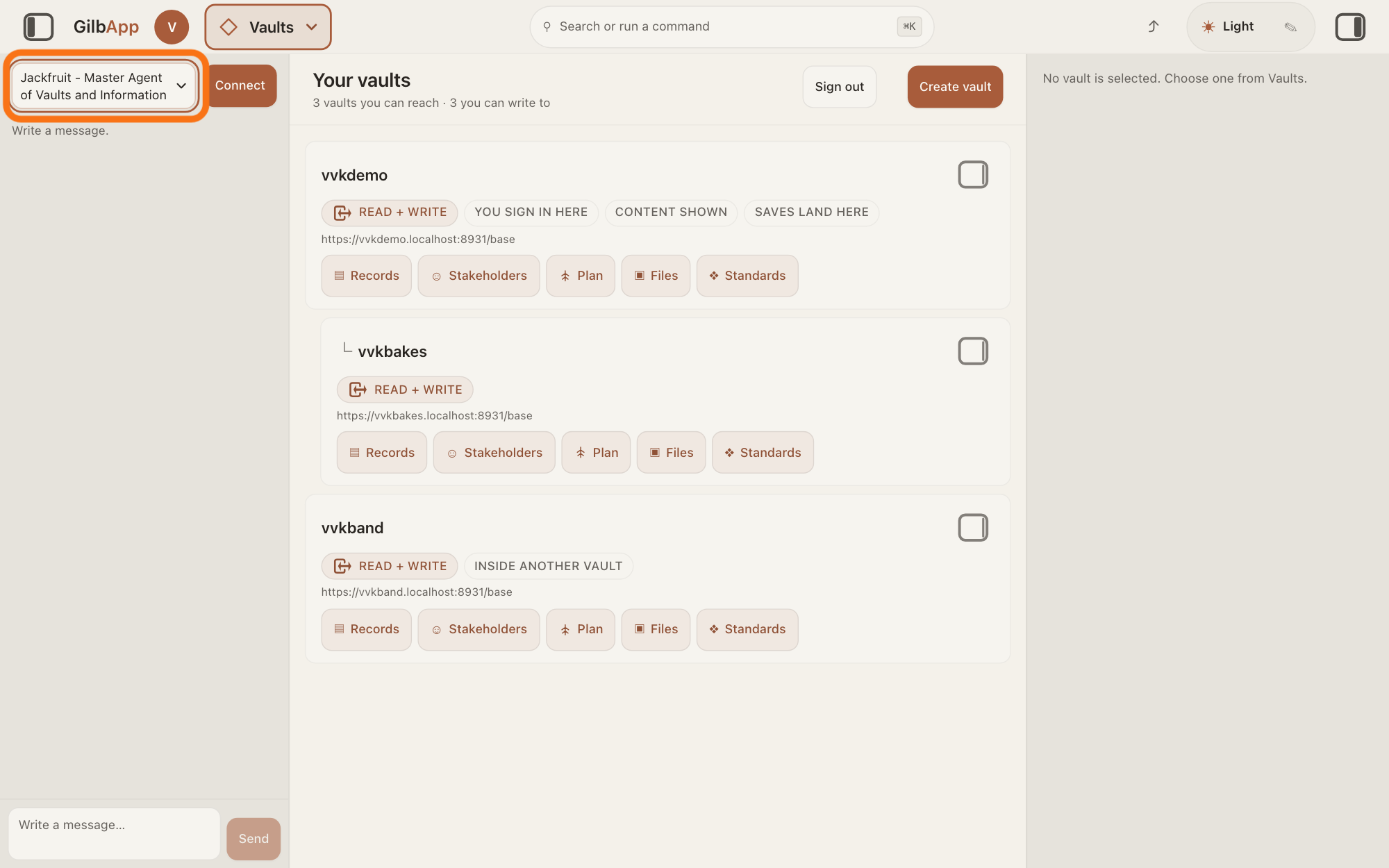
Choose Kai-Zen - Master Agent of Planning in the agent list.
Press the agent list at the top of the left pane and choose Kai-Zen - Master Agent of Planning. Each agent has its own chat, and the list shows which one you are in.
Show as text
The chat is open in a pane at the left. At the top of that pane the outlined agent list reads "Jackfruit - Master Agent of Vaults and Information", the first pick; the "Connect" button sits to its right. Click the list to choose another agent.
More about this
A new chat starts on the first agent in the list, Jackfruit - Master Agent of Vaults and Information. The list comes from GilbPlatform each time the chat opens. GilbApp keeps your choice for this browser tab. While an agent is answering, the list is greyed out.
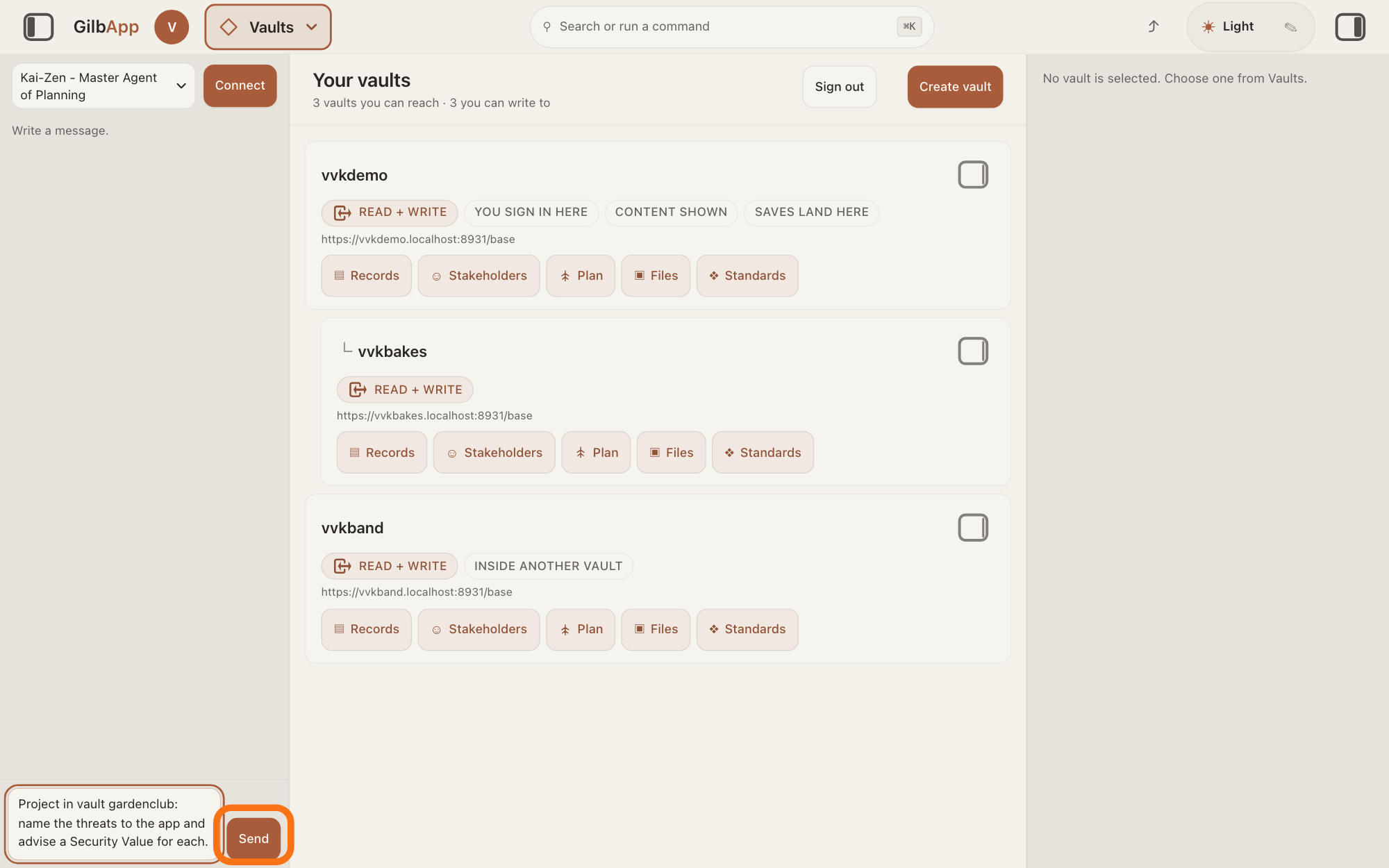
Type your request in Write a message… and press Send.
In Write a message…, name your project's vault if Kai-Zen keeps one for your app, type that it should name the threats to your app and advise a Security Value for each, and press Send.
Show as text
The agent list at the top of the chat now reads "Kai-Zen - Master Agent of Planning". At the bottom, a request to name the threats to an app and advise a Security Value for each is typed in the box. The outlined "Send" is to its right. Press it.
More about this
You cannot choose Agent.Architect, the agent that writes a plan's decision tables, or Agent.Hacker, the security agent, in the agent list; Kai-Zen hands work to agents you cannot choose yourself. A Security Value says how well the app holds against one threat, as a number, such as the share of attack attempts that fail, or the time it takes to notice one. Return also sends. For example:
Project in vault gardenclub: name the threats to the app and advise a Security Value for each.
Deeper
Also asked:
Can my AI check my app for security holes? Partly: Kai-Zen can have the threats to your app named and a Security Value advised for each, as the steps show. Agent.Hacker checks a live system for weak points only when a person starts it directly, and no screen lets you start it today.
An agent is your AI following one written procedure, its standing instructions, for one kind of work. Agent.Hacker's standing instructions give it two jobs. For advice, it names the threats in scope, who could do what harm, and how, and for each threat advises a Security Value with a Scale, the ruler it is measured on, a Meter, which says how its number is found, and a Tolerable (the survival limit), and any Solution worth weighing. It only advises and never edits your plan; its standing instructions say Agent.Architect, an agent Kai-Zen hands work to, writes the advice into it.
Its other job, checking a live system for weak points, runs only when a person starts it directly, with the system and the parts to test named, and, before any probe that could halt GilbPlatform or change data, a way to recover written first; its findings are advice and block no one, and it never wipes or deletes a vault. Agent.Hacker's standing instructions name Agent.Architect, Agent.VDT and a person as the ones who start it, not Kai-Zen, and no screen lets you start it today. Whether Kai-Zen passes your request to Agent.Hacker is not written in any standard and has not been tested.
Agent.Architect also names the threats to your project and writes a Security Value for each, as a row in the decision tables of its level, so an option that drops one below Tolerable loses on that alone. Kai-Zen hands work to it when it challenges the Solutions while it sharpens the plan; the answer on how Kai-Zen keeps the whole project's Values in view tells more.
This answer is written for a computer screen.
Source: Standards read 2026-11-11: Agent.Hacker (A 06gf80k3d9s8naw5a8pec2er10) Role (mode:advice Who spawns: Agent.Architect, Agent.VDT (optional), HumanAgent, output Return package for Agent.Architect — no spec file writes; mode:eval HumanAgent only, Advisory report — never blocks other agents), Advice (who could do what harm, and how, "a Security Value with Scale, Meter and Tolerable ... and any Solution worth weighing", "Advise only. Return the advice to the caller; Agent.Architect writes it. Never edit VDT, VKT or spec files"), Eval (Refuse if the dispatcher is not HumanAgent; named environment and surfaces; a recovery path before any probe that can halt GilbPlatform, or change durable data, grants or identity setup, and With no path, use read-only probes only, re-read 2026-11-11:; Never wipe or delete a vault); Agent.Architect (K agent-architect-06gd2d2akhyx3b1th9qrx09q6m) Security, Rows (A means that drops one below Tolerable loses on its own). Agent list https://id.gilb.com/base/ai/agents (read 2026-11-11): Agent.Hacker listed, pick false, entry https://appbuilder.gilb.com/base/e/06gf80k3d9s8naw5a8pec2er10; picks Jackfruit, Kai-Zen, Agent.Concept, Agent.Coder. GilbPlatform 498d29a0 (live at https://id.gilb.com/version, read 2026-11-11): src/routes/ai-chat.ts:466-470 (Kai-Zen as a pick routes: the route tools and the Agent roster), src/ai/named-role-run.ts:312-345 (a hand-off is found by (a) a link in the loaded standing, else (b) the record the OPERATOR's agent list fixes the name to, else (c) by name on the agent's own vault), :1-13; src/ai/chat-agents.ts:113-149 (only a pick can be chosen). GilbApp ebd9415e (live at https://gilb.com/app/version.json, read 2026-11-11): src/components/menu/sectionMenuList.ts:330 (Choose an agent, Pick or connect an AI agent.), src/components/agent/AgentChat.tsx:1046 (Write a message…), :1063 (Send); the chat shows picks only (the chat code, src/components, in GilbApp 49b1ae53). Kai-Zen to Agent.Hacker: no standard writes it. Kai-Zen.Delegate hands work to the other agents in this group (Kai-Zen, 2026-11-11), Agent.Hacker is in the GilbPlatform Frontend pack, and Agent.Hacker.Role names who starts it: Agent.Architect, Agent.VDT (optional), HumanAgent for advice, HumanAgent only for eval (re-read 2026-11-11); check 11m found it in no other standard (find --deep). The code can put Agent.Hacker on Kai-Zen's roster (step b above), but no chat was sent, so the page asks Kai-Zen for the security advice, the route Agent.Architect.Security writes, and says the hand-off to Agent.Hacker is not written and not tested. Row: Agents.GetSecurityAdvice.
Checked against GilbApp d529620.