
← Finding your way: the Main menu and sections
How do I go back to where I was a moment ago?
Short answer
Press your browser's Back button; if it skips the place, press Main menu and choose the section again, or search and select the record.
Before you start
You need to be signed in to GilbApp on a computer. The pictures show a made-up person on a test site; your screen shows your own name and address.
Words used here (2)
Steps
Press your browser's Back button.
Press the Back button of your browser, as on any web page. After the moves below, GilbApp goes back one step, to the screen you were on just before.
More about this
These moves leave a step for Back: choosing Stakeholders or Plan, or a list under Plan such as Values; the Stakeholders and Plan buttons on a vault's card; Open in Main Screen at the top of the right pane, shown on a plan card or a person's card; and a link on a record's card that opens another record. Some other moves change the screen without leaving a step, so Back skips over them, such as choosing Vaults, Records, Files, Deleted, Standards or Ontology, opening a record from a list, and jumping to a record from Search or run a command. If no move since you opened GilbApp left a step, Back leaves GilbApp for the page you were on before it; open https://gilb.com/app again.
If Back skipped the place, press Main menu and choose the section again.
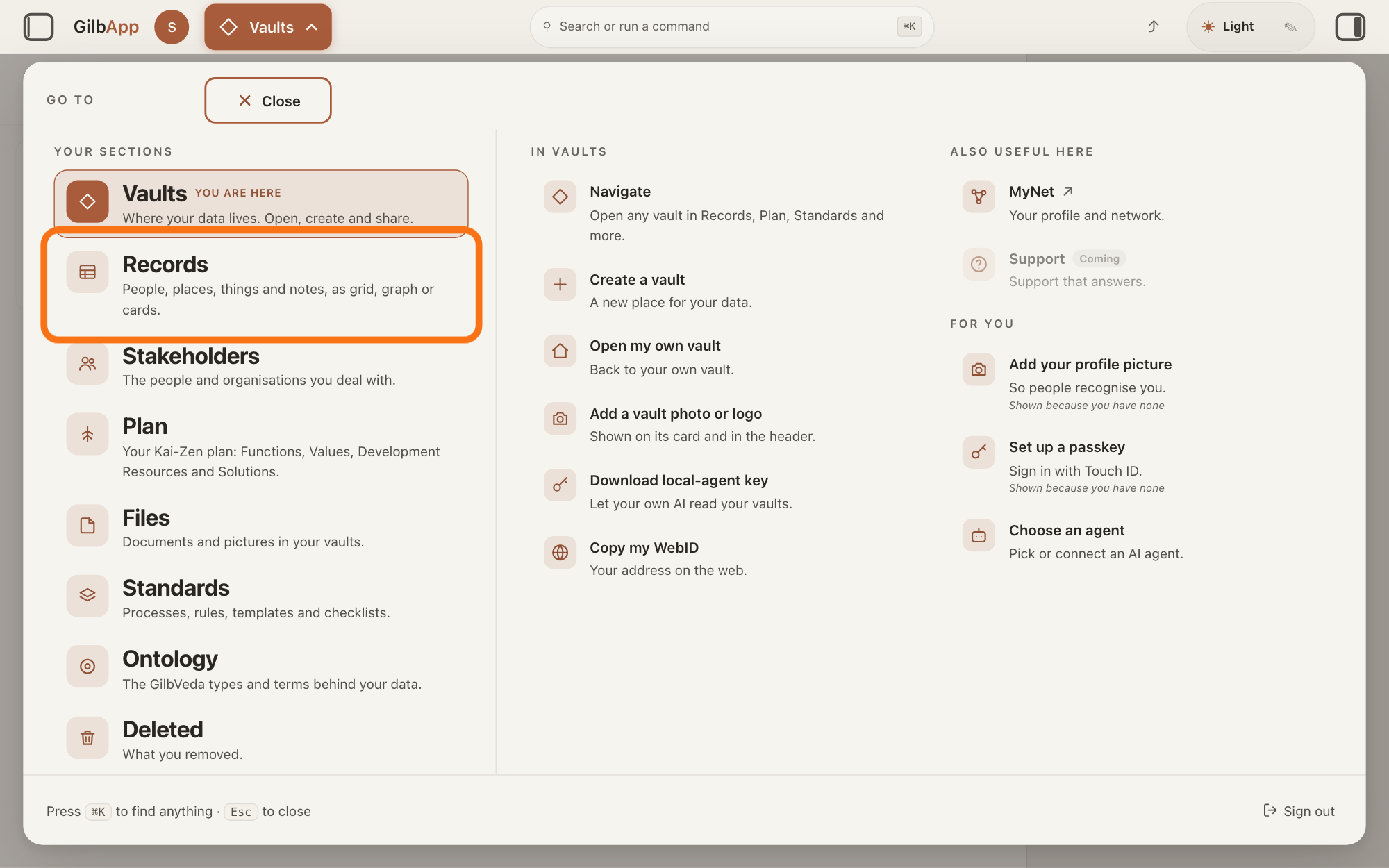
Press Main menu, next to your profile picture at the top left; it shows the name of the section you are in, such as Vaults. In the panel GO TO that opens, under YOUR SECTIONS, choose the section you were in, such as Records.
Show as text
At the top left, under the button "Main menu", the panel headed "GO TO" lists your sections, with "YOU ARE HERE" beside the one you are in. The row "Records", outlined in orange, is the one to press to go back to your records.
More about this
YOU ARE HERE marks the section you are in now. To go back to another vault, choose Vaults and press Records on that vault's card. A record you had open may not be open again; step 3 finds it.
To reopen a record, search and select it in Search or run a command.
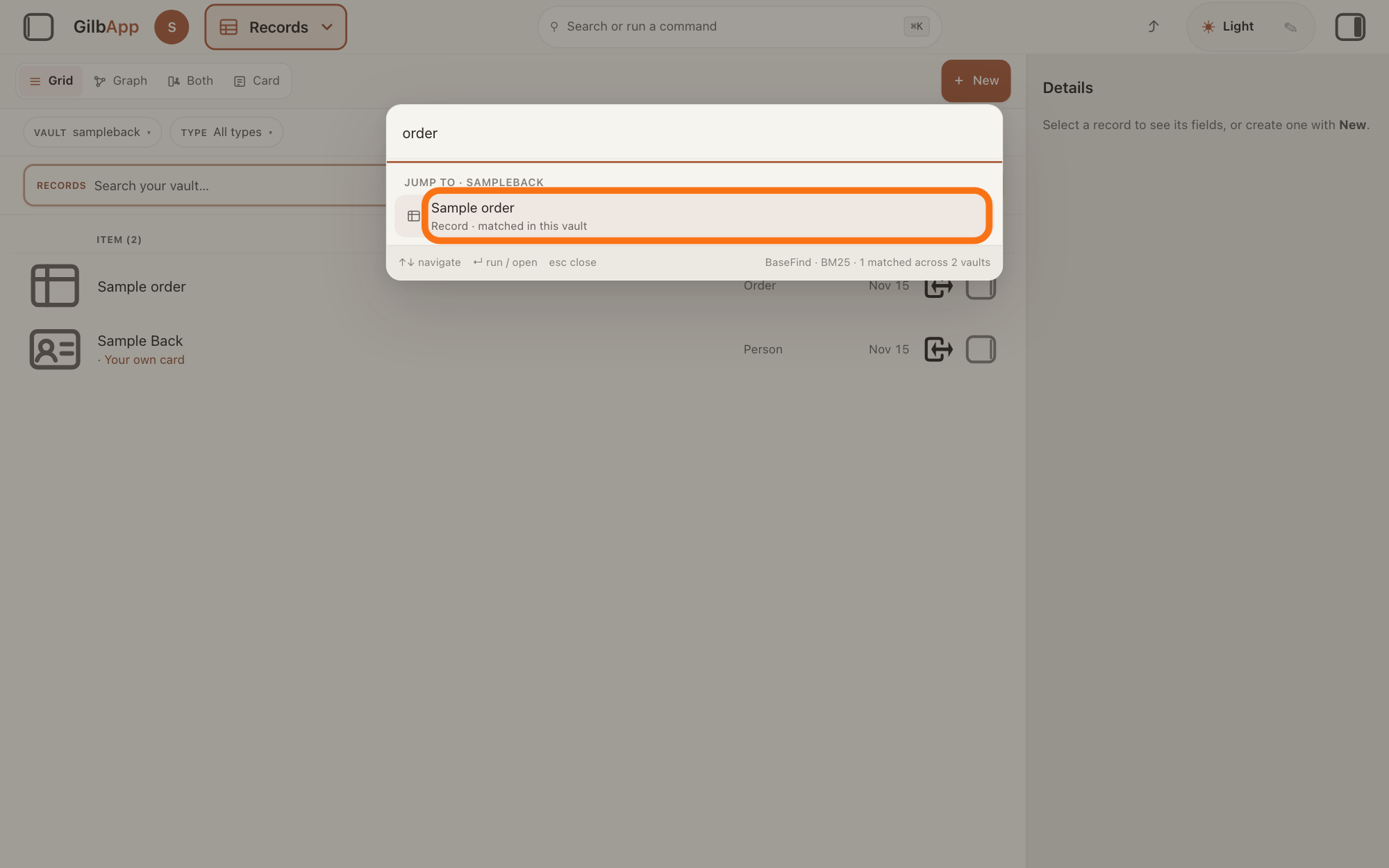
Press Search or run a command in the middle of the top bar, or press ⌘K, and type a whole word of the record's name. Select the record with the mouse, or with the arrow keys and Return; GilbApp opens it.
Show as text
In the middle of the top bar, the box "Search or run a command" is open with a word typed in it. Under "JUMP TO ·" and the name of your vault, the record outlined in orange is the one to select; GilbApp opens it.
More about this
The box searches all your vaults, and also finds a section or a vault by a few letters. The answer How do I search across all my vaults? shows more. On Windows the keys are Ctrl+K.
Deeper
GilbApp has no Back button or list of recent places of its own: going back one step is your browser's Back button, and only after the moves step 1 names.
In the window that makes a new record, with a record open, Back returns to the five cards; it is a button of that window, not the browser's Back, and it does not leave the window. With no record open the button reads Cancel and closes the window.
To keep a place you want to come back to later, copy a link to it with ⤴ in the top bar, or ⌘S; opening that link later opens GilbApp on the same section, vault and record. The answer How do I share a link to what I am looking at? shows how.
This answer is written for a computer screen.
Source: GilbApp d5296208 (https://gilb.com/app/version.json, read 2026-11-15): src/components/AppShell.tsx:799-807 (a section choice replaces the address), :813-834 (Stakeholders: one pushed step), :840-853 and :910-926 (Plan and a vault card's Plan button: pushed), :993-1028, :1045-1077, :1078-1103 (a vault card's Records, Files and Standards: replaced), :1169-1189 (a jump from Search or run a command: replaced), :1210-1216 (a list row: replaced), :1647-1691 (what Main menu does), :2000 (the Main menu button); src/components/records/recordsView.ts:86-120 (a link on a card and Open in Main Screen: pushed), :145-162; src/components/records/OpenInMainButton.tsx:38-51; src/components/records/ConnectedCreateDialog.tsx:2068 (Back). Live pages: How do I find my way around GilbApp?, How do I search across all my vaults?, How do I share a link to what I am looking at?, How do I create a record?.
Checked against GilbApp d529620.