
← When an agent stops, asks or goes wrong
How do I have a concept found or made in GilbVeda?
Short answer
Press Main menu, choose Choose an agent, choose Agent.Concept - Master of Concepts, type what you need a term for, and press Send.
Before you start
You need to be signed in to GilbApp on a computer, with your own AI, Claude Code or Grok, connected in the chat, each by its own answer. The pictures show a made-up person on a test site; your screen shows your own name and address.
Words used here (4)
- agent
- An agent is your AI following one written procedure, its standing instructions, for one kind of work.
- GilbApp
- GilbApp is the app, opened in a web browser at https://gilb.com/app, where you open, fill and share your vaults.
- GilbPlatform
- GilbPlatform is the service that keeps people's and organisations' data in vaults, each at its own web address.
- Jackfruit
- Jackfruit is the vault agent: it finds, reads, writes and links records in your vaults, and makes new vaults for you.
Steps
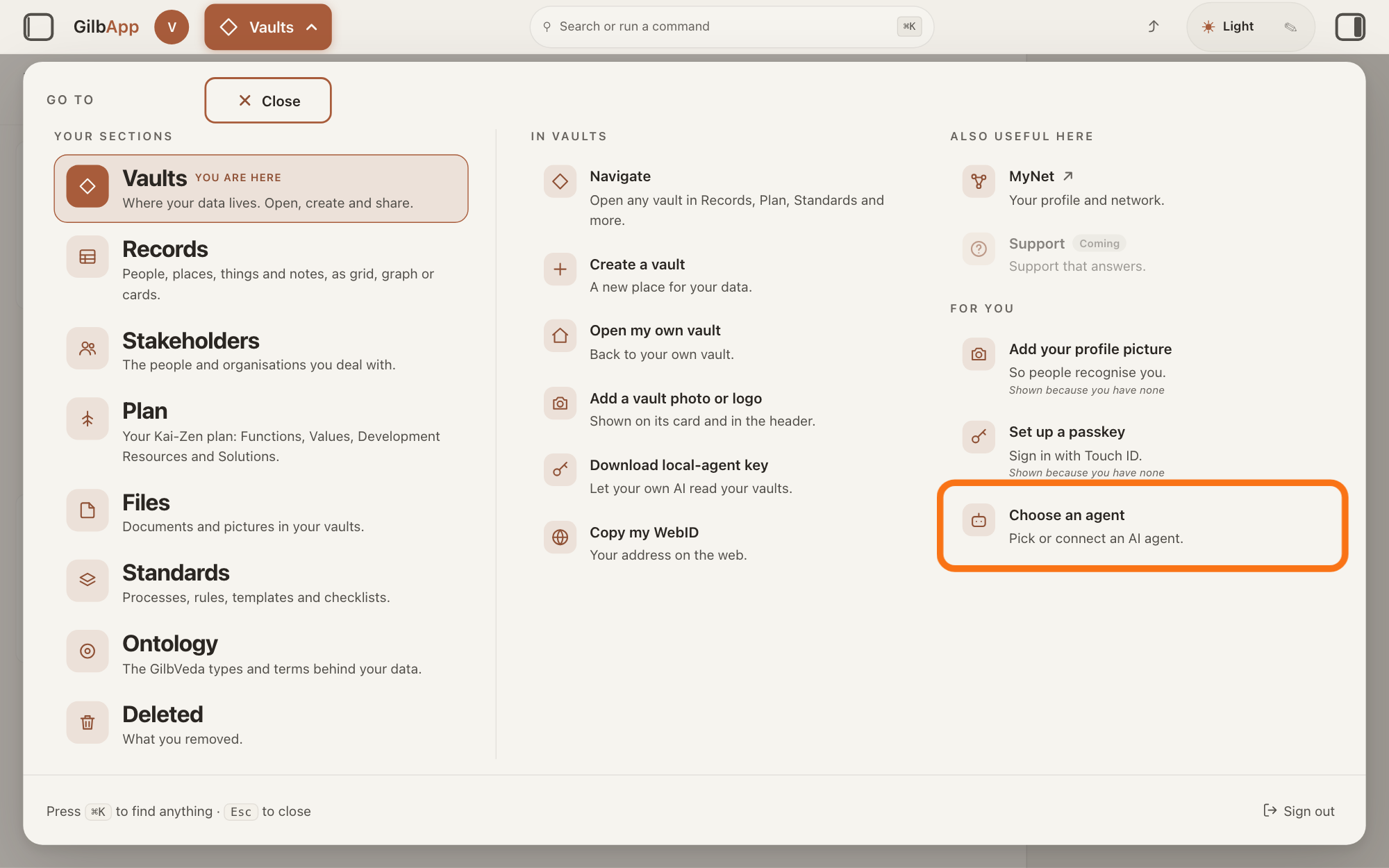
Press Main menu at the top left and choose Choose an agent.
Press Main menu, next to your profile picture at the top left, and under FOR YOU choose Choose an agent (Pick or connect an AI agent.). The button shows the name of the section you are in, such as Vaults. GilbApp opens the left pane, where you chat, and puts the cursor on the agent list at the top of it.
Show as text
The panel headed "GO TO" is open. In the right-hand column under "FOR YOU", the outlined row reads "Choose an agent" and "Pick or connect an AI agent." Click it; the chat opens in a pane on the left.
More about this
The square button at the far left of the top bar also shows or hides the left pane. You can also search for Choose an agent in Search or run a command.
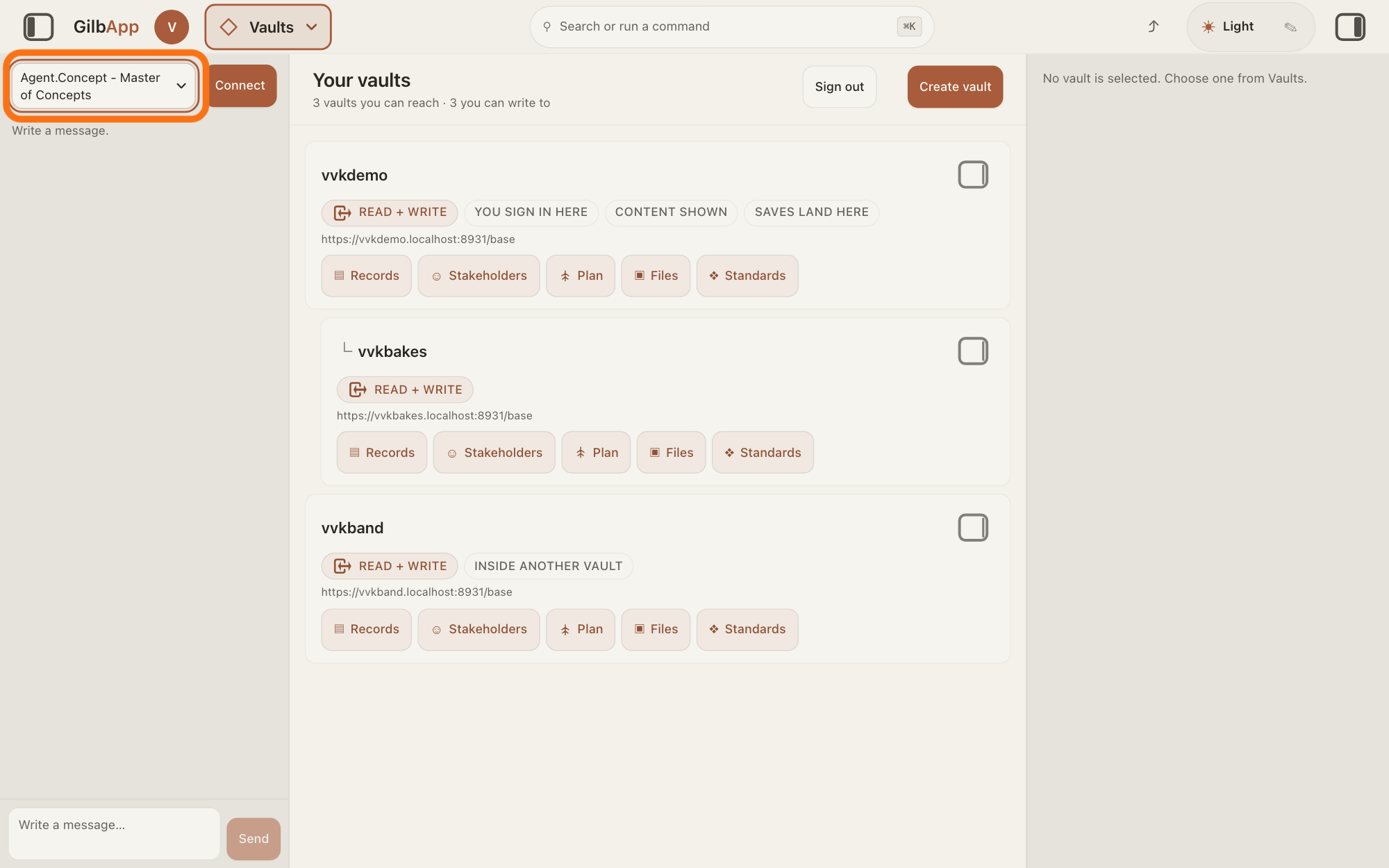
Choose Agent.Concept - Master of Concepts in the agent list.
Press the agent list at the top of the left pane and choose Agent.Concept - Master of Concepts. Each agent has its own chat, and the list shows which one you are in.
Show as text
The chat is open in a pane at the left. At the top of that pane, the outlined agent list reads "Agent.Concept - Master of Concepts", with "Connect" to its right. Choose this agent in the list.
More about this
Agent.Concept is the agent that finds and makes GilbVeda's terms. GilbVeda is the shared list of terms that every fact name and every type on GilbPlatform comes from. A new chat starts on the first agent in the list, Jackfruit - Master Agent of Vaults and Information. The list comes from GilbPlatform each time the chat opens. GilbApp keeps your choice for this browser tab. While an agent is answering, the list is greyed out.
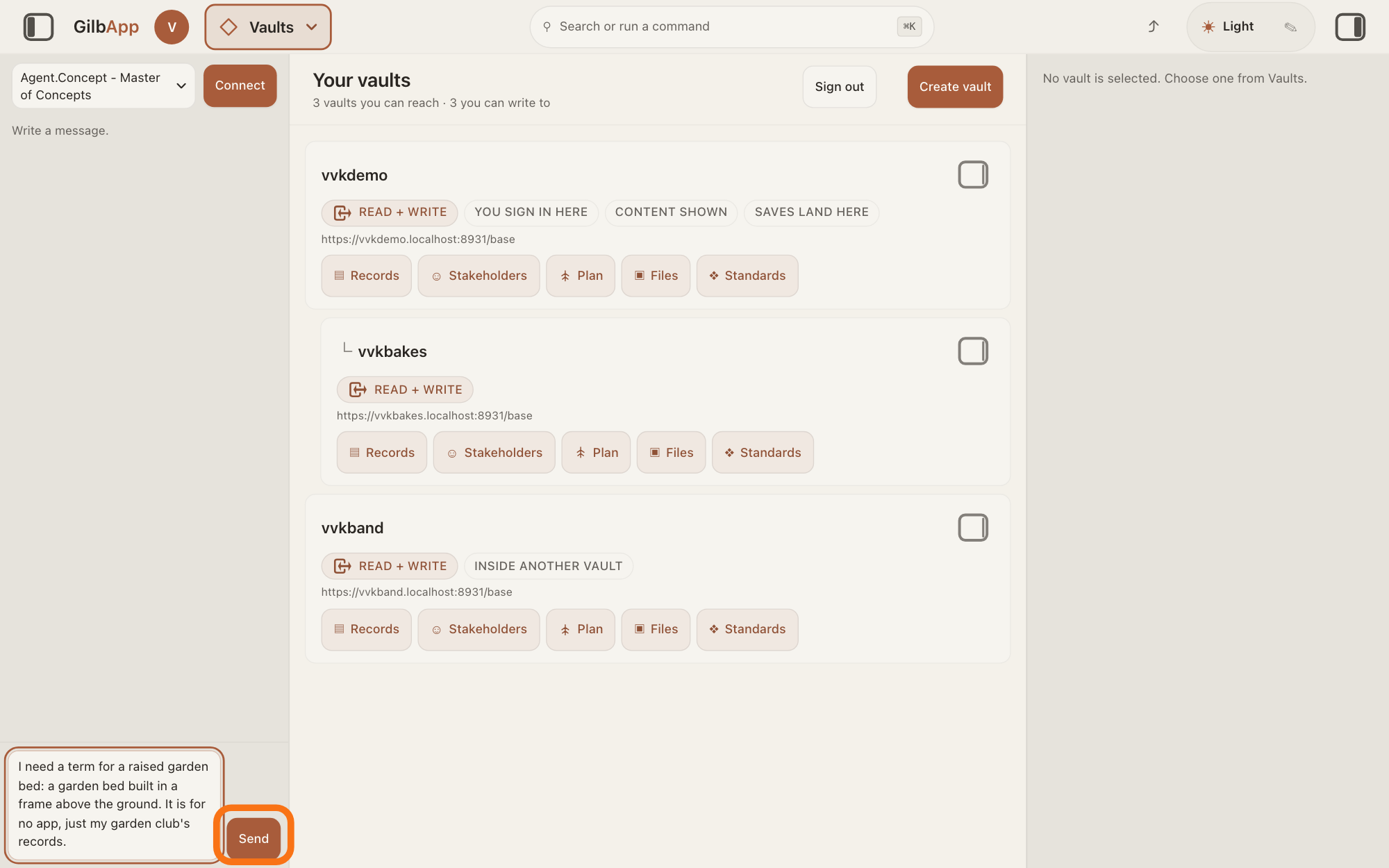
Type what you need a term for in Write a message… and press Send.
Click the box that shows Write a message…, say in your own words what you need a term for and what it means, and press Send. A term is the shared name GilbVeda keeps for a kind of thing, a detail of it, a link between two things, or a species.
Show as text
At the bottom of the chat pane on the left, a message that starts "I need a term for a raised garden bed" is typed in the box "Write a message…". The outlined "Send" button is to the right of the box. Press it to send the message.
More about this
Agent.Concept looks the term up first, by its name and by its meaning. If it finds one, it gives you that one; if not, it makes it at once, as a suggested term with you as its maker, without asking anyone to confirm. If you have not named the app the term is for, it asks only that; a term for no app says so. A suggested term can be used at once; approving it is later, separate work. Return also sends; Shift and Return starts a new line. While it works, the pane says The agent is writing…, then Ran and the name of each tool it uses.
Deeper
Also asked:
Why does my AI ask to make a new term or type before it builds? Every fact name and every type on GilbPlatform comes from GilbVeda, the shared list of terms. When its work needs a term GilbVeda does not have, the term is looked up first and made only if none is found; a record in your vault never stands in for it.
What is Agent.Concept? Agent.Concept is the agent that finds and makes GilbVeda's terms: the shared names for kinds of things, their details, the links between them, and species. It looks a term up first and makes one only when none is found.
What does Agent.Concept do, and when do I need it? It finds a term in GilbVeda, or makes it when none exists. You rarely need to ask it yourself: Jackfruit and Kai-Zen ask it when their work needs a term. Choose it in the agent list when you want a term for something new.
The agent says it needs a new concept. What do I do? Usually nothing: Jackfruit and Kai-Zen ask Agent.Concept themselves, and it makes a missing term at once, without asking anyone to confirm. If it asks which app the term is for, name the app; that is all it asks.
An agent is your AI following one written procedure, its standing instructions, for one kind of work. Agent.Concept's standard tells it to do the right thing with each term: one meaning per term, never a second term for a meaning a term already carries, and the right kind of term. It never lets a record in your vault stand in for a term.
For a species, Agent.Concept looks in GilbLife, GilbPlatform's list of species, by the species' scientific or common name, and adds the species there when it is missing.
When the new term is a kind of thing, Agent.Concept's standard has it make the term's picture in the same job, but in GilbApp's chat it has no tool to store a picture, so a type made there has none until one is added; the answer on setting a term's picture says how. A picture made by AI is under CC0 1.0, a licence that lets anyone use it with no credit owed; for your own real photo you choose CC BY 4.0, which asks for credit, or CC0 1.0; when it is not known which, it asks you whether AI made it.
If you say it should ask you nothing, it asks nothing: it takes a stated default for each thing it would ask, and names each default in its answer as an assumption. A new term that would change or break a term already in use still stops and asks first.
You need not ask yourself when another agent is working for you: Jackfruit, working on your own request, asks Agent.Concept at once when what it writes needs a term GilbVeda does not have, and Kai-Zen asks it before it writes a Function or a Value of your plan; the answer on tagging and linking specs says more. No other agent finds or makes a GilbVeda term. GilbApp's Search GilbVeda types… on a card in Plan lists only terms GilbVeda already has, and makes none.
On a terminal, your own AI acts as Agent.Concept with GilbPlatform's mint program, gilb-mint.ts, in the same way: look up first, make a term only when none is found.
Without your own AI, the chat answers only if GilbPlatform has switched on its shared AI; otherwise it says Connect your own AI first — press Connect. Your AI works only for you.
This answer is written for a computer screen.
Source: Standards read 2026-11-10 and,: Agent.Concept (J 06gf80rjtdw3h9q187p80kx00m) Task (Mode Mint-for-a-need: "In an app ... a chat turn picked as Agent.Concept reaches you ... On a terminal, the person's own AI acts as you, with the mint client gilb-mint.ts ... You mint for them at once. No one confirms, and you do not ask the person first." 1 Look up first, both by the short name ... and by its meaning, a species: lookup_taxon with its GBIF taxon IRI or its scientific or common name; 2 "On a HIT, answer that term and stop. Never mint a second term for a meaning a live term carries."; 3 On a MISS, mint at once ... a species: mint_taxa; 4 When the term is a Type, make its picture in the same job; 5 one meaning per term, no duplicate ... the right kind; 6 "Name the app the term is for; if the person has not named it, ask only that ... A term made for no app says so in its justifiedBy"; 7 "Answer the found or minted term to whoever asked, so their work goes on with it. ⛔ Never let a record in the person's own vault, or a local file, stand in for a concept."; "What you mint lands Suggested, with the person as its minter. Approving it is the moderation mode's job."; "If the requester waived questions, ask none ... take a stated default ... Say each default in your answer as an assumption ... A mint that would change or break a live term still stops"), PictureLicence ("Made by AI ... CC0 1.0. Anyone may use it, with no credit owed. Do not ask. The person's own real picture ... they choose CC BY 4.0 or CC0 1.0. Not known which: ask the person whether AI made it."), ClosedSend (GilbLife species); Jackfruit (J 06gc28mranrr7ewfjfmm74ath0) preamble (call ask_agent_concept at once with what is needed, without asking the person) and Concepts; Dev.Guide.Overview.Vocabulary (Every fact name and every type comes from one shared vocabulary, GilbVeda). GilbPlatform 4d008a55: src/routes/ai-chat.ts:473-478 (the four mint tools only on an Agent.Concept pick's turn), src/ai/chat-mint-tools.ts:161-209 (lookup_term, lookup_taxon, mint_term, mint_taxa). GilbApp af0f04ee: steps 1-2 (sectionMenuList.ts:330-331, AgentSelector.tsx:15-16, :57-86); production list (public read) Agent.Concept with description Master of Concepts, pick true.
Checked against GilbApp d529620.