
← What is the difference between …?
How do I make my own agent?
Short answer
Open your own vault, press ❖ Standards, Procedures, + New procedure, type a name, press Create procedure, type each step, choose it under My agents.
Before you start
You need to be signed in to GilbApp on a computer, with your own AI connected in the chat, Claude Code or Grok, to talk to the agent you make. The pictures show a made-up person on a test site; your screen shows your own name and address.
Words used here (5)
- Procedure
- A Procedure is the kind of standard that holds an agent: who you call, and the steps that agent runs, in order.
- agent
- An agent is your AI following one written procedure, its standing instructions, for one kind of work.
- GilbApp
- GilbApp is the app, opened in a web browser at https://gilb.com/app, where you open, fill and share your vaults.
- vault name
- A vault name is the short name your vault is known by on GilbPlatform: small letters and digits, the first part of its address.
- GilbPlatform
- GilbPlatform is the service that keeps people's and organisations' data in vaults, each at its own web address.
Steps
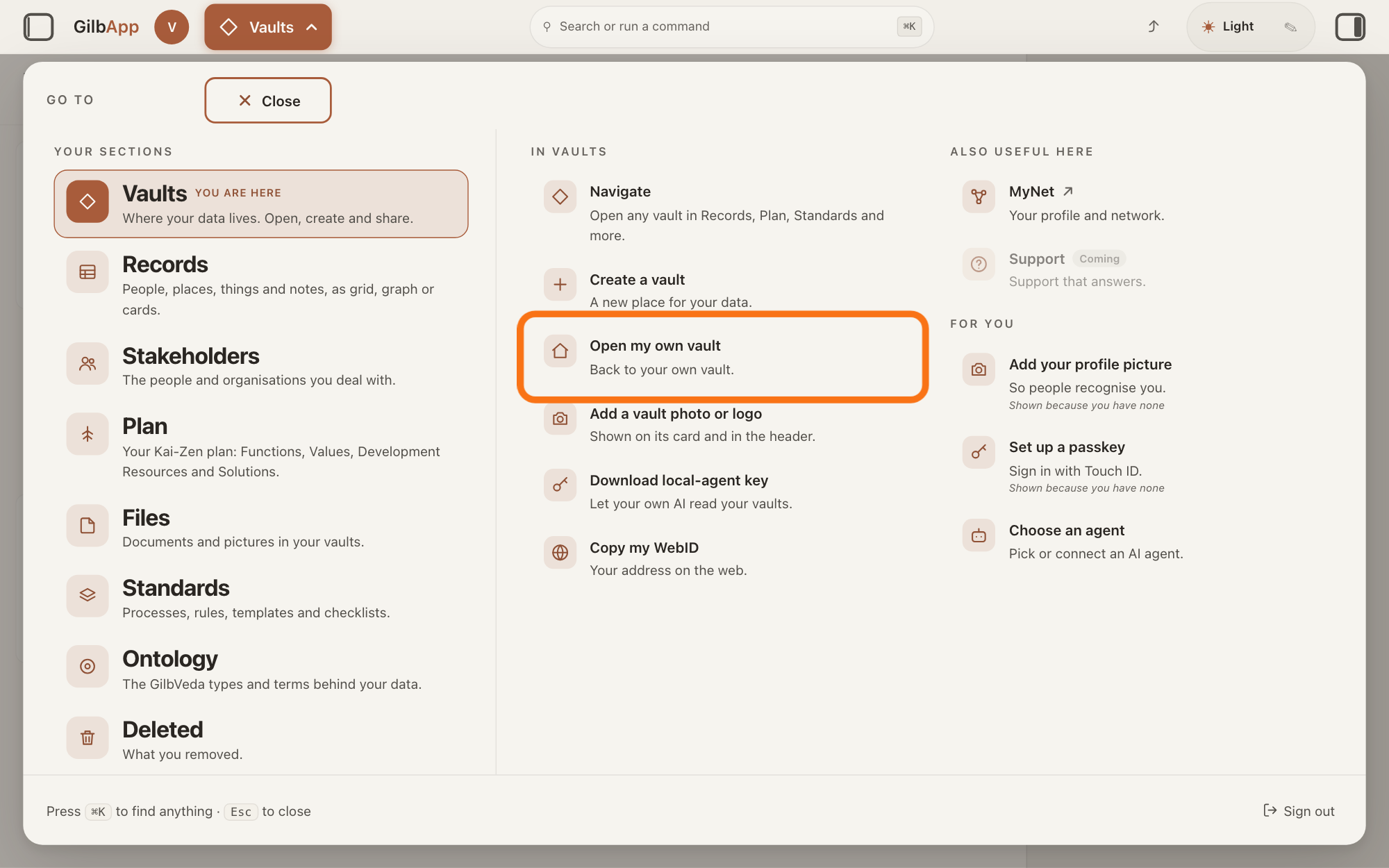
Press Main menu at the top left and choose Open my own vault.
Press Main menu, next to your profile picture at the top left, and under IN VAULTS choose Open my own vault, which reads Back to your own vault. The button shows the name of the section you are in, such as Vaults. GilbApp goes to Your vaults, picks your own vault and shows its details in the pane on the right.
Show as text
The panel headed "GO TO" is open with "Vaults" marked "YOU ARE HERE". In the middle column under "IN VAULTS", the outlined row reads "Open my own vault" and "Back to your own vault." Click it.
More about this
If you are in another section, rest the pointer on Vaults in the panel first, so that its options show beside it; the answer on opening your own vault names the panel's other choices. Your agent must be in a vault you own: a vault someone else shared with you does not count, even if you may write in it.
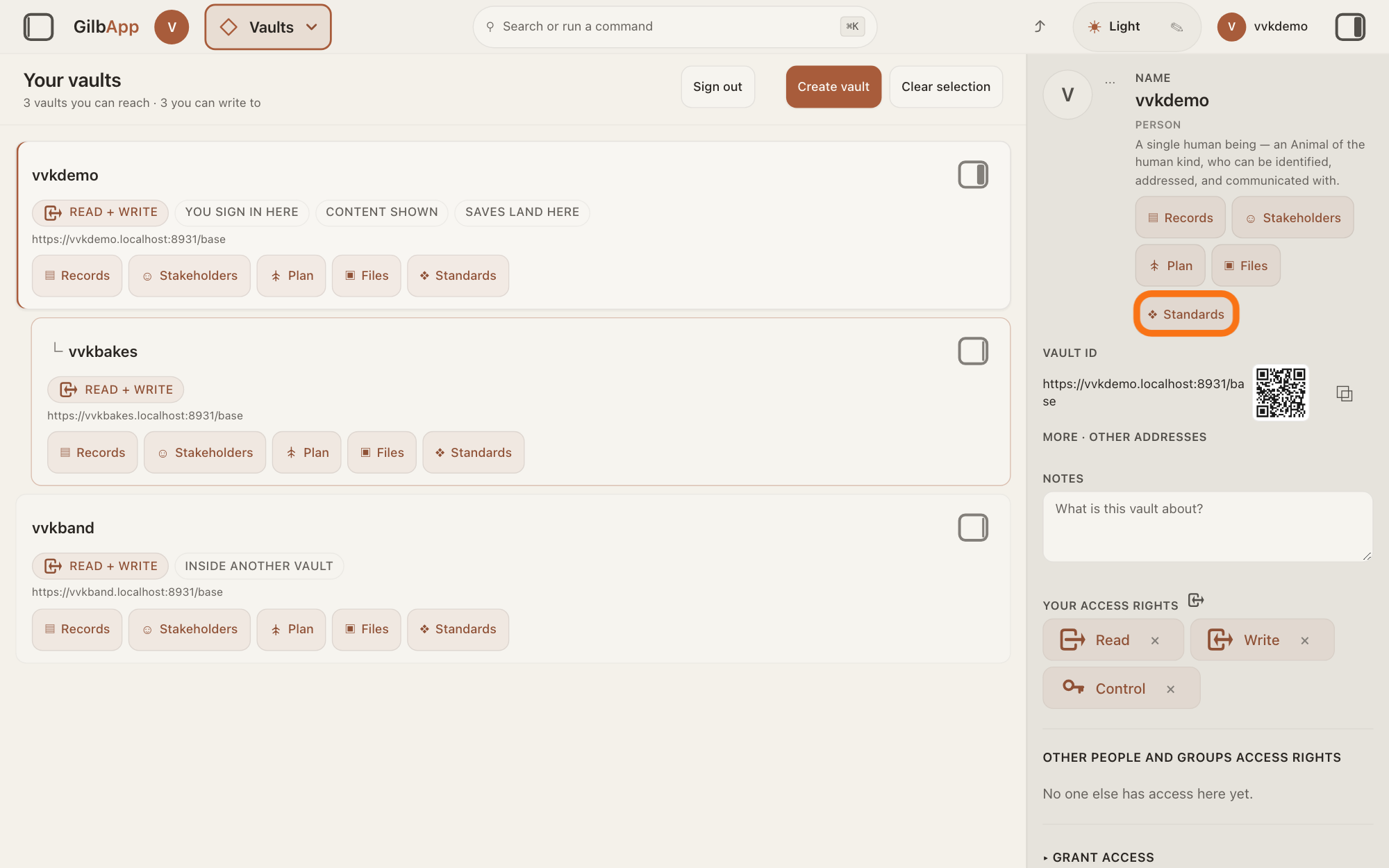
Press ❖ Standards under your vault's name.
In the pane on the right, press ❖ Standards under your vault's name. Standards opens on your vault, on the tab Processes, with a row of tabs: Policies, Processes, Procedures, Rules, Templates & Forms, Checklists, References and Lookups.
Show as text
Your own vault's details are in the pane on the right. Under the name and type, "Main menu"s are listed; the last one, the outlined "❖ Standards", sits on its own line. Press it to open your vault's Standards.
More about this
Each tab holds one kind of standard; a standard is a written procedure, rule set, form or other guide that people and agents follow as they work. You need only Procedures. Beside ❖ Standards, the buttons ▤ Records, ☺ Stakeholders, Plan and ▣ Files open your vault in those sections instead.
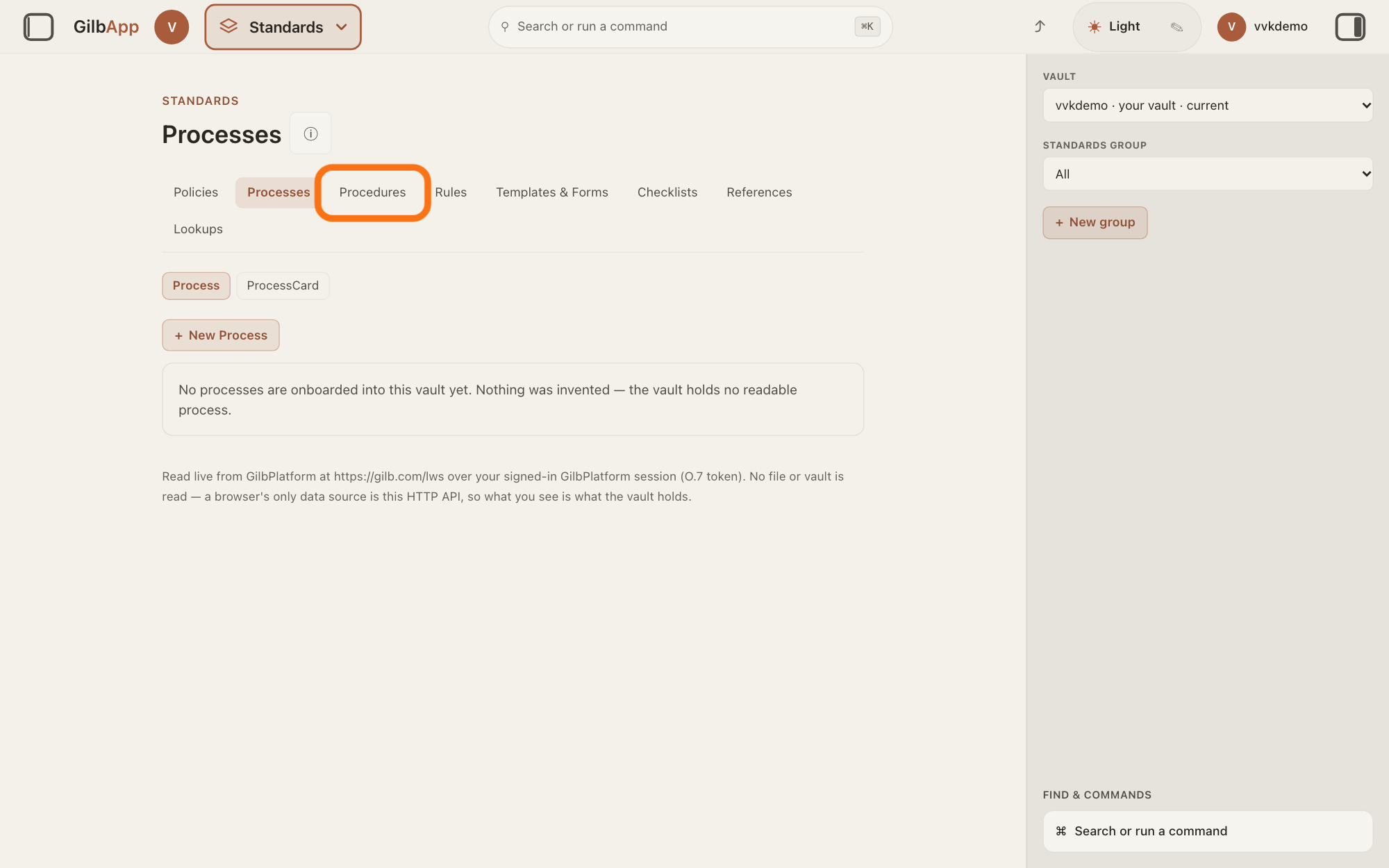
Press the Procedures tab.
Press Procedures in the row of tabs. The screen is headed Procedures; press ⓘ beside the heading and a line says Select a procedure to read the how-to steps for one Task — not a Process flow.
Show as text
The "Standards" screen shows a row of tabs: "Policies", "Processes", "Procedures", "Rules", "Templates & Forms", "Checklists", "References" and "Lookups". The third tab, "Procedures", is outlined. Press it.
More about this
A Procedure is the kind of standard that holds an agent: who you call, and the steps that agent runs. If your vault holds none yet, the screen says "No procedures are onboarded into this vault yet. Nothing was invented — the vault returned no readable procedure."; otherwise it lists them under a search box.
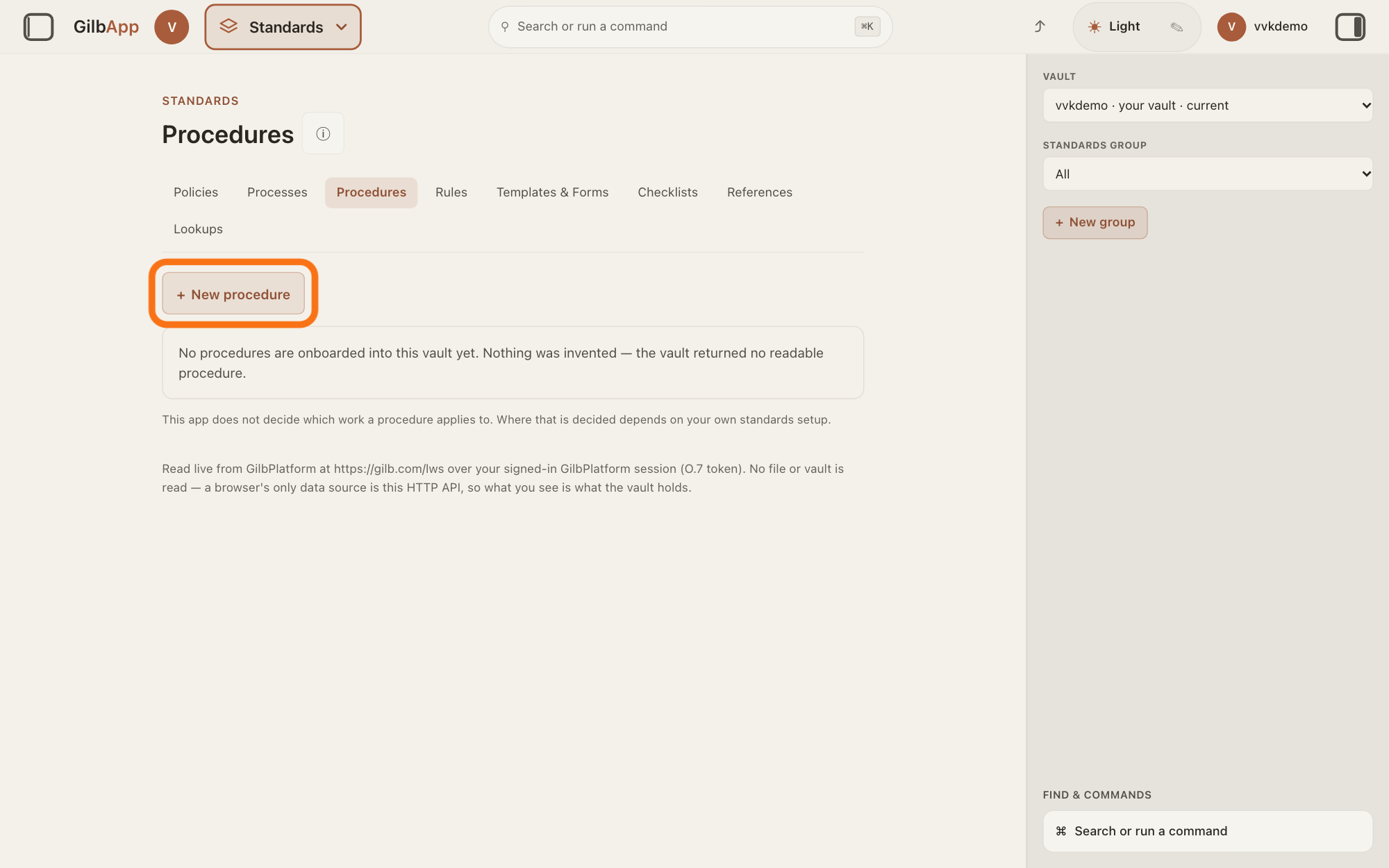
Press + New procedure.
Press + New procedure above the list. A form opens with the boxes TITLE, STEWARD’S NOTE (optional) and AUTHORITY (optional).
Show as text
The screen is headed "Procedures". Under the tabs, the outlined button reads "+ New procedure", and the box below it reads "No procedures are onboarded into this vault yet." Press "+ New procedure".
More about this
You need only TITLE. The steward's note is free text for the other people who look after your standards; the screen says it does not decide what the document applies to. AUTHORITY names who established the procedure, a person or a body; left empty, the document names no one. Cancel closes the form without making anything.
Type your agent's name in TITLE and press Create procedure.
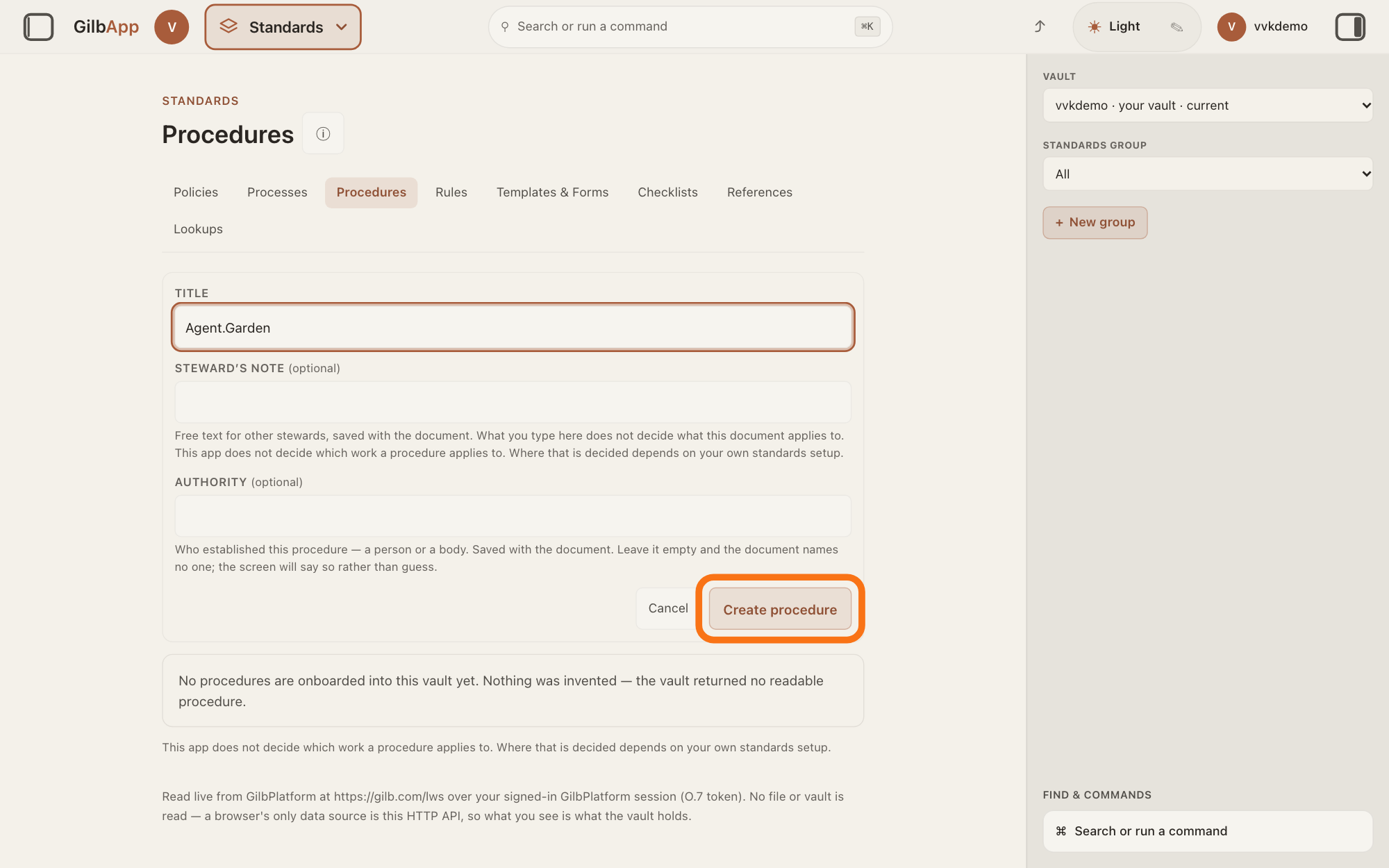
Type the name your agent will have in the chat, as one word of letters, digits, dots and hyphens, at least three characters long, such as Agent.Garden, and press Create procedure. The procedure opens, headed by its name, with Steps below it.
Show as text
The new-procedure form is open: your agent's name is typed in "TITLE", and "STEWARD’S NOTE (optional)" and "AUTHORITY (optional)" are empty. At the bottom right of the form, the outlined button reads "Create procedure". Press it.
More about this
A name with a space or any other character is not offered as an agent: the procedure is made, but it does not show under My agents. Nor are these words, in any letter case: the, and, you, this, that, please, thanks, hello, claude, assistant, agent, user and system. If you give the procedure a tag, a short fixed name, with Add tag, the tag is the agent's name instead of the title. Add note adds a steward's note; you need neither. The button reads Creating… while it works. All procedures goes back to the list.
Type a step in What the follower does at this step and press Add step.
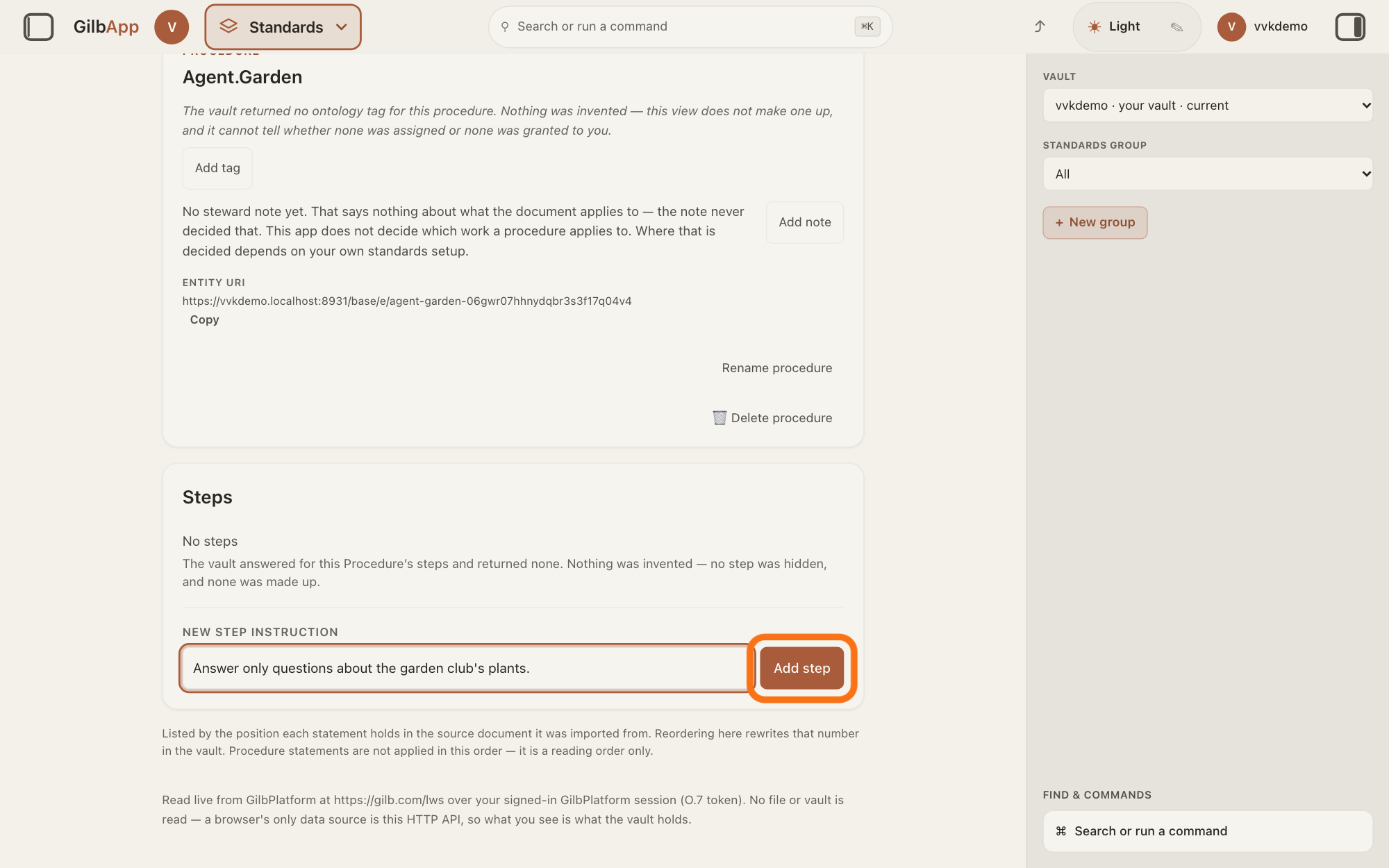
Under NEW STEP INSTRUCTION, type one thing your agent is to do in the box that shows What the follower does at this step, and press Add step or Return. Add each further step the same way, in the order the agent is to follow them.
Show as text
The procedure is open, and under "Steps" it reads "No steps". In the box under "NEW STEP INSTRUCTION", "Answer only questions about the garden club's plants." is typed. To the right of the box, the outlined button reads "Add step". Press it.
More about this
For example: Answer only questions about the garden club's plants. The step shows under Steps with its number, and opens in the pane on the right, where you can change its words; you need not. The button reads Adding… while it works. These steps are your agent's standing instructions: in the chat, GilbPlatform gives them to your AI with each message you send to this agent.
Choose your agent under My agents in the agent list.
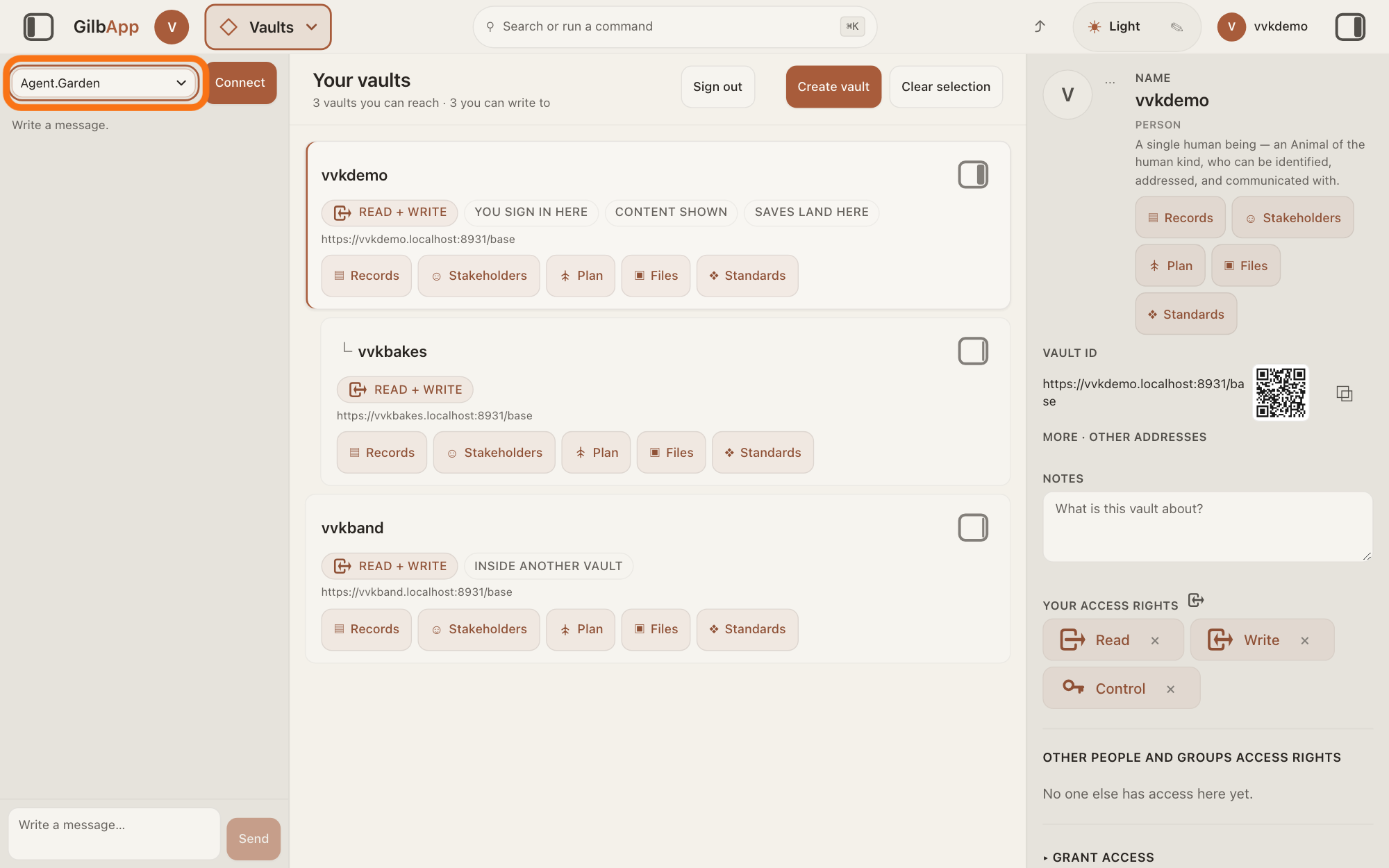
If the chat is not showing, press the square button at the far left of the top bar. Click the agent list at the top of the chat and choose your agent under My agents; then type your message and press Send, as the answer on chatting with an agent in GilbApp shows.
Show as text
The chat is open in a pane at the left. At the top of that pane, the outlined agent list reads "Agent.Garden", your own agent; "Connect" is to its right. Type your message below as usual.
More about this
GilbApp reads your own agents when the chat starts, so if a new agent is not there, reload the GilbApp page. My agents shows only when you own at least one agent.
Deeper
Also asked:
What is My agents in the agent list? It is the part of the agent list that holds the agents you made yourself, each a Procedure in a vault you own. Only you see it, and it shows only when you own at least one agent.
What is the difference between a standard and an agent? A standard is a written procedure, rule set, form or other guide that people and agents follow. An agent is your AI following one written procedure, its standing instructions; your own agent is a Procedure you write in a vault you own.
Can I make an agent in a vault someone shared with me? No. Your agent must be a Procedure in a vault you own: a vault someone else shared with you does not count, even if you may write in it.
What should I write in my agent's steps so it works well? Type one thing your agent is to do in each step, in the order it is to follow them, for example Answer only questions about the garden club's plants. This help gives no more advice on wording.
Can my own agent hand work to Kai-Zen or Agent.Coder? To Kai-Zen, no: GilbPlatform lets no agent hand work to Kai-Zen. A step of your Procedure can hand work to another agent; this help has not shown that done with Agent.Coder.
Can my agent run on its own on a schedule? No: an agent works only when you send it a message, and GilbPlatform starts no agent at a set time. If you need this, write to [email protected].
The chat says Your own agents could not be loaded. What now? GilbApp could not read the agents you made, so they are missing from My agents for now. The other agents still work; reload the page to try again.
An agent is your AI following one written procedure, its standing instructions, for one kind of work. Your own agent is a Procedure you write in a vault you own; it works with your own AI, in the chat, like the agents GilbPlatform offers.
Only you see your own agents: GilbApp offers each one only to the person who owns its vault, and giving others access to that vault does not show it to them. GilbPlatform checks the first 20 vaults you can reach, keeps those you own, and lists up to 50 of your agents from them. Each time you send a message to your agent, it checks again that the agent is still a Procedure in a vault you own.
If the agent's standing instructions cannot all be read, a line above the box says so; the answer on seeing which standing instructions an agent loaded explains that line. Your agent signs its messages with its name only if one of its steps says so.
This answer is written for a computer screen.
Source: GilbApp af0f04ee (https://gilb.com/app/version.json read 2026-11-10), code read: step 1 (gilbAppMenuRows.ts:83-84); step 2 VaultSectionButtons.tsx:74 (standards: Standards, glyph ❖), :125-126; process/standardsTabs.ts:9-23 (LIVE_TABS labels in order); step 3 process/StandardsSection.tsx:252-275 (SectionTabs), :1828-1856 (title Procedures, subtitles Select a procedure to read the how-to steps for one Task — not a Process flow. and The how-to steps this procedure holds, in the order they are performed.), process/ProceduresTab.tsx:452-465 (empty sentence), :487-533 (search box, list); step 4 ProceduresTab.tsx:335-341 (+ New procedure), :345-414 (Title, Steward’s note with (optional) in normal case, help "Free text for other stewards, saved with the document. What you type here does not decide what this document applies to." + StewardNoteLine.tsx:44-45, Authority (optional), help "Who established this procedure — a person or a body. Saved with the document. Leave it empty and the document names no one; the screen will say so rather than guess.", Cancel, Create procedure/Creating…; labels drawn uppercase by class, the (optional) span normal-case); :322-327 (onCreated opens the new procedure); :590 (All procedures); DocumentTag.tsx:205 (Add tag); step 6 ProcessViewer.tsx:168-181 (PROCESS_UNIT_COPY: Steps, New step instruction, Add step, placeholder What the follower does at this step; a Procedure takes it, :376-395), :1652-1720 (AddStep: Return submits, Adding…, label uppercase), ProceduresTab.tsx:683-701 (new step opened in the right rail, ShellContext.ts:539-552), lib/base/procedureHooks.ts:248-285 (writes one t:ProcedureStep in the procedure's own vault); step 7 components/agent/AgentSelector.tsx:70-78 (optgroup My agents only when there is an own agent), lib/base/useOwnAgents.ts:1-22 (read once per mount and per person). GilbPlatform 4d008a55 (https://id.gilb.com/version), code read at 4d008a55: src/ai/own-agents.ts:3 ("A t:Procedure with a tag or a title, in a vault that person OWNS, offered only to them"), :7 (Reach is not ownership), :38 (OWN_AGENT_VAULT_CAP = 20), :41 (OWN_AGENT_ENTRY_CAP = 50), :184-205 (checkOwnAgentEntry, re-checked on each pick), :294-307 (a name failing nameFault is not listed); src/ai/agent-list.ts:210 (NAME_MIN_CHARS = 3), :217-219 (refused words), :222 (`/^[A-Za-z0-9.-]+$/`), :242-252 (nameFault), :717-726 (storedNameOf: the tag, else the title); src/routes/ai-chat.ts:413-427 (own pick checked each turn), :622-651 (its Procedure loaded as standing each turn); src/ai/chat-agents.ts:83-85 (ownChatAgent). Standards, 200: Agent.Standard.Type.Procedure ("A Procedure holds an Agent. It is who you call, and the steps that agent runs. It has no entry or exit conditions."); GilbPlatform.SignOff. GilbVeda t:Procedure (public read, Approved: "a repeatable description to instruct people as to the best-known practice, or recommended way, to carry out the task"). GilbPlatform 4d008a55 src/ai/own-agents.ts:113-173 (`ownAgentList`: vaults from list_vaults, `vaultIds.slice(0, OWN_AGENT_VAULT_CAP)` = the first 20 before ownership is tested, then `distinct.slice(0, OWN_AGENT_ENTRY_CAP)` = 50, sorted by name), code read at 4d008a55.
Checked against GilbApp d529620.