
How do I move a term in the hierarchy?
Short answer
Press Main menu, choose Ontology, search and select the term, then search and select its new parent under IS-A PARENT (MOVE IN HIERARCHY).
Before you start
You need to be signed in to GilbApp on a computer, with the right to write to GilbVeda, and the new parent must already be in GilbVeda; most people do not have that right, and Deeper says what they can do. The pictures show a made-up person on a test site; your screen shows your own name and address.
Words used here (4)
- GilbApp
- GilbApp is the app, opened in a web browser at https://gilb.com/app, where you open, fill and share your vaults.
- record
- A record is one piece of data with its own address, such as a person, a place, a thing or a note.
- is-a parent
- An is-a parent is the broader GilbVeda term that a term is a kind of, such as Chair for Dining Chair.
- field
- A field is one named fact on a record, such as its title or a due date; its name comes from GilbVeda.
Steps
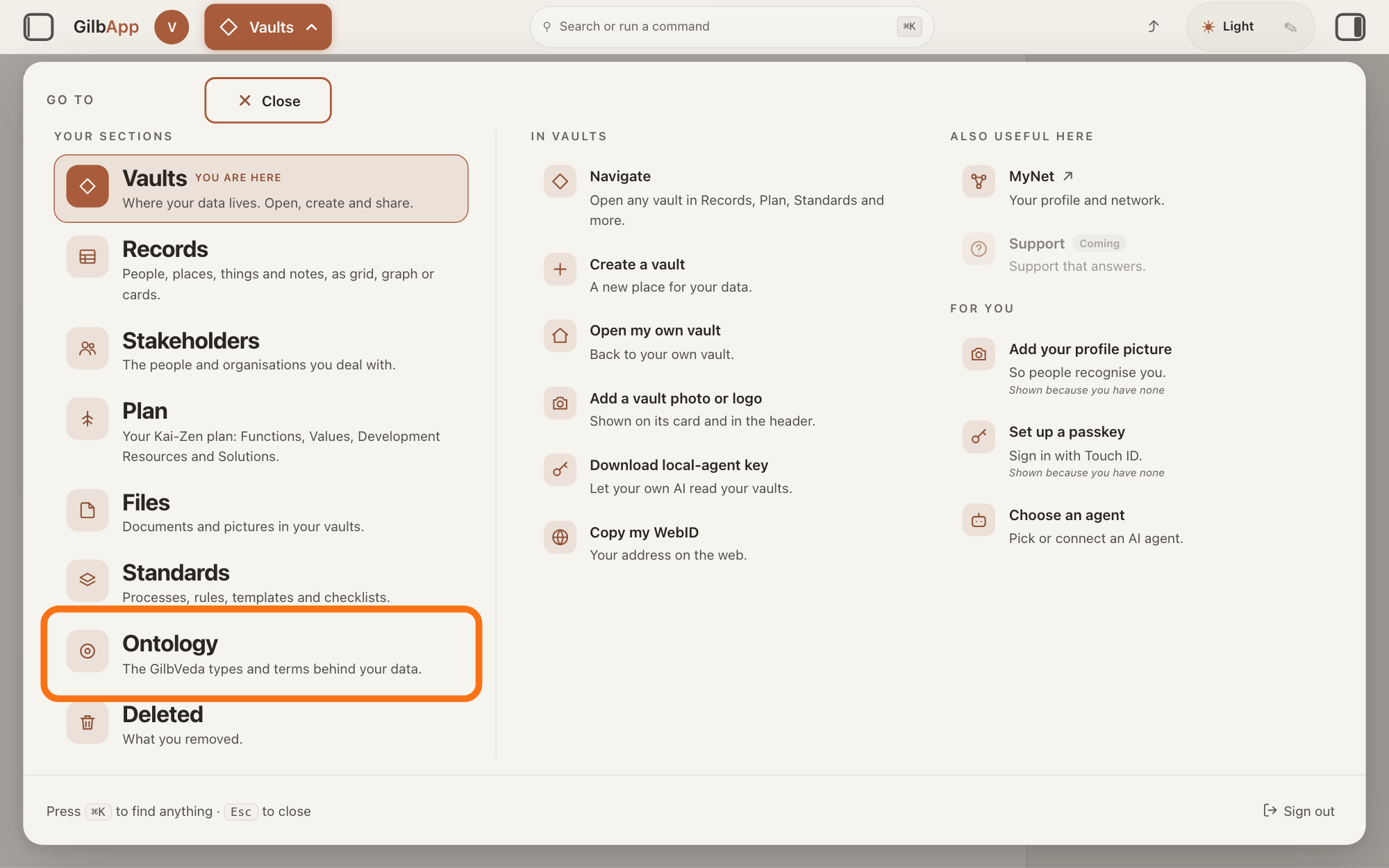
Press Main menu at the top left and choose Ontology.
Press Main menu, next to your profile picture at the top left, and under YOUR SECTIONS choose Ontology. The button shows the name of the section you are in, such as Vaults.
Show as text
The panel headed "GO TO" is open over the window. In the left column under "YOUR SECTIONS", near the bottom, the outlined row reads "Ontology" and "The GilbVeda types and terms behind your data." Click it to open the Ontology screen.
More about this
A panel headed GO TO opens; Ontology reads The GilbVeda types and terms behind your data. It always opens on GilbVeda, the shared list of terms: the button at the top left of the screen reads GilbVeda Ontology, the cursor is in the box marked CONCEPTS, and below are three columns, TYPES, FUNCTIONS and VALUES. A type is a kind of thing; a Function is what a system does, written as an action; a Value is a perceived benefit, measured as a number. A term is the shared name GilbVeda keeps for a kind of thing, a detail of it, a link between two things, or a species. The right pane says No concept selected. Resting the pointer on Ontology in the panel shows more choices under IN ONTOLOGY; you need none of them here.
Search and select the term in the box marked CONCEPTS.
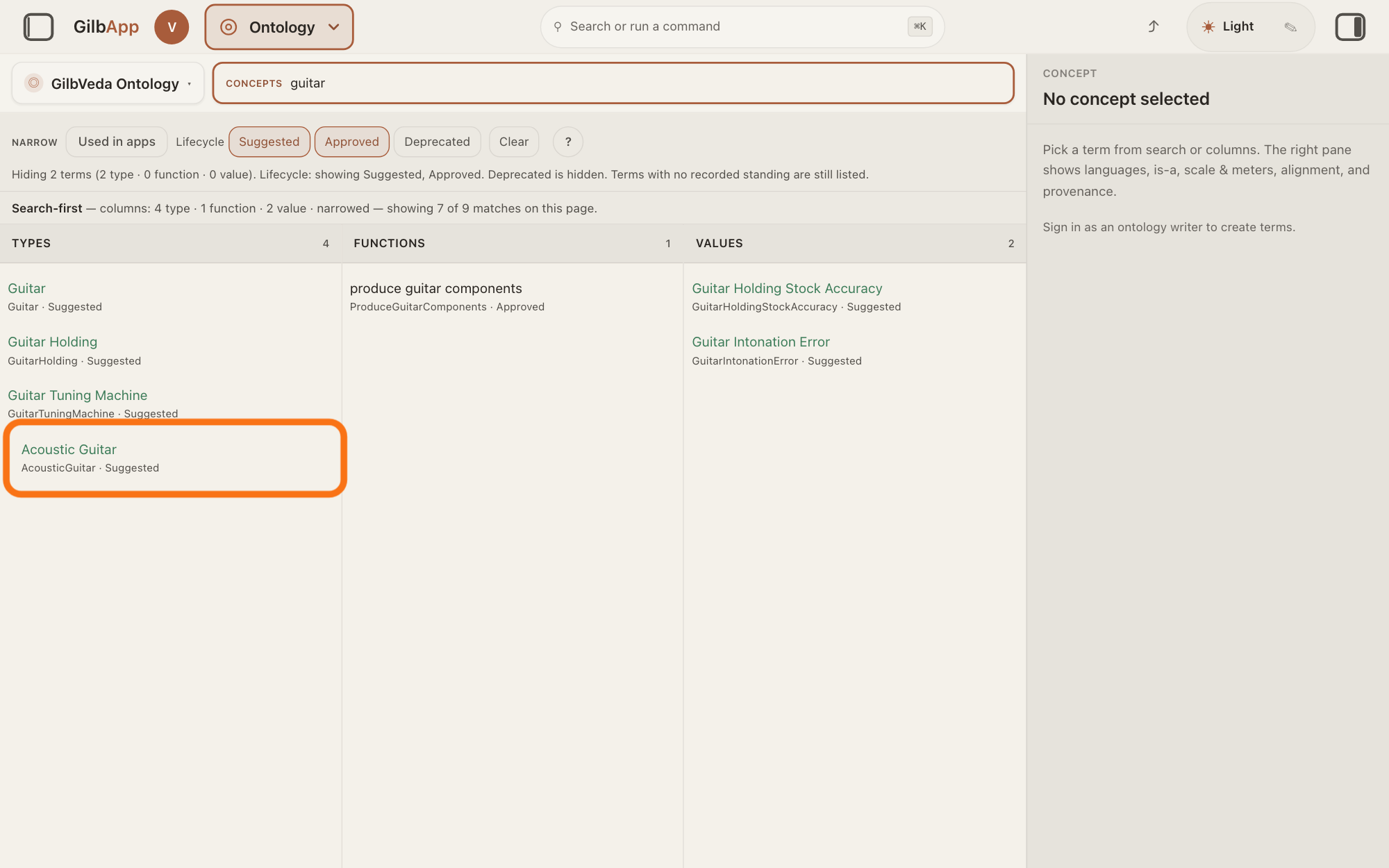
Type at least three letters of the term's name in the box marked CONCEPTS and click the term in its column. The right pane shows the term.
Show as text
A name is typed in the box marked "CONCEPTS", and the matches fill the three columns. In "TYPES", one match is outlined. Click your term in its column; the pane on the right then shows it.
More about this
The answer on finding a term says more about the search, and about deprecated terms, which it hides at first. You can also click a term while browsing the columns, or the Type link in a record's ▸ DETAILS, which opens that type here.
Search and select the new parent under IS-A PARENT (MOVE IN HIERARCHY).
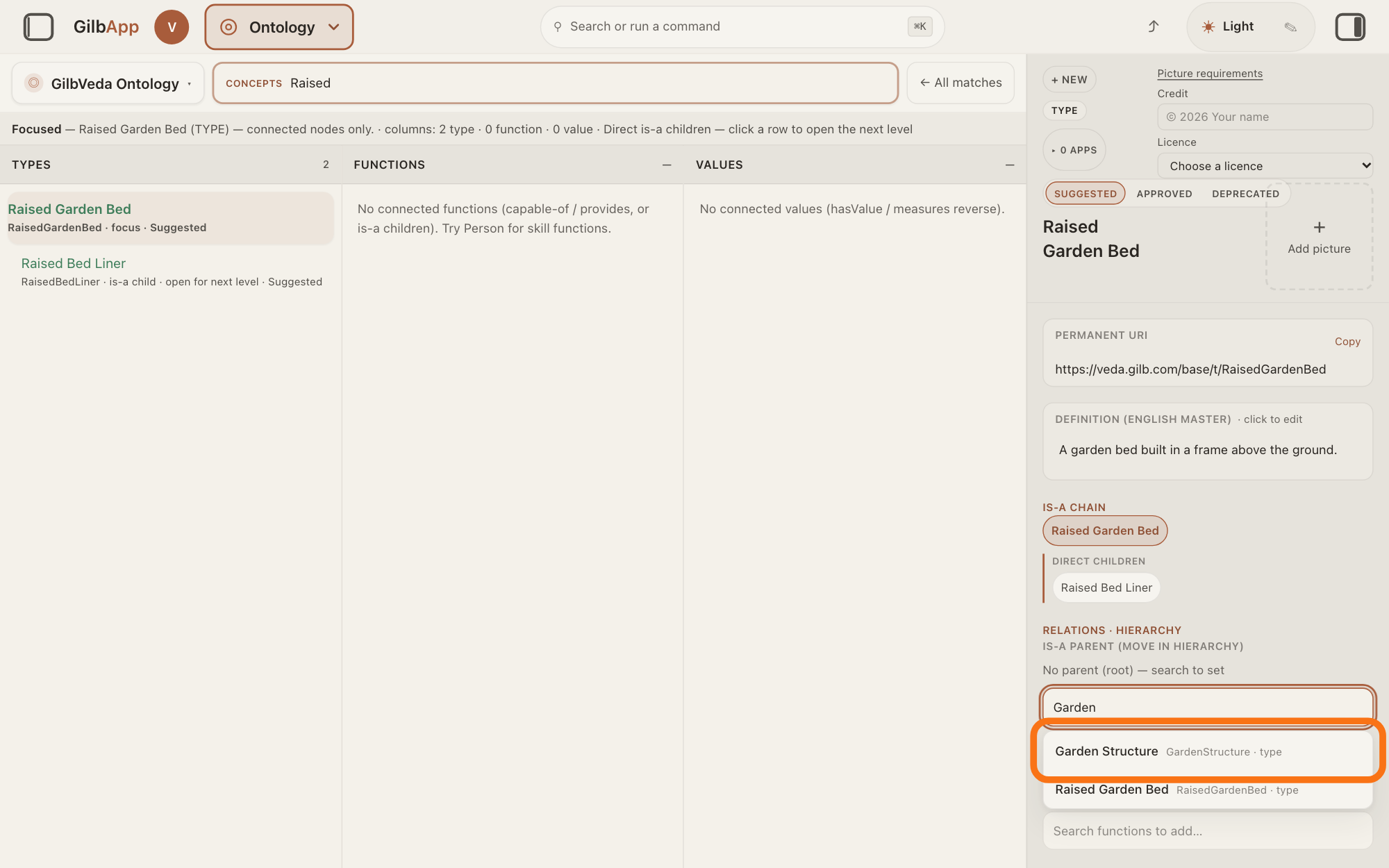
Under RELATIONS · HIERARCHY, type a word of the new parent's name in the box that shows Search types…, and click the parent in the list. For a function the box shows Search functions…, and for a value Search terms….
Show as text
In the right pane, under "IS-A PARENT (MOVE IN HIERARCHY)", it reads "No parent (root) — search to set". A word is typed in the search box below it, and a list of types opens under the box. The outlined match is the new parent; click it. Each row shows the term's name, its short name and "type".
More about this
An is-a parent is the broader term this one is a kind of, such as Chair for Dining Chair; a term has at most one. The current parent shows under the label with ×, which takes the parent away and puts the term at the top of its tree; with none, the label reads No parent (root) — search to set. If no other term is below this one or linked to it, the move is saved at once; otherwise a box opens first (step 4). Saving the move puts the term back to SUGGESTED, not yet approved. + NEW, SUGGESTED, APPROVED, DEPRECATED, the text fields and the picture have their own answers; you do not need them here.
If a box opens, press Confirm move.
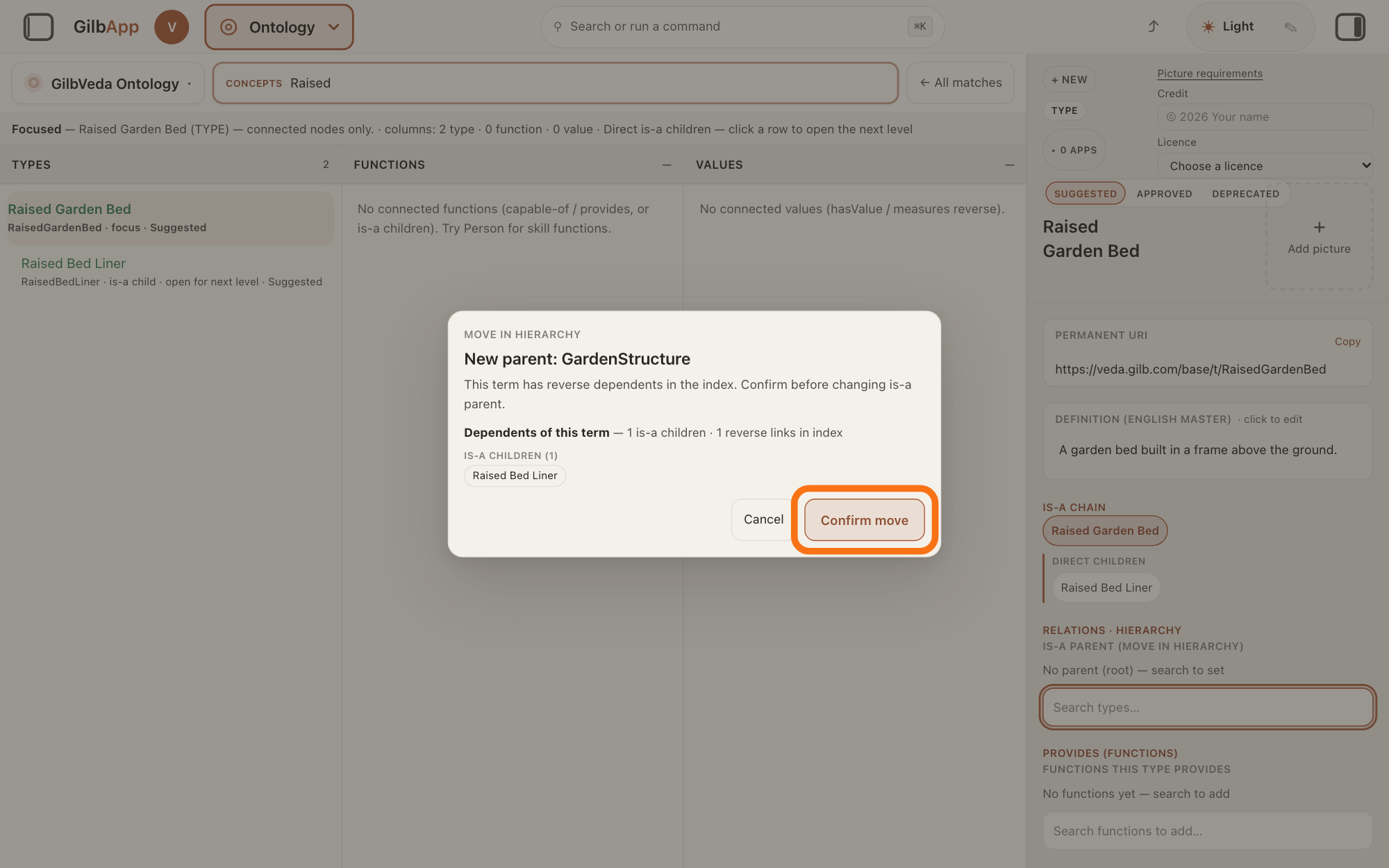
In the box headed MOVE IN HIERARCHY, check who depends on the term and press Confirm move. Cancel leaves the term where it was.
Show as text
A box opens in the middle of the window, headed "MOVE IN HIERARCHY", with "New parent:" and the parent's name. It says the term has reverse dependents and lists them under "Dependents of this term", here one under "IS-A CHILDREN (1)". Check them, then press the outlined "Confirm move" at the bottom right; "Cancel" leaves the term where it was.
More about this
The box names New parent: and says "This term has reverse dependents in the index. Confirm before changing is-a parent." Under Dependents of this term it lists, with counts, such groups as IS-A CHILDREN, VALUES THAT MEASURE THIS and TYPES THAT PROVIDE THIS; Computing dependents… shows while it counts. The terms below this one stay below it, so they move with it. The box does not show which apps use the term.
Deeper
GilbApp shows these controls only to a person whose sign-in may write to GilbVeda's own vault, the place where the shared list of terms is kept, and most people may not. Everyone else sees the parent under RELATIONS · HIERARCHY as ↑ is-a parent with its name, which opens it, or No is-a parent (root)., and a type's line of parents under IS-A CHAIN.
GilbVeda's own rules say that only Agent.Concept, the agent that finds and makes GilbVeda's terms, writes GilbVeda; your own AI acting as Agent.Concept counts as Agent.Concept. Those rules count a new parent as a change that could break an app using the term. Such a change is made only when the term's meaning is wrong or one term carries two meanings, and then not in place: a new term is made under the right parent, and the old one is retired with a pointer to it. Agent.Concept places and moves types by GilbVeda's placement rules, and reads which apps use a term before it changes it. GilbApp moves the term where it is, and its check lists the terms that depend on it, not the apps that use it.
A term you had Agent.Concept make, with you as its maker, can be given a new parent by you while it is still suggested, through GilbPlatform's mint program, gilb-mint.ts, which your own AI uses on a terminal as Agent.Concept. In GilbApp's chat, Agent.Concept, the agent that finds and makes GilbVeda's terms, has tools to look terms up and to make new ones, but none to change, approve or retire a term. The answer on changing or retiring a term you minted shows how: the new parent goes in subTypeOf.
Every move is kept: the term's CHANGE HISTORY in the right pane shows who changed it, when and what.
This answer is written for a computer screen.
Source: GilbApp ebd9415e7a90de8c289eaa7bb02f40c8ee80cf79 (https://gilb.com/app/version.json read 2026-11-11, dirty false); every GilbApp file cited is byte-identical to af0f04ee (between af0f04ee and ebd9415e, the cited files: empty), so line numbers are read from the unpack (no checkout): OntologyConceptPane.tsx:1351-1404 (Relations · hierarchy uppercase; writer: OntologyTermSinglePick Is-a parent (move in hierarchy), search placeholders Search types…, Search functions…, Search terms…, No parent (root) — search to set; reader: ↑ is-a parent, chip, No is-a parent (root).), :1308-1340 (Is-a chain, non-value only), :874-901 (requestParentChange: no dependents → save at once; else the box; confirmParentMove), :617-650 (saveField demotes to Suggested), :1755-1800 (Confirm hierarchy move dialog: Move in hierarchy uppercase, New parent:, the sentence, Dependents of this term, Cancel, Confirm move); OntologyTermPick.tsx:236-275 (label uppercase, current value button and × that sends "", search dropdown), :115-125 (Searching…, No matches); OntologyBlastPanel.tsx:16-39 (Computing dependents…, groups Is-a children, Values that measure this, Types that provide this, Types capableOf (sample), uppercase, counts); ontologyWrite.ts:64-81, :1092-1096. GilbPlatform 498d29a0dec9a15d167f4b6b5d731382a6bcede0 (https://id.gilb.com/version read 2026-11-11, dirty false); every platform file cited is byte-identical to 4d008a55 except docs/BASE-DEVELOPER-GUIDE.md, whose changes touch none of the parts cited; code read at 498d29a0: src/termrequest/own-terms.ts:33-39 (CHANGEABLE includes a:subTypeOf); src/routes/term-mint.ts:240-274; scripts/devkit/gilb-mint.ts:202; src/ai/chat-mint-tools.ts:136-235. Standards: Rule_Code_gilbveda-ontology-master 2026-11-10 (RuleBvmasterSoleMinter; RuleBvmasterUsageFirst; RuleBvmasterNoBreak a moved parent ... is made only when it is necessary, and never in place); Agent.Concept.Standards ("On every Type mint, re-parent or placement: Rule_Write_Code_gilbveda-type-placement"). GilbVeda public read / local copy 2026-11-10: t:IsA (Approved: "X is-a Y asserts X is a kind of Y and inherits Y's definition. The acyclic, single-parent subsumption backbone of the Type tree").
Checked against GilbApp d529620.