
← Back to How do I download a copy of my vault?
How do I open my own vault?
Short answer
Press Main menu, choose Open my own vault, and press ▤ Records under your vault's name to see what it holds.
Before you start
You need to be signed in to GilbApp on a computer. The pictures show a made-up person on a test site; your screen shows your own name and address.
Words used here (3)
- GilbApp
- GilbApp is the app, opened in a web browser at https://gilb.com/app, where you open, fill and share your vaults.
- agent
- An agent is your AI following one written procedure, its standing instructions, for one kind of work.
- record
- A record is one piece of data with its own address, such as a person, a place, a thing or a note.
Steps
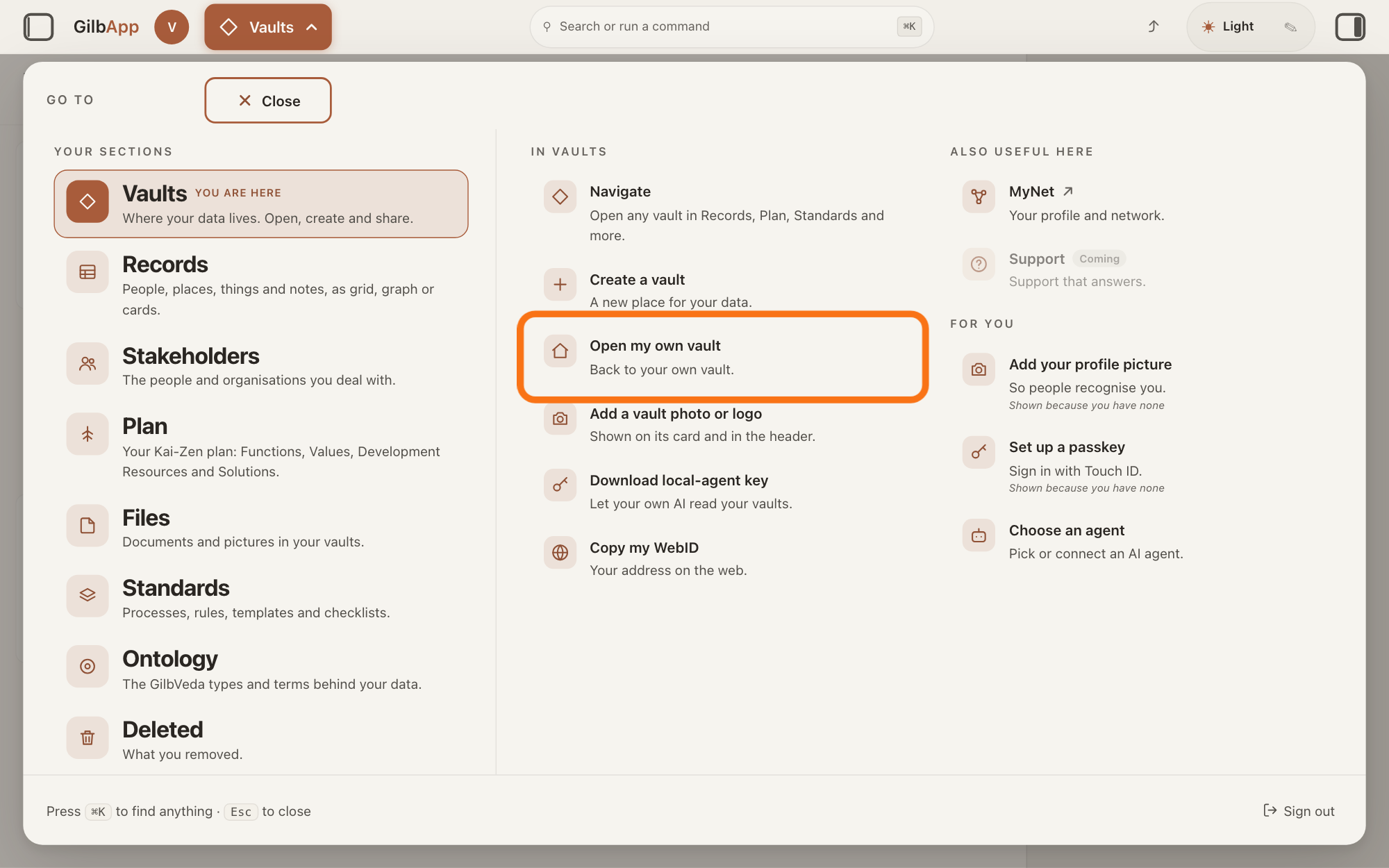
Press Main menu at the top left and choose Open my own vault.
Press Main menu, next to your profile picture at the top left, and under IN VAULTS choose Open my own vault, which reads Back to your own vault. GilbApp goes to Your vaults, picks your own vault and shows its details in the pane on the right.
Show as text
The panel headed "GO TO" is open with "Vaults" marked "YOU ARE HERE". In the middle column under "IN VAULTS", the outlined row reads "Open my own vault" and "Back to your own vault." Click it.
More about this
The button shows the name of the section you are in, such as Vaults. In another section, rest the pointer on Vaults in the panel first, so its options show beside it. IN VAULTS also holds Navigate, Create a vault, Add a vault photo or logo, Download local-agent key and Copy my WebID; you do not need them. Your profile picture opens the same pane in one press; its hover text is Open your vault — and your vault's name. You can also search for own in Search or run a command and select Open my own vault; selecting Open and your vault's name there goes straight to its records. A vault is the place where a person or a group keeps their records.
Press ▤ Records under your vault's name.
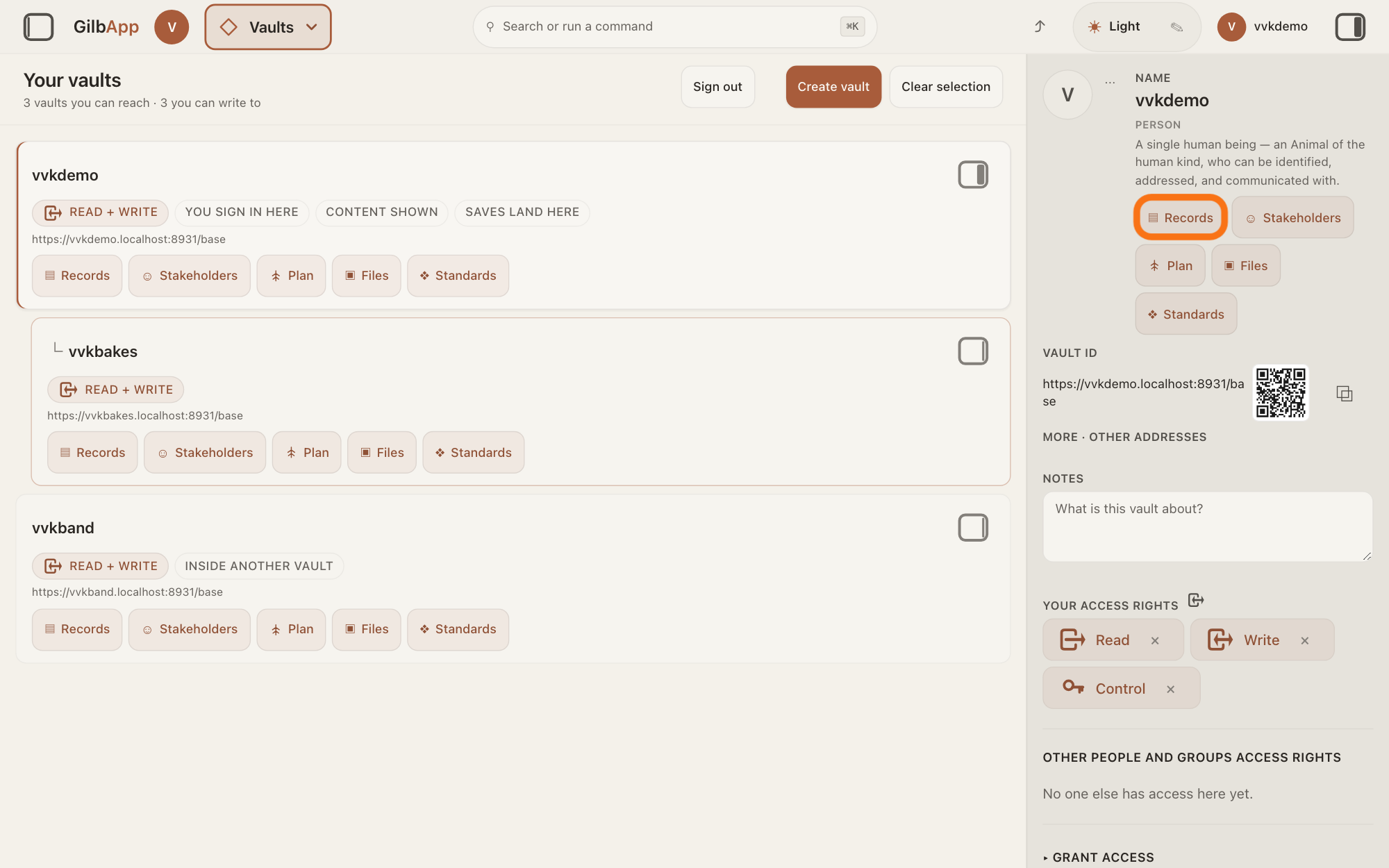
In the pane on the right, press ▤ Records under your vault's name. Records opens with your vault's records; a record is one piece of data with its own address, such as a person, a place, a thing or a note.
Show as text
Your own vault's card is marked "YOU SIGN IN HERE", and its details fill the pane on the right: the letter, "NAME", the type and a row of section buttons. The first of them, the outlined "▤ Records", is under the name. Press it.
More about this
Beside it, ☺ Stakeholders, Plan, ▣ Files and ❖ Standards open your vault in those sections instead. The pane also shows the vault's picture with ⋯, VAULT ID with a QR code, a square pattern a phone camera can read, and ⧉, MORE · OTHER ADDRESSES, NOTES, YOUR ACCESS RIGHTS, OTHER PEOPLE AND GROUPS ACCESS RIGHTS, ▸ GRANT ACCESS, ▸ CONNECT AI, and lower down a line beginning Sign in with, COMPUTERS SIGNED IN and LOCAL AGENT ON THIS COMPUTER; you do not need them here. Behind the pane, your vault's card shows CONTENT SHOWN and SAVES LAND HERE: the sections show this vault, and new records start in it; Sign out, Create vault and Clear selection sit above the cards.
Deeper
Also asked:
What do Content shown, Saves land here, Inside another vault and Parent unclear on a vault's card mean? The sections show this vault; new records are saved in it; it was made inside another vault that is not listed above it; it is inside more than one vault, so it is listed on its own.
Your own vault is the one made when you signed up; its card in Vaults says YOU SIGN IN HERE. Another vault you can reach opens the same way from its own card in Vaults: its panel button shows its details, and its ▤ Records button its records.
Opening your vault changes nothing in it and gives no one access to it.
This answer is written for a computer screen. In a window narrower than 840 pixels, such as a phone, your vault's details open in a sheet from the right.
Checked against GilbApp d529620.