
← Back to When do I actually start making the app?
How do I pick the next step?
Short answer
Press Main menu, choose Choose an agent, choose Kai-Zen - Master Agent of Planning, type that it should deliver the next step, press Send.
Before you start
A project Kai-Zen set up for you, with its plan written, and your own AI, Claude Code or Grok, connected in GilbApp's chat. The pictures show a made-up person on a test site; your screen shows your own name and address.
Words used here (7)
- agent
- An agent is your AI following one written procedure, its standing instructions, for one kind of work.
- Kai-Zen
- Kai-Zen is the planning agent: it finds out what you want, chooses the way, hands the work to other agents and reports back.
- project
- A project is work to bring about a change you want, such as a new app or a better way of doing something.
- GilbApp
- GilbApp is the app, opened in a web browser at https://gilb.com/app, where you open, fill and share your vaults.
- Jackfruit
- Jackfruit is the vault agent: it finds, reads, writes and links records in your vaults, and makes new vaults for you.
- GilbPlatform
- GilbPlatform is the service that keeps people's and organisations' data in vaults, each at its own web address.
- Value Delivery Step
- A Value Delivery Step, or step, is the Solutions, or parts of them, delivered together in one short cycle to move some Values.
Steps
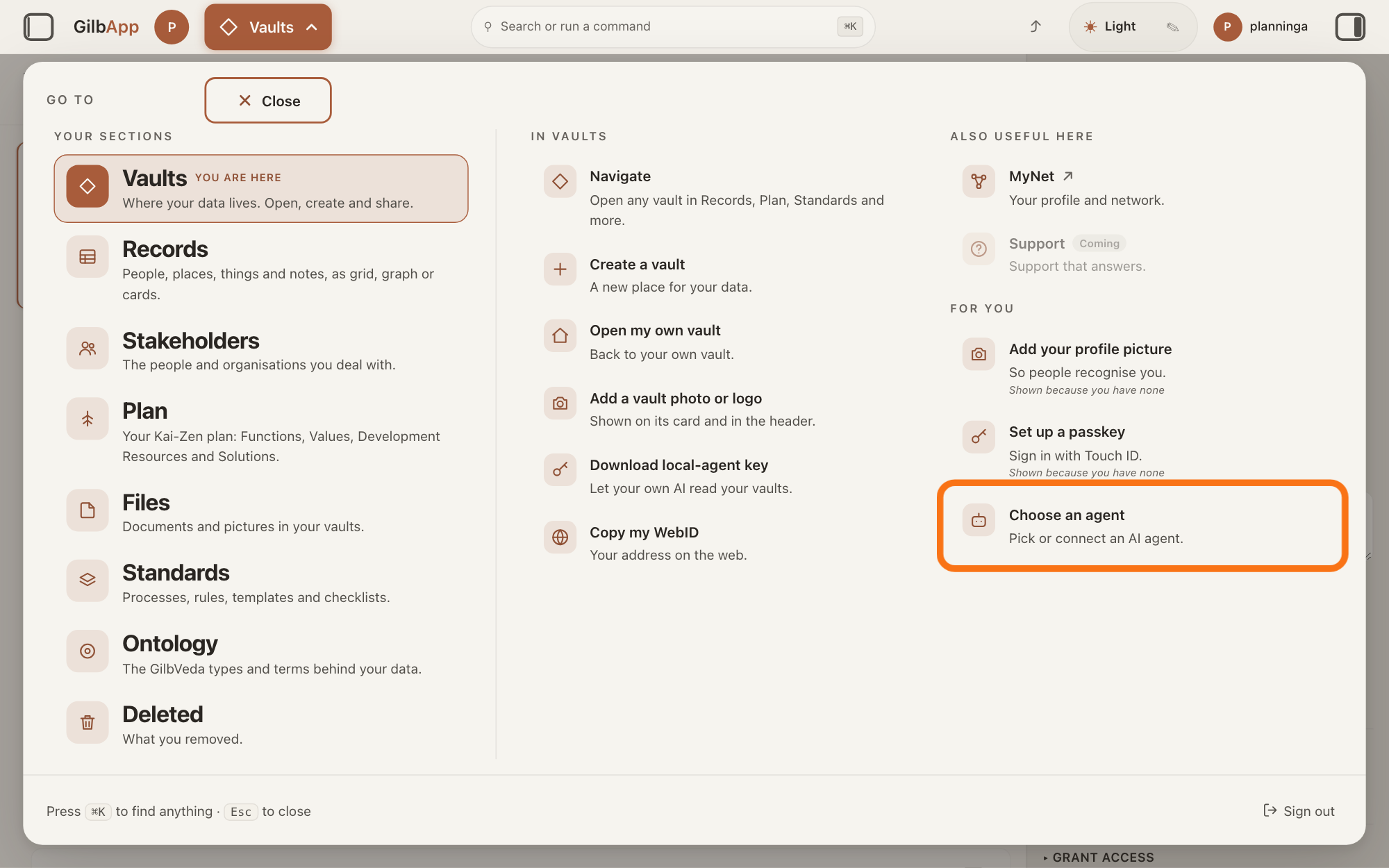
Press Main menu at the top left and choose Choose an agent.
Press Main menu, next to your profile picture at the top left, and under FOR YOU choose Choose an agent (Pick or connect an AI agent.). The button shows the name of the section you are in, such as Vaults. GilbApp opens the left pane, where you chat, and puts the cursor on the agent list at the top of it.
Show as text
The "GO TO" panel is open. In the right column under "FOR YOU", the outlined row is "Choose an agent", with the line "Pick or connect an AI agent." Press it; the chat opens in a pane on the left.
More about this
The square button at the far left of the top bar also shows or hides the left pane. You can also search for Choose an agent in Search or run a command.
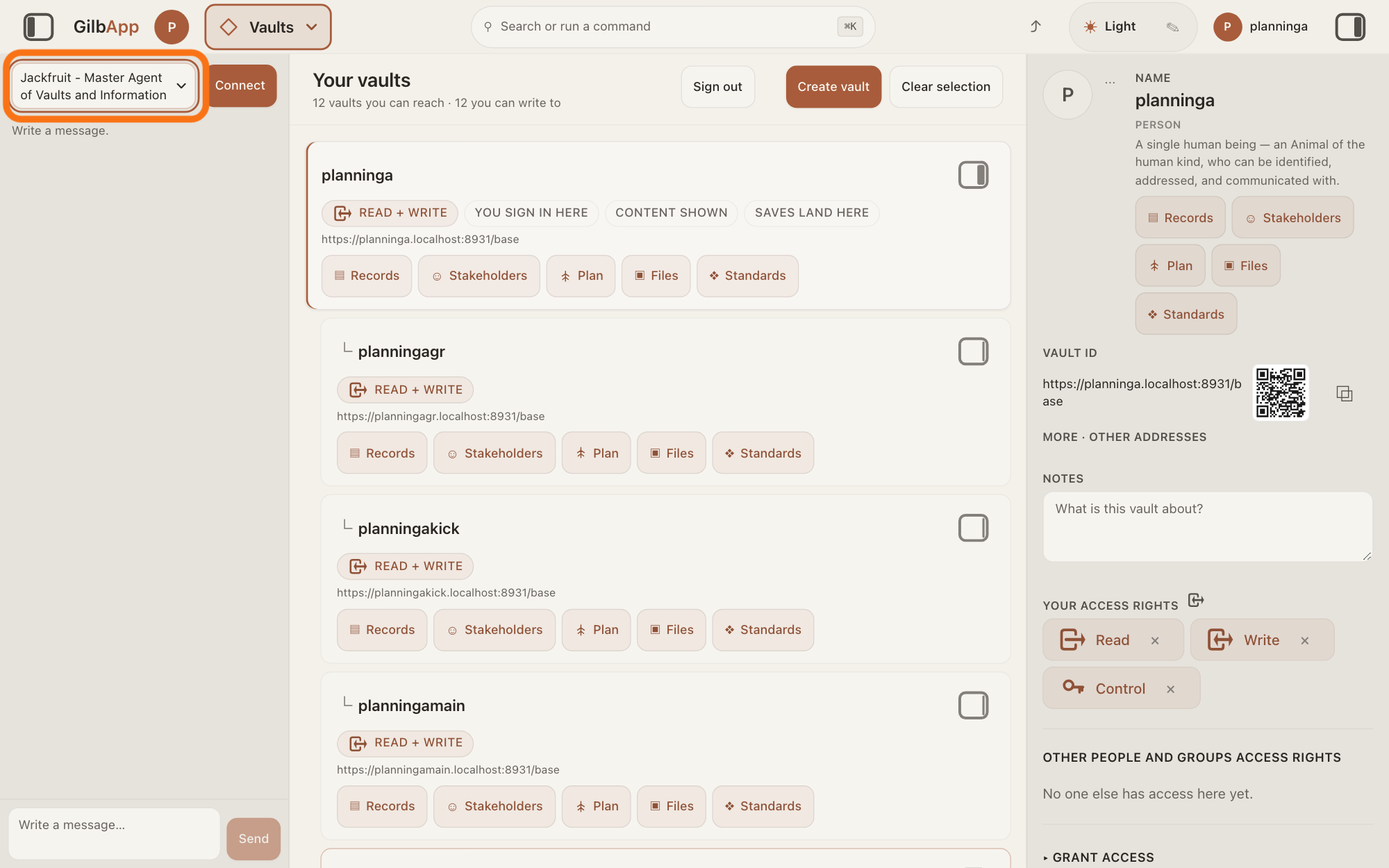
Choose Kai-Zen - Master Agent of Planning in the agent list.
Press the agent list at the top of the left pane and choose Kai-Zen - Master Agent of Planning. Each agent has its own chat, and the list shows which one you are in.
Show as text
The chat pane is open on the left. At its top is the outlined agent list, showing "Jackfruit - Master Agent of Vaults and Information". Open it and choose "Kai-Zen - Master Agent of Planning". Beside the list, the picture shows "Connect"; your screen shows your connected AI there.
More about this
A new chat starts on the first agent in the list, Jackfruit - Master Agent of Vaults and Information. The list comes from GilbPlatform each time the chat opens. GilbApp keeps your choice for this browser tab. While an agent is answering, the list is greyed out.
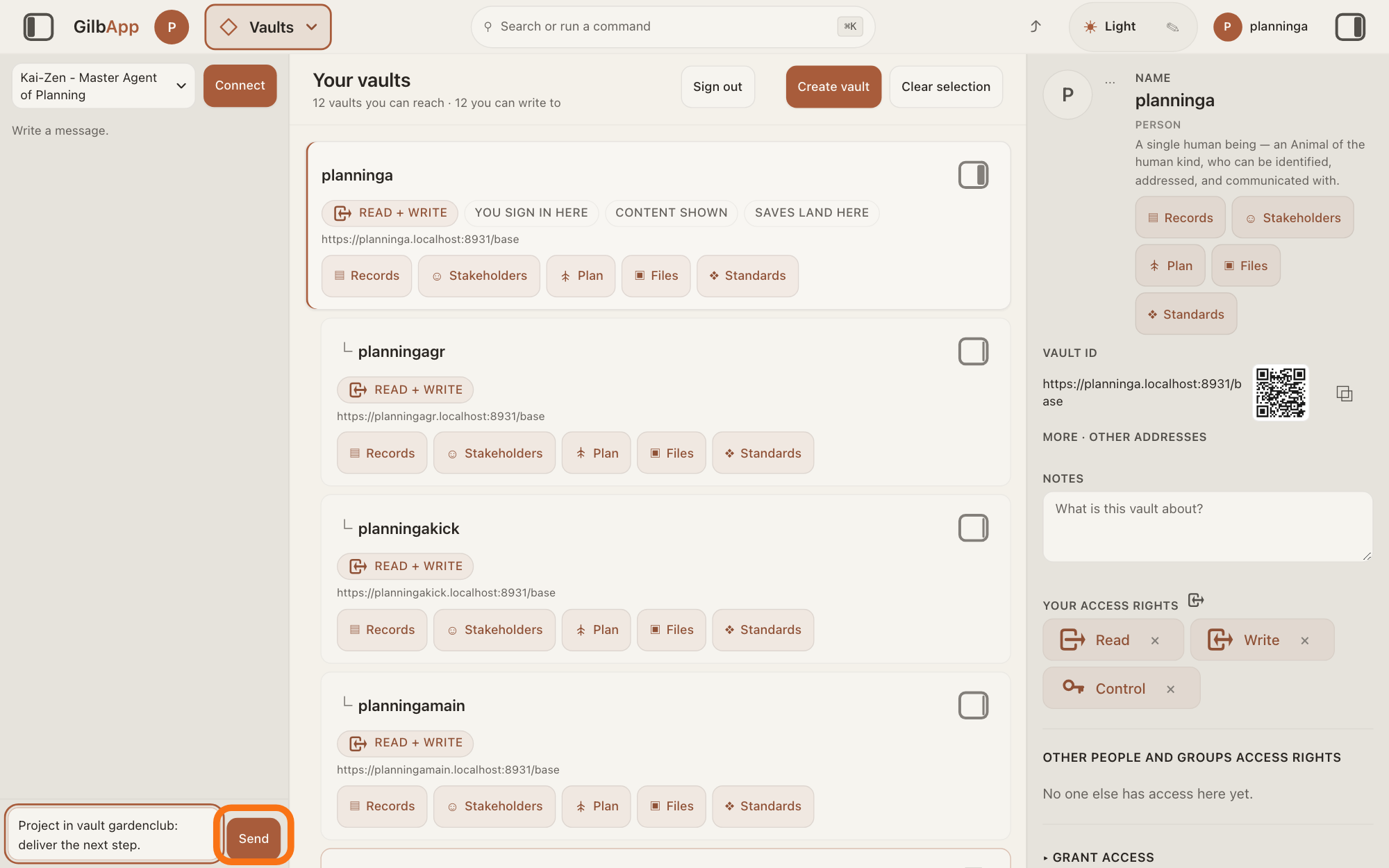
Type the request to deliver the next step in Write a message… and press Send.
In Write a message…, name the project's vault, type that Kai-Zen should deliver the next step, and press Send. A step, a Value Delivery Step, is the Solutions, or parts of them, delivered together in one short cycle to move some Values; Kai-Zen picks it first, writes it, then hands it to the builder.
Show as text
"Kai-Zen - Master Agent of Planning" is chosen at the top of the chat pane. In the box at the bottom, a request is typed: the project's vault and "deliver the next step." Press the outlined "Send" button to the right of the box.
More about this
A Solution is how a Function (what a system does) gets done, and a Value is a perceived benefit, measured as a number. The builder is Agent.Coder for an app on GilbPlatform, or the place the project names. Return also sends; Shift and Return starts a new line. While it works, the pane says The agent is writing…, then Ran and the name of each tool it uses, and Send reads Queue. Some acts it always stops and asks you about first, such as a release; the answer on answering Kai-Zen's questions shows how to reply. For example:
Project in vault gardenclub: deliver the next step.
Deeper
Also asked:
How do I build the next step after the first one? Ask Kai-Zen to deliver the next step. It picks and writes the step, hands it to the builder, has it checked and tested, puts it live, which it always asks you about first, and has its Values measured.
Kai-Zen picks a step for real just before the round of delivery that builds it. When it plans a new project, it ends the plan with suggested steps, each Planned, and a suggested Value Tracking Table with their Estimates. A Value Tracking Table (VTT) follows your Values and Development Resources across your steps: one column for each step, and in each cell the Estimate made before the step is built, then the Actual measured after it is delivered. An Estimate is how far the step is expected to move a Value; an Actual is how far it was measured to move it. A Development Resource is what the work uses up, such as money or time. Kai-Zen stores the suggested steps and table in the project's vault and shows them to you for one approval with the rest of the plan, unless you said in your own words that you need not approve it, then starts the first round with the first suggested step. That list is only a forecast: before each round Kai-Zen starts from it and changes it with what is true today and what it has learned. A request to deliver the next step runs the whole round: Kai-Zen picks and writes the step, hands it to the builder, has what was built checked and tested by agents other than the one that built it, puts it live, which it always stops and asks you about first, asks you to check it live, and has each Value the step aims at measured. After each round it shows you the measured Values and the next step. If the spend so far is over Budget, the most of a Development Resource you plan to use, or a Value is still below Tolerable where the plan expected it above, it stops and asks you whether to go on. Otherwise it goes on to the next step, unless you say to re-plan or that you are done.
Before every round Kai-Zen asks: what can we do now, with what is true today, that gives the most value for the least effort? That is the next step. Its steps first lift every Value above its Tolerable (the survival limit), and only then move the Values toward their Goal (the number you plan to reach). Of the steps that do this, it takes the smallest one with the most Value for its cost.
To weigh the steps, Kai-Zen cuts the Solutions already chosen into the smallest parts, or combinations of parts, that can be delivered next. For each one it asks: if this step is delivered next, how far does it move each Value from its Status (where it stands now) toward its Goal? It scores them in a Value Decision Table (VDT), a table that ranks options by how much they move the level's Values for their cost, and builds a set: it adds steps, best ratio first, until every Value is past Tolerable, then toward Goal, with the cost kept within Budget, and it names any Value the set cannot bring to Tolerable.
A step uses only what is true today: what is built, a builder that is ready, and a measured Status. If the builder is not ready, Kai-Zen says so, does the steps that need no builder first, and names the date by which the builder is needed. A step is as small as possible while still delivering value that can be measured. A step whose value is below its cost waits, unless it lifts a Value above Tolerable. A step names a tool, library or vendor as decided only if a VDT chose it; otherwise the step runs that VDT first, and a spike, a quick trial, only measures for it. The first step of a project sets up the base its kind needs, for an app on GilbPlatform the core app with its login from the code bank, a store of code to reuse, plus something of direct value if it can.
In the Kai-Zen method a step is also a round of learning. Kai-Zen compares each Actual with its Estimate before it picks the next step, and uses the difference to estimate better. It writes what worked, what did not, how to deliver the Values, and what the stakeholders actually want in the step's Learned line, and carries that into the next pick and into sharpening the plan. A stakeholder is a person, group or system that cares whether a Value goes up or down. The answer on tracking estimates and actuals shows where the Estimates and Actuals are kept.
In Kai-Zen's group of agents, Agent.ValueDeliveryStep's job is to pick and write each step and keep the project's VTT. An agent is your AI following one written procedure, its standing instructions, for one kind of work.
GilbApp has no control that picks a step. To pick one yourself, open a Value Decision Table of your plan: under it, Best set lists the Solutions to take first by Kai's rule: Tolerable first, then Goal, within Budget, with Budget used:, Still below Tolerable after the set:, Reached Goal: and, when any, Left out: and why; the answer on comparing Solutions in a VDT shows such a table. A step is not offered as a column there; it is a column of a Value Tracking Table only. Then write the step in the project's VTT, as the answer on writing a step shows. On the Plan screen, the button VTT in the row of kinds shows only Value Tracking Tables.
From GilbApp's chat Kai-Zen works only with the vault, unless you choose a code folder while Claude Code is connected; otherwise a project kept in a folder on your computer needs Claude Code in Terminal. The answer How do I let my AI build in a folder on my computer from GilbApp's chat? shows how. In Claude Code in Terminal you can ask the same way. Start Claude Code, type this line with your own short name, the one you gave your AI when you connected your computer, and press Return:
/mcp__gilb-<short name>__agent
Then say which project, ask Kai-Zen to deliver the next step, and press Return.
This answer is written for a computer screen.
Source: GilbApp af0f04ee838a4d55887d2ff1f72edd49a4ff7ca0 (https://gilb.com/app/version.json read 2026-11-09, buildTime 2026-11-09.522Z, dirty false); code read from the archive (no checkout). Steps 1 and 2: identical to (sectionMenuList.ts:330, LeftRegion.tsx:16-20, AgentSelector.tsx:15-16, :57-79, chatAgents.ts:67-75, as cited there). Step 3: AgentChat.tsx:1046 (Write a message…), :1063 (Send/Queue), :711 (Return sends unless Shift), :545, :551-553 and :888 (The agent is writing…, then Ran <tool>). No control in GilbApp picks a delivery step: the code at af0f04ee shows only the chat's Slipping in — the agent reads it at its next step, MyNet focus comments and the process-step order code. Best set: PlanTable.tsx:986-1011, :1926-1927 (not drawn for a Value Tracking Table: `deliveryOrder`), bestSet.ts:382-419 (BEST_SET_RULE (the rule: Tolerable first, then Goal, within Budget), Still below Tolerable after the set:, Reached Goal:). A step is not a column of a VDT: TableCard.tsx:416-417 (`columnTypes`: steps only when `isVtt`), PlanTable.tsx:1141-1142 (A step is a column of a Value Tracking Table only). VTT kind button: planFilterRows.ts:28. Standards (2026-11-09, all 200): Kai-Zen.ValueDeliveryStepRules (Question, TolerableFirst, Today, First, Small, Forecast, Learning, NoPrebaked, Defer), Kai-Zen.VDTRules (Set, StepPriority), Kai-Zen.VDT (Question for ValueDeliverySteps, Analyse), Kai-Zen.WriteStep (Pick with Kai-Zen.VDT, Estimate as the next column of the project's VTT), Kai-Zen.VTTRules (Rows, Columns, Estimate, Learn), Agent.ValueDeliveryStep (Role You pick and write each ValueDeliveryStep and keep the project's VTT), Kai-Zen.New (Steps each Planned, and the suggested VTT with their Estimates. It is a forecast; Show "stored in the project vault ... for one approval ... unless the requester waived it"; Cycle start the first delivery cycle with the first suggested step), Kai-Zen.Cycle (Step Start from the suggested VTT and change it with what is true today; Build "If the builder is not ready, say so, do the steps that need no builder first, and name the date"; Next "Show the requester the measured Values and the next step. If the spend so far is over Budget, or a Value is still below Tolerable where the plan expected it above, stop and ask"), Kai-Zen.Existing (Evaluate: deliver; Deliver -> Kai-Zen.Cycle; Read), Kai-Zen.AskRules.Stop (a release always stops). GilbVeda public read 2026-11-09: t:EvoStep (label Evo Step; package of change; small increments, typically a week in duration; on the Plan card "the Value Delivery Step of the Kai-Zen words: the combination that together gives complete movement towards some Values in a short cycle"), t:ValueTrackingTable, t:ValueDecisionTable. stakeholder and agent glosses (published); Kai-Zen.Cycle (Step, Build, Check "Have Agent.Scaling check what was built, and the builder's tester test it ... not the agent that built it", Live, Human, Measure, Next "Otherwise go back to Kai-Zen.Cycle.Step unless the requester says re-plan or done"), Kai-Zen.HumanCheck.Ask (Ask the requester to check it live), Kai-Zen.ValueDeliveryStepRules.Learning ("what works and what does not, how to deliver the Product, Stakeholder and Business Values, and what the stakeholders actually want"), Standards 2026-11-09. Code-folder exception: GilbApp 49b1ae53 (https://gilb.com/app/version.json, read 13 November 2026), src/components/agent/AgentChat.tsx:677-692 and :1084-1090 (Choose a code folder, Code in, Claude Code only); live answer How do I let my AI build in a folder on my computer from GilbApp's chat?
Checked against GilbApp d529620.