
← Finding things: search, sort and filter
How do I search across all my vaults?
Short answer
Press Search or run a command at the top, then search and select the record under its vault's name.
Before you start
You need to be signed in to GilbApp on a computer, with records in one or more vaults; the answer on creating another vault shows how to make more. The pictures show a made-up person on a test site; your screen shows your own name and address.
Words used here (3)
- record
- A record is one piece of data with its own address, such as a person, a place, a thing or a note.
- GilbApp
- GilbApp is the app, opened in a web browser at https://gilb.com/app, where you open, fill and share your vaults.
- GilbPlatform
- GilbPlatform is the service that keeps people's and organisations' data in vaults, each at its own web address.
Steps
Press Search or run a command.
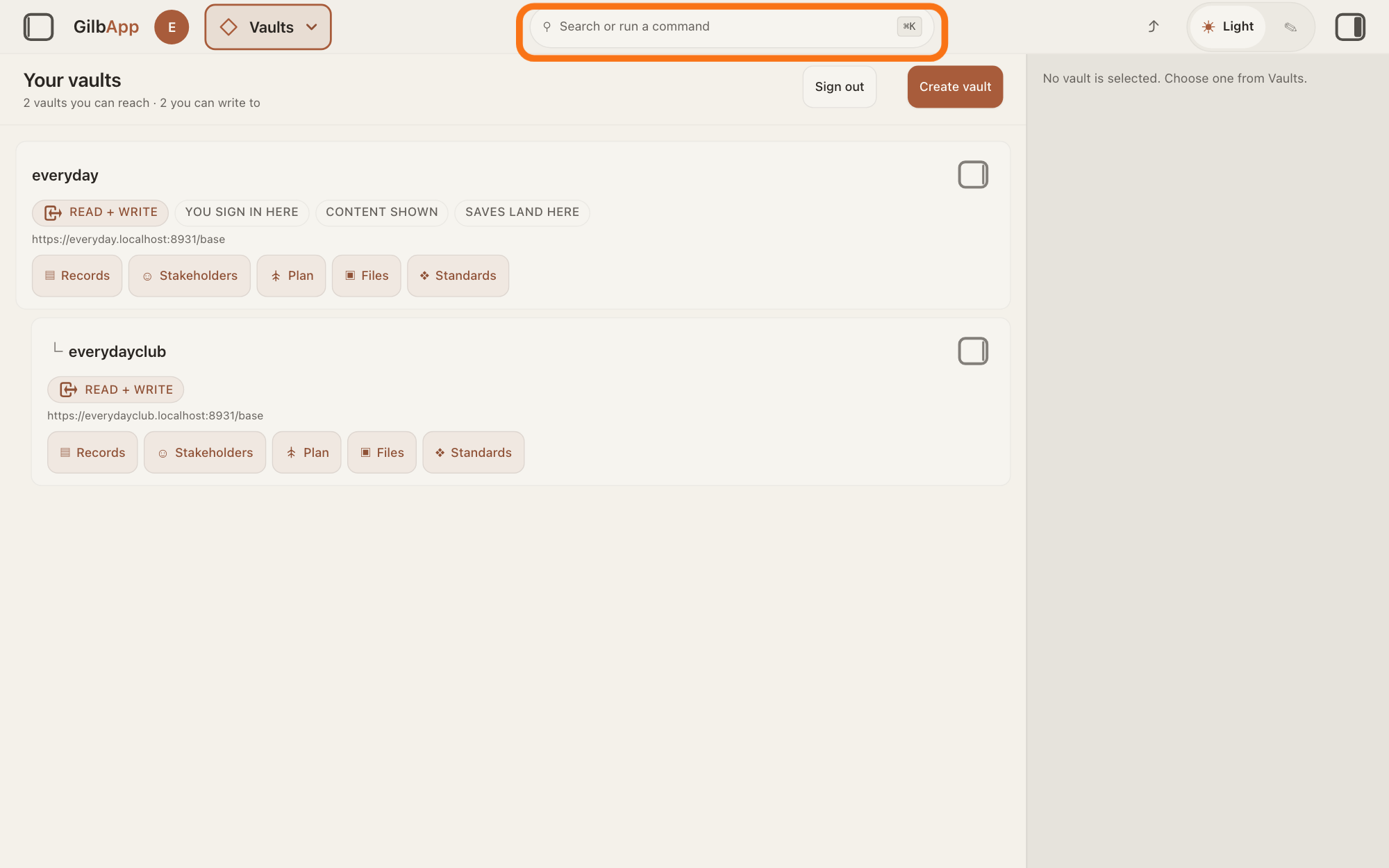
Press Search or run a command in the middle of the top bar, or press ⌘K. A box opens that shows Search all your vaults or run a command….
Show as text
The screen shows "Your vaults". In the middle of the top bar, the outlined bar reads "Search or run a command" with "⌘K" at its right. Click it.
More about this
The top bar is on every screen of GilbApp, so you can search from anywhere. Esc closes the box. On Windows the keys are Ctrl+K.
Search and select the record under its vault's name.
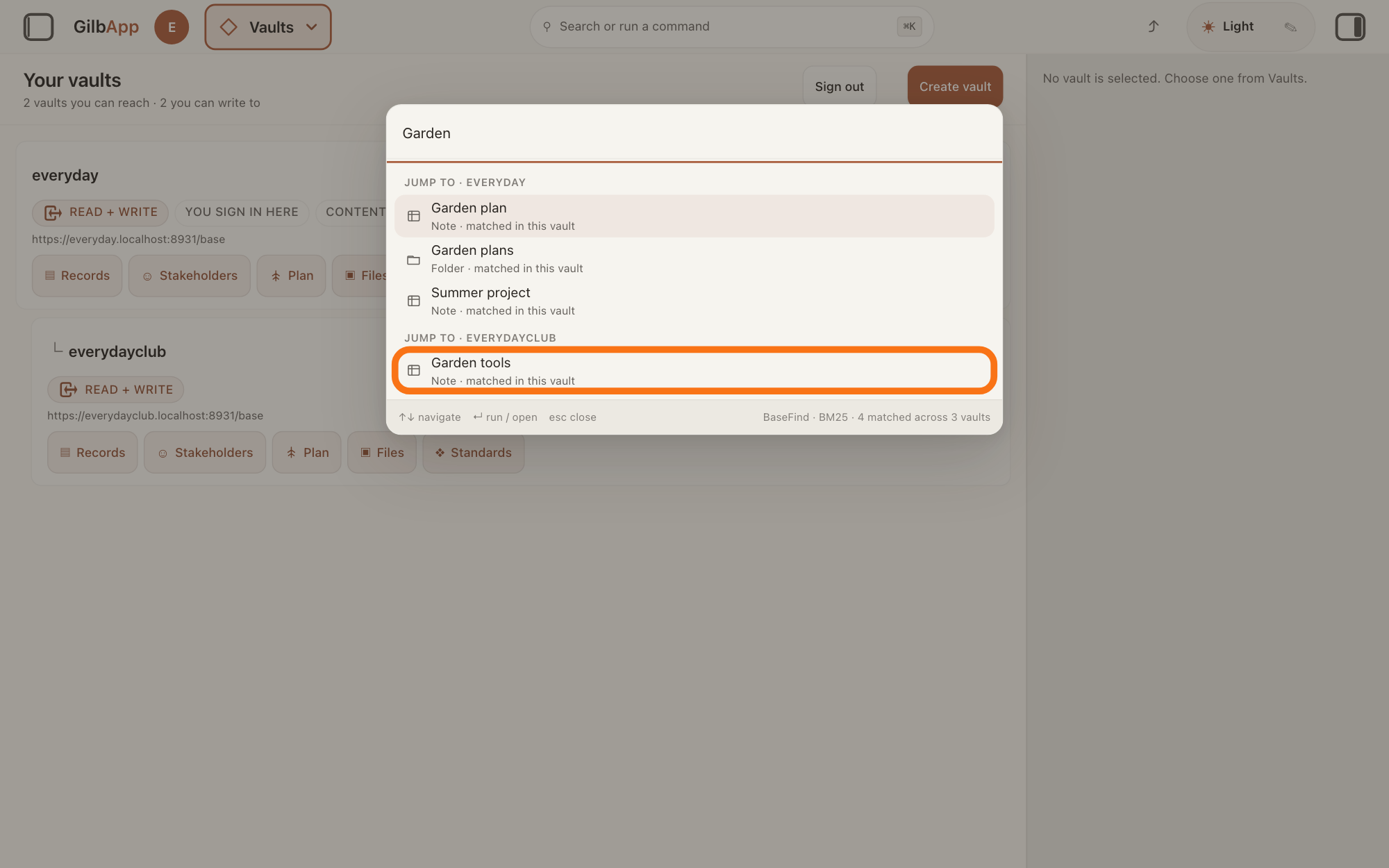
Type a whole word the record holds, such as a word of its name, and select the record with the mouse, or with the arrow keys and Return. GilbApp opens it.
Show as text
A search box is open with "Garden" typed. The matches are grouped under headings that start "JUMP TO ·" followed by a vault's name; each match says "matched in this vault". The outlined line, under the second heading, is Garden tools. The foot reads "BaseFind · BM25 · 4 matched across 3 vaults". Click the match you want.
More about this
GilbPlatform asks every vault you can read at once and lists its best 20 matches. The matches are grouped by vault under JUMP TO · and the vault's name, each with its type and matched in this vault under its name; files are matched only in the vault on screen. While it asks, the box says Asking your vaults…. If a vault does not answer, it says Showing results from so many of so many vaults, names the ones it couldn’t reach and adds These results may be incomplete. With nothing found it says Nothing in your vaults matches. Its foot starts BaseFind · BM25, the names of GilbPlatform's search and of the way it ranks matches, and says how many matched across how many vaults. The box also lists commands, colours and vaults that match what you typed, under COMMANDS, THEME and VAULTS; you do not need them here.
Deeper
Also asked:
What is the Search or run a command box, and what can I type in it? It is the box in the middle of the top bar; ⌘K opens it too. Type a whole word to find a record in all your vaults, or a few letters of a section, an act from Main menu, a colour such as Theme — Dark, or a vault, and select it.
Are there keyboard shortcuts in GilbApp? A few: ⌘K opens Search or run a command, ⌘S copies a link to the view on your screen, as Share this view does, and Esc closes the box that is open. On Windows use Ctrl instead of ⌘.
Can I search everything I have, not only the vault that is open? Yes: Search or run a command asks every vault you can read at once, your own and those others have given you access to, as the steps show.
Search says some of my vaults didn't answer. What does that mean? GilbApp could not reach those vaults just then, so their records are missing and the results may be incomplete. It does not mean they hold no match: try again.
How do I see the records of all my vaults in one list? Open Records, press Main menu and under IN RECORDS choose Records from all my vaults. The list then holds records from every vault you can read.
To list the records of all your vaults instead, open Records, press Main menu at the top left and under IN RECORDS choose Records from all my vaults (Not just the open one.). The list then holds records from every vault you can read, VAULT shows All held vaults and their number, and a line above the list says how many rows came from how many vaults, such as 24 rows from 3 of 3 vaults read; it names any vault whose rows are not all shown. The search box then searches all of them, though it still shows Search your vault…. The graph still shows only the open vault. Moving to another section ends this, and Records shows one vault again.
To search only some vaults, press VAULT above the list, tick those vaults, and press Done; the search box then asks only them. For people, Find a person under IN STAKEHOLDERS in the GO TO panel looks Among the stakeholders in all your vaults.
The search reaches every vault you can read, your own and those others have given you access to, and only what you may read in them. Records you have deleted are not found. A few letters of a word find no record here, only a whole word; the same box finds a section, command, colour or vault by a few letters, and a file of the open vault by a part of its name. Signed out, the box says Sign in to search your vaults. If GilbPlatform cannot be reached it says Couldn’t reach your vaults just now — that is not the same as having no matches.
This answer is written for a computer screen.
Source: GilbApp af0f04ee838a4d55887d2ff1f72edd49a4ff7ca0 (version.json read 2026-11-09, dirty false); unpack (no checkout). GilbPlatform 4d008a55367a6e7453920c463a8923df37de62e9 (id.gilb.com/version same read). Step 1: AppShell.tsx:1984-1991 (top-bar button), :2156 (CommandPalette mounted in the shell); CommandPalette.tsx:286-291 (placeholder Search all your vaults or run a command…), :89 (Esc). Step 2: CommandPalette.tsx:149 (useCrossVaultJump), :269 (select -> openRecord), :298 (groups Commands, Theme, Vaults), :330-350 (Jump to · <vault>, why line), :352-358 (partial notice), :365-376 (status sentences), :404-405 (foot); searchHooks.ts:723-800 (fanoutSearch over every reachable vault, why <type> · matched in this vault, files only of the vault on screen); fanout.ts:202-215; Base 4d008a55 src/routes/fanout.ts:192-196 (vaults derived for the caller, narrowed by ?vaults=), :228-242 (coverage and x-base-fanout-complete), src/routes/search.ts:55-63 (whole-word text match); src/read/local-projection.ts:242-244 and src/read/lifecycle.ts:60 (fan-out Find is live only). Deeper 1: gilbAppMenuRows.ts:135-136 (Records from all my vaults, Not just the open one.); AppShell.tsx:416-421 (wsa=1), :258-274 (a section move ends it); workingSetLoadVaults.ts:44-53 (held = readable), :179-186; WorkingSetFacetBar.tsx:218-235 (All held vaults (N)); RecordGrid.tsx:1959-1995 (MultiVaultCoverageLine N rows from X of Y vaults read, not-all-loaded reasons), :1196-1206 (placeholder stays Search your vault… with wsa), searchHooks.ts:381-395 (no vault chosen -> fan-out); useListedVaultIds.ts (Graph draws the open vault). Deeper 2: WorkingSetFacetBar.tsx:301-360 (vault ticks), :204-210 (Done); searchHooks.ts:381-395 (one vault -> that vault; several -> fan-out to those); gilbAppMenuRows.ts:150-153. Step 2 fixes 10i: searchHooks.ts:735 (fanoutSearch, no `match` = whole-token), Base src/routes/search.ts:66; fanout.ts:272 and Base src/read/local-projection.ts:558 (best 20). Deeper 3: CommandPalette.tsx:56-65 (commands, colours, vaults by substring), searchHooks.ts:613-618 (files by part of the name); Capability.GilbPlatform.FindAcrossVaults (every vault you can read; anonymous derives none); CommandPalette.tsx:365-371. Capability rows: CapabilityTags-GilbApp row 53 (ShowRecordsFromAllVaults), CapabilityTags-GilbPlatform row 53 (FindAcrossVaults); evidence Capability-GilbApp-GilbSupport.md:86, Capability-GilbPlatform-GilbSupport.md:118. GilbApp 49467c2b (https://gilb.com/app/version.json, read 14 November 2026): CommandPalette.tsx:179-203 (the box lists Main menu sections and acts, Theme — Light/Dark/Colourblind, vaults); AppShell.tsx:1602-1611 (⌘K / Ctrl-K); ShareButton.tsx:41-49 (⌘S / Ctrl-S runs Share this view), AppShell.tsx:2013.
Checked against GilbApp d529620.