
How do I send another message while the agent is still answering?
Short answer
While the agent writes, type your message in Write a message… and press Queue; it goes out when the agent is done.
Before you start
You need to be signed in to GilbApp on a computer, with the chat open and an agent still writing its answer. The pictures show a made-up person on a test site; your screen shows your own name and address. They show the chat without Claude Code connected.
Words used here (2)
Steps
Type your message in Write a message… while the agent writes.
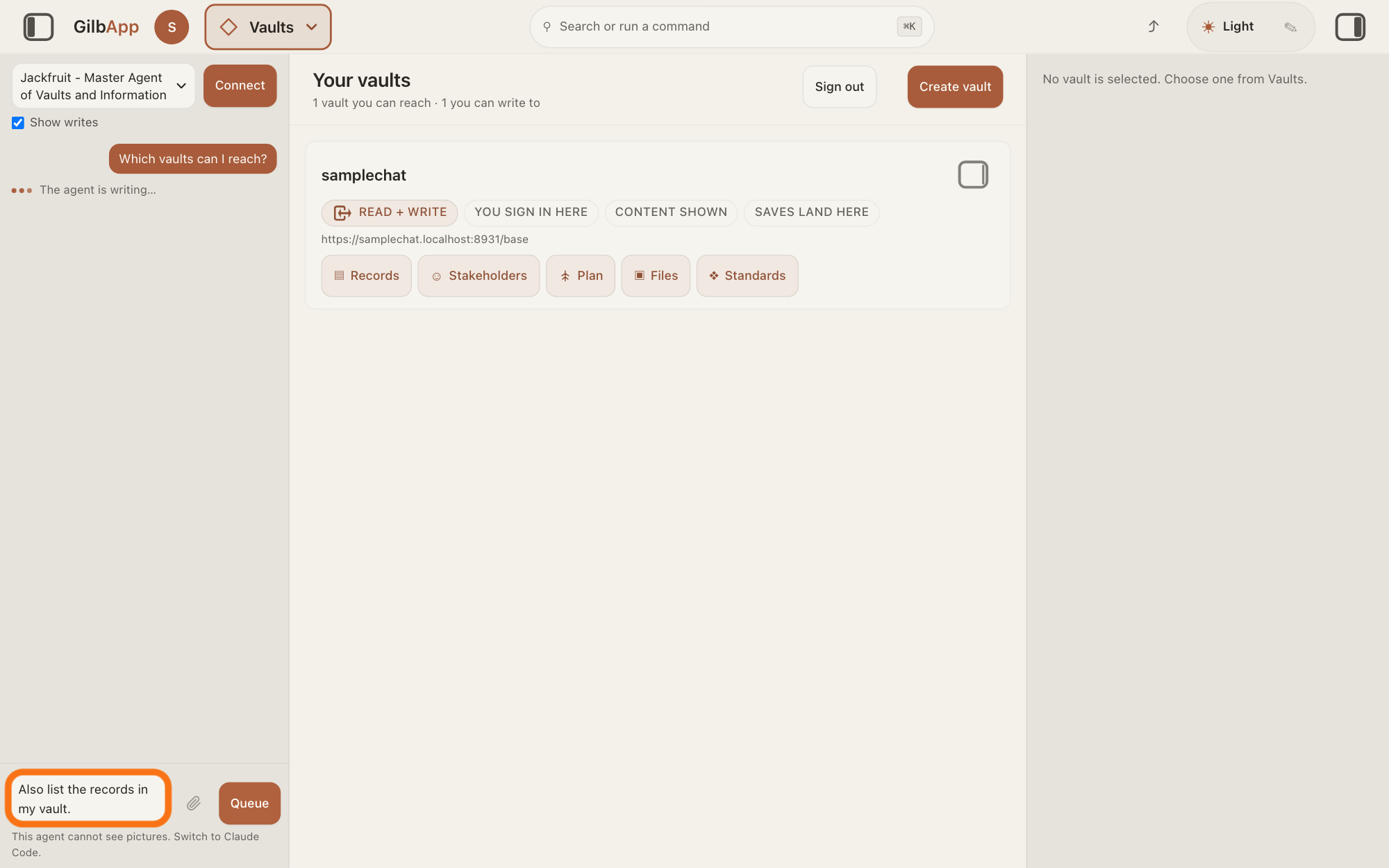
Click the box Write a message… at the bottom of the chat and type your message while the pane still shows The agent is writing…, or Ran and the name of a tool.
Show as text
On the left, the chat shows your first message and, under it, "The agent is writing…". At the bottom of the chat, the box outlined in orange holds the new message you typed. The button to its right reads "Queue".
More about this
The box stays open while the agent works, so you can type at any time. With Claude Code and Code in switched on, a line that starts Working and the time shows instead. Return sends the message; Shift+Return starts a new line. The answer on chatting with an agent in GilbApp shows how to open the chat and choose an agent.
Press Queue.
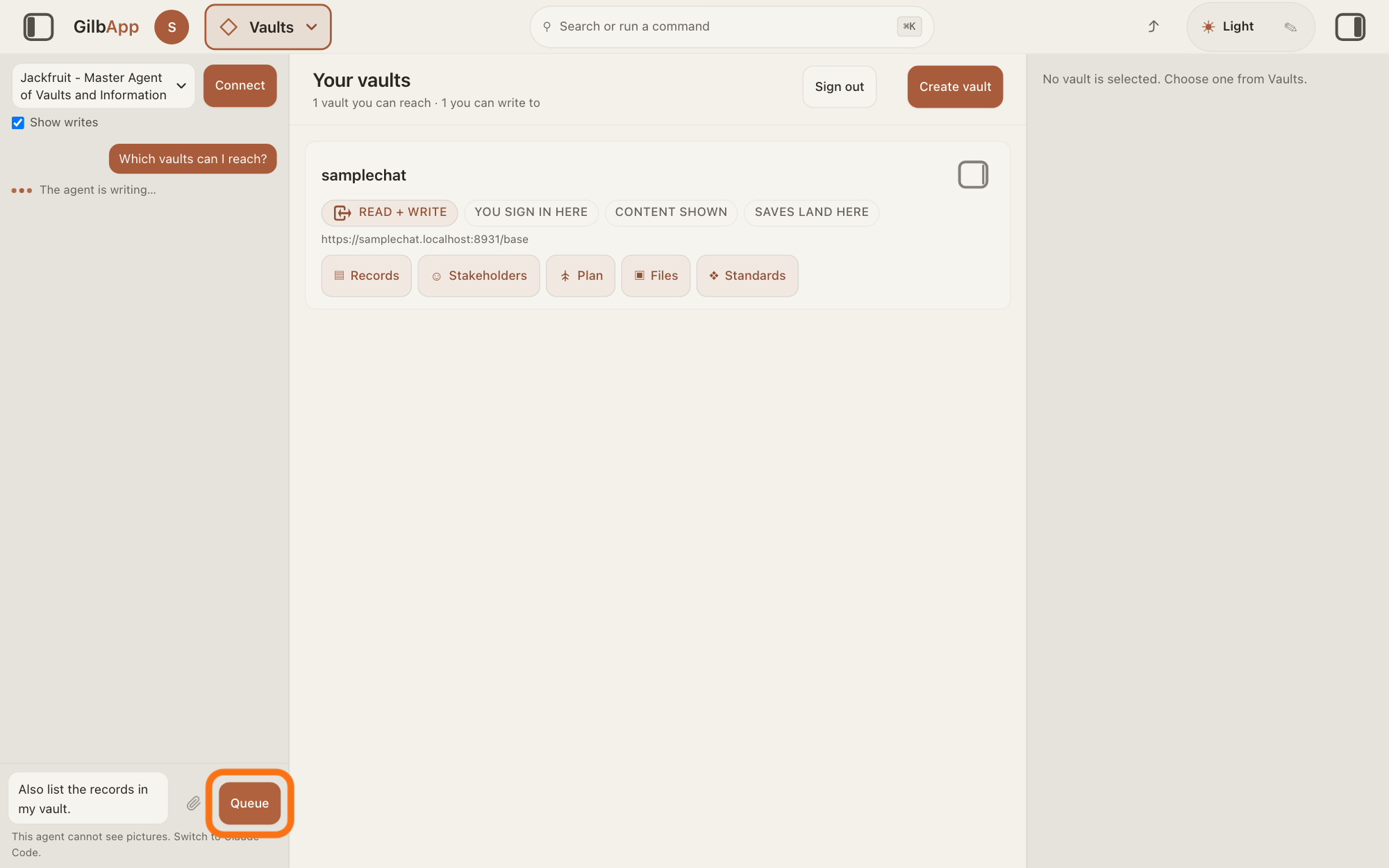
Press Queue, to the right of the box: it is the Send button, which reads Queue while the agent writes. Your message moves above the box, under Waiting to send (1) — goes out when the agent is done.
Show as text
Your new message is typed in the box at the bottom left of the screen. Press the button "Queue" to the right of the box, outlined in orange. It is the "Send" button, which reads "Queue" while the agent writes.
More about this
The number counts the messages waiting; each one you add joins the list, in the order you sent them. Return in the box does the same as Queue. When the agent is done, GilbApp sends every waiting message by itself, together as one message with a blank line between them, and it shows on the right as your message. You need to press nothing more. A message with pictures goes out on its own.
To hand it to the agent now, press Slip in now.
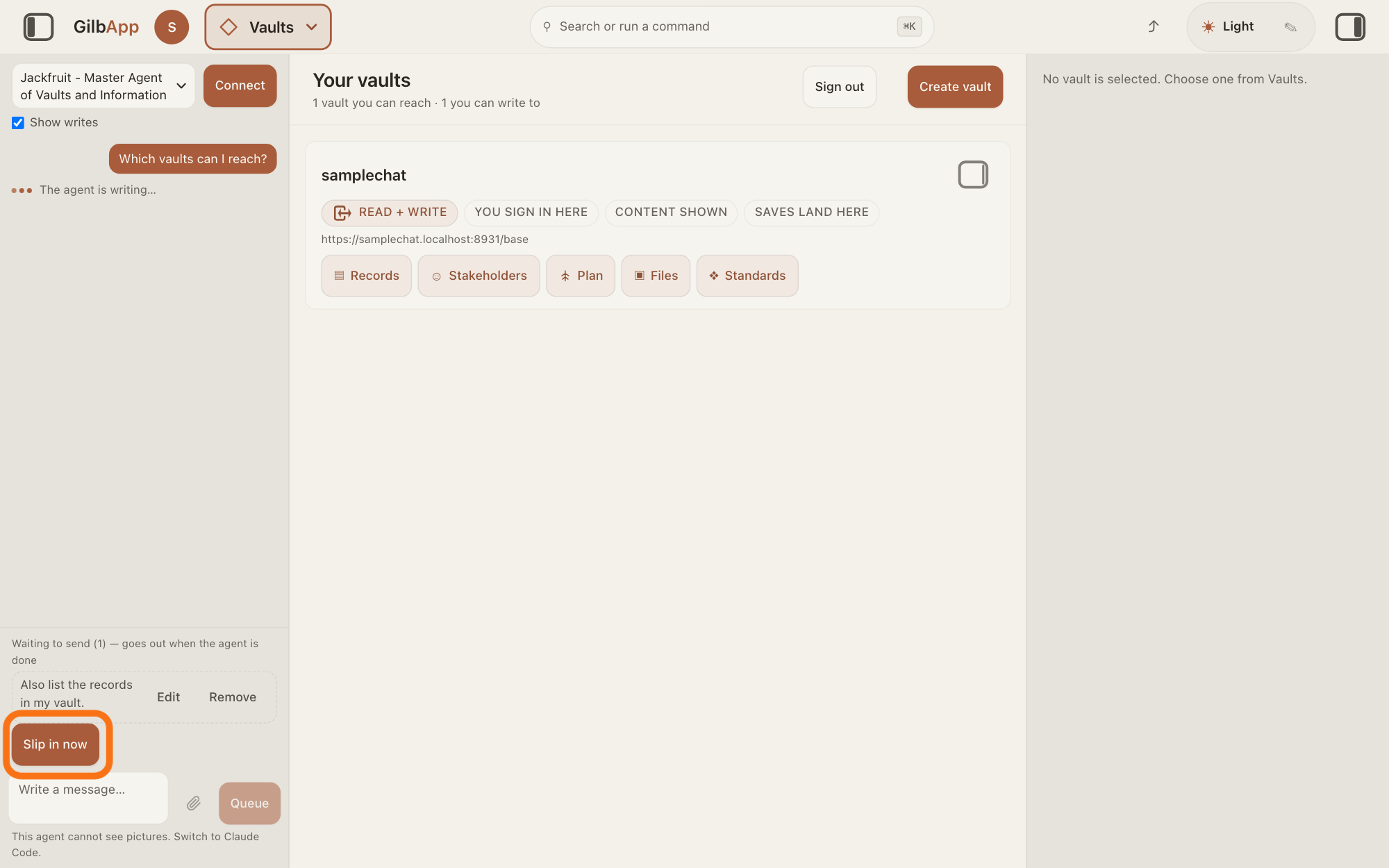
Press Slip in now under the waiting messages. Each one then shows Slipping in — the agent reads it at its next step.
Show as text
Above the box at the bottom of the chat, a small line says "Waiting to send (1) — goes out when the agent is done", with your message under it and "Edit" and "Remove" at its right. Under the message, the button "Slip in now" is outlined in orange.
More about this
Once the agent has taken a message, it leaves the list and shows on the right as your message. One press hands over up to 10 waiting messages; a message with pictures is not slipped in. If the agent cannot take it, a line says The turn ended first, so it will be sent next. or It could not be slipped in, so it will be sent after the turn., and the message waits as before. Slip in now shows only while the agent writes and a message still waits.
To change a waiting message, press Edit beside it.
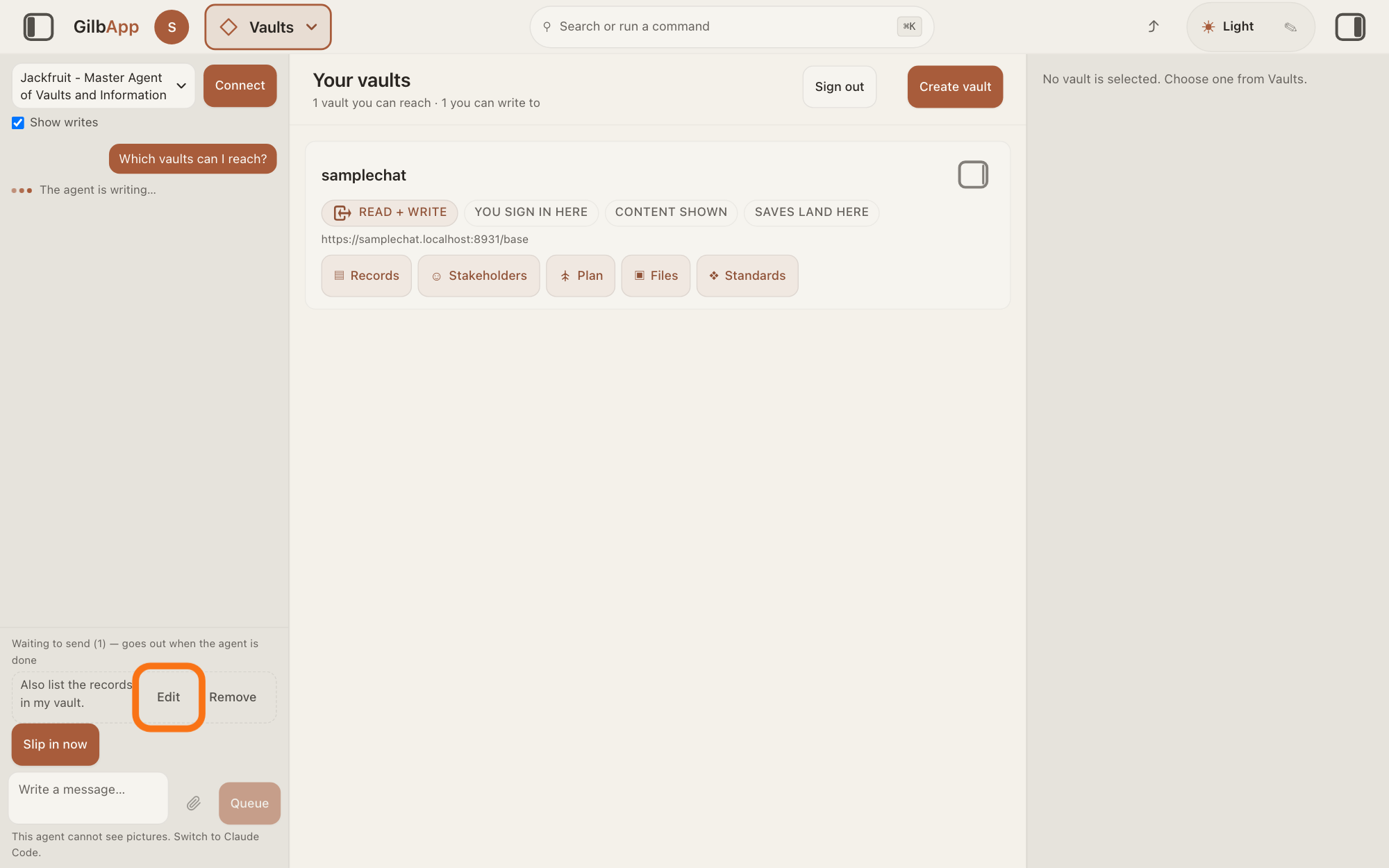
Press Edit at the right of the waiting message. It leaves the list and goes back into the box Write a message…, where you can change it and press Queue again.
Show as text
Above the box, under "Waiting to send (1) — goes out when the agent is done", your waiting message shows in a dashed frame. At its right, "Edit" is outlined in orange; "Remove" is beside it.
More about this
If the box already holds text, the message is added after it, below a blank line. If the agent is done by then, the button reads Send again. A message that shows Slipping in has no Edit or Remove: it has been handed to the agent.
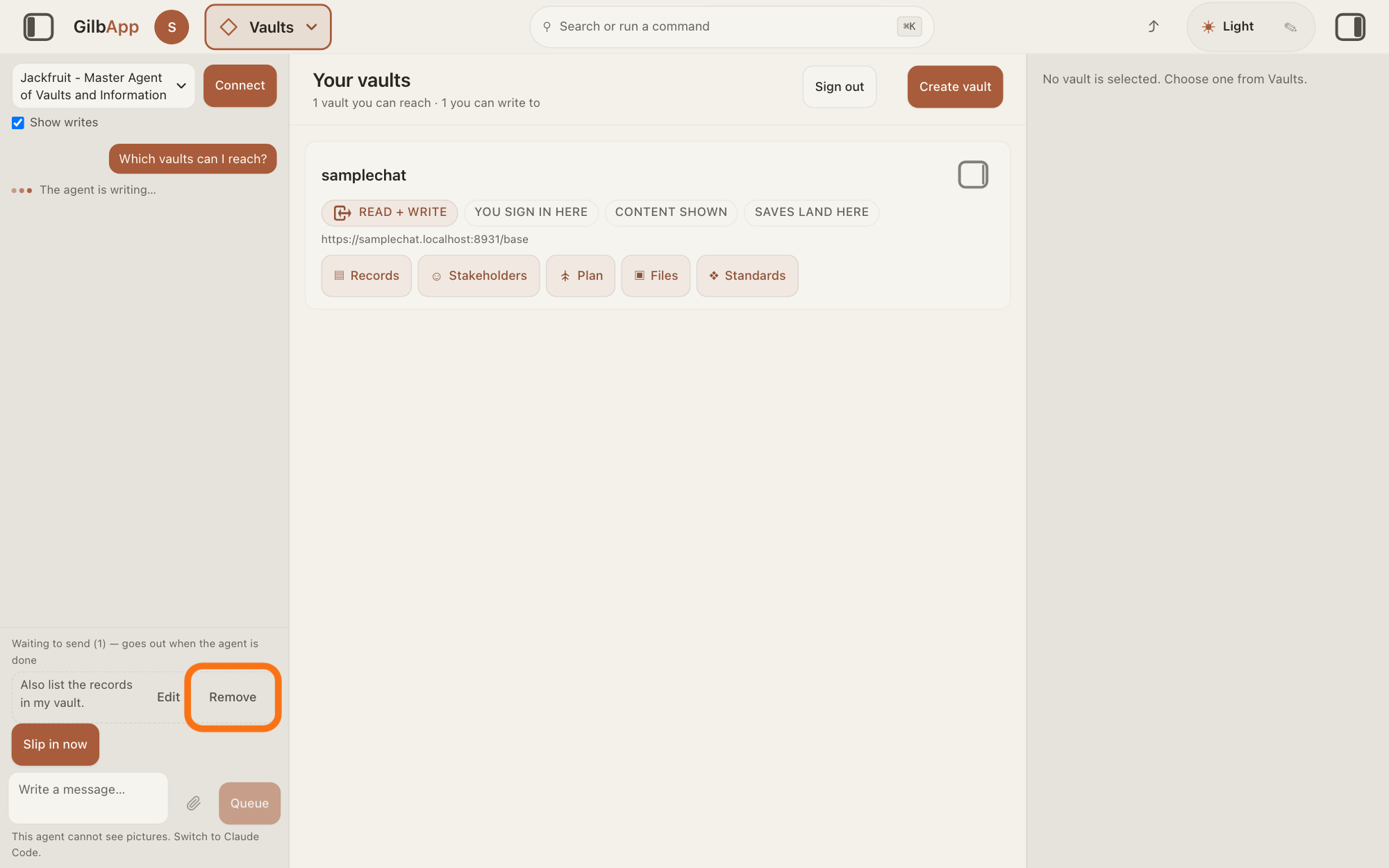
To drop a waiting message, press Remove beside it.
Press Remove at the right of the waiting message. It leaves the list and is not sent.
Show as text
Above the box, your waiting message shows in a dashed frame under "Waiting to send (1) — goes out when the agent is done". At its far right, "Remove" is outlined in orange; "Edit" is just left of it.
More about this
It asks nothing first; to send the message after all, type it again. When the last waiting message goes, the Waiting to send line goes too.
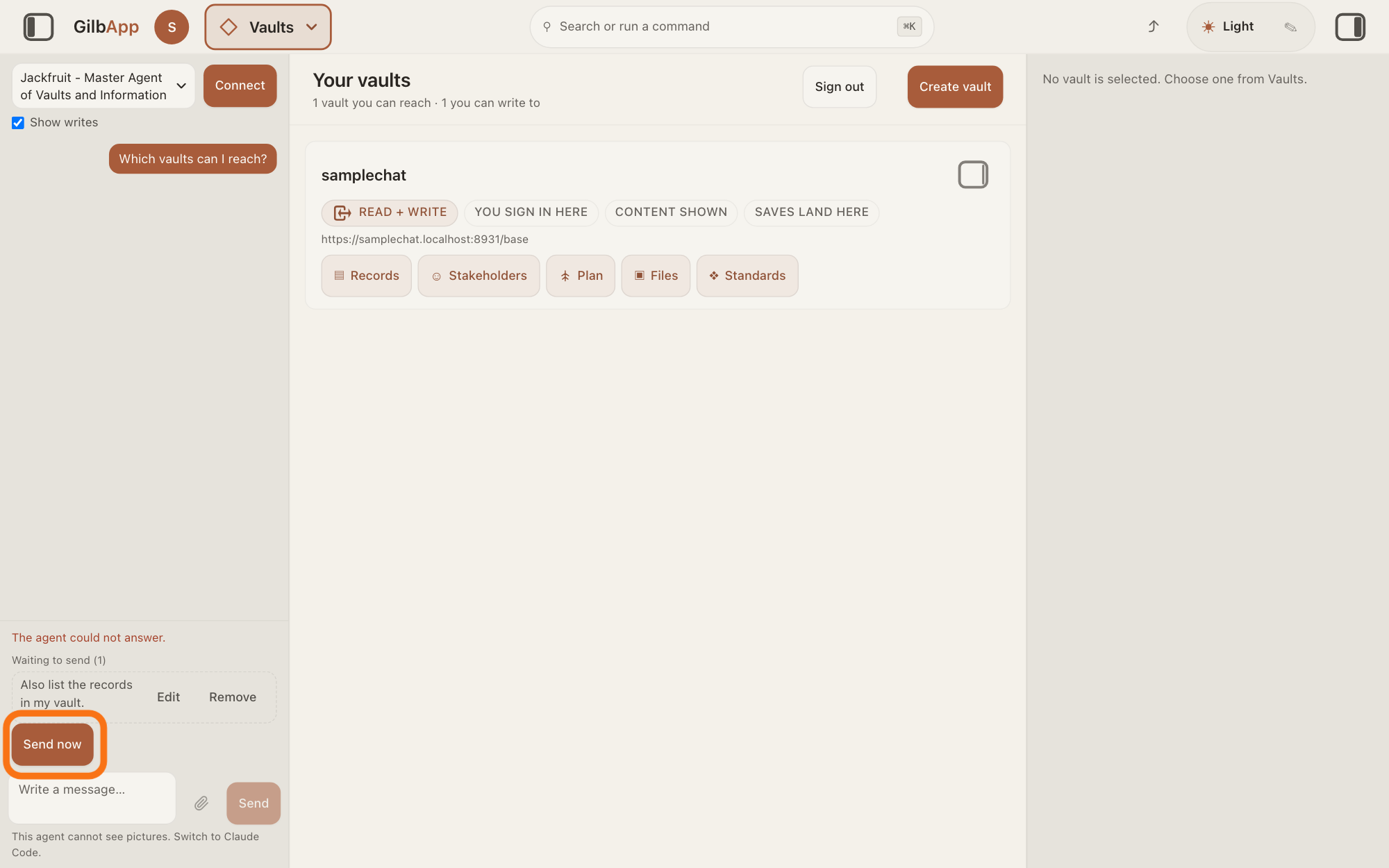
If a message still waits after the agent stopped, press Send now.
Press Send now under the waiting messages. GilbApp sends all of them at once, as one message.
Show as text
The pane no longer shows "The agent is writing…", and a line above the box says what went wrong. Under "Waiting to send (1)", your message still waits. Press "Send now" under it, outlined in orange.
More about this
This happens when the agent stopped without an answer and a line above the box says what went wrong, such as The agent could not answer., or, with Claude Code connected, a line that starts Claude Code:: the waiting messages are then not sent by themselves. The line over the list then reads Waiting to send and the number, without — goes out when the agent is done. Edit and Remove still work.
Deeper
Also asked:
Can I send the agent a picture or a file in the chat? Pictures only, with Claude Code connected: press the paperclip beside Write a message… (PNG, JPEG, GIF or WebP); no other files. Other agents show This agent cannot see pictures. Switch to Claude Code.
My message says Waiting to send. What does that mean? You sent it while the agent was still answering, so it waits above the box. It goes out by itself when the agent is done; Slip in now hands it over sooner. If the agent stopped without an answer, it does not go out: press Send now.
Waiting messages are kept only while the page is open: they are not saved, so reloading the page or closing the tab drops them. Choosing another agent, which you can do once the agent is done, drops them too.
With Claude Code and Code in switched on, Stop under the Working line stops the answer that is running. Otherwise no button stops an answer already running; Stop shows only while the chat goes on by itself, and then it stops the chat after the turn that is running.
With Claude Code, a long job can run out of tool rounds, the steps it may take in one turn, and the chat then goes on by itself. If messages are waiting at that moment, they go out instead, and the chat does not go on by itself.
This answer is written for a computer screen.
Source: GilbApp d5296208bbffa2ab70076e6194f5537c4be1ddf7 (https://gilb.com/app/version.json, read 2026-11-15). src/components/agent/AgentChat.tsx:1721 (Return sends unless Shift), :2333 (Queue/Send), :2074 (The agent is writing…), :2072-2076 and src/components/agent/AgentWorkingIndicator.tsx:60-80 (a code turn shows Working and Stop), src/components/agent/turnActivity.ts:75 (Working · and the time), AgentChat.tsx:2151-2152 (Waiting to send (N) — goes out when the agent is done / Waiting to send (N)), :2182 (Slipping in — the agent reads it at its next step), :2193-2231 (Edit, Remove), :659-678 and :2240 (Slip in now, up to 10 per press, a message with pictures is not slipped in), :383-384 (the two notes when a message cannot be slipped in), :2258 (Send now), :2104-2120 (Stop while the chat goes on by itself), :2144 (the red line), :1393 (The agent could not answer.); src/lib/base/chatQueue.ts:41 (a message with pictures goes alone), :53-57 (others joined with a blank line); AgentChat.tsx:2288 (Write a message…), :749-751 and :2322-2323 (the paperclip, Claude Code only); src/lib/base/chatPictures.ts:12 (PNG, JPEG, GIF, WebP), :102 (This agent cannot see pictures. Switch to Claude Code.). Claude Code bridge 0.3.6 (https://gilb.com/app/claude-code-bridge.mjs, read 15 November 2026): a failed turn's error starts Claude Code:. Live page: How do I chat with an agent in GilbApp?
Checked against GilbApp d529620.