
How do I write a private note on a card?
Short answer
In Stakeholders, search and select the person, then type your note in My Note at the top of the card; only you can read it.
Before you start
You need to be signed in to GilbApp on a computer, with the person's card in your own vault; the answer on adding a person as a stakeholder shows how to make one. The pictures show a made-up person on a test site; your screen shows your own name and address.
Words used here (4)
- My Note
- My Note is your own private note about a person or an organisation on your card of them; only you can read it.
- GilbApp
- GilbApp is the app, opened in a web browser at https://gilb.com/app, where you open, fill and share your vaults.
- record
- A record is one piece of data with its own address, such as a person, a place, a thing or a note.
- Where / How we met
- Where / How we met is where and how you first met a person, in your own words, kept for you alone.
Steps
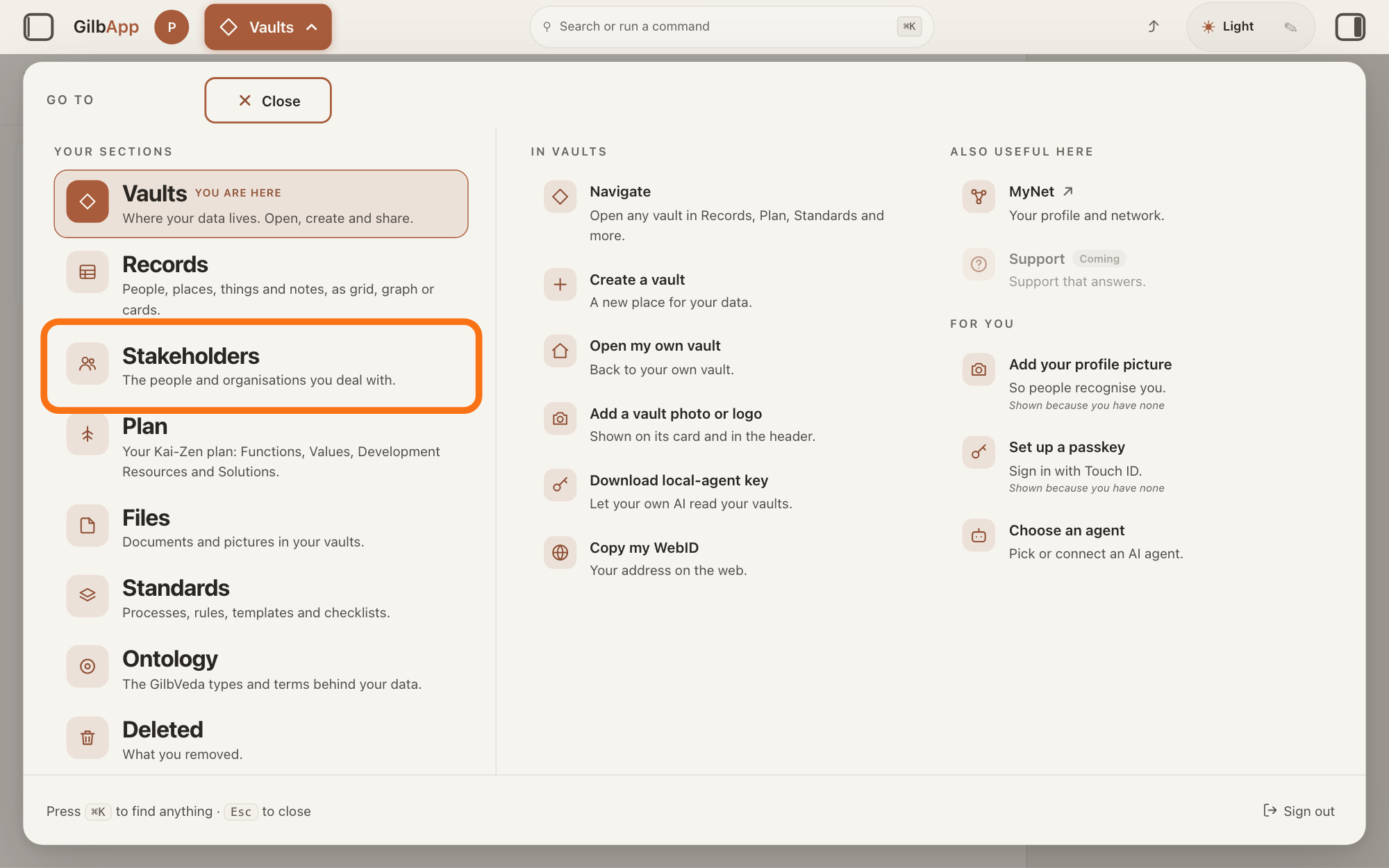
Press Main menu at the top left and choose Stakeholders.
Press Main menu, next to your profile picture at the top left, and under YOUR SECTIONS choose Stakeholders. A stakeholder is a person, group or system that cares whether a Value goes up or down.
Show as text
At the top left, press "Main menu" (it shows the name of the section you are in). In the panel headed "GO TO", look under "YOUR SECTIONS" and press "Stakeholders", "The people and organisations you deal with.", outlined in orange.
More about this
The button shows the name of the section you are in, such as Vaults. A panel headed GO TO opens; Stakeholders reads The people and organisations you deal with. You can also press the Stakeholders button on the card of a vault (the place where a person or a group keeps their records) in Vaults. The screen lists your stakeholders and has the views Grid, Graph, Both and Card. The list also holds organisations, systems and groups; the TYPE column says which are Person.
Search and select the person in the list.
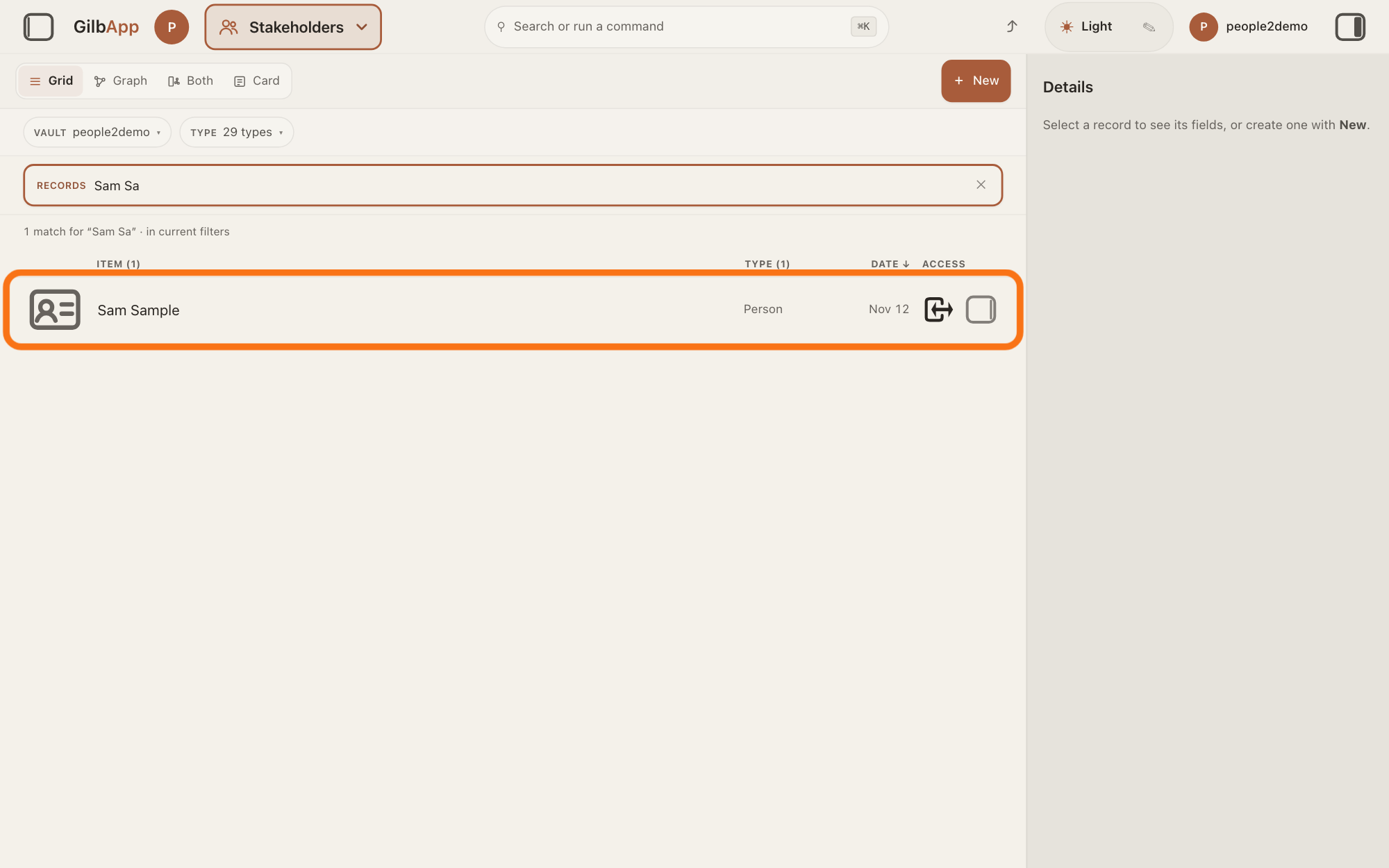
Type a word of the person's name in the search box marked RECORDS above the list, and click the person in the list. The person's card opens in the middle of the screen, and the right pane, headed Actions, holds what you can do with it.
Show as text
In the box marked "RECORDS" above the list, type the person's name or its first letters until the line under the box reads "1 match" and only their row is left. Press that row, outlined in orange, to open their card.
More about this
The box shows Search in current filters…, because the list holds only stakeholders; the answer on avoiding adding the same person twice shows more about the search. If you can only read the vault that holds the card, nothing on it can be changed. You do not need the right pane here.
Type your note in My Note.
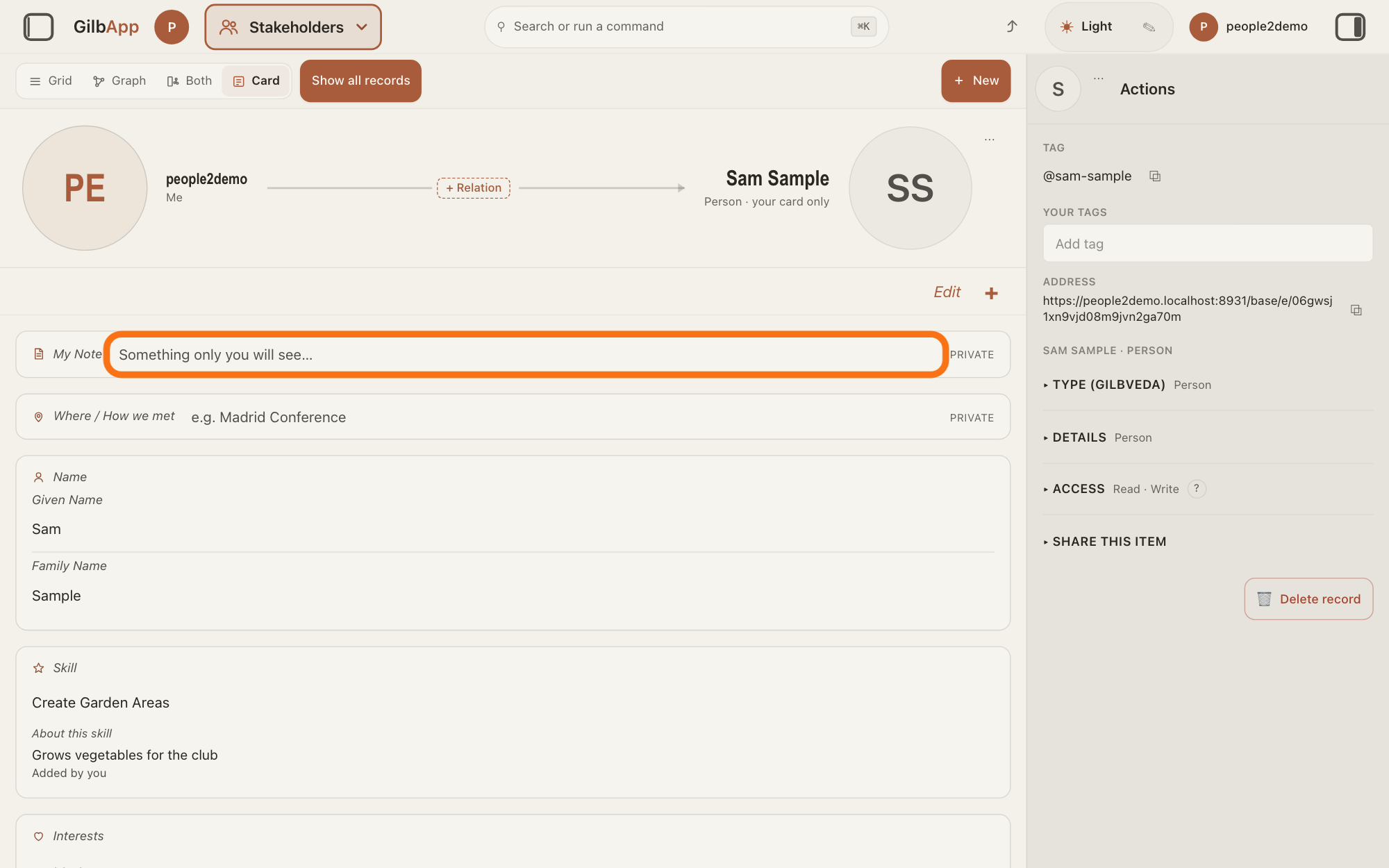
At the top of the person's card, click the box beside My Note, which shows Something only you will see…, and type your note. GilbApp saves it by itself while you type and when you leave the box.
Show as text
At the top of the card, the one-line groups "My Note" and "Where / How we met" are each marked "PRIVATE". Type your note in the box beside "My Note", outlined in orange.
More about this
Under the box it says Not saved yet…, then Saving…, then Saved; if a save fails, it says Could not save your note and why. PRIVATE beside the title means the note is kept for you alone; Deeper says who can read it. The box grows as you type, and Return starts a new line. Once the note has text, it shows as text at the top of the card: click it to change it, which turns on edit mode (Edit reads Done). To empty the note, delete its text. If the note cannot be read, the card says Could not load your note. with Try again.
If you want, type where you met in Where / How we met.
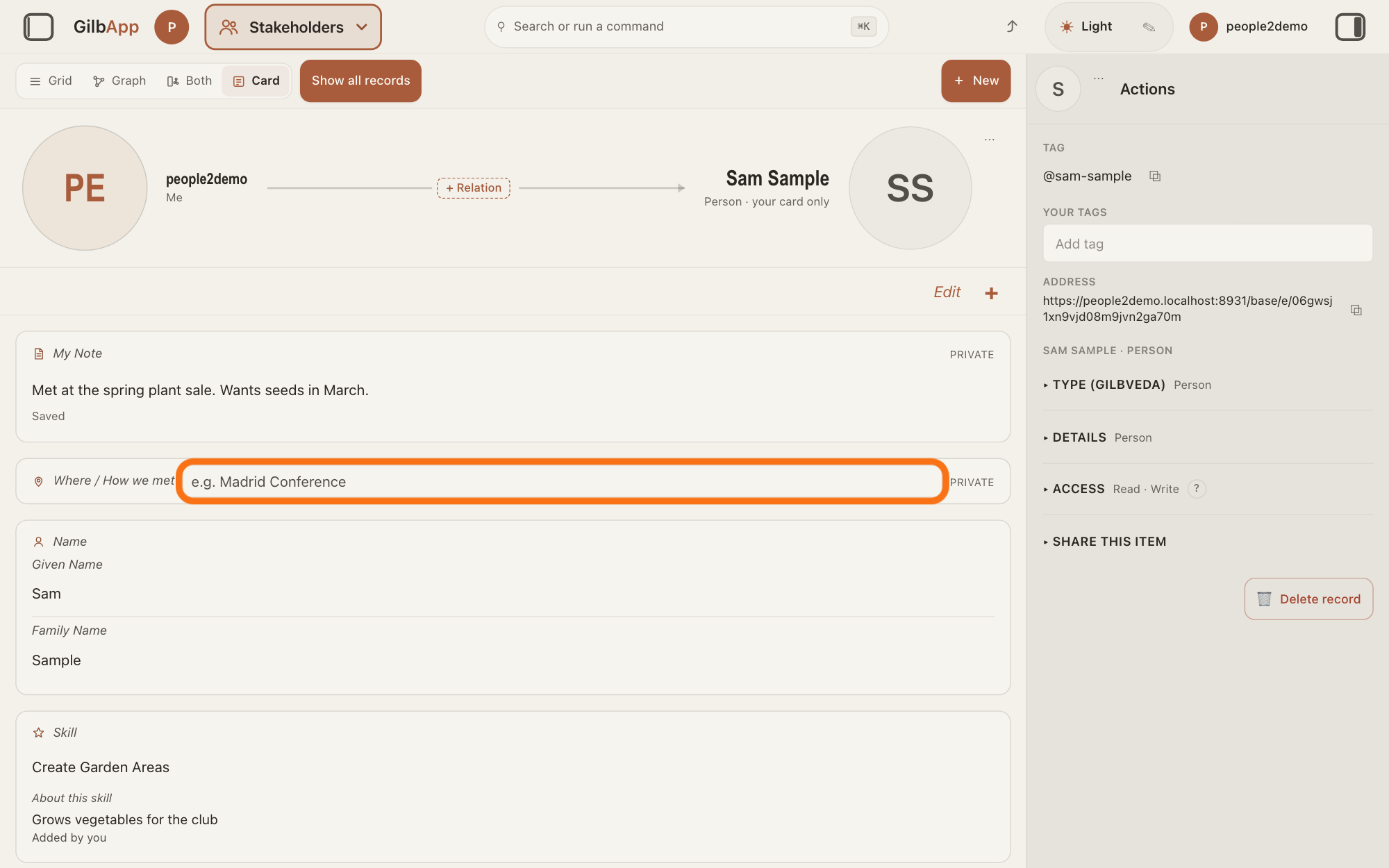
Under My Note, click the box beside Where / How we met, which shows e.g. Madrid Conference, and type where or how you met the person. It saves by itself, as My Note does.
Show as text
When you leave the box, the note shows under "My Note" with "Saved". If you want, type where you met in the box beside "Where / How we met", outlined in orange; it reads "e.g. Madrid Conference" until you do.
More about this
It is kept for you alone in the same way, and it carries the same PRIVATE. If a save fails, it says Could not save where you met and why. When you have finished, click outside the card or press Done if it shows; what you typed is already saved.
Deeper
Also asked:
Can I write a note or a comment on a record? On a person's card in your own vault, yes: My Note, which only you can read. For any other record, make a record of the type Note and link it to that record; the answers on creating a record and on linking two records show how.
GilbPlatform lets only you read My Note and Where / How we met, when you are signed in: not the person the card is about, not the people you share your vault with, and not an AI you gave access to it. They are kept in your own vault, read back only for you, and never shown in a search or on anyone's card.
My Note and Where / How we met are on a card kept in your own vault only; a card in a vault someone shared with you, and your own card, have none. If the card is connected to the person's own online card, the card a person keeps about themselves on GilbPlatform, your note is kept under that person, not under the card, and still only you can read it, so every card of yours connected to them shows the same note. A note written in another app shows under the box, followed by — from another app. Each can hold up to 8,000 characters.
This answer is written for a computer screen.
Source: GilbApp af0f04ee838a4d55887d2ff1f72edd49a4ff7ca0 (https://gilb.com/app/version.json, built 2026-11-09, read 2026-11-10). Steps 1-2:. records/HolderNoteGroup.tsx:1-15 (My Note and Where / How we met, private, through GET/PUT /base/connect/annotations; the contact cannot read what is written about them), :39-58 (titles, placeholders, error words), :96-160 (always drawn on a card you can write; one-line box typed at once; grows), :160-240 (text shown, click enters edit mode, Loading…, Try again, '— from another app'); mynet/PrivateMarker.tsx:1-19 ('Private', CSS capitals); mynet/AnnotationSaveState.tsx ('Not saved yet…', 'Saving…', 'Saved', '<lead> — <reason>'); lib/contact/useAnnotationDraft.ts:3, :31-35 (debounce, blur and page-hide writes); records/ContactCardSlots.tsx:14-16 (the two notes go through the annotations route, the holder's own vault only), :45-58 (a linked card keys the notes to the person), :95-125 (read only when it can matter; empty groups shown), :198-209 (slots); lib/contact/contactAnnotation.ts:66-69 (annotationsFit: the card's vault is your own vault); RecordDetail.tsx:1676-1688 (none on your own card). GilbPlatform 4d008a55: src/routes/connect-annotations.ts:1-12 ('THE ONLY READ PATH for these three types. Public-card, search, vCard, logs, projections and generic entity dumps must not carry the prose — and these routes only resolve (caller, heldParty), so the subject cannot read a note written about them'), :52-58 (note and origin at most 8000 characters; "" clears), :297-330 (PUT: written to a vault of the signed-in person); src/baseconnect/connection-annotation.ts:1-46 (My Note and Where/How we met stored at visibility tier private, rung 1: the holder is admitted and every other principal is denied; each record lives in the author's own vault; the subject cannot read it). GilbVeda read publicly 2026-11-10: t:ContactPrivateNote ('THE HOLDER'S OWN PRIVATE ANNOTATION ABOUT ANOTHER PARTY ... Its SUBJECT is the other party; its AUDIENCE is the holder alone.'), t:ConnectionOrigin ('WHERE AND HOW A CONNECTION BEGAN, in a holder's own words'). Live answers: How do I create a record?; How do I link two records?
Checked against GilbApp d529620.