
Kai-Zen says something I do not understand, or stopped. What now?
Short answer
Read Kai-Zen's last message for what it asks, then type your answer or your question in Write a message… and press Send.
Before you start
A message from Kai-Zen in GilbApp's chat, after you started work with Kai-Zen by its own answer. The pictures show a made-up person on a test site; your screen shows your own name and address.
Words used here (3)
- Kai-Zen
- Kai-Zen is the planning agent: it finds out what you want, chooses the way, hands the work to other agents and reports back.
- GilbApp
- GilbApp is the app, opened in a web browser at https://gilb.com/app, where you open, fill and share your vaults.
- agent
- An agent is your AI following one written procedure, its standing instructions, for one kind of work.
Steps
Type your answer or your question in Write a message….
In the box that shows Write a message…, type what Kai-Zen asks for: your answers, your go, or what is wrong. If you do not understand something, ask in your own words instead, such as:
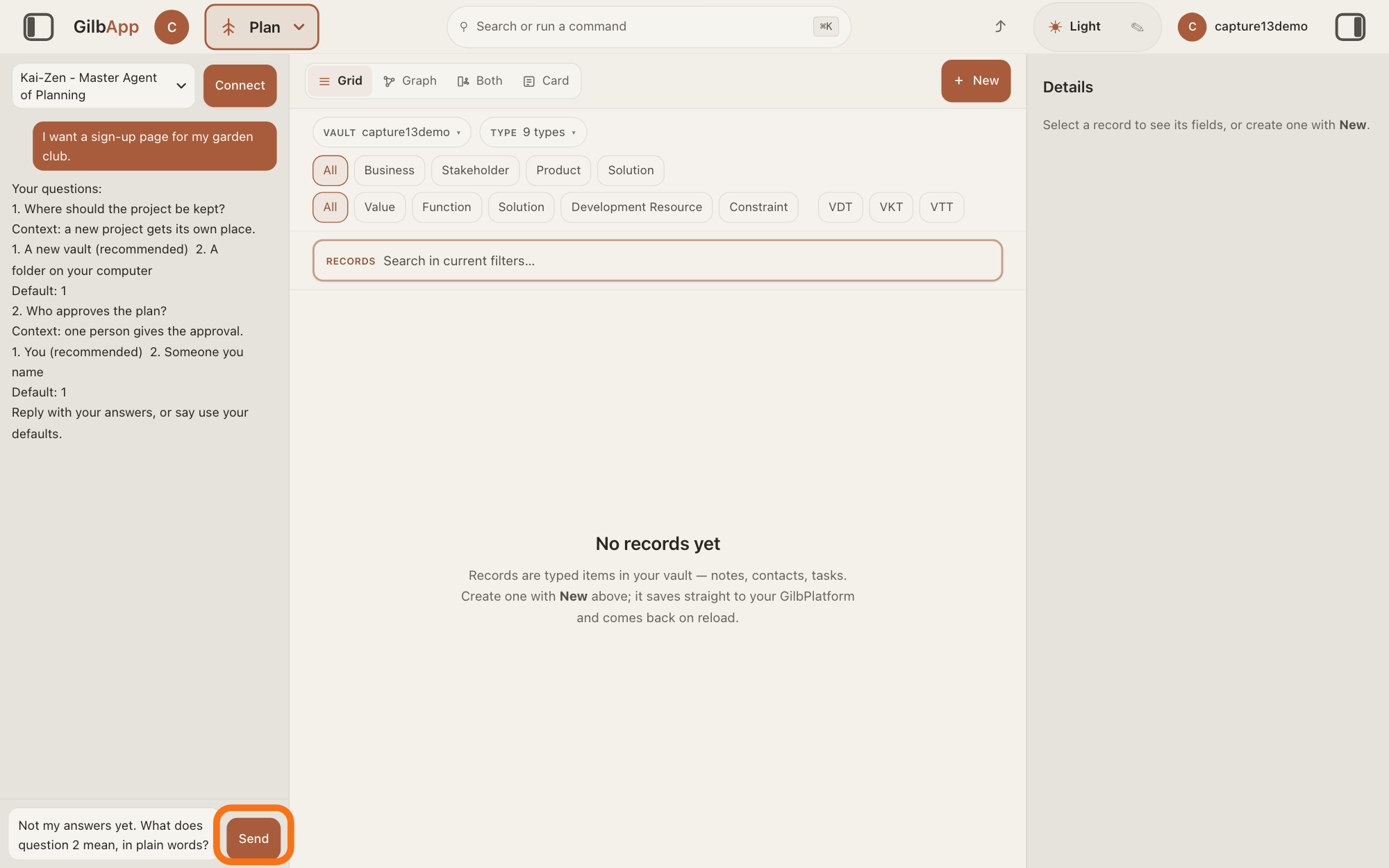
Not my answers yet. What does question 2 mean, in plain words?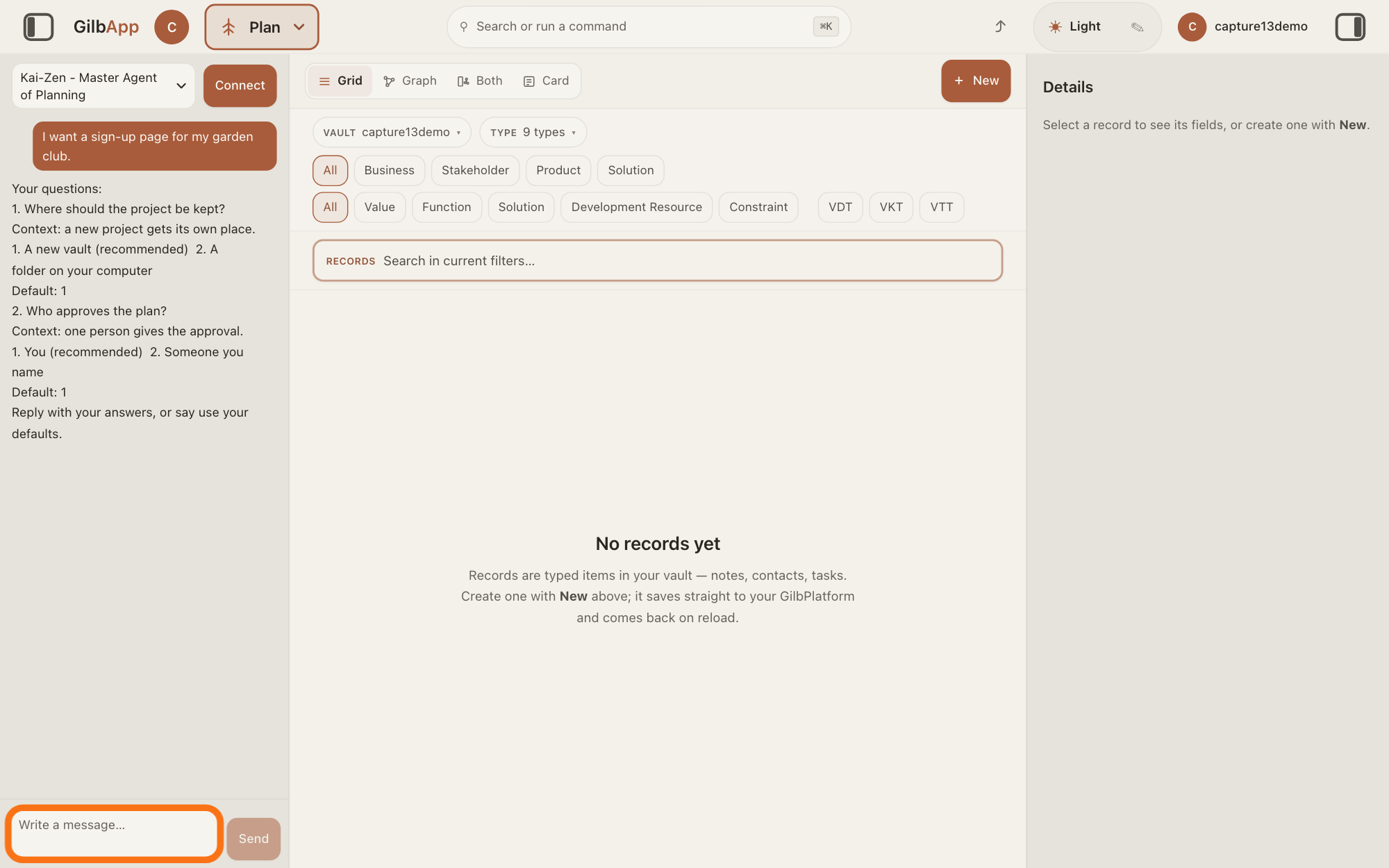
Show as text
The left pane shows "Kai-Zen - Master Agent of Planning" at the top and Kai-Zen's last message, here its questions, ending with Reply with your answers, or say use your defaults. At the bottom, the empty "Write a message…" box has the orange outline. Click it and type your answer, or your question about what you do not understand.
More about this
Name the word or the line you do not understand. Kai-Zen takes the message after its questions as your reply, so say first that you are not answering yet. Questions you never answer take their default.
Press Send.
Press Send, or press Return. Kai-Zen's reply shows in the same chat.
Show as text
Kai-Zen's message is still in the left pane. At the bottom, the box holds a question that starts Not my answers yet. and asks what question 2 means, in plain words. "Send" to the right of the box has the orange outline. Click "Send", or press Return.
More about this
Shift and Return starts a new line without sending. While it works, the pane says The agent is writing…, then Ran and the name of each tool it uses, and Send reads Queue.
Deeper
Also asked:
Kai-Zen stopped and is waiting. What does it need? Read its last message: it waits for your answers to its questions, your yes before an act it never does without you, your check of a live change, or your approval of the whole result. Type that in Write a message… and press Send.
Kai-Zen works on until the work is done; it does not ask you to type continue so it can go on, though GilbApp's own lines below may. It waits for you at these points:
At the start, after its questions: its message holds Your questions: and ends with Reply with your answers, or say use your defaults. The answer on answering Kai-Zen's questions shows how.
Before an act it never does without you, such as putting work live, ending a record or deleting a vault, giving access to a vault, spending more than the budget, or changing a goal you set. It stops only that part, asks one question in the same form, and goes on with the rest. The answer on why Kai-Zen stops and asks lists them all.
When a change is live: it asks you to check it live. Send back what is wrong, or that it is fine.
At the end: it asks for one approval of the whole result. Reply with what you want changed, or give your go.
When the money spent is over the budget, or something is still below the lowest level you could accept where the plan expected it above: it stops and asks whether to go on.
When it reports what is done, what is not, and why, it has finished that request: ask for what you want next. After each delivered step it shows what was measured and the next step, and goes on unless you say re-plan or done.
What sits under For your information — no answer needed needs no reply.
If the pane says The agent is writing…, or Ran and the name of a tool, Kai-Zen has not stopped: it is still working, and Send reads Queue. A message you send then waits under Waiting to send until the agent is done; Slip in now hands it to the agent at its next step.
If Claude Code is your AI and the pane says "The turn ran out of tool rounds, so I am going on by myself (1 of 15). Press Stop to stop.", Kai-Zen has not stopped: GilbApp sends the next turn for you, up to 15 times in a row. If the pane says "The turn ran out of tool rounds 15 times in a row. Send continue to go on." or "You pressed Stop. Send continue to go on.", type continue in Write a message… and press Send. If an error line shows above the box, such as The agent could not answer., your message did not get an answer: send it again, and if the line stays, write to [email protected] with what you sent, the line, and the time. A line such as <name> returned an error in the pane means one tool failed; while the pane shows a line, the agent is still working.
Kai-Zen and the other agents follow written procedures that use words of their own. When a word or a line is not clear, ask in your own words in the same chat: name it, and ask what it means in plain words and what it means for your app. Many words also have a What is …? answer in this help, such as an agent, a session or an assumption.
If a line above the box says The agent is answering WITHOUT its standing instructions, the agent is answering without all of its written procedure, and its answer may not follow its usual way of working.
This answer is written for a computer screen.
Source: GilbApp 96968de7c3e3e685296f20a2599cbc8d305c9ea7 (live build, read 12 November 2026): src/components/agent/AgentChat.tsx:1046 (Write a message…), :1063 (Send/Queue), :711 (Return sends unless Shift), :545 (The agent is writing…), :553 (Ran), :955-1013 (Waiting to send, Slip in now), :70 and :897-934 (the tool rounds lines, Stop); src/lib/base/agentChat.ts:128-142 (standing-instructions lines). Standards Kai-Zen (Report, Ask), Kai-Zen.AskRules (One: Wait for that one reply, then run to the end, Form, NoAnswer, Stop, NoContinue, EndApproval), Kai-Zen.StopRules.Owed and Kai-Zen.Cycle (Human, Next), read from GilbPlatform on 12 November 2026. Shared wording: live answers How do I answer Kai-Zen's questions?, Why does Kai-Zen stop and ask, or follow a standard?, How do I start work with Kai-Zen? (queue lines), How do I change the product while a project runs?.
Checked against GilbApp d529620.