
My plan looks wrong or too big. How do I fix it?
Short answer
Press Main menu, choose Choose an agent, choose Kai-Zen - Master Agent of Planning, type what is wrong, and press Send.
Before you start
A project Kai-Zen set up for you, and your own AI, Claude Code or Grok, connected in GilbApp's chat. The pictures show a made-up person on a test site; your screen shows your own name and address.
Words used here (6)
- agent
- An agent is your AI following one written procedure, its standing instructions, for one kind of work.
- Kai-Zen
- Kai-Zen is the planning agent: it finds out what you want, chooses the way, hands the work to other agents and reports back.
- project
- A project is work to bring about a change you want, such as a new app or a better way of doing something.
- GilbApp
- GilbApp is the app, opened in a web browser at https://gilb.com/app, where you open, fill and share your vaults.
- Jackfruit
- Jackfruit is the vault agent: it finds, reads, writes and links records in your vaults, and makes new vaults for you.
- GilbPlatform
- GilbPlatform is the service that keeps people's and organisations' data in vaults, each at its own web address.
Steps
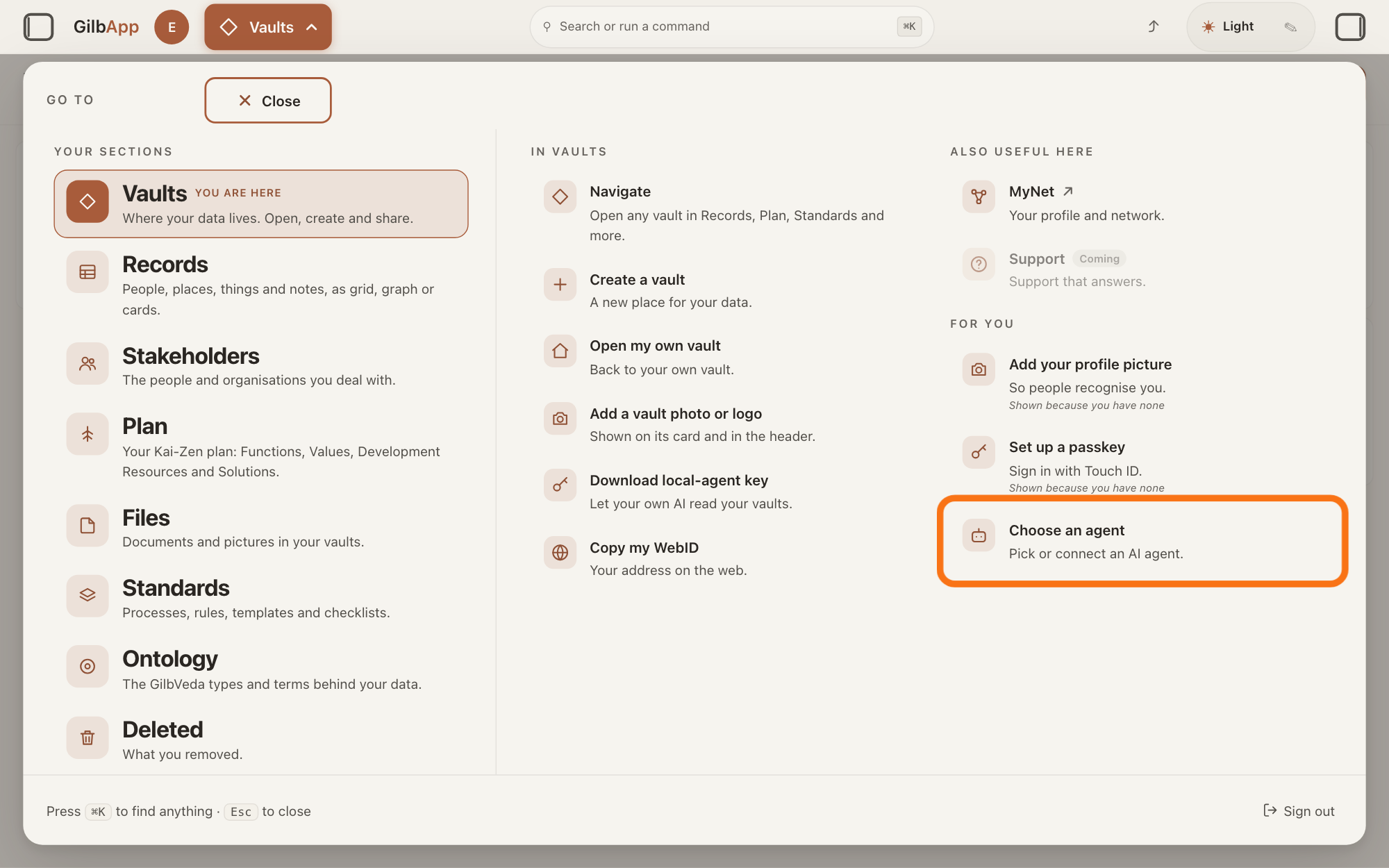
Press Main menu at the top left and choose Choose an agent.
Press Main menu, next to your profile picture at the top left, and under FOR YOU choose Choose an agent (Pick or connect an AI agent.). GilbApp opens the left pane, where you chat, and puts the cursor on the agent list at the top of it.
Show as text
The panel headed "GO TO" is open. In the right-hand column under "FOR YOU", the outlined row reads "Choose an agent" and "Pick or connect an AI agent." Click it; the chat opens in a pane on the left.
More about this
The button shows the name of the section you are in, such as Vaults. The square button at the far left of the top bar also shows or hides the left pane. You can also search for Choose an agent in Search or run a command.
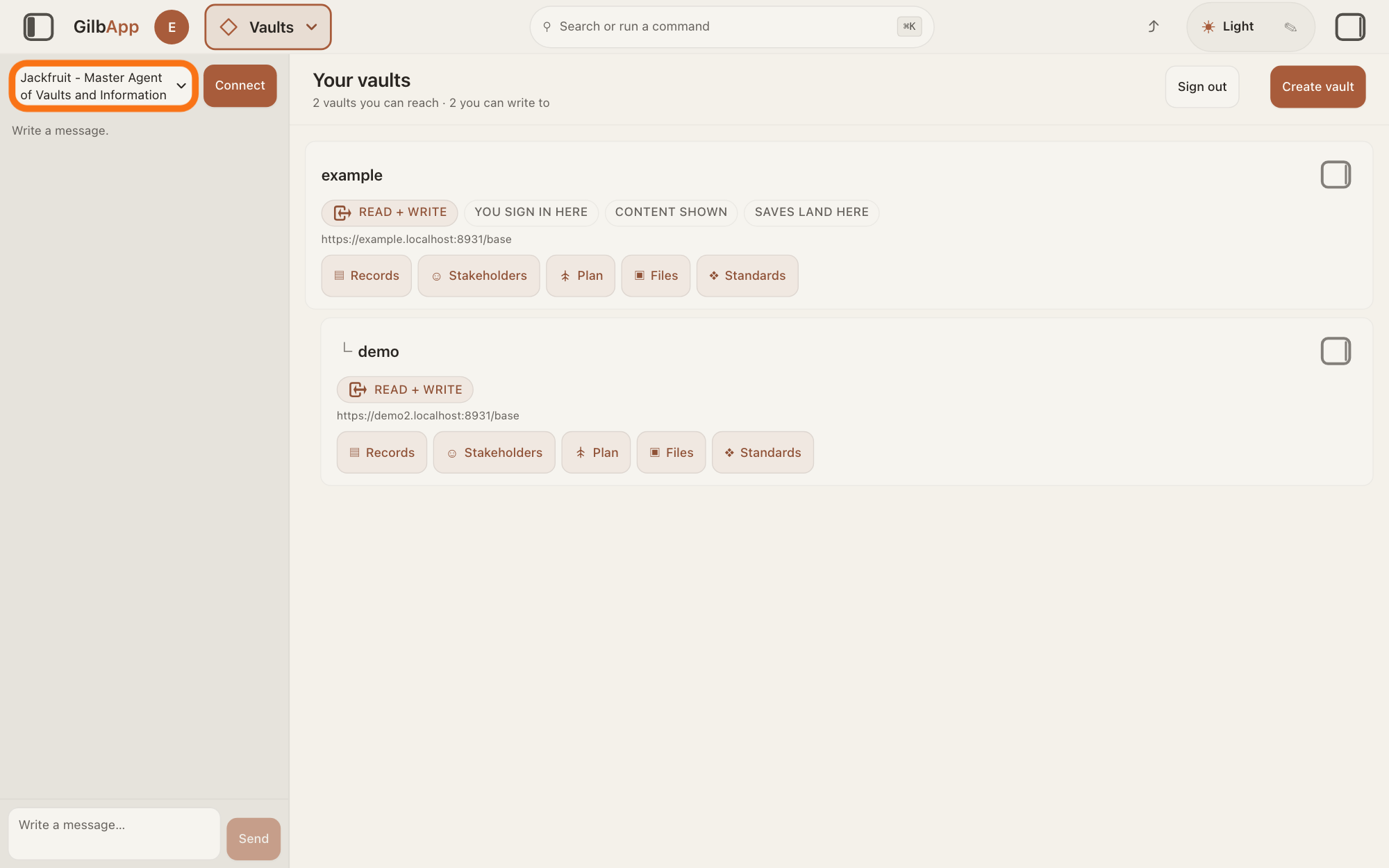
Choose Kai-Zen - Master Agent of Planning in the agent list.
Press the agent list at the top of the left pane and choose Kai-Zen - Master Agent of Planning. Each agent has its own chat, and the list shows which one you are in.
Show as text
The chat is open in a pane at the left. At the top of that pane the outlined agent list reads "Jackfruit - Master Agent of Vaults and Information", the first pick. Click the list and choose "Kai-Zen - Master Agent of Planning".
More about this
A new chat starts on the first agent in the list, Jackfruit - Master Agent of Vaults and Information. The list comes from GilbPlatform each time the chat opens. GilbApp keeps your choice for this browser tab. While an agent is answering, the list is greyed out.
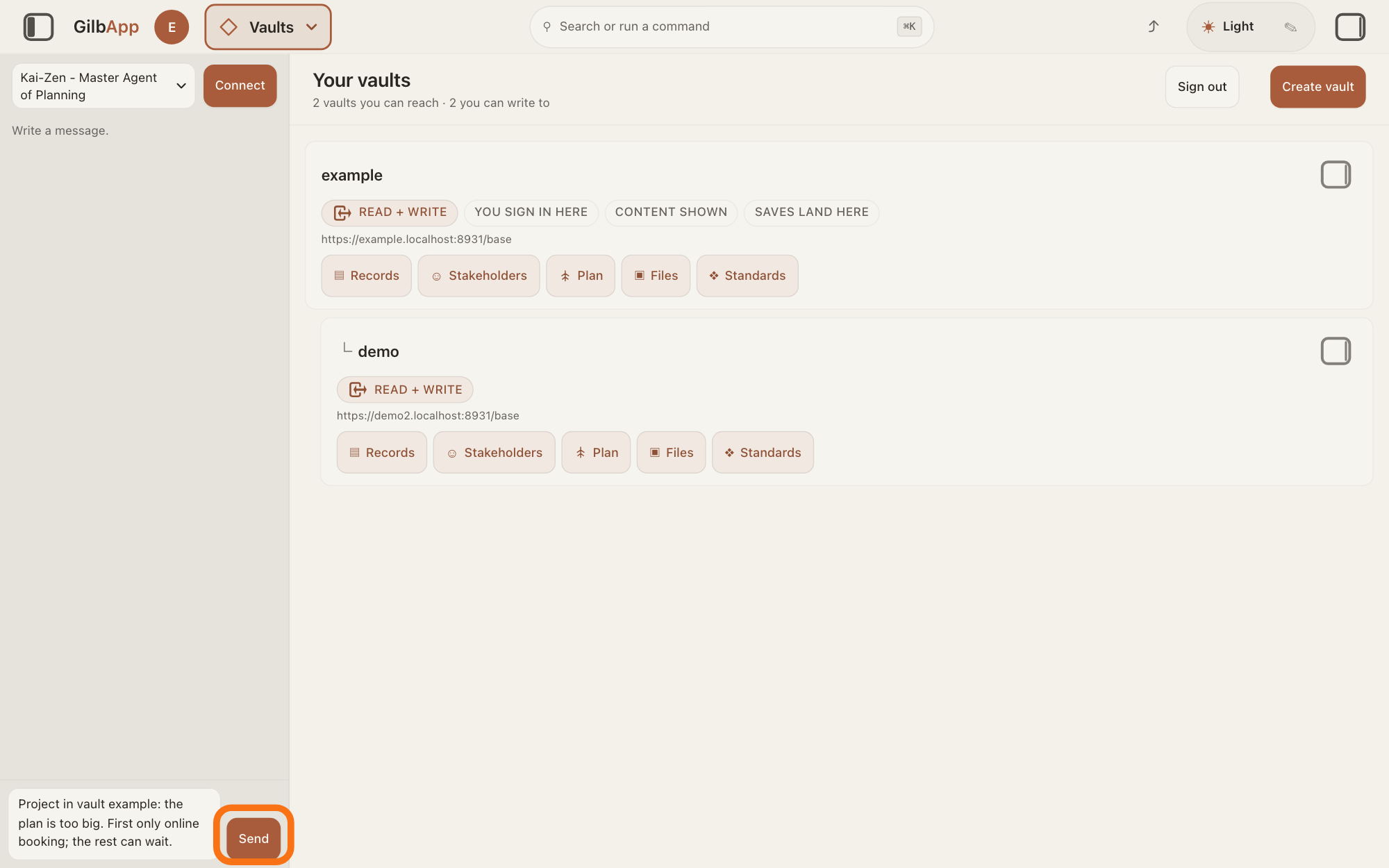
Type what is wrong in Write a message… and press Send.
In Write a message…, name the project's vault, say what is wrong or too big, and what you want instead, then press Send.
Show as text
The agent list at the top of the chat reads "Kai-Zen - Master Agent of Planning". At the bottom, the box holds a message that names a vault, says the plan is too big, and says what should come first. The outlined "Send" is to the right of the box. Press it.
More about this
Return also sends; Shift and Return starts a new line. If you do not say where the project is kept, Kai-Zen looks for it in the vaults you can reach; if several fit, it asks which one. Before it does anything, it reads the project's setup, its specs, the requirements written in its plan, and its last round of delivery. While it works, the pane says The agent is writing…, then Ran and the name of each tool it uses, and Send reads Queue. It does not ask again what you already answered, unless a new fact changes it. For example:
Project in vault example: the plan is too big. First only online booking; the rest can wait.
Deeper
The easiest time is the one approval before building. Kai-Zen, the planning agent, shows you the whole plan and asks for one approval; reply there with what you want changed, and it changes it and asks once more. You can also ask for a change at any time later, as the steps show.
Too big: the plan describes your whole idea, but it is delivered in steps, small pieces of the app built and put live one at a time, and the order of the steps is only a forecast. Say what you want first and what can wait. Each step stays as small as possible, and a step that costs more than it brings waits, unless it is needed to reach the lowest level you can accept. To leave a part out altogether, say so; Kai-Zen hands your words to the agents that write each part of the plan, and then makes the plan more exact again. An agent is your AI following one written procedure, its standing instructions, for one kind of work.
Wrong: name what is wrong and what it should say, such as a missing group of people the app is for, or a goal that is too high. What Kai-Zen decided itself, such as the estimates, you may change. A Value you set, or a level you set on it, is changed only with your yes; a Value is a goal for how well your app must do something. A way of building that you chose yourself is kept: Kai-Zen lists it for your approval instead of removing it.
You can also fix a mistake yourself in GilbApp. Each part of the plan is a card in the project's vault. Press Main menu, choose Plan, select the card and press Edit to change a line; changes save as you leave a field. The answer How do I write a Solution in my plan? shows such a card, and How do I edit a record? shows the same for any record. To remove a card, delete it: it is kept, not erased, but GilbApp cannot restore it, as the answer How do I delete a record, and can I get it back? shows. Kai-Zen reads the project again before it does anything, so it starts from what you changed.
A new feature for an app that is already being built, such as a new button, is a change to the product; the answer How do I change the product while a project runs? shows how. To begin again from your idea, see the answer How do I start my project over?
In Claude Code in Terminal, the window where you type commands (on a Mac, the Terminal app), you can ask the same way. Start Claude Code, type this line with your own short name, the one you gave your AI when you connected your computer, and press Return:
/mcp__gilb-<short name>__agent
Then say which project and what is wrong, and press Return.
This answer is written for a computer screen.
Source: GilbApp 96968de7, src/components/menu/sectionMenuList.ts:330 (Choose an agent, Pick or connect an AI agent.); src/components/regions/LeftRegion.tsx:16; src/components/agent/AgentSelector.tsx:57-79; src/components/agent/AgentChat.tsx:1046 (Write a message…), :1062-1064 (Send, Queue), :711 (Return sends unless Shift), :545, :553 (The agent is writing…, Ran); src/shell/gilbAppMenuRows.ts:162 (Plan). Standards: Kai-Zen.Existing (Read, Evaluate, Update, Change, Replan); Kai-Zen.NoPlacing; Kai-Zen.Sharpen.Challenge; Kai-Zen.AskRules (Decide, Settled, EndApproval); Kai-Zen.ValueRules.HumanSet; Kai-Zen.ValueDeliveryStepRules (Forecast, Small, Defer). Live answers: How do I continue a project with Kai-Zen?, How do I change the product while a project runs?, How do I write a Solution in my plan?, How do I edit a record?, How do I delete a record, and can I get it back?, What if I do not know an answer, or want to skip or change one?.
Checked against GilbApp d529620.