
The chat says "The agent could not answer." What now?
Short answer
The agent's answer failed and gave no reason: type your message again in Write a message… and press Send to try once more.
Before you start
You need to be signed in to GilbApp on a computer, with the chat open and the red line The agent could not answer. above the box, or, with Claude Code connected, a red line that starts Claude Code:. The pictures show a made-up person on a test site; your screen shows your own name and address. They show the chat without Claude Code connected.
Words used here (2)
Steps
Type your message again in Write a message….
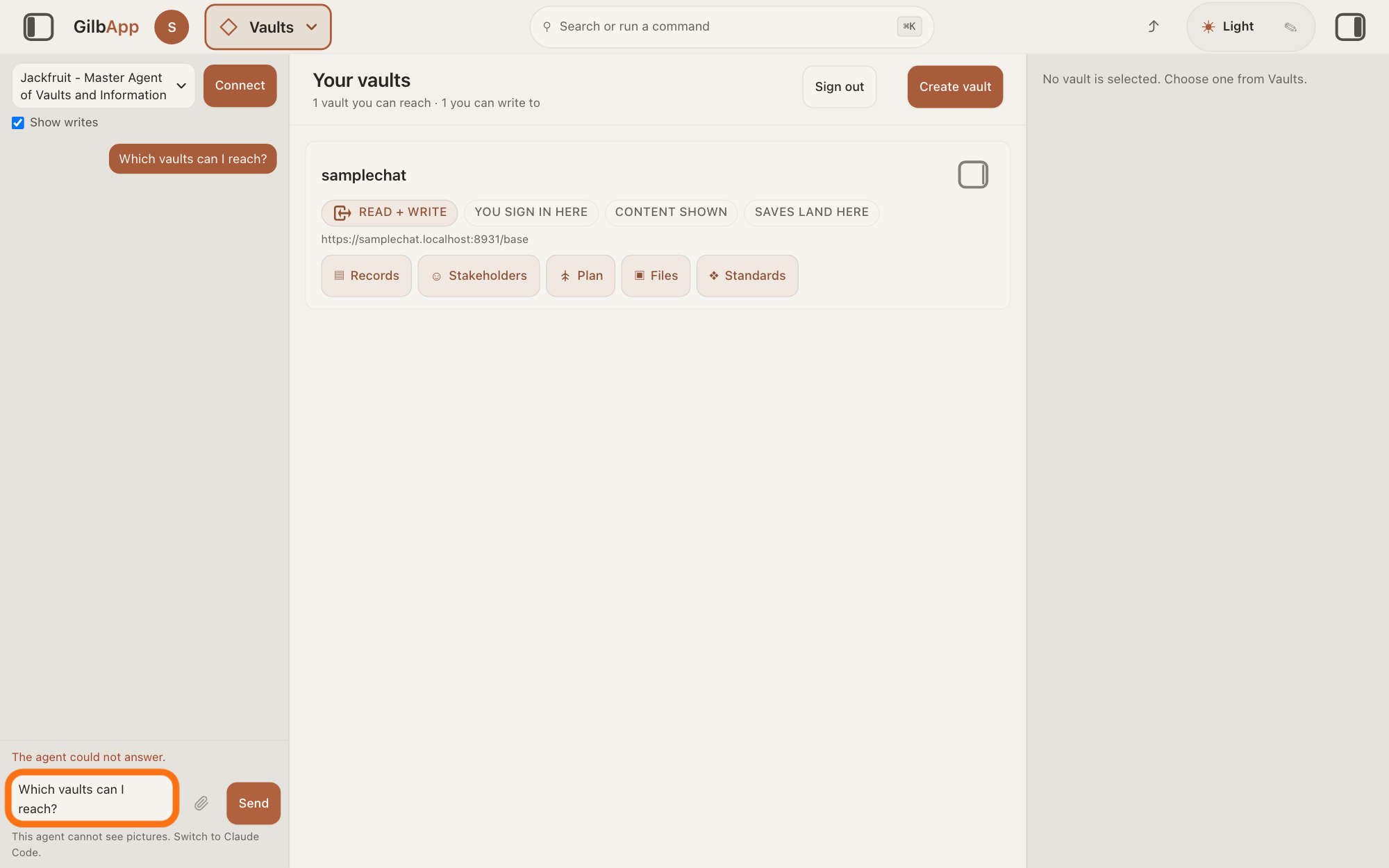
Click the box Write a message… at the bottom of the chat and type, or paste, your message again. It still shows in the conversation, on the right, but the box is empty.
Show as text
On the left, the chat shows your message on the right and no answer. Just above the box at the bottom, a small red line says "The agent could not answer." The box under it, outlined in orange, holds your message, typed again.
More about this
The red line The agent could not answer. sits just above the box. It shows when the agent stopped without an answer and the error carried no reason, so GilbApp cannot say why. With Claude Code connected, the red line starts Claude Code: and then Claude Code's own message; the steps are the same. The answer on chatting with an agent in GilbApp shows how to open the chat.
Press Send.
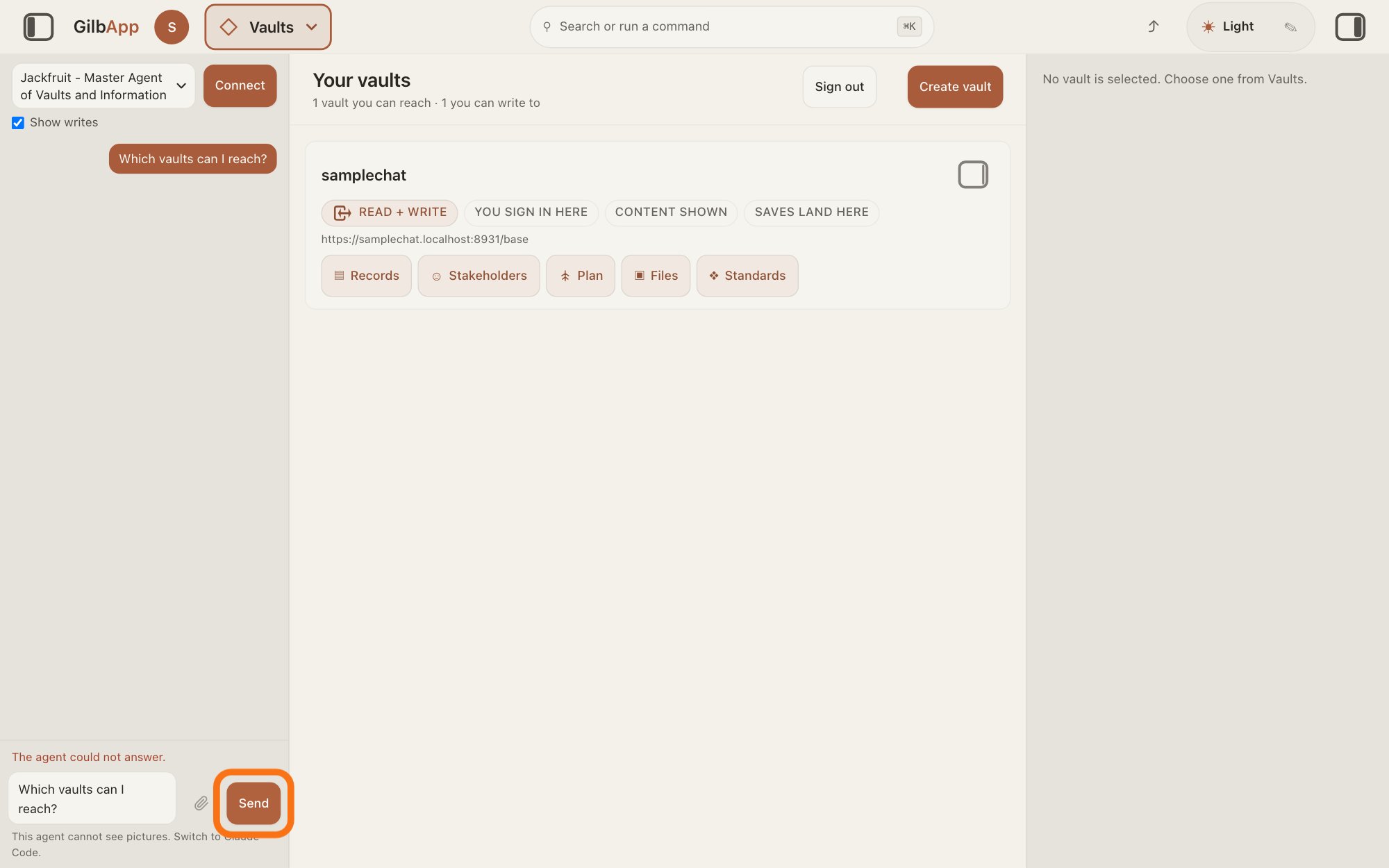
Press Send, to the right of the box. The red line goes away, the pane shows The agent is writing…, and the agent's answer shows on the left.
Show as text
Your message is typed again in the box at the bottom of the chat, under the red line. Press the button "Send" to the right of the box, outlined in orange. The red line goes away and the agent starts again.
More about this
The agent gets the conversation again, so it also sees the message that failed. Anything it already did in your vaults before it stopped is not undone: check before you ask it to do the same again. If messages wait above the box under Waiting to send, press Send now there instead; the answer on sending another message while the agent is still answering says more.
If the same line comes back, copy it and write to [email protected].
Select the red line, copy it, and paste it into an e-mail to [email protected], with the agent's name and what you asked.
More about this
GilbApp has no button to report a problem from the chat. Copy what you need before you close the tab: the chat keeps the conversation in this browser tab only.
Deeper
Also asked:
The chat says The agent could not answer. What now? Type your message again and press Send; if the same red line comes back, copy it and write to [email protected]. GilbApp does not know why: the line shows when the agent's turn stopped with an error that carried no reason.
The red line sits just above the box Write a message…. A turn is the agent's work on one message. The line reads exactly The agent could not answer. when the error gave no words at all. Other forms of the same line:
A line that ends with (HTTP and a number, and then — no reason was sent — copy this line if you report it, means the turn was refused without a reason; it starts with The agent could not answer or with a short code word the server sent. Copy the whole line if you write to support.
Another sentence in its place is the reason itself; it often says what to do.
With Claude Code connected, the line starts Claude Code: and then Claude Code's own message.
Your session needs to re-authorize — try again. means your sign-in had to be renewed: send your message again.
Other red lines above the box have their own answers: Your own agents could not be loaded. is in How do I make my own agent?, and SuperGrok's could not start and could not finish are in How do I connect my AI to GilbApp chat?
GilbApp has no button to report a problem from the chat; write an e-mail to [email protected] and name the agent and what you asked. The conversation stays in this browser tab only, and only its last 32 messages: closing the tab ends it, so copy what you need first.
This answer is written for a computer screen.
Source: GilbApp d5296208 (https://gilb.com/app/version.json, read 15 November 2026): src/components/agent/AgentChat.tsx:1208 (the red line is cleared at each send), :2074 (The agent is writing…), :1393 (an error shows its own words, or The agent could not answer.), :2144 (the red line above the box), :2258 (Send now), :2288 (Write a message…), :2333 (Send); src/lib/base/agentChat.ts:241-248 (an error with no words reads The agent could not answer.), :336-355 (two refused sign-ins give Your session needs to re-authorize — try again.; otherwise the server's sentence or the fallback); src/lib/base/serverError.ts:34, :93-112 (the server's sentence, or the label, (HTTP and the number, and — no reason was sent — copy this line if you report it); Claude Code client 0.3.6, as carried in GilbApp d5296208, src/client.ts:563-569 (with Claude Code, the label and (HTTP and the number for a refused turn); Claude Code bridge 0.3.6 (https://gilb.com/app/claude-code-bridge.mjs, read 15 November 2026): a failed turn's error starts Claude Code:. Live answers, sentences shared: How do I chat with an agent in GilbApp?; How do I send another message while the agent is still answering?; Where do I get more help?; How do I make my own agent?; How do I connect my AI to GilbApp chat?
Checked against GilbApp d529620.