
← Back to How safe is signing in with an e-mail code?
What happens when I sign out?
Short answer
Press Main menu, then Sign out; GilbApp shows the sign-in card again, and this browser can no longer get new keys to your vaults.
Before you start
You need to be signed in to GilbApp on a computer. To also end the link between GilbApp's chat and your Claude Code, press Disconnect first: signing out leaves it.
The pictures show a made-up person on a test site; your screen shows your own name and address.
Words used here (5)
- GilbApp
- GilbApp is the app, opened in a web browser at https://gilb.com/app, where you open, fill and share your vaults.
- session
- A session is one stretch of work with an agent, from its start until you close it; with Kai-Zen it ends in a handoff.
- GilbPlatform
- GilbPlatform is the service that keeps people's and organisations' data in vaults, each at its own web address.
- passkey
- A passkey is a sign-in kept on your device and unlocked the way you unlock the device, so you sign in with no e-mail code.
- record
- A record is one piece of data with its own address, such as a person, a place, a thing or a note.
Steps
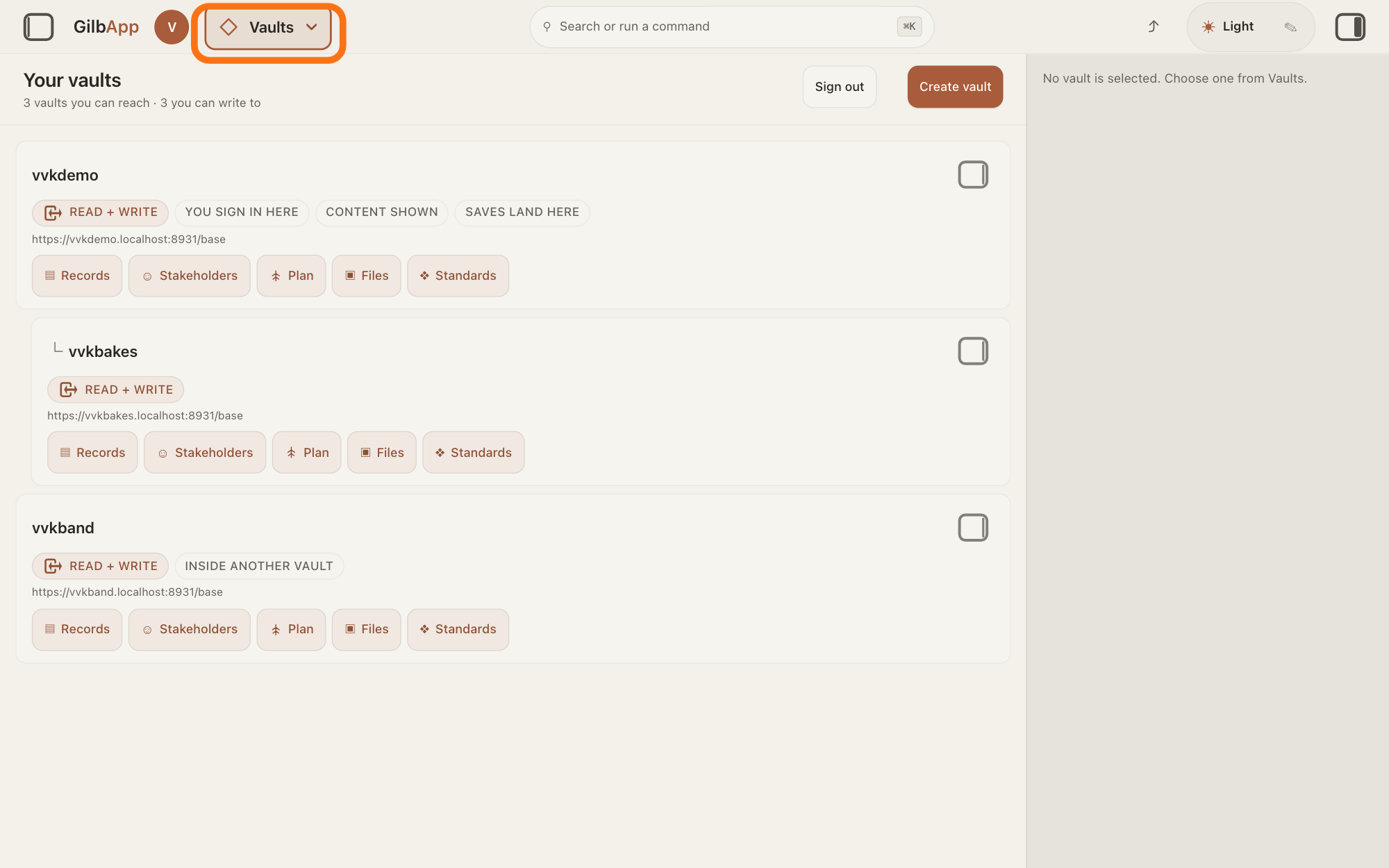
Press Main menu at the top left.
Press Main menu, next to your profile picture at the top left. The panel opens.
Show as text
The "Your vaults" screen is open. At the top left, next to the round profile picture, the outlined "Main menu" button shows the name of the section you are in, "Vaults". Press it to open the menu.
More about this
The button shows the name of the section you are in, such as Vaults. The panel also opens when the pointer rests on the button; Close or Esc closes it. You can also press Sign out at the top of Your vaults, where it reads Signing out… while it works, or search for sign out in Search or run a command and select Sign out (End this session.); each does the same as the next step.
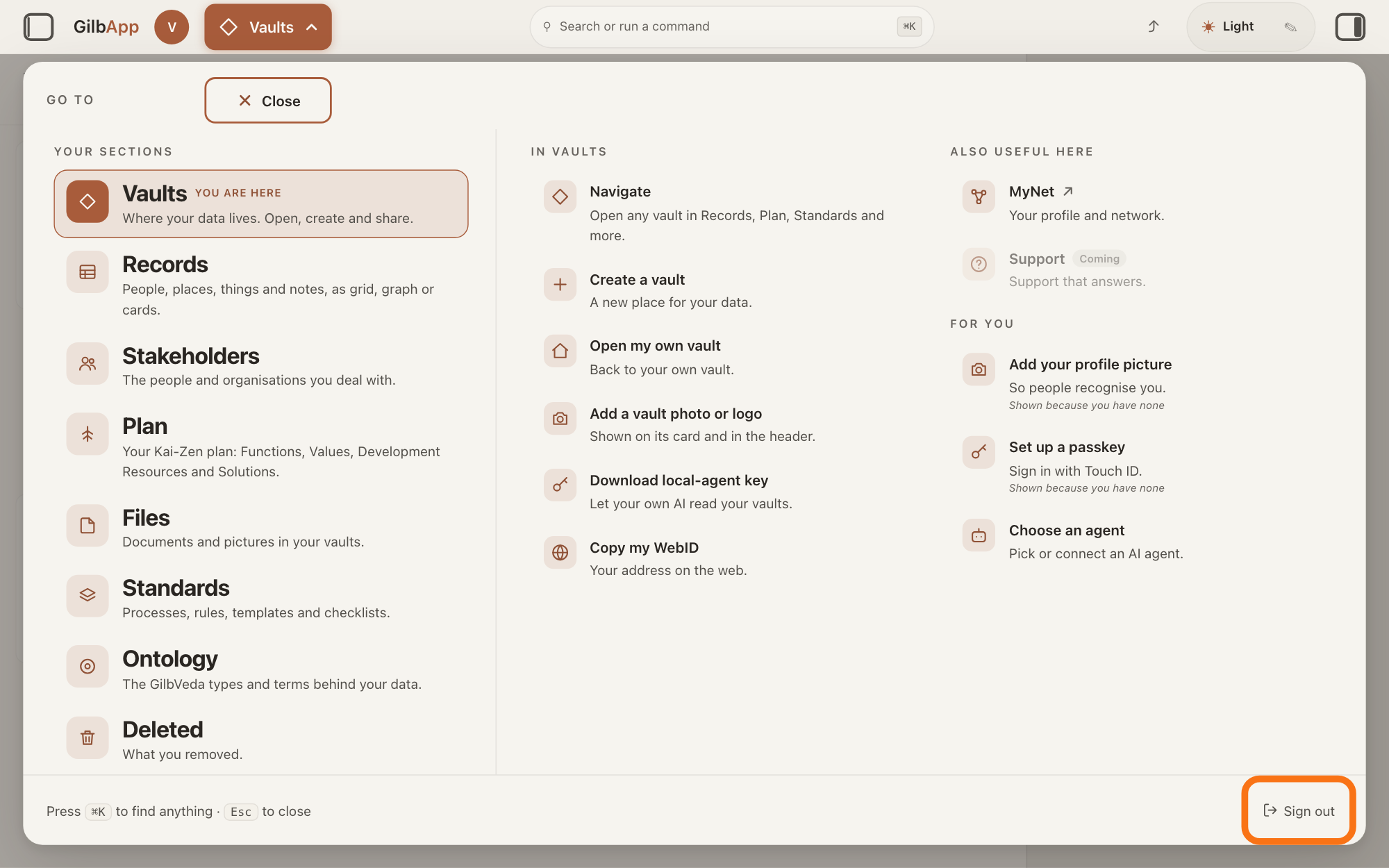
Press Sign out at the bottom right of the panel.
Press Sign out at the bottom right of the panel; GilbApp asks nothing more. When you are signed out, the card Welcome to GilbApp shows again, and you sign in the same way.
Show as text
The panel headed "GO TO" is open. At its bottom right, in the footer line that starts "Press ⌘K to find anything", the outlined "Sign out" is at the far right. Press it to sign out of GilbApp.
More about this
GilbPlatform ends this browser's sign-in at once, and the browser deletes its cookie, the small note the browser keeps for GilbPlatform. It also ends every key tied to this browser: your vaults refuse them within about 5 seconds. A plain key, which no browser secret protects, is not tied to it and keeps working for up to 30 minutes; GilbApp throws its own copy away. This is the same whether you signed in with the e-mail code or with a passkey, a sign-in kept on your device. GilbApp also clears the copies of your records it kept in this browser. Other browsers and other computers where you signed in stay signed in: sign out in each.
Deeper
Also asked:
How do I sign out on every computer at once? You cannot today: GilbApp has no way to sign out a browser on another computer, so sign out in each browser itself. A computer added with gilb-computer add is cut off with Revoke under COMPUTERS SIGNED IN.
Is it safe to sign in on a shared or public computer? Yes, if you press Sign out when you are done: it ends that browser's sign-in. Add a passkey only on your own device, since a passkey stays on the device it was made on.
Signing out ends this browser's sign-in, not everything that can act for you. A plain key is not tied to this browser, so signing out does not end it: it ends by itself after about 30 minutes. This holds for the file gilb-session.token from Download key and for a copy of the plain key GilbApp itself used.
A computer added with gilb-computer add, a command run on that computer, stays signed in. Revoke under COMPUTERS SIGNED IN cuts it off, but does not sign out a browser on it; the answer on removing a computer from your account shows how. GilbApp has no way today to sign out a browser on another computer: sign out in that browser itself.
The link between GilbApp's chat and your Claude Code stays in this browser until you press Disconnect or it goes unused for 30 days, and Disconnect does not sign you out; the answer on disconnecting your AI shows how. An AI you connected with ▸ CONNECT AI acts as its AI vault, a small vault that stands for your AI, and keeps working after you sign out: the answer on taking access away shows how to cut it off.
Other apps you signed in to with an e-mail code keep their own sign-in: sign out in each. When an app ends its sign-in through GilbPlatform, for example with the app's own button to sign out, your vaults refuse that sign-in within about 5 seconds too, and the app can no longer renew it. Such an app may have used an outside service for you, a service run by someone else, for example one that removes a photo's background. The short key GilbPlatform made for that service keeps working there for at most 5 minutes after you sign out. GilbApp itself uses no outside service; the answer on outside services says what such a service learns about you.
If GilbApp still shows your vaults after you pressed Sign out, you are still signed in: when GilbPlatform cannot record the sign-out, it keeps you signed in so that you can try again. GilbApp does not say so. Press Sign out again.
This answer is written for a computer screen.
Source: GilbApp ebd9415e (https://gilb.com/app/version.json read 2026-11-11, dirty false; moved from af0f04ee; none of SectionMenu.tsx, VaultsView.tsx, sectionMenuList.ts, signOut.ts, ComputersSignedIn.tsx changed between them), code read at ebd9415e: src/lib/base/signOut.ts:1-51 (POST /onboard/logout with credentials, redirect manual; the answer's status is not read, A failed call is not fatal; then drops the token, the DPoP key (dpopCredential.invalidate(true)), purgeWorkingSet, endSpeed (the device copy ... belongs to the holder who signs out), the per-holder link stores, plan choice, pending fields and unsaved notes; refetches the session, so AppShell shows SignInPane when the cookie is gone); src/components/menu/SectionMenu.tsx:33-38, :96 (Sign out is the panel's footerAction); src/components/VaultsView.tsx:121-133 (Sign out / Signing out… at the top of Your vaults); src/components/menu/sectionMenuList.ts:362-363 (command Sign out, End this session., keywords logout, sign out, log out); src/components/AppShell.tsx:1768-1770 (menu api signOut = the same function); src/lib/base/token.ts:1-9, :154-160 (the plain bridge token, 1800 s, in memory); src/lib/base/localAgentToken.ts:1-12, :17-20 (Download key mints a fresh UNBOUND token of at most 30 minutes; the key is tied to this browser is the app's own word for a bound key); src/components/LocalAgentTokenButton.tsx:19, :42 (about 30 minutes); vendor claude-code-client 0.1.6 (tgz in git at ebd9415e) src/client.ts:8-9 (pairing secret in localStorage per principal; kept until Disconnect, a 401, or 30 idle days), :350; signOut.ts touches no pairing. No call to /base/oauth/token or /base/service/ anywhere in GilbApp src. GilbPlatform 498d29a0 (https://id.gilb.com/version read 2026-11-11, dirty false; contains 5be516b4), code read at 498d29a0: src/routes/onboarding.ts:1315-1377 (POST /onboard/logout ends every bridged DPoP key through the sign-out authority before destroySession; any failure keeps the session and answers 503 the sign-out could not be recorded everywhere; :1367-1368 destroySession and the expired cookie); src/routes/session-token.ts:130 (1800 s), :399-447 (plain Bearer, no cnf.jkt, not recorded), :449-481 (DPoP-bound token; recordBridgedDpopKey); src/auth/ended-sign-in.ts:1-22 (keyed by cnf.jkt: an unbound token is never ended); src/auth/ended-sign-in-set.ts:8, :185 (reloaded every 5 seconds), :238-263 (sign-in ended); src/auth/verify.ts:430 and src/auth/bearer-principal.ts:77 (the vault checks call assertSignInLive); src/routes/sign-out.ts:1-13, :49-103 (POST /base/auth/sign-out, an app's own sign-out; 204 or 503; A credential already minted lives at most 300 seconds); src/auth/outside-service-exchange.ts:15-19, :222 (no service key after the sign-in ended), :367 (at most 300 s). REAL on production 2026-11-10: an app's sign-out answered 204, the vault refused the old sign-in 4 seconds later (401 sign-in ended); service token 300 s. The browser path (/onboard/logout) is READ, not sent. Row: Capability.Setup.SignOut. GilbPlatform 0fc5a548 (https://id.gilb.com/version, read 13 November 2026): src/routes/sign-out.ts:1-40 (POST /base/auth/sign-out ends the device key and, through endFamiliesForSignOut, the renewal); Dev.Guide.SignIn.StaySignedIn (After a sign-out, a renew with that credential is refused.); Proc_v_i_c_PublishPagesDev step 3 (Sign out signs the person out on this device and on the server).
Checked against GilbApp d529620.