
← The places: GilbPlatform, GilbApp and vaults
What is a WebID, and how do I copy mine?
Checked against GilbApp d529620.
A WebID is the web address GilbPlatform knows you by; to copy yours, press Main menu and choose Copy my WebID.
You need to be signed in to GilbApp on a computer. The pictures show a made-up person on a test site; your screen shows your own name and address.
Steps
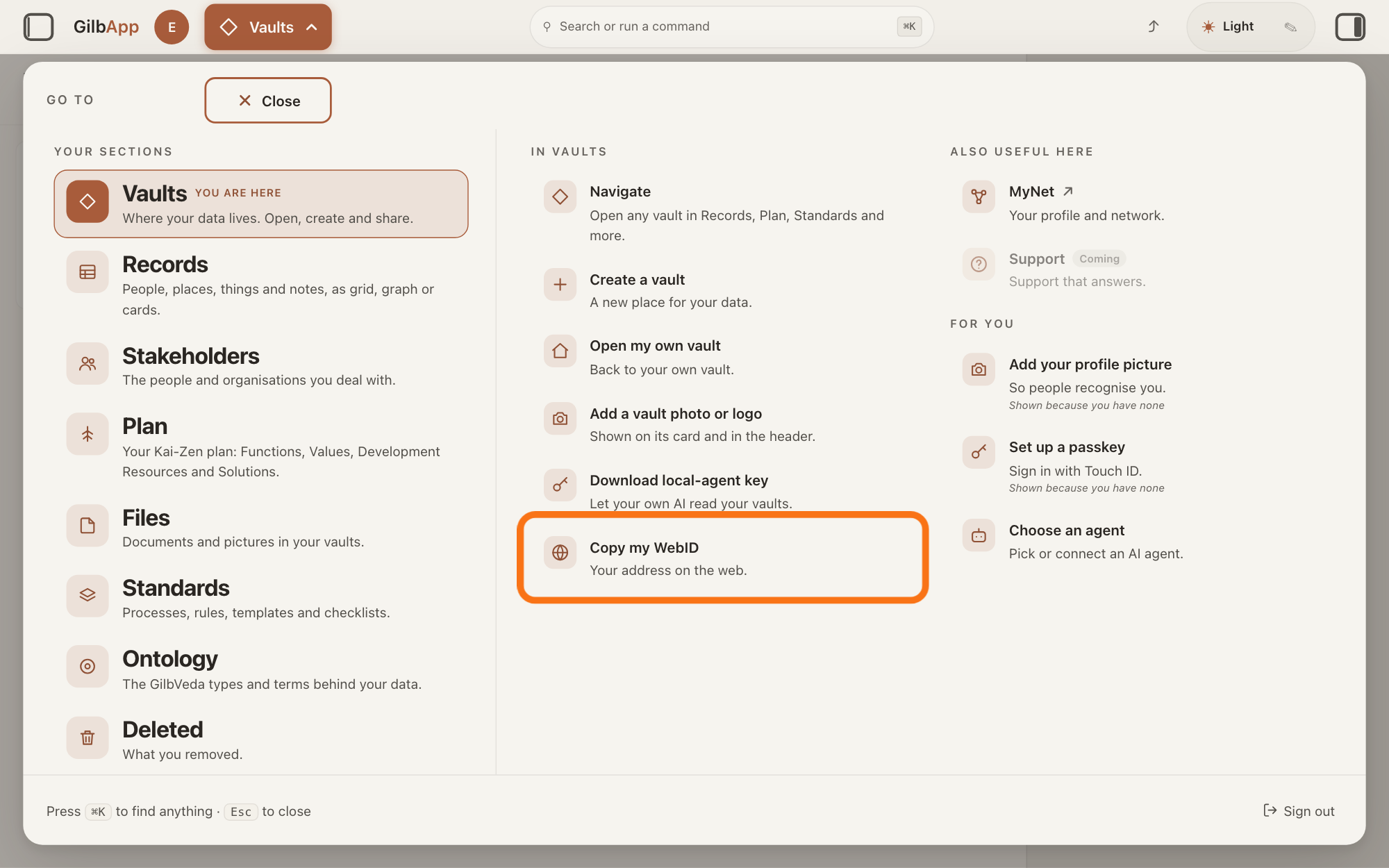
Press Main menu at the top left and choose Copy my WebID.
Press Main menu, next to your profile picture at the top left, and under IN VAULTS choose Copy my WebID (Your address on the web.). The panel closes and your WebID is copied, ready to paste.
Show as text
The panel headed "GO TO" is open over "Your vaults". In the middle column under "IN VAULTS", the last row, outlined, reads "Copy my WebID" with "Your address on the web." under it. Click it to copy your WebID.
More about this
The button shows the name of the section you are in, such as Vaults. If you are in another section, rest the pointer on Vaults in the panel first, so that its options show beside it. GilbApp shows no message when it copies, and none if your browser does not let it copy; steps 2 and 3 show the WebID so you can check. IN VAULTS also holds Navigate, Create a vault, Open my own vault, Add a vault photo or logo and Download local-agent key; you do not need them. You can also search for webid in Search or run a command and select Copy my WebID.
To see your WebID, press your profile picture.
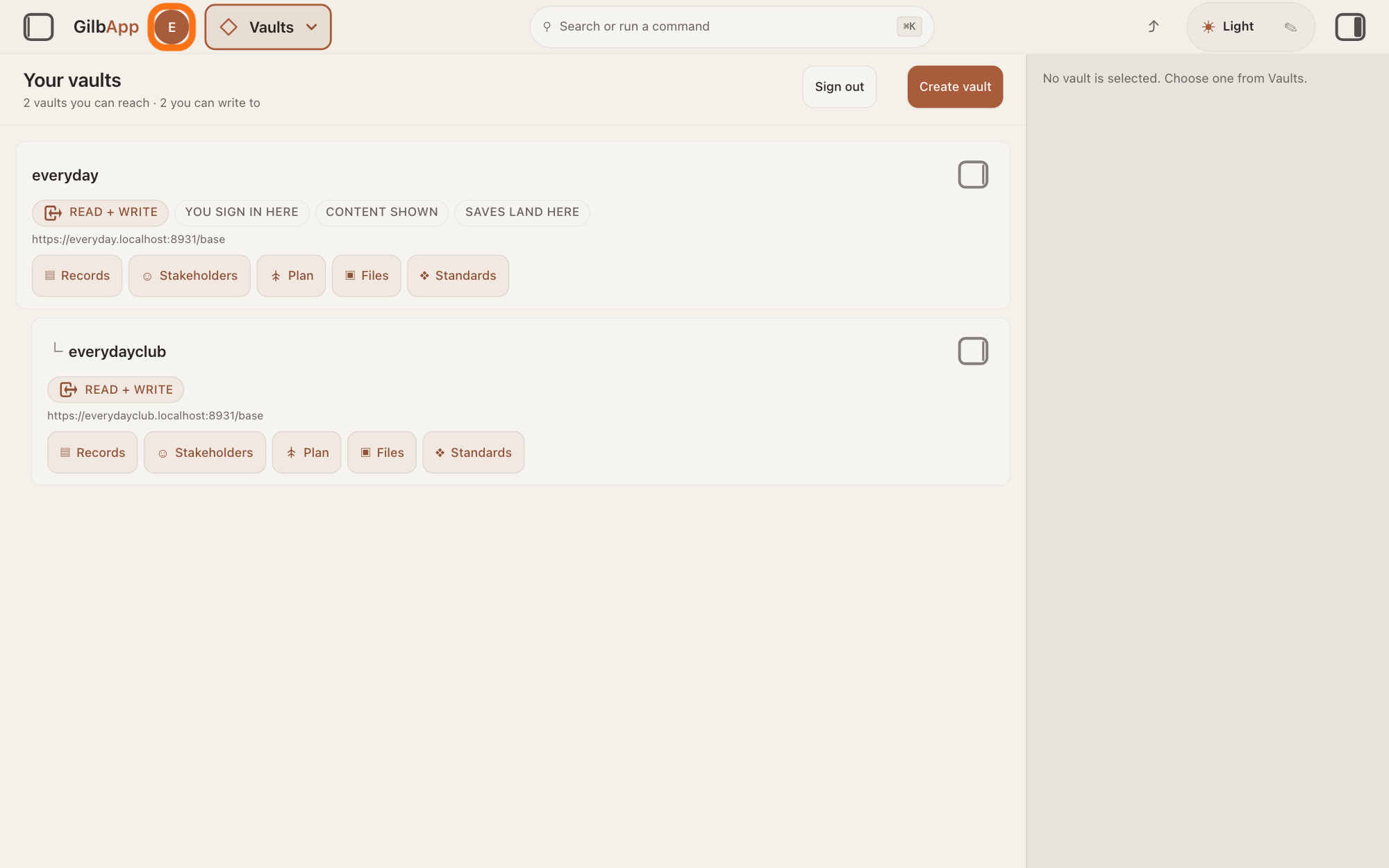
Press your profile picture at the top left, left of Main menu; its hover text is Open your vault — and your vault's name. GilbApp opens Vaults with your own vault's details in the pane on the right.
Show as text
The panel is closed and "Your vaults" is on screen. At the top left, between "GilbApp" and "Main menu" "Vaults", the outlined round picture shows your first letter. Click it.
More about this
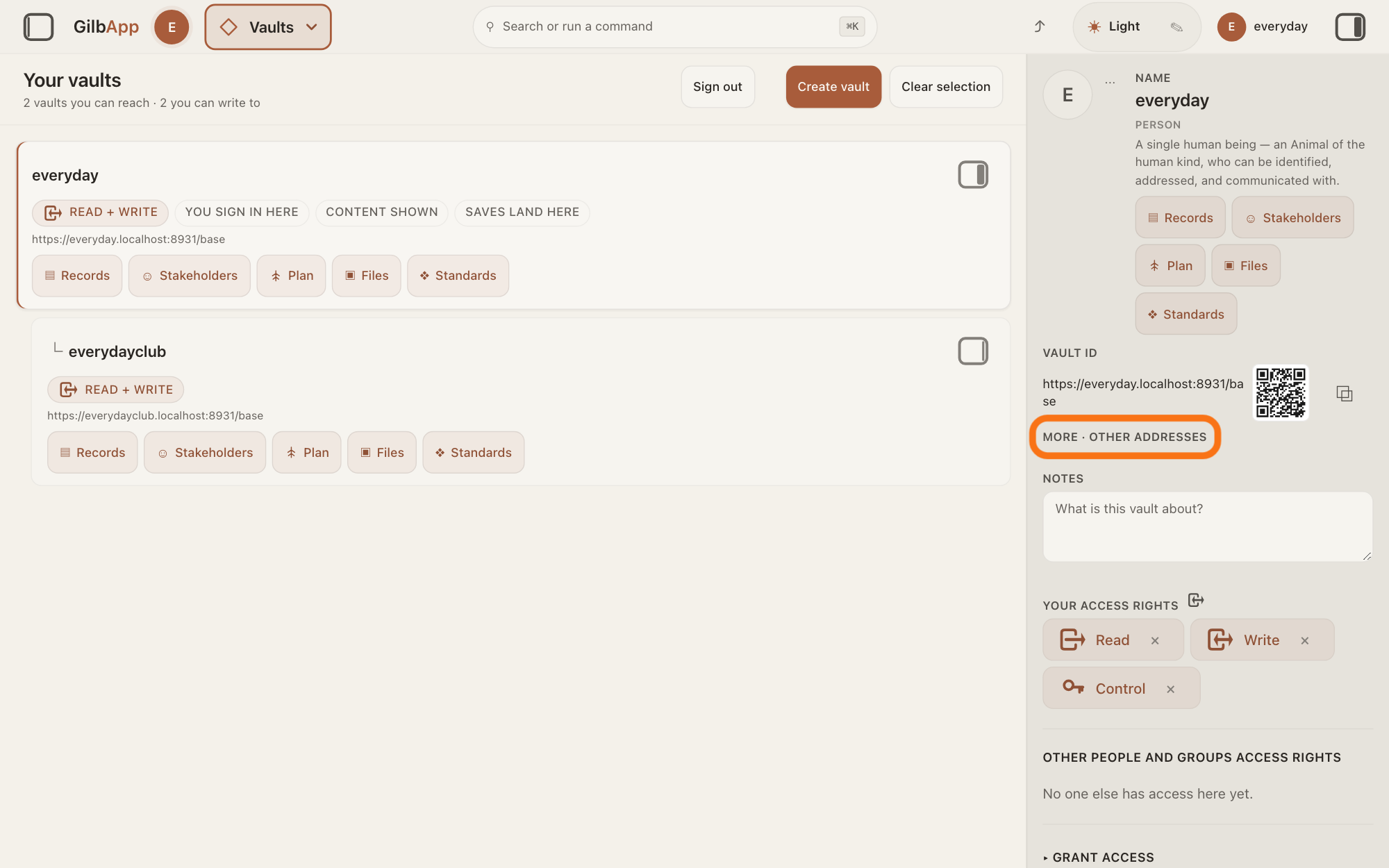
The pane shows your vault's NAME, its VAULT ID, which is your vault's address, and MORE · OTHER ADDRESSES. The rest of the pane, such as your access and who can find the vault, is not needed here.
Open MORE · OTHER ADDRESSES.
Press MORE · OTHER ADDRESSES under VAULT ID. Under SIGNED IN AS the pane shows your WebID, the same address Copy my WebID copies.
Show as text
Your own vault is selected and its details fill the right pane: "NAME", "VAULT ID" with the address, a QR code and a copy button. Under the address, the outlined line reads "MORE · OTHER ADDRESSES". Click it.
More about this
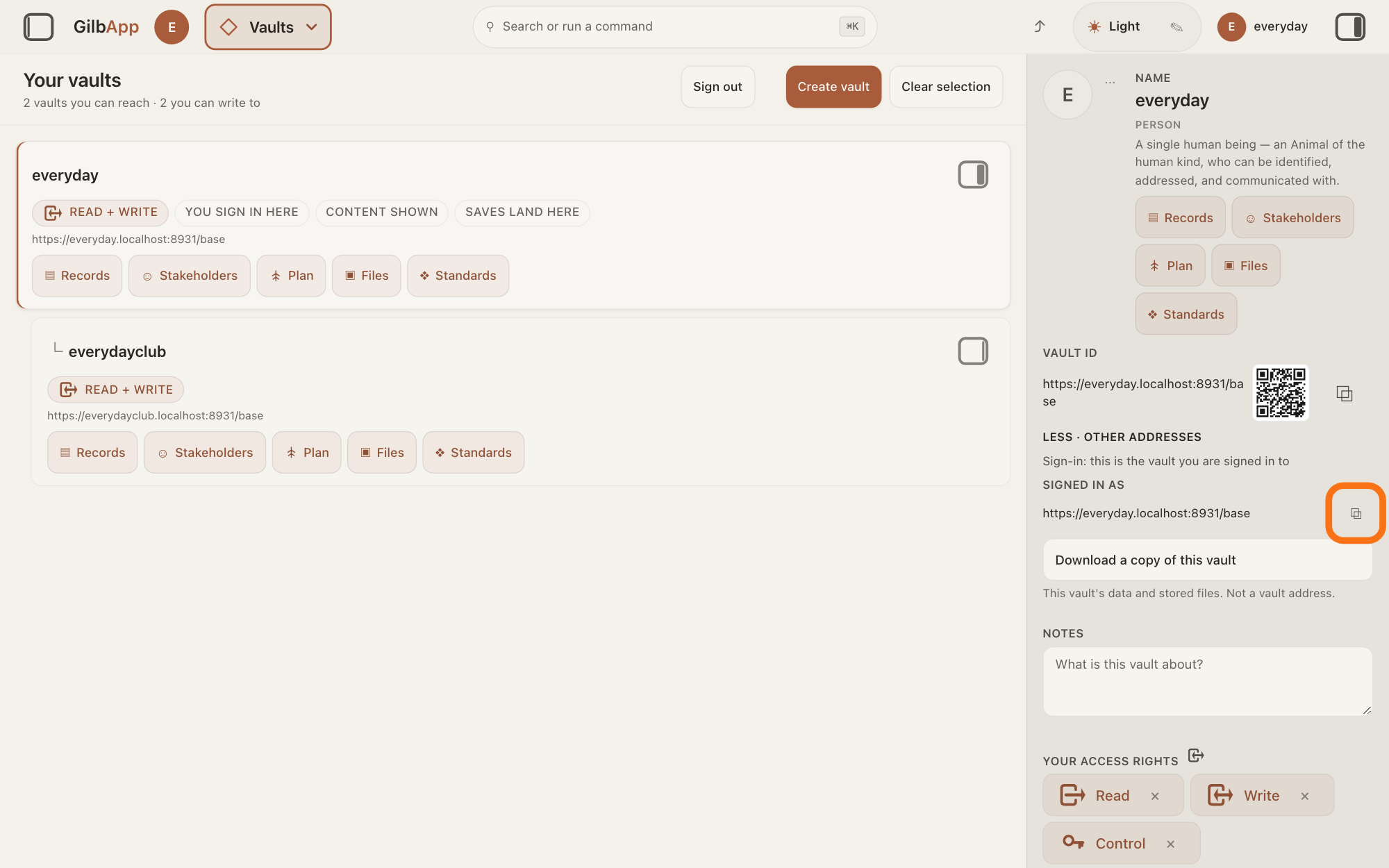
Above it, Sign-in: this is the vault you are signed in to says this is your own vault. Below it, Download a copy of this vault takes a copy of the whole vault; you do not need it here. LESS · OTHER ADDRESSES closes it again.
To copy it from here, press ⧉ beside it.
Press ⧉ at the right of the address under SIGNED IN AS. GilbApp copies it, as Copy my WebID does, and shows no message.
Show as text
The line now reads "LESS · OTHER ADDRESSES". Under it: "Sign-in: this is the vault you are signed in to", then "SIGNED IN AS" with your WebID. At the right end of the WebID line, the small outlined copy button "⧉". Click it to copy your WebID.
More about this
The ⧉ beside VAULT ID copies your vault's address instead. That is what someone needs to share a vault with you; the answer on sharing a vault with a person shows how.
Deeper
Also asked:
What can others see on my profile and my WebID? Your WebID is a public address; knowing it lets no one in. MyJackfruit's Privacy page says your vault's address and profile are public by design and your records are not unless you share them; in MyNet each line of your card has a badge that says who sees it.
A WebID is the web address that names you on GilbPlatform, as a vault address names a vault. Access you are given is recorded against it, and you use the same one in every app on GilbPlatform, so you need no separate account in each (https://myjackfruit.com/your-vault/). An AI you connect acts under one of its own: the address of its AI vault, a small vault that stands for your AI; the answer on what an AI vault is says more.
Knowing your WebID does not let anyone in. To use your vaults, someone must sign in as you, so keep your passkey, the sign-in your device keeps for you, and your e-mail account safe (https://myjackfruit.com/terms/).
This answer is written for a computer screen. In a window narrower than 840 pixels, such as a phone, the side panes are hidden and the right pane is Detail in the bar at the bottom.
Source: GilbApp af0f04ee838a4d55887d2ff1f72edd49a4ff7ca0 (https://gilb.com/app/version.json read 2026-11-10): src/shell/gilbAppMenuRows.ts:70-92 (Vaults row; options in order Navigate, Create a vault, Open my own vault, Add a vault photo or logo, Download local-agent key, Copy my WebID Your address on the web., keywords incl. webid); src/components/AppShell.tsx:1731-1733 (copyWebId writes session.principal to the clipboard; a refusal is swallowed, no message), :1247-1257 (openVaultDetail: section Vaults, vault selected, right pane opened), :1966-1976 (profile picture, title `Open your vault — <name>`); section menu 0.2.4 SectionMenu.tsx:431-432 (choosing an option closes the panel first; read with `tar -xOzf` from the vendored tarball, nothing unpacked); src/components/menu/sectionMenuList.ts:257-259 (copy WebID opens no part); src/components/regions/RightRegion.tsx:1218 (principal={session?.principal} into the vault pane); src/components/VaultDetail.tsx:158 (Name), :231-238 (Vault id with copy), :261-268 (More/Less · other addresses), :283-290 (Sign-in: this is the vault you are signed in to, Signed in as + copy), :296-321 (Download a copy of this vault), :447-478 (copy buttons ⧉); src/components/VaultNoteField.tsx:17-18 (labels drawn uppercase); src/components/CopyIdButton.tsx:35-54 (⧉, silent copy). Meaning: GilbVeda t:Principal (The identity an authorization decision is RECORDED AGAINST) and t:PrincipalURI (the WebID-shaped handle by which the principal is picked out and dereferenced), t:WebIdAlias (all Suggested), public read 2026-11-10; GilbPlatform 4d008a55 docs/BASE-DEVELOPER-GUIDE.md §4.7 :4338-4346 (principal WebID, the authz key); src/auth/account.ts:455-498 (A25: a new account's acting identity is re-stamped to its personal vault's root URI); src/routes/session-token.ts (bridge returns `principal`); Dev.Guide.AppAccess.Bind (a bound AI's principal is its AI vault's address); https://myjackfruit.com/your-vault/ ("You use the same personal vault account (WebID) in every app on the GilbPlatform, so you do not need a separate account in every app"), https://myjackfruit.com/terms/ ("Keep your passkey and your email account safe: anyone who can sign in as you can use your vaults."), read 2026-11-10. https://myjackfruit.com/privacy/ ("Your vault's address and your profile are public by design; your records are not, unless you share them."), last updated November 11, 2026, read 14 November 2026; the live answer Can my app have public profiles, where users see each other?