
← Back to Who can see and use my app once it is live?
Where does my app keep its data, and can I see it?
Short answer
In vaults; to see it, press Main menu, choose Vaults, press ▤ Records on the vault's card, and search and select a record.
Before you start
You need to be signed in to GilbApp on a computer, with access to the vault your app writes in. The pictures show a made-up person on a test site; your screen shows your own name and address.
Words used here (3)
- record
- A record is one piece of data with its own address, such as a person, a place, a thing or a note.
- GilbApp
- GilbApp is the app, opened in a web browser at https://gilb.com/app, where you open, fill and share your vaults.
- field
- A field is one named fact on a record, such as its title or a due date; its name comes from GilbVeda.
Steps
Press Main menu at the top left and choose Vaults.
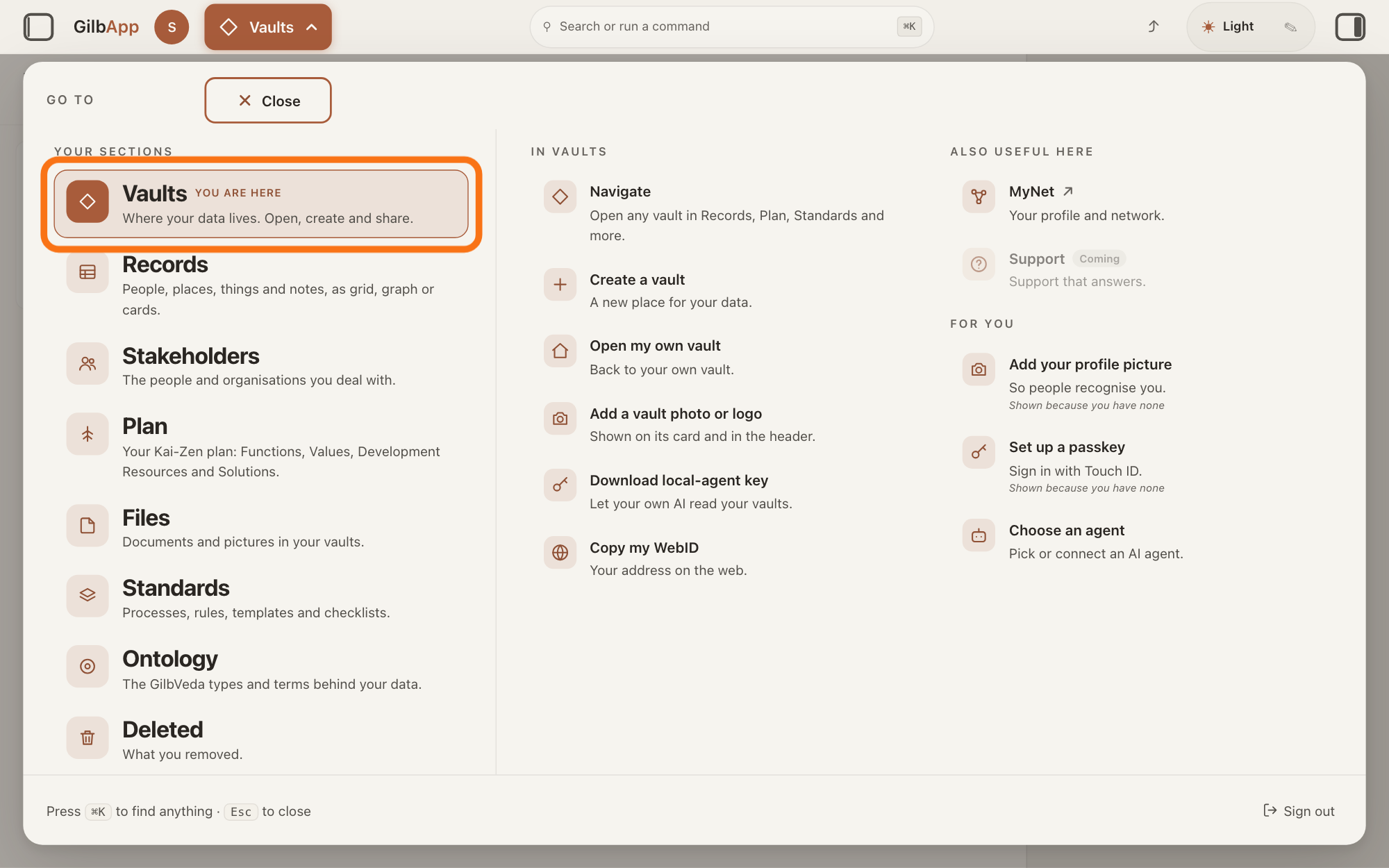
Press Main menu, next to your profile picture at the top left, and under YOUR SECTIONS choose Vaults. The button shows the name of the section you are in, such as Vaults.
Show as text
Top left, "Main menu" is open, and the "GO TO" panel fills the screen. Under "YOUR SECTIONS", the row "Vaults" ("Where your data lives. Open, create and share.") has the orange outline. Click it.
More about this
A panel headed GO TO opens; Vaults reads Where your data lives. Open, create and share. The Vaults screen lists the vaults you can reach as cards. A vault you cannot reach has no card.
Press ▤ Records on the card of the vault your app writes in.
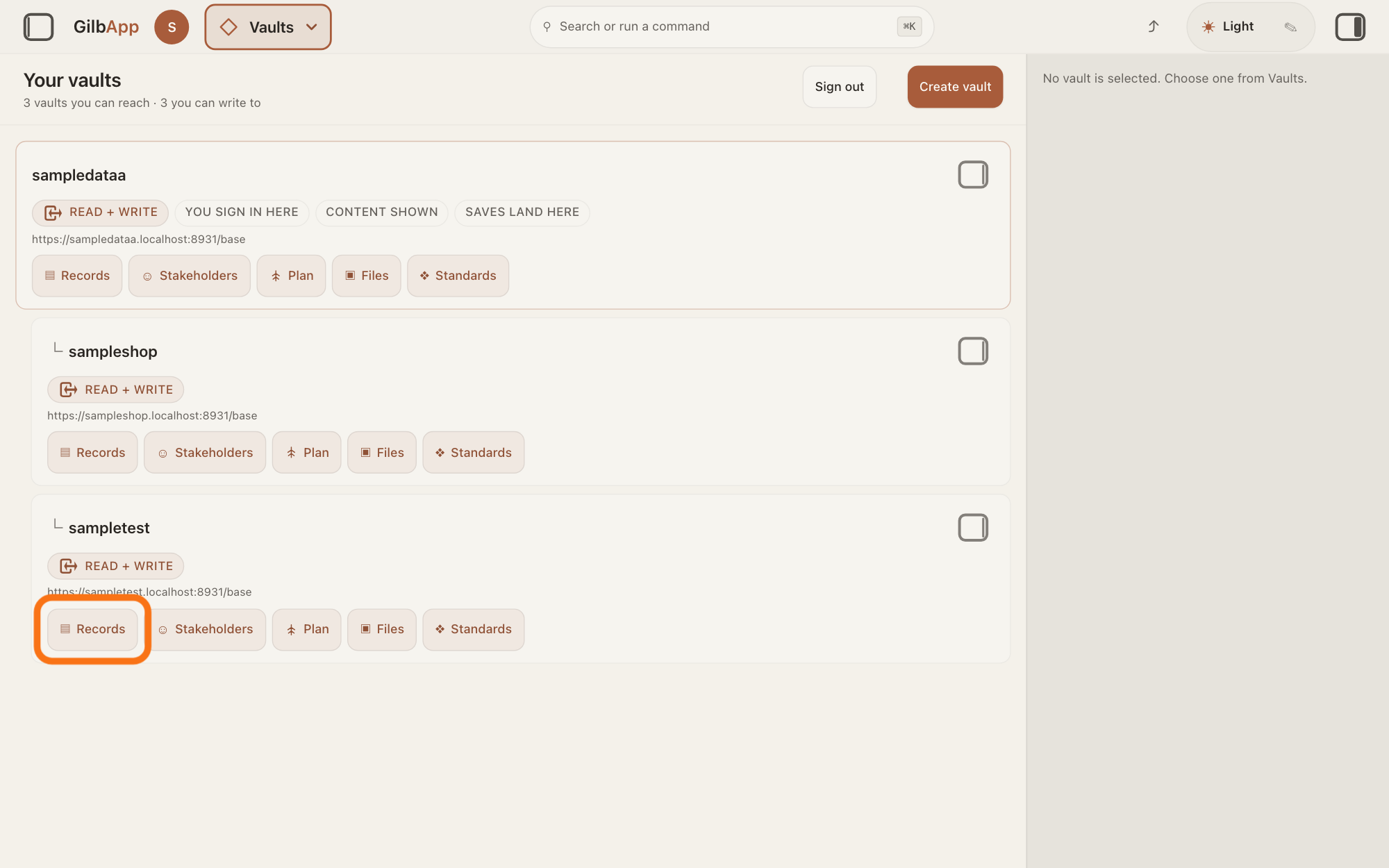
On the card of the vault your app writes in, press ▤ Records. The Records screen opens with that vault's records in a list.
Show as text
The middle of the screen lists your vaults as cards. On the card of the vault your app writes in, the button "▤ Records", the first in the row of buttons on the card, has the orange outline. Click it.
More about this
Its hover text is Open, the vault's name and in Records. The other buttons on the card, such as ▣ Files, open the vault in those sections; you do not need them here. Clicking the card itself only selects it, and the small square button at its top right, Show vault info, shows the vault's details. If you do not know which vault your app writes in, ask your AI.
Search and select a record in the list.
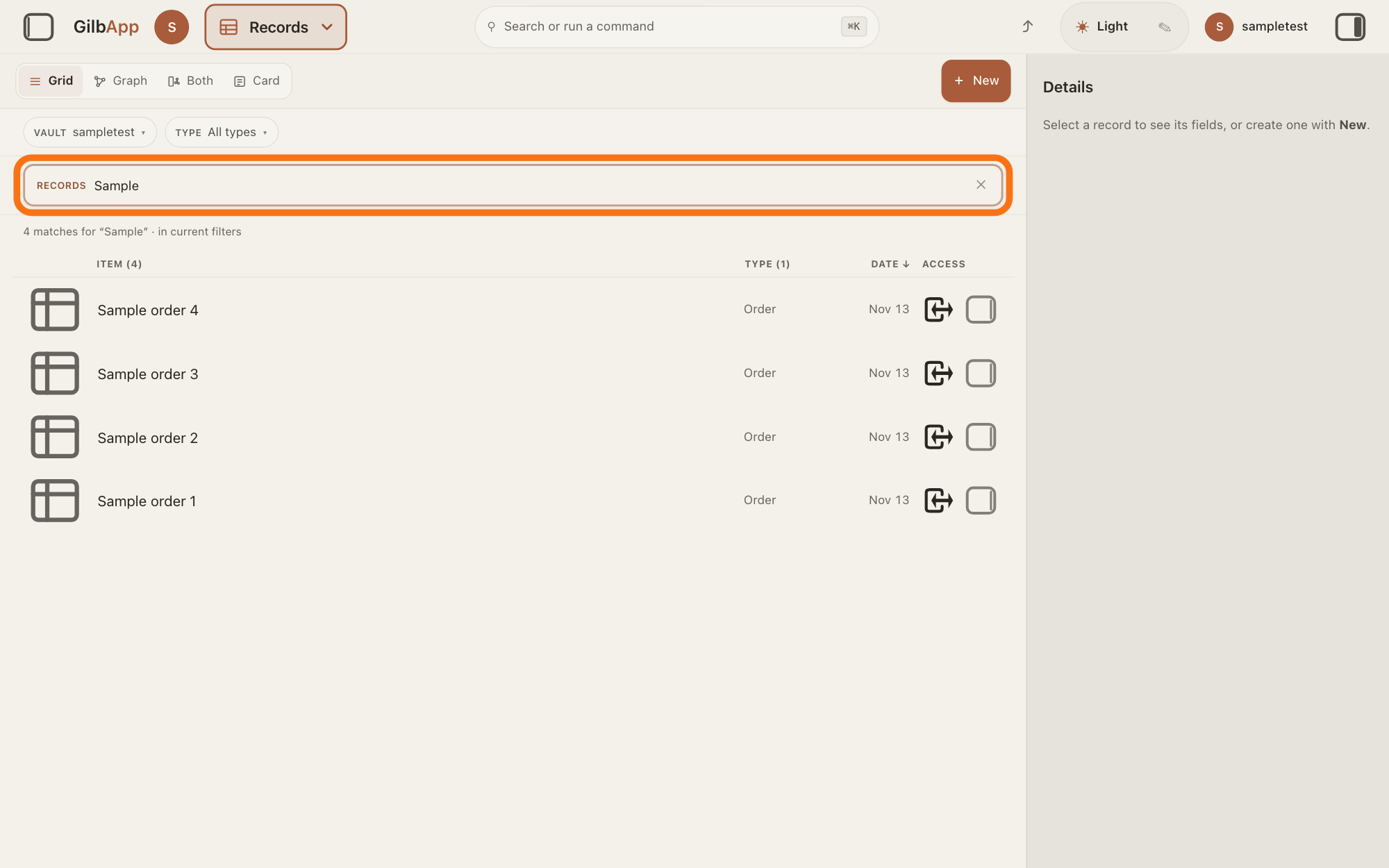
Type a word of the record's name in the search box marked RECORDS above the list, and click the record in the list. The record opens in the middle of the screen with its fields, the data your app saved in it.
Show as text
The middle of the screen lists the vault's records, with "VAULT" and "TYPE" above them. The search box marked "RECORDS", outlined in orange, holds a word, and the list shows the records whose name holds it. Click a record to see its fields.
More about this
To see only one kind of record, such as your app's orders, choose it under TYPE above the list; VAULT chooses which vaults the list shows. The column heads ITEM, TYPE and DATE sort the list. The right pane, headed Actions, holds what you can do with the record; the small square button at the right end of a row, Show card info, shows the record there and keeps the list. Above the list, the view buttons, such as Grid and Graph, change how the records are drawn, and + New makes a new record; you do not need them here. The answers How do I find a record? and How do I sort and filter the list? show more.
Deeper
Also asked:
Can I see the data my app has saved? Yes, the records in the vaults you can reach: in Vaults, press ▤ Records on the vault's card and select a record. What your users keep in their own vaults you see only if they share it with you.
Your app keeps its data in vaults, not in a database of its own, a store a program keeps its data in. A vault is the place where a person or a group keeps their records; a record is one piece of data with its own address, such as a person, a place, a thing or a note.
An app built on GilbPlatform does not keep its own copy of its users' data: it signs them in, then reads and writes in their vaults. So the people who use your app keep what they put in it in their own vaults, not in yours. While you try your app signed in as yourself, it reads and writes in your vaults, as it would for anyone.
What you can see: the records in the vaults you can reach, and what others have shared with you. You do not see what your app's users keep in their own vaults, unless they share it with you; your app gets no more than the signed-in person can. Content your app shows to everyone, such as a list of products, can be kept in a vault of yours that your app reads for everyone; the developer answer How does my app's server read its own vault? tells how. Which vault your app writes in, and which kinds of record, is decided while it is built: ask your AI if you are not sure.
You can also ask Jackfruit, the vault agent, in GilbApp's chat to list or read records for you; the answer How do I work with Jackfruit? shows how. Files your app stores, such as pictures, are in the vault too: ▣ Files on the vault's card opens them, and the answer How do I browse my files and pictures? shows more. Deleted records are not in the list; How do I delete a record, and can I get it back? tells where they go.
This answer is about your app's data. Your app's code is kept apart from it, in the app's own folder on your computer; GilbApp's chat does not reach the files on your computer unless you choose a code folder while Claude Code is connected. The answer How do I let my AI build in a folder on my computer from GilbApp's chat? shows how.
To take a copy of a whole vault, see How do I download a copy of my vault? Where the vaults themselves are kept is in the answer Where is my data stored?
This answer is written for a computer screen. In a window narrower than 840 pixels, such as a phone, the side panes are hidden and the right pane is Detail in the bar at the bottom.
Source: GilbApp 49b1ae53 (https://gilb.com/app/version.json, read 13 November 2026): src/shell/gilbAppMenuRows.ts:76 (Where your data lives. Open, create and share.), :122; src/components/VaultsView.tsx:153 (cards of the vaults you can reach), :257 (Show vault info), :290-305 (section buttons on the card); src/components/VaultSectionButtons.tsx:70-73 (▤ Records, ▣ Files), :125 (hover Open <vault> in <section>); src/components/records/RegisterScopedSearch.tsx:73-74; src/components/records/WorkingSetFacetBar.tsx:133-140 (Vault, Type); src/components/records/RecordGrid.tsx:1693 (Show card info). Standard Agent.Coder (Agent.Coder.GilbStack 7a: images in the app's own folder; 14a: an app's server and the developer's own vault), read 13 November 2026. Live help pages, sentences shared: Do I need a new vault for each app or project? (an app does not keep its own copy of its users' data); Can my app have its own users who sign in? (no more than the signed-in person can); How do I find a record?; How do I download a copy of my vault?; How does my app's server read its own vault?; How does Kai-Zen put a change live? (GilbApp's chat does not reach the files on your computer unless you choose a code folder while Claude Code is connected); How do I work with Jackfruit? Code-folder exception: GilbApp 49b1ae53 (https://gilb.com/app/version.json, read 13 November 2026), src/components/agent/AgentChat.tsx:677-692 and :1084-1090 (Choose a code folder, Code in, Claude Code only); live answer How do I let my AI build in a folder on my computer from GilbApp's chat?
Checked against GilbApp d529620.