
Where is what I tell Kai-Zen written down, and where is my plan kept?
Short answer
In your project's vault: press Main menu, choose Vaults, and press Plan on its card. The chat itself stays only in this browser tab.
Before you start
You need to be signed in to GilbApp on a computer, with a project Kai-Zen has set up in a vault. The pictures show a made-up person on a test site, with the right-hand pane closed; your screen shows your own name and address.
Words used here (6)
- project
- A project is work to bring about a change you want, such as a new app or a better way of doing something.
- GilbApp
- GilbApp is the app, opened in a web browser at https://gilb.com/app, where you open, fill and share your vaults.
- Kai-Zen
- Kai-Zen is the planning agent: it finds out what you want, chooses the way, hands the work to other agents and reports back.
- vault name
- A vault name is the short name your vault is known by on GilbPlatform: small letters and digits, the first part of its address.
- agent
- An agent is your AI following one written procedure, its standing instructions, for one kind of work.
- record
- A record is one piece of data with its own address, such as a person, a place, a thing or a note.
Steps
Press Main menu at the top left and choose Vaults.
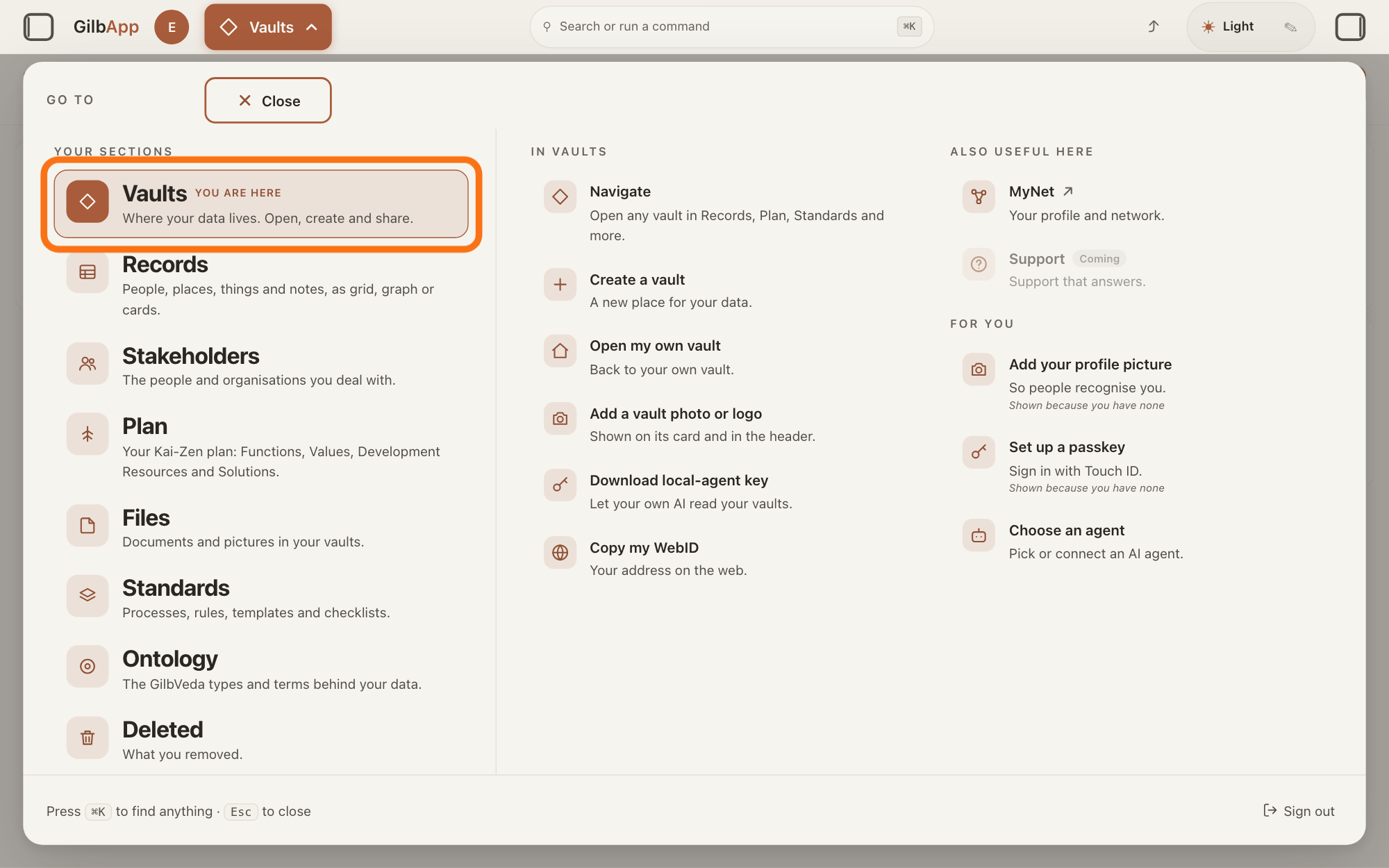
Press Main menu, next to your profile picture at the top left, and under YOUR SECTIONS choose Vaults. The button shows the name of the section you are in, such as Vaults.
Show as text
At the top left, "Main menu" is open and the panel headed "GO TO" fills the window. In the left column under "YOUR SECTIONS", the outlined row "Vaults" reads "Where your data lives. Open, create and share." Click it.
More about this
A panel headed GO TO opens; Vaults reads Where your data lives. Open, create and share. The Your vaults screen lists your vaults as cards: your own vault, and the project's vault with the name it was given when Kai-Zen set the project up.
On your project's vault card, press Plan.
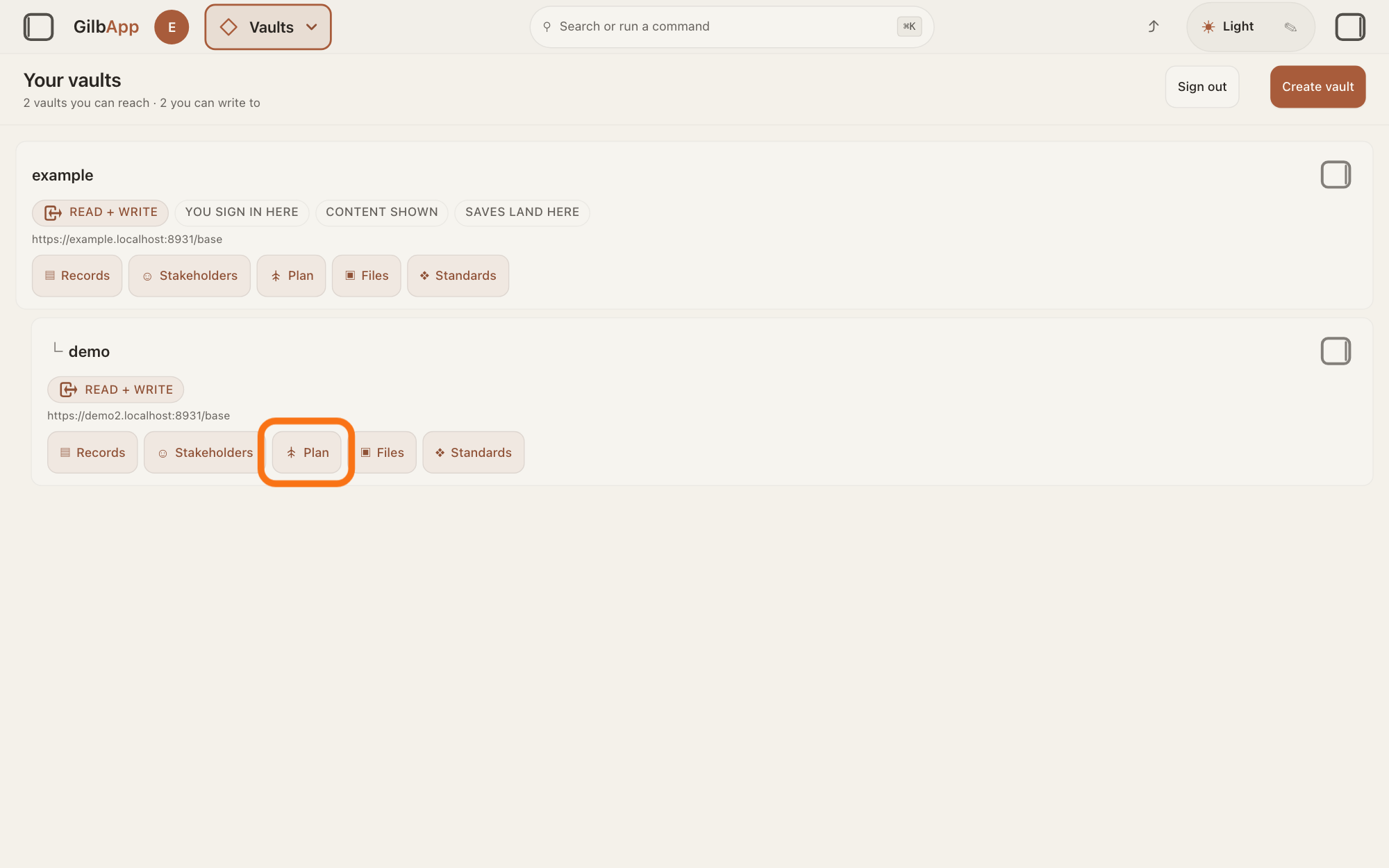
Find the card with your project's vault name and press Plan in the row of buttons on it. GilbApp opens the plan of that vault. In Main menu, Plan reads Your Kai-Zen plan: Functions, Values, Development Resources and Solutions.
Show as text
The "Your vaults" screen lists your vaults as cards. On the card of the project's vault, a row of buttons reads "▤ Records", "☺ Stakeholders", "Plan", "▣ Files" and "❖ Standards". Press "Plan", outlined in orange, to open the project's plan.
More about this
The left pane, where you chat, closes; your chat stays in this tab, and Choose an agent in Main menu opens it again. On the same card, ☺ Stakeholders opens the people and groups the plan is for, and ▤ Records every record in the vault, the set-up record among them; ▣ Files and ❖ Standards are not needed here. Pressing the card itself only selects it. If Plan is greyed, the line under the buttons says why, such as Plan opens once your vaults are read.
Deeper
Also asked:
Where does what I said get written down? In the project's vault: Kai-Zen stores a set-up record with your own words, its questions and your answers, and writes the plan as records in the same vault. The chat itself stays only in this browser tab.
Can I see everything I have told Kai-Zen? Not the chat: GilbApp keeps only its last 32 messages, in this browser tab only. What you told Kai-Zen is in the set-up record and the plan in the project's vault; read them there, or ask Kai-Zen in the chat what it wrote down.
Where do I find my plan in GilbApp? Press Main menu, choose Vaults, find your project's vault card and press Plan on it. GilbApp opens the plan of that vault.
What is a plan in GilbApp? The plan Kai-Zen writes with you: a set of records in the project's vault, shown as cards, saying whom the app is for, what it must do, how good it must be, the ways to build it, its limits and its steps. Plan in Main menu shows it.
What you tell Kai-Zen, the planning agent, is written down where the project is kept. For a new project, Kai-Zen offers a new vault first, a place on GilbPlatform where records are kept, and does all the planning there; you may choose a folder on your computer instead, or both. One vault holds one project.
When it sets up the project, Kai-Zen stores one set-up record in the project's vault and reads it back. It holds, in your own words, what the project should change and for whom; each question Kai-Zen asked, with its default and your answer; and each thing it assumed for you. A record is one piece of data with its own address, such as a person, a place, a thing or a note. Your words go whole to the agents that write the plan; they do not rename or rewrite them. The plan is a set of records in the same vault: whom it is for, what the app must do, how good it must be, the ways to build it, its limits and its steps. Kai-Zen also keeps the project's reports and handoffs there; a handoff is the note Kai-Zen writes when you end a session: what was done, what is open and where to start next time.
The chat is not kept: GilbApp keeps it in this browser tab only, and only its last 32 messages, so closing the tab ends it. You do not need it: Kai-Zen reads the project itself and does not ask again what you already answered. To see later what you told Kai-Zen, read the set-up record and the plan, or ask Kai-Zen in the chat what it wrote down.
The project's records are not public unless you share them; the answer How do I share a vault with a person? shows how. To keep a copy yourself, see the answer How do I download a copy of my vault?
If you chose a folder on your computer, GilbApp does not show it: from GilbApp's chat Kai-Zen works only with the vault, unless you choose that folder as a code folder while Claude Code is connected, and otherwise a folder on your computer needs Claude Code in Terminal. The answer How do I let my AI build in a folder on my computer from GilbApp's chat? shows how.
This answer is written for a computer screen.
Source: GilbApp 96968de7 (live build, 12 November 2026): src/shell/gilbAppMenuRows.ts:75-76 (Vaults, Where your data lives. Open, create and share.), :162-163 (Plan, Your Kai-Zen plan: Functions, Values, Development Resources and Solutions.); src/components/VaultsView.tsx:113 (Your vaults), :216-235 (the card selects), :294-306 (the card's section buttons); src/components/VaultSectionButtons.tsx:26 (Plan opens once your vaults are read), :69-75 (buttons Records ▤, Stakeholders ☺, Plan, Files ▣, Standards ❖), :139-149 (the reason shown under the row); src/components/AppShell.tsx:909-923 (Plan opens the named vault and closes the left pane); src/components/agent/AgentChat.tsx:1-5 (the chat stays in this tab). Kai-Zen standards: Kai-Zen.New.Setup; Kai-Zen.ProjectRules (Outcome, Vault, Files); Kai-Zen.NoPlacing. GilbVeda t:ProjectSetup (Project Setup). Live help pages, shared: What can my AI see and do in my vault, and does it remember? (32 messages; handoff); How do I continue a project with Kai-Zen?; Do I need a new vault for each app or project? (folder needs Claude Code in Terminal); What is a record?; How do I download a copy of my vault? (step 1 words); How do I start work with Kai-Zen? (Choose an agent opens the left pane); How do I answer Kai-Zen's questions? (does not ask again). Code-folder exception: GilbApp 49b1ae53 (https://gilb.com/app/version.json, read 13 November 2026), src/components/agent/AgentChat.tsx:677-692 and :1084-1090 (Choose a code folder, Code in, Claude Code only); live answer How do I let my AI build in a folder on my computer from GilbApp's chat?
Checked against GilbApp d529620.