
Who is a standard's authority?
Short answer
Press Main menu, choose Standards, press Policies, choose the policy, and read the Authority: line above its card.
Before you start
You need to be signed in to GilbApp on a computer, with a policy or a procedure in a vault you can read, such as your own vault. The pictures show a made-up person on a test site; your screen shows your own name and address.
Words used here (6)
- GilbApp
- GilbApp is the app, opened in a web browser at https://gilb.com/app, where you open, fill and share your vaults.
- record
- A record is one piece of data with its own address, such as a person, a place, a thing or a note.
- entry condition
- An entry condition is something that must be true before a process may start; a process starts only when its entry conditions hold.
- exit condition
- An exit condition is what must be true before a process may finish; when it is true, the process hands back.
- agent
- An agent is your AI following one written procedure, its standing instructions, for one kind of work.
- Procedure
- A Procedure is the kind of standard that holds an agent: who you call, and the steps that agent runs, in order.
Steps
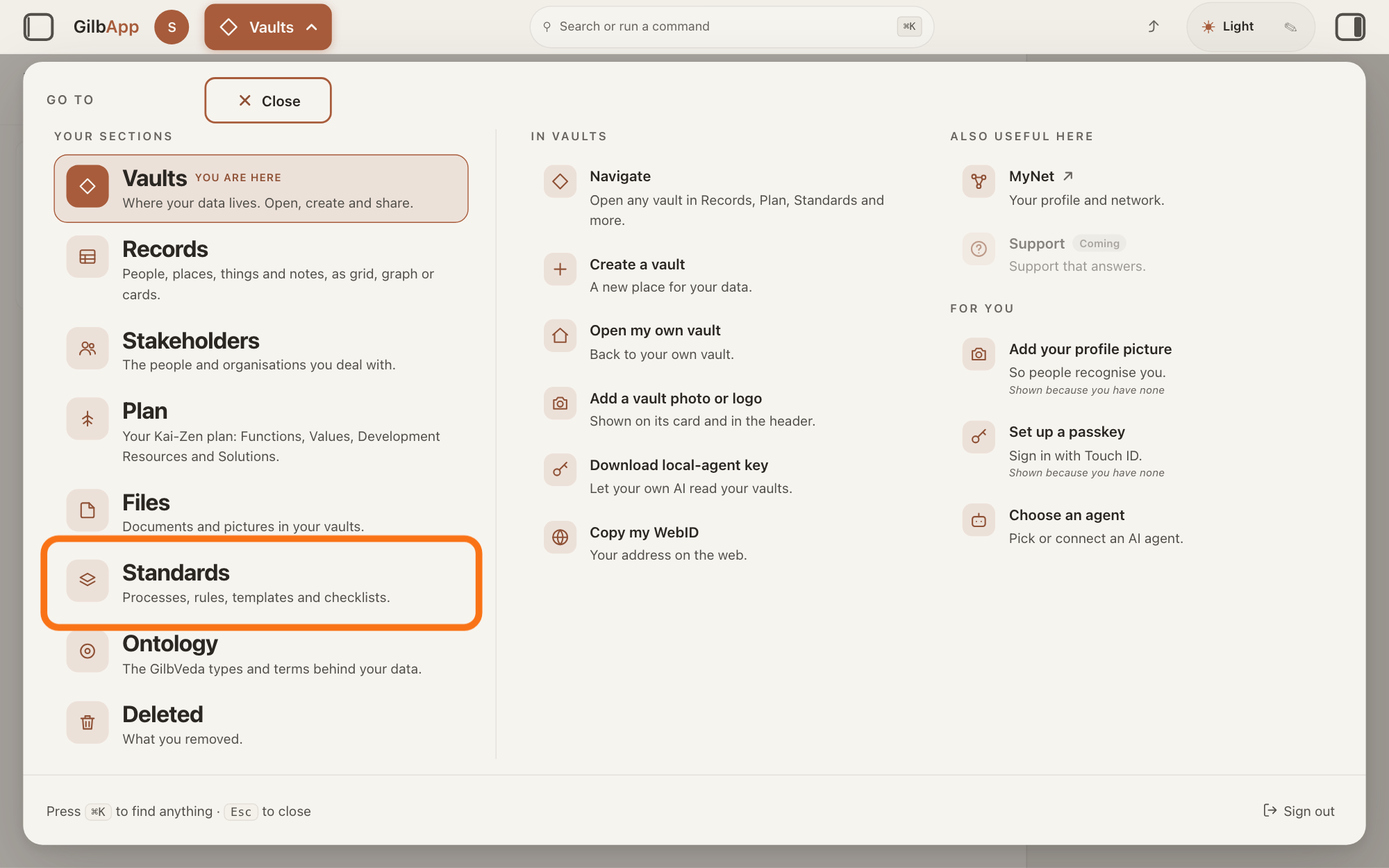
Press Main menu at the top left and choose Standards.
Press Main menu, next to your profile picture at the top left, and under YOUR SECTIONS choose Standards. The button shows the name of the section you are in, such as Vaults.
Show as text
The panel headed "GO TO" covers the screen. In the left column under "YOUR SECTIONS", the row "Standards" with the line "Processes, rules, templates and checklists." is outlined. Press it to open the Standards screen.
More about this
A panel headed GO TO opens; Standards reads Processes, rules, templates and checklists. Standards opens on the vault you picked in Vaults, or on your own vault if you picked none; a vault is the place where a person or a group keeps their records. It opens on the tab Processes, with Process chosen in the row under the tabs. A process is a standard that holds work: entry conditions, steps in order, and exit conditions; a standard is a written procedure, rule set, form or other guide that people and agents follow as they work. On the right, VAULT changes the vault, STANDARDS GROUP shows only the standards of one group, and + New group, shown only where you may write in the vault, makes a group; you need none of them here.
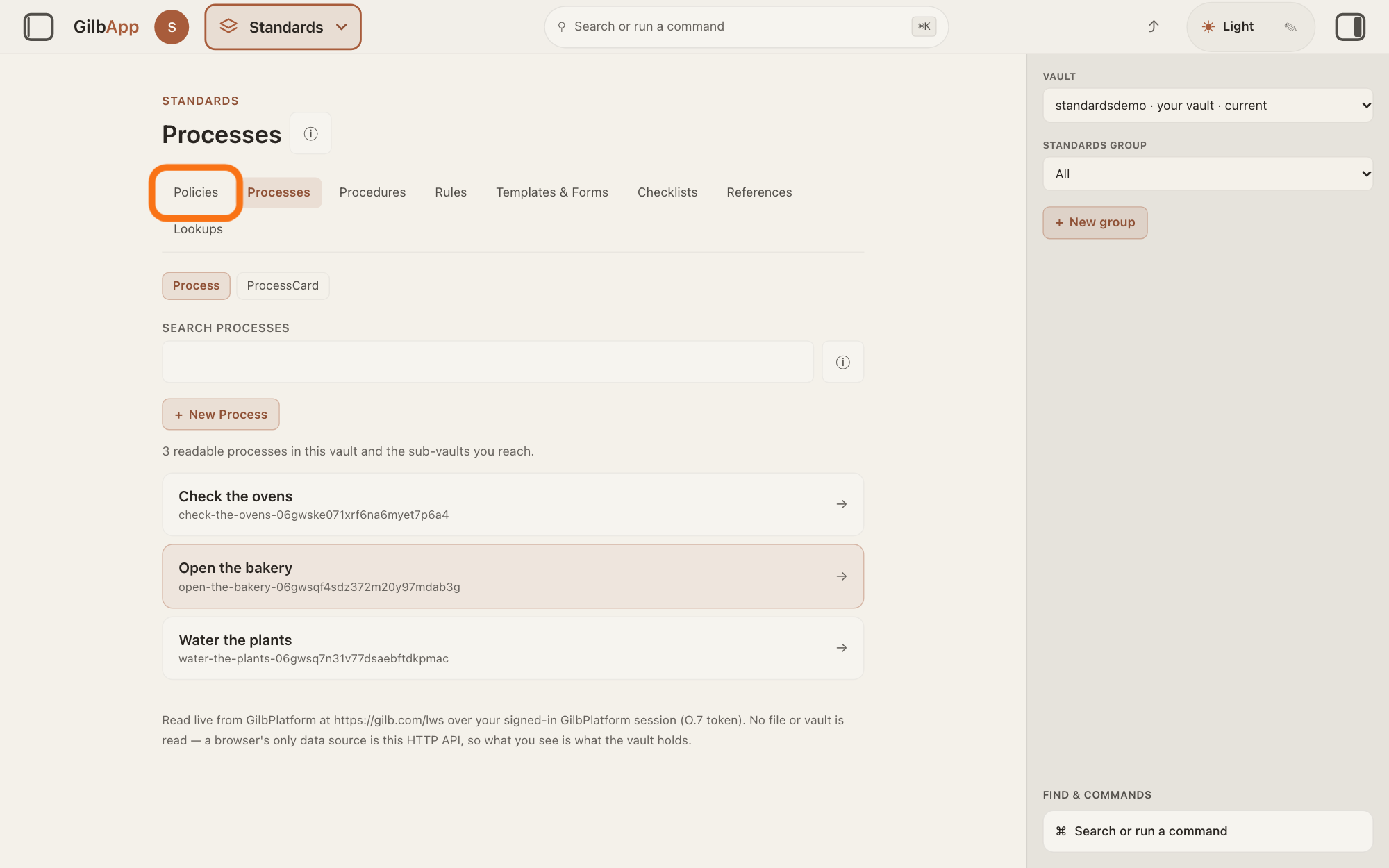
Press Policies in the row of tabs.
Press Policies, the first tab in the row of tabs. The screen is headed Policies; press ⓘ beside the heading and a line says Select a policy to read the statements it holds.
Show as text
Near the top of the middle, in the row of tabs, the first tab "Policies" is outlined. The tab "Processes" is the one open now. Press "Policies".
More about this
A policy is the kind of standard that holds principles for people who decide later. Only policies and procedures show an authority: Procedures, the third tab, works the same way. Processes, Rules, Templates & Forms, Checklists, References and Lookups show no authority line.
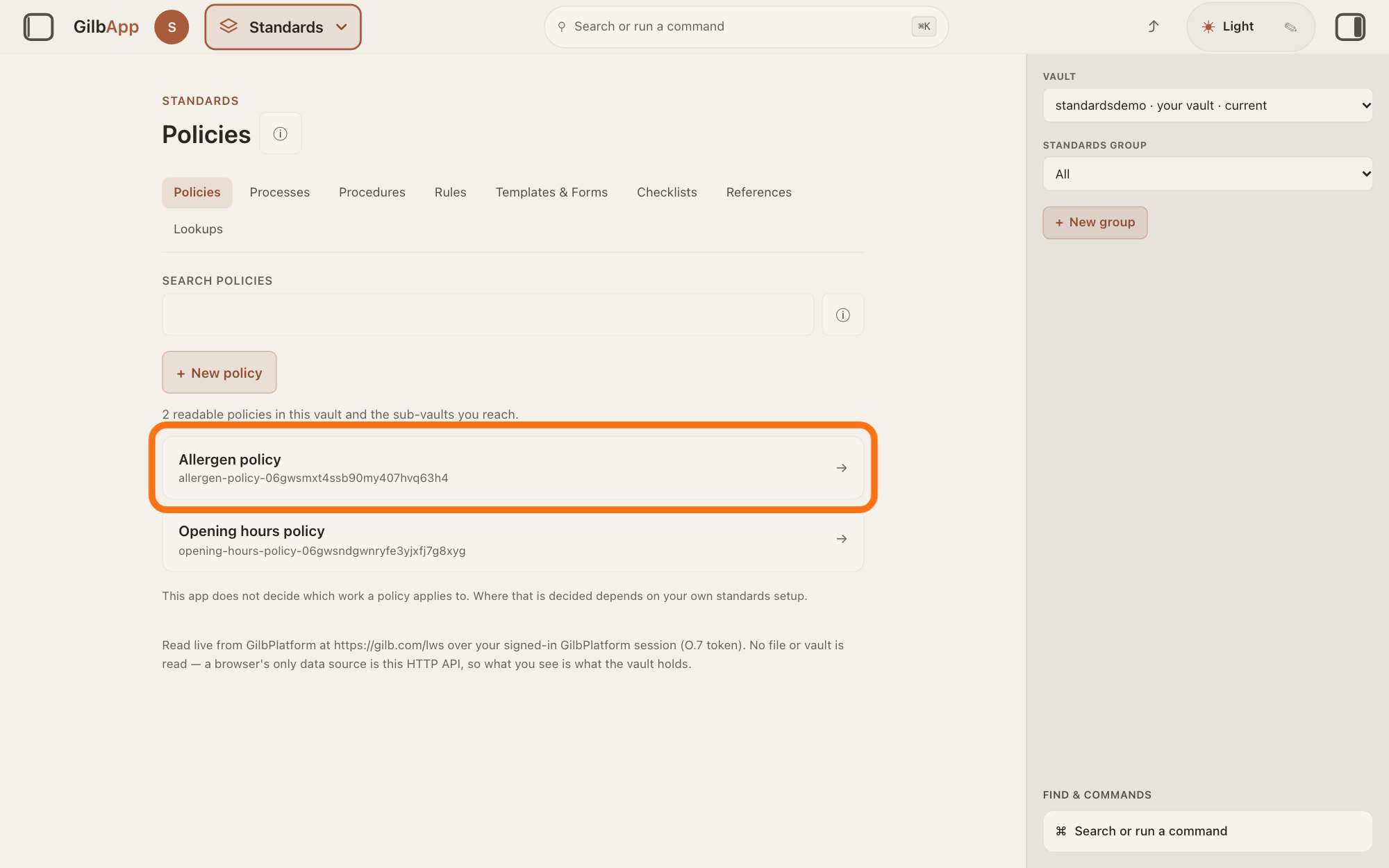
Choose the policy in the list.
Click the policy's row in the list. The policy opens: a card with POLICY and its title, and the statements it holds below it.
Show as text
The screen is now headed "Policies". Under "SEARCH POLICIES" and "+ New policy", two made-up policies are listed; the row Allergen policy is outlined. Press it to open the policy.
More about this
If the list is long, type a word of its title in the box SEARCH POLICIES above the list first. If the vault holds no policy, the screen says "No policies are onboarded into this vault yet. Nothing was invented — the vault returned no readable policy." + New policy makes a new one; you do not need it here. All policies goes back to the list.
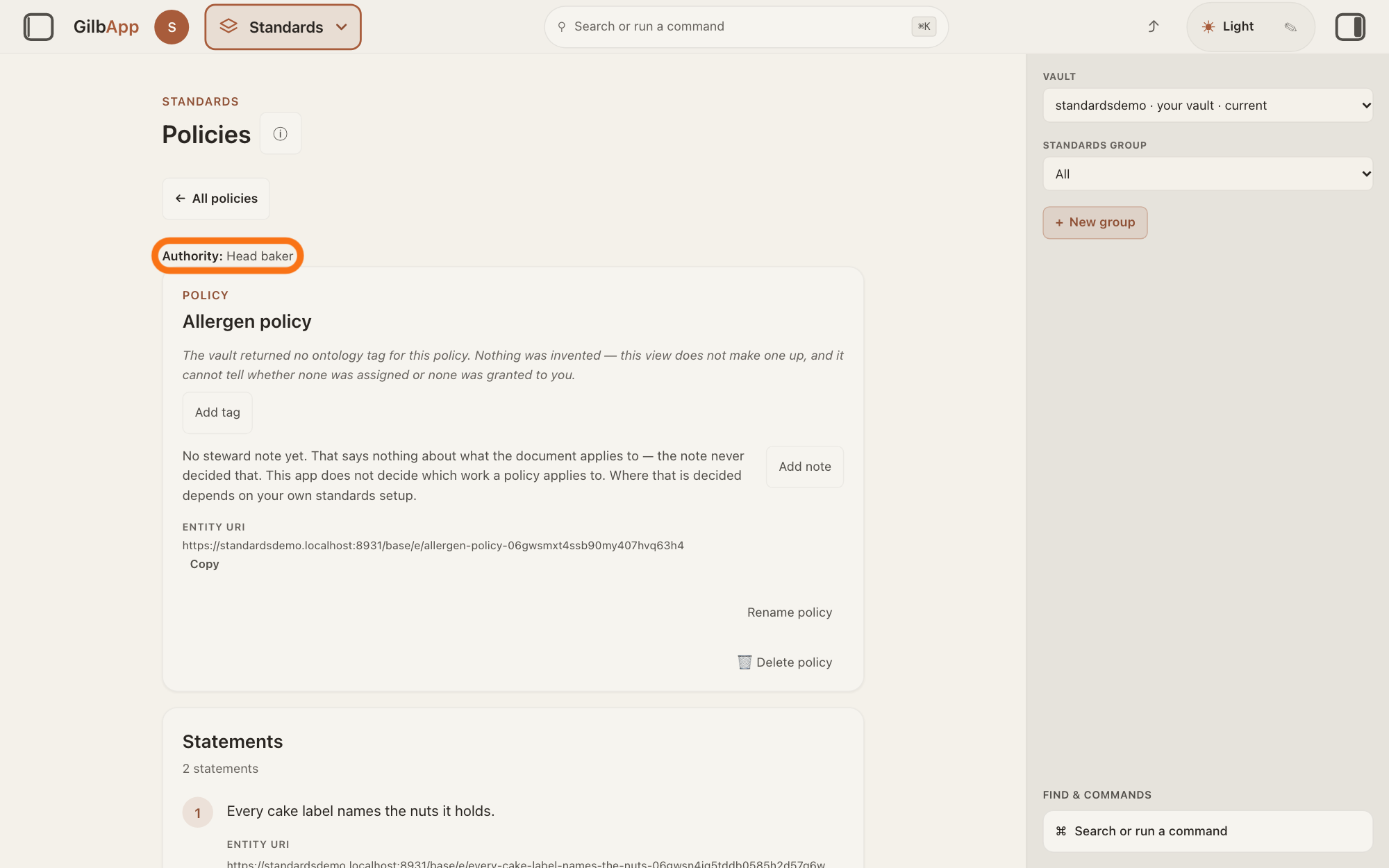
Read the Authority: line above the policy's card.
Read the line above the card: Authority: and then the person or body who established the policy, in the words saved with it.
Show as text
The policy is open. Above its card, under "All policies", the line "Authority: Head baker" is outlined. Read who set the policy there; a policy with no authority shows no such line. The card below shows "POLICY" and Allergen policy.
More about this
If the policy names no one, the line reads "This policy does not name who established it, so this screen cannot say who did. Nothing was guessed." GilbVeda, the shared list of terms, calls authority the power to decide, influence or enforce a matter. GilbApp asks for the authority only in the form that makes a policy or a procedure, in the box AUTHORITY (optional); the answer on writing a new standard shows that form. On a procedure the line reads the same, with procedure in place of policy. The card's other controls, Add tag or Edit tag, Add note or Edit note, ENTITY URI with Copy and, if you may write in the vault, renaming, deleting and Add statement, change it or have their own answers; you do not need them here.
Deeper
The Authority: line says who established a policy or a procedure. It does not say who may change it: whoever holds write access to the vault a standard lives in may change it (GilbPlatform.StandardRules.Owner, © 2026 Kai Gilb). Nor does it say who owns the words: the standards Kai Gilb publishes on GilbPlatform belong to Kai Gilb, and the terms for them do not cover the standards customers write in their own vaults (GilbPlatform.Licence.Copyright, © 2026 Kai Gilb).
A template, under Templates & Forms, holds a blank form and filled examples, each one a specimen, a part of the template. GilbApp marks each specimen at the start of its line with what it is: BLANK, a form to copy and fill in; EXAMPLE, a filled one to follow; COUNTER-EXAMPLE, a filled one not to follow; or GUIDANCE, words on how to use the template. Role not declared means the specimen does not say what it is; GilbApp does not guess it from the specimen's heading or words. A specimen you add in GilbApp carries no role, so it reads Role not declared: GilbApp has no control to set one.
This answer is written for a computer screen. In a window narrower than 840 pixels, such as a phone, the side panes are hidden and the right pane is Detail in the bar at the bottom.
Source: GilbApp af0f04ee838a4d55887d2ff1f72edd49a4ff7ca0 (https://gilb.com/app/version.json read 2026-11-10, buildTime 2026-11-09.522Z, dirty false), read: shell/gilbAppMenuRows.ts:220-230 (Standards, Processes, rules, templates and checklists.); components/AppShell.tsx:658 (default tab processes); components/process/standardsTabs.ts:9-25 (tab order Policies, Processes, Procedures, Rules, Templates & Forms, Checklists, References, Lookups); components/process/StandardsControls.tsx:66-71 (Vault, CSS capitals), :128-145 (Standards group, CSS capitals, option All); components/process/StandardsSection.tsx:1870-1874 (Policies, Select a policy to read the statements it holds.); components/process/PoliciesTab.tsx:238-262 (the row opens the policy), :432-433 (no policies sentence), :339-343 (+ New policy), :362-372 (Authority (optional), CSS capitals, help text Who established this policy — a person or a body.), :191-201 (absence sentence), :562 (All policies), :597 and :611 (the authority line above the card; eyebrow Policy, CSS capitals per ProcessViewer.tsx:1958-1963); components/process/StandardsSearchBox.tsx:339-344 (Search + policies, CSS capitals); components/process/StandardsDocumentAuthority.tsx:65-79 (Authority: then the saved string, or the absence sentence); components/process/ProceduresTab.tsx:193-202 (the procedure sentence), :626 (the same line on a procedure); StandardsDocumentAuthority (non-test code): drawn only by PoliciesTab and ProceduresTab; components/process (non-test code): written only by the two create forms; components/process/StandardsUnitRole.tsx:56 (Role not declared), :70-75 (blank, example, counter-example, guidance), :114 (title: nothing inferred from heading or body), :127 (uppercase CSS); components/process/ProcessViewer.tsx:1069-1079 (role first on the line); components/process/TemplatesTab.tsx:478-480 (a specimen created in GilbApp carries no role). GilbVeda public read 2026-11-10: t:Authority (Approved: "a specific level of power to 'decide' or 'influence' or 'enforce' a specific matter"), t:SpecimenRole (Suggested: blank, example, counterExample, guidance, declared, never inferred), t:Policy, t:Template. Standards,: GilbPlatform.StandardRules (J 06gew6ngqsvpd5wygjv0gp4gg0, 2026-11-10) rules Owner (Whoever holds write access to the vault a standard lives in may change it.) and Kinds (a Policy holds principles for people who decide later); GilbPlatform.Licence (J 06gj9wh899wc7cbn72ek2q8pgc) rule Copyright ("The standards Kai Gilb publishes on GilbPlatform ... belong to Kai Gilb. These terms do not cover standards customers write in their own vaults."). Rechecked 2026-11-11 against the live builds GilbApp ebd9415e7a90de8c289eaa7bb02f40c8ee80cf79 (https://gilb.com/app/version.json, buildTime 2026-11-11.937Z) and GilbPlatform 498d29a0dec9a15d167f4b6b5d731382a6bcede0 (https://id.gilb.com/version): the diff from af0f04ee to ebd9415e changes none of the files cited here except AppShell.tsx (line 658 unchanged); the diff from 4d008a55 to 498d29a0 changes none of the platform files cited here.
Checked against GilbApp d529620.