
← Who it is for (Stakeholders)
How do I see all my stakeholders?
Short answer
Press Main menu and choose Stakeholders to see the stakeholders in every vault you can read, as one list.
Before you start
You need to be signed in to GilbApp on a computer. The pictures show a made-up person on a test site; your screen shows your own name and address.
Words used here (2)
Steps
Press Main menu at the top left and choose Stakeholders.
Press Main menu, next to your profile picture at the top left, and under YOUR SECTIONS choose Stakeholders. A stakeholder is a person, group or system that cares whether a Value goes up or down.
Show as text
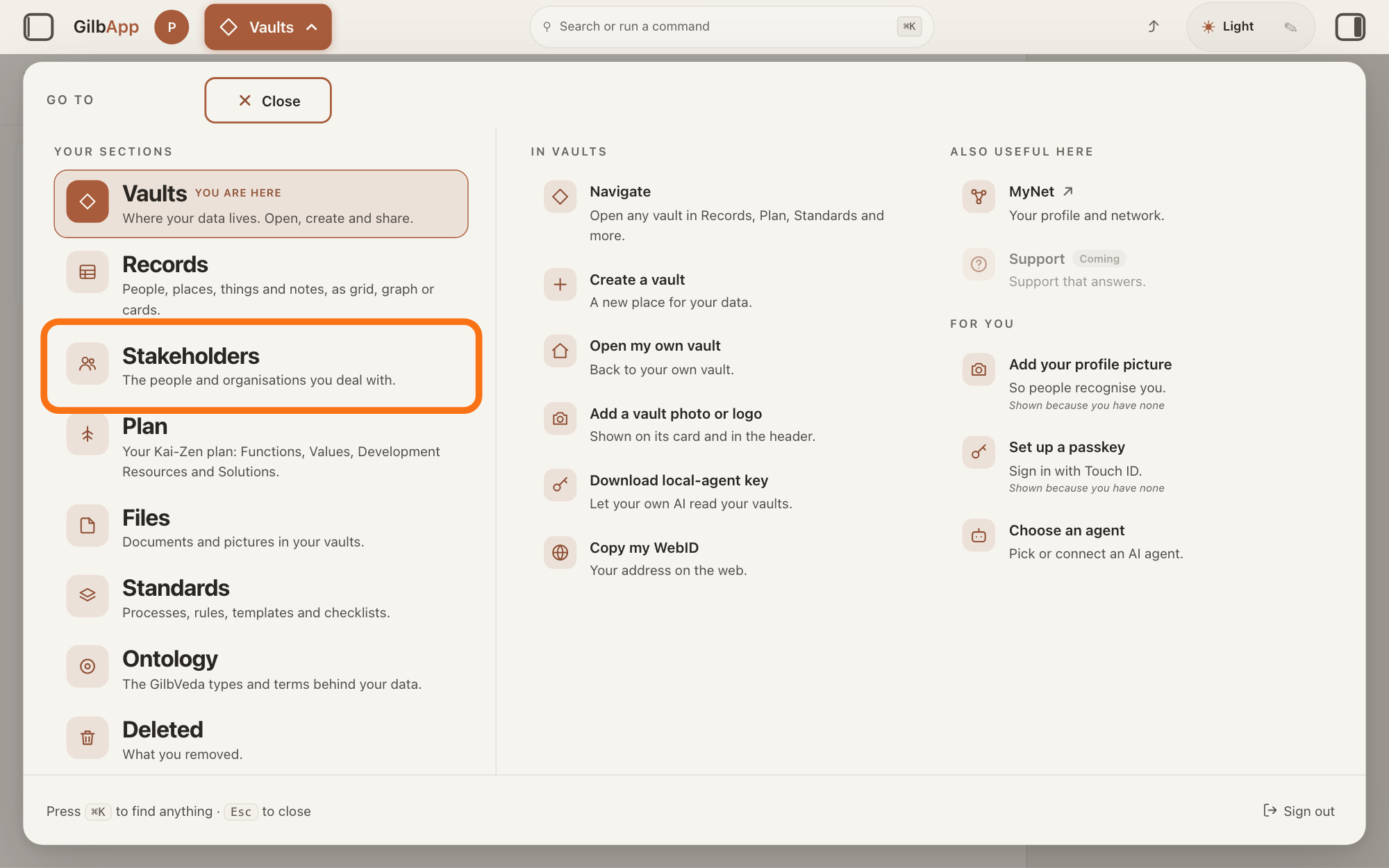
At the top left, press "Main menu" (it shows the name of the section you are in). In the panel headed "GO TO", look under "YOUR SECTIONS" and press "Stakeholders", "The people and organisations you deal with.", outlined in orange.
More about this
The button shows the name of the section you are in, such as Vaults. A panel headed GO TO opens; Stakeholders reads The people and organisations you deal with. The list holds the stakeholders of every vault you can read; a vault is the place where a person or a group keeps their records. The Stakeholders button on the card of a vault in Vaults shows that vault alone. The views Grid, Graph, Both and Card change only how the list is shown; Grid is the list.
Choose a row to open that stakeholder.
Click the stakeholder's row in the list. Its card opens in the middle of the screen.
Show as text
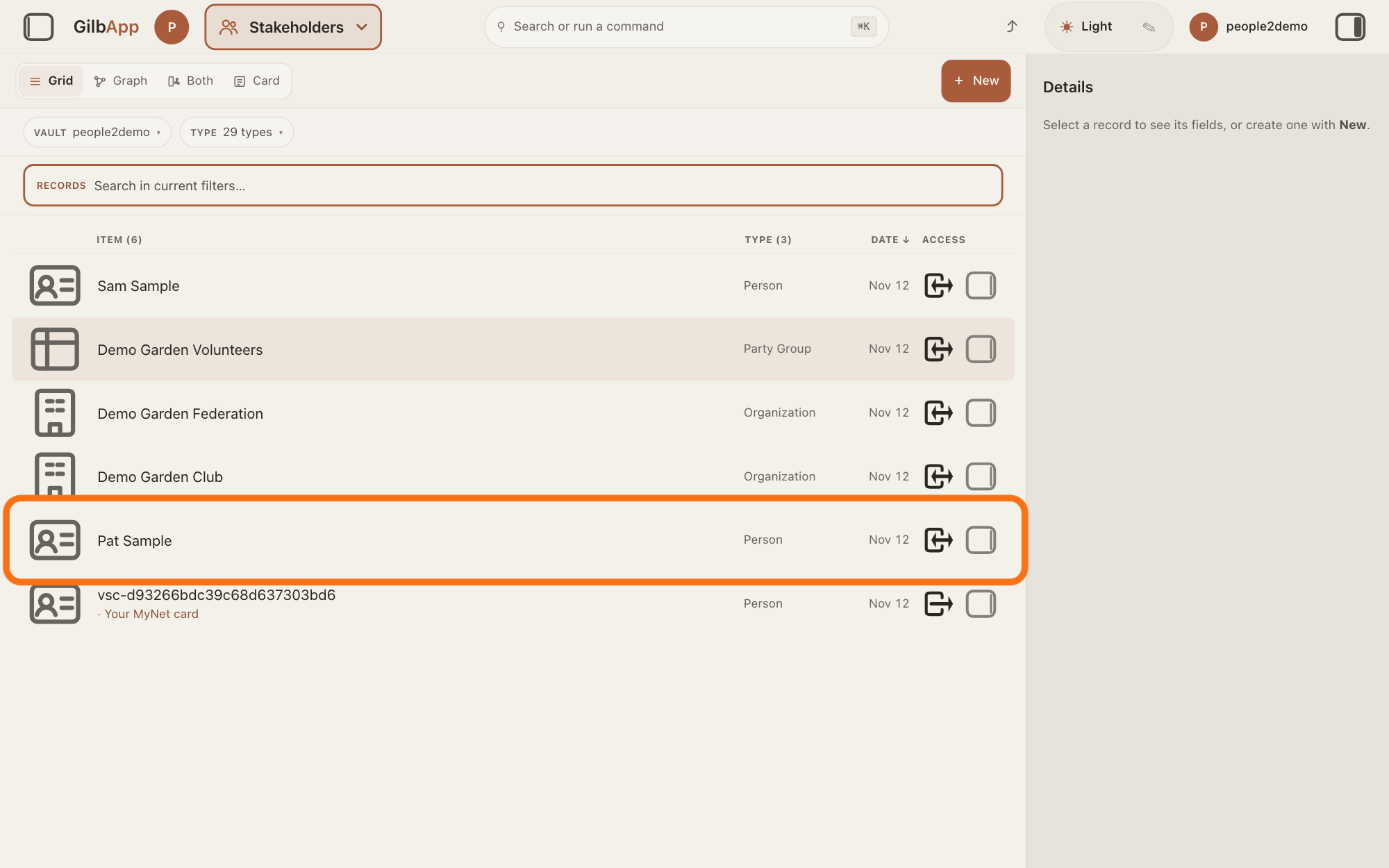
The "Stakeholders" screen lists every person and organisation in the vault, with "TYPE", "DATE" and "ACCESS" columns. Press a row, outlined in orange, to open that stakeholder's card.
More about this
The list also holds organisations, systems and groups; the TYPE column says what each is. ITEM, TYPE and DATE over the list sort it, as the answer on sorting and filtering the list shows. With several vaults, a line over the list says how many rows came from how many vaults, such as 12 rows from 2 of 2 vaults read; Not all loaded names any vault whose rows are not all shown, and why. People you placed in your circles in MyNet, Gilb's app for your profile and network, are rows too, with a chain-link sign on their picture (hover text Live link to their account — not a copy). Such a person with no card of yours is a row you can read but not change; until its name is read it shows Name not read yet. Your own card says Your MyNet card, Your own card or Your own card, not the one MyNet shows under its name.
Deeper
Also asked:
What is Stakeholders in the menu, and how is it different from Records? Both open the same list. Records is for records of every kind: its menu line reads People, places, things and notes, as grid, graph or cards. Stakeholders shows only the people, organisations and other stakeholders, from every vault you can read.
What is the difference between Records and Stakeholders? Stakeholders is the Records list narrowed to stakeholders, from every vault you can read. Choose other vaults or types by hand and Main menu reads Records again.
Each row is one card. GilbApp never joins two cards because they have the same name: two cards of one person, say in two vaults, are two rows. Only cards linked to the same person's online card, the card a person keeps about themselves on GilbPlatform, show as one row, the newest; the others are reached from that card. The answer on avoiding adding the same person twice shows how to check.
The people from your circles show only when the list holds every vault you can read, not when it was opened from a vault's card. If their name cannot be read, the row shows Name could not be read.
Choosing vaults or types by hand under VAULT or TYPE narrows the list, and Main menu then reads Records, as the list is then an ordinary records list. Find a person in the GO TO panel puts you in the search box of this list.
This answer is written for a computer screen.
Source: GilbApp af0f04ee (https://gilb.com/app/version.json read 2026-11-10); live bundle gilb.com/app/assets/index-CEVUjjQB.js for the gilb-stakeholders-ui words. Step 1 first part first part (stakeholder gloss from the published What is a Stakeholder?). gilbAppMenuRows.ts:142-156 (Stakeholders, its line, Find a person); stakeholdersEntry.ts:1-30 (type set from the master, every held vault; one vault named when one is held; the vault card's button names one vault), :60-90 (the menu calls it Stakeholders only while the set is exactly that; by hand otherwise Records); workingSetLoadVaults.ts:44-53 (held = every vault you can read); onlineStakeholders.ts:1-20 (circle people as rows; one row when a local record is linked by a:sameAs; no local record = read-only row), stakeholdersEntry.ts:66-90 (`everyHeldOnly`: online rows only for the every-vault set); RecordGrid.tsx:1124-1160 (row click opens), :1462-1530 (online row, name, read only), :1600-1605 (LinkBadge on the face), :1720-1745 + OwnCardBand.tsx:23-25, :98-101 (own-card words), :1216-1220 + :1960-2000 (coverage line, Not all loaded); bundle: LinkBadge title Live link to their account — not a copy, NAME_NOT_YET Name not read yet, NAME_NOT_READ Name could not be read; sectionMenuList.ts:305-306 (MyNet Your profile and network.). GilbApp 49467c2b (https://gilb.com/app/version.json, read 14 November 2026): src/shell/gilbAppMenuRows.ts:115-148 (Records: People, places, things and notes, as grid, graph or cards.; Stakeholders), src/components/records/stakeholdersEntry.ts:1-30 (the same list, set to the stakeholder types and every vault you hold).
Checked against GilbApp d529620.