
← Changing your mind while building
How do I start my project over?
Short answer
Press Main menu, choose Choose an agent, choose Kai-Zen - Master Agent of Planning, type that you want a new project, and press Send.
Before you start
Your own AI, Claude Code or Grok, connected in GilbApp's chat. The pictures show a made-up person on a test site; your screen shows your own name and address.
Words used here (6)
- agent
- An agent is your AI following one written procedure, its standing instructions, for one kind of work.
- Kai-Zen
- Kai-Zen is the planning agent: it finds out what you want, chooses the way, hands the work to other agents and reports back.
- project
- A project is work to bring about a change you want, such as a new app or a better way of doing something.
- GilbApp
- GilbApp is the app, opened in a web browser at https://gilb.com/app, where you open, fill and share your vaults.
- Jackfruit
- Jackfruit is the vault agent: it finds, reads, writes and links records in your vaults, and makes new vaults for you.
- GilbPlatform
- GilbPlatform is the service that keeps people's and organisations' data in vaults, each at its own web address.
Steps
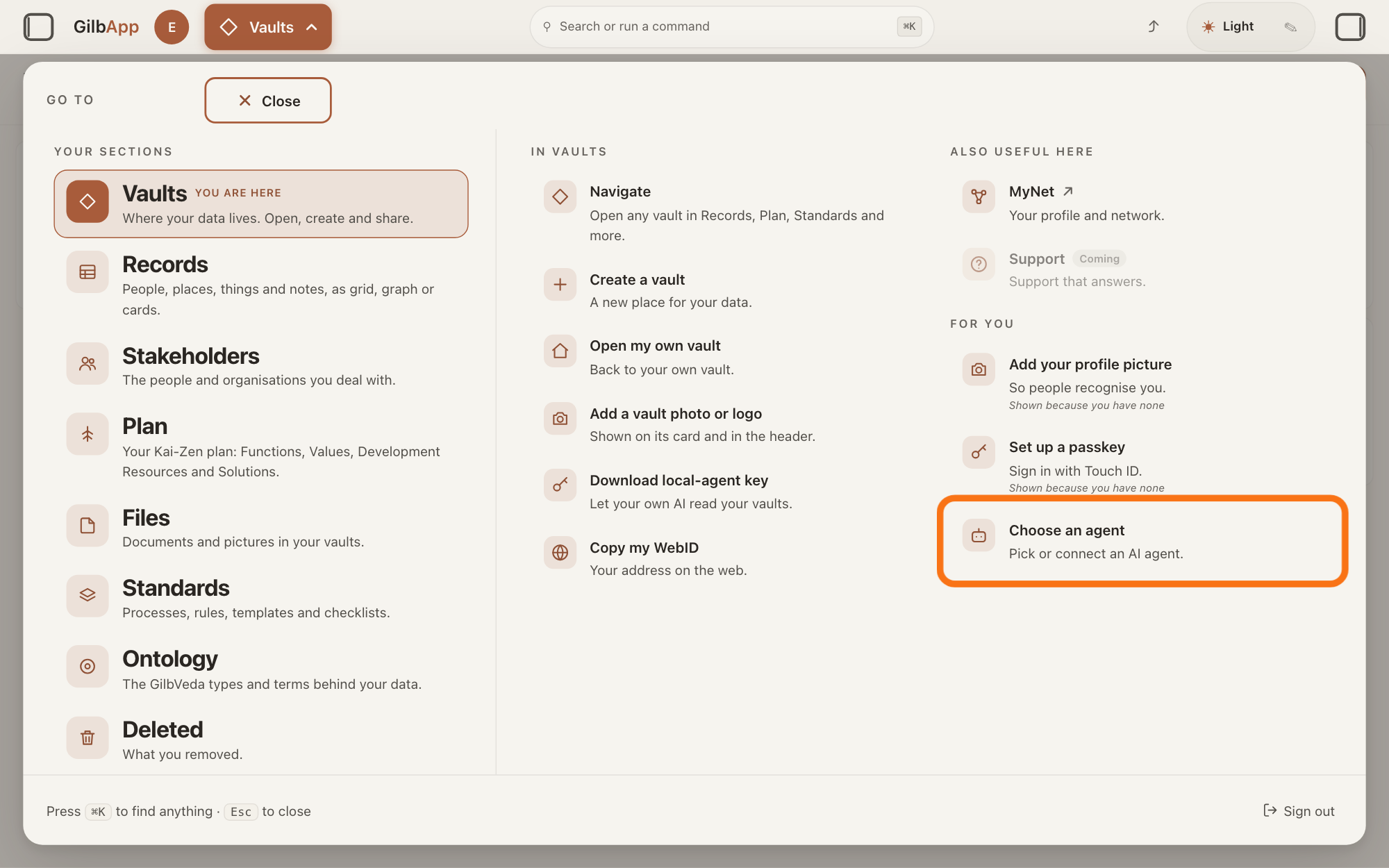
Press Main menu at the top left and choose Choose an agent.
Press Main menu, next to your profile picture at the top left, and under FOR YOU choose Choose an agent (Pick or connect an AI agent.). GilbApp opens the left pane, where you chat, and puts the cursor on the agent list at the top of it.
Show as text
The panel headed "GO TO" is open. In the right-hand column under "FOR YOU", the outlined row reads "Choose an agent" and "Pick or connect an AI agent." Click it; the chat opens in a pane on the left.
More about this
The button shows the name of the section you are in, such as Vaults. The square button at the far left of the top bar also shows or hides the left pane. You can also search for Choose an agent in Search or run a command.
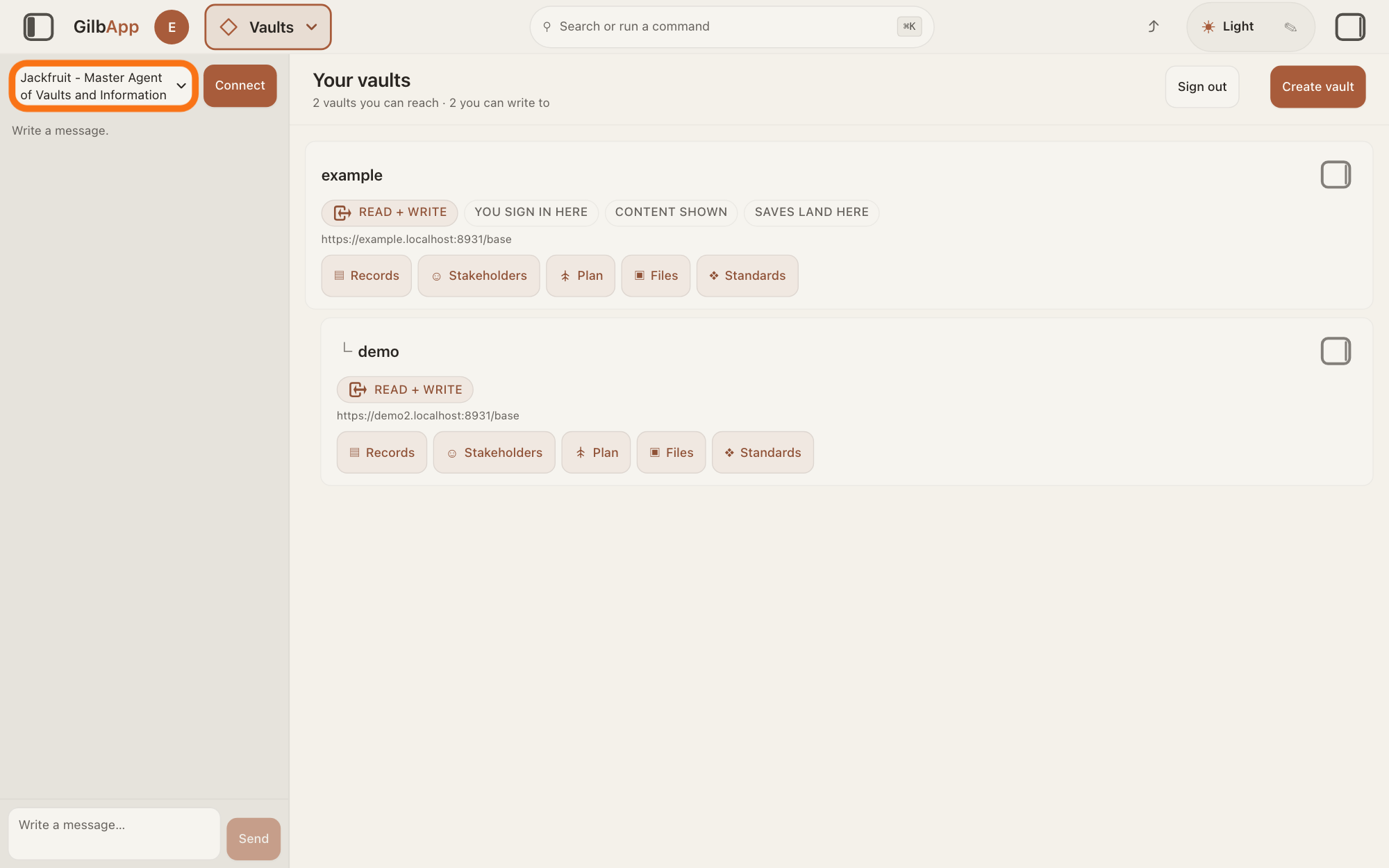
Choose Kai-Zen - Master Agent of Planning in the agent list.
Press the agent list at the top of the left pane and choose Kai-Zen - Master Agent of Planning. Each agent has its own chat, and the list shows which one you are in.
Show as text
The chat is open in a pane at the left. At the top of that pane the outlined agent list reads "Jackfruit - Master Agent of Vaults and Information", the first pick. Click the list and choose "Kai-Zen - Master Agent of Planning".
More about this
A new chat starts on the first agent in the list, Jackfruit - Master Agent of Vaults and Information. The list comes from GilbPlatform each time the chat opens. GilbApp keeps your choice for this browser tab. While an agent is answering, the list is greyed out.
Type that you want a new project in Write a message… and press Send.
In Write a message…, say that you want to start over as a new project and describe your idea in your own words, then press Send. For example:
A new project, starting over: a booking app for a small bike-repair shop.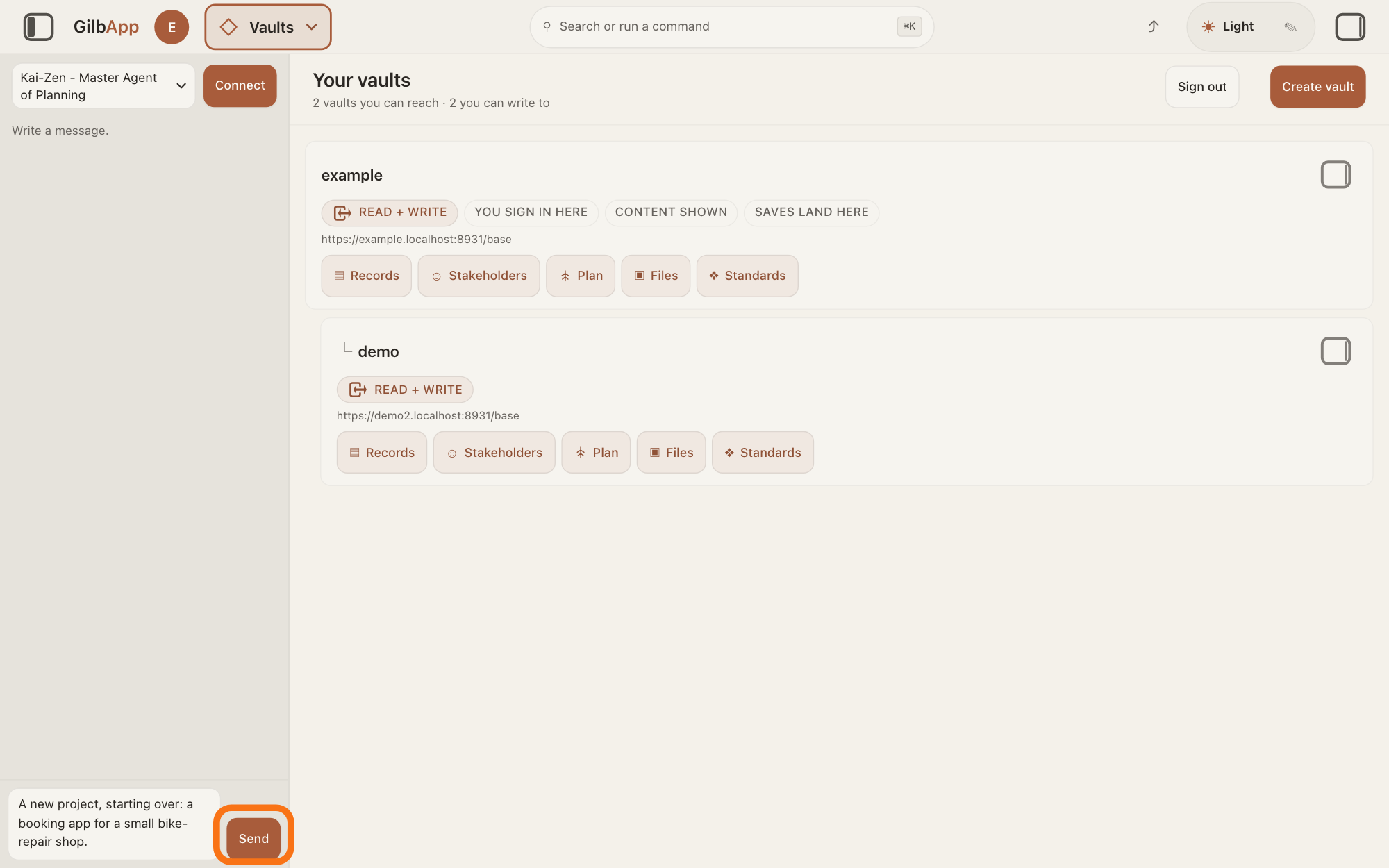
Show as text
The agent list at the top of the chat reads "Kai-Zen - Master Agent of Planning". At the bottom, the box holds a request for a new project, a booking app for a small bike-repair shop. The outlined "Send" is to the right of the box. Press it.
More about this
Return also sends; Shift and Return starts a new line. While it works, the pane says The agent is writing…, and Send reads Queue. Kai-Zen then asks its questions in one message, among them where to keep the project, with a new vault offered first; the answer How do I answer Kai-Zen's questions? shows how to reply. To carry something over from the old project, name its vault and say what to keep.
Deeper
Also asked:
Can I start again without starting from the beginning? Yes. Tell Kai-Zen what is different now and it changes the plan instead of starting over. Your data stays in the old project's vault and your code in its folder: say what to keep.
Starting over can mean two things. Kai-Zen is the planning agent; an agent is your AI following one written procedure, its standing instructions, for one kind of work. To keep the project and plan it again, you need not start over: tell Kai-Zen what is different now, and it changes the plan and makes it more exact again; the answer My plan looks wrong or too big. How do I fix it? shows how. To begin again from your idea, ask Kai-Zen for a new project, as the steps show.
A new project gets its own vault, the place where a person or a group keeps their records. Kai-Zen asks where to keep it and offers a new vault first; Jackfruit, the vault agent, makes it. If you say nothing, Kai-Zen makes the vault. One vault holds one project, and Kai-Zen never offers to put a second project in a vault that holds one, so the new project does not go into the old project's vault. For a new project, Kai-Zen asks its questions again, such as who owns the project and who approves the plan; to skip them, write use your defaults in your first message.
The old project stays as it is, in its own vault, and you can still read it. No agent deletes a vault, and GilbApp has no button to delete one; to have a vault deleted, write to [email protected], the address MyJackfruit's Privacy page gives for asking to delete your data, and say which vault, as the answer Can I delete a vault? shows. To remove single cards of the old plan, delete them; the answer How do I delete a record, and can I get it back? shows how. A vault you no longer use can stay: its records are not public unless you share them.
Keeping what is good. Starting again need not mean starting from nothing. Your plan: tell Kai-Zen what is different now, and it changes the plan instead of starting over. Your data: it stays in the old project's vault; name that vault and say what to carry over. Your code: it stays in its folder on your computer and, once building has started, in its copy on GitHub, a website where programmers keep and share code; tell your AI which parts to keep, or ask it to go back to an earlier version. The answers Can I undo what I've built, or go back to an earlier version? and Where does all the code go, and can I get a copy of it? tell more. Tell your AI to make the GitHub copy private, unless you want everyone to see your code.
You do not need to clear your chat: GilbApp keeps a chat in its browser tab only, and Kai-Zen reads the project itself.
In Claude Code in Terminal, the window where you type commands (on a Mac, the Terminal app), you can ask the same way. Start Claude Code, type this line with your own short name, the one you gave your AI when you connected your computer, and press Return:
/mcp__gilb-<short name>__agent
Then say you want a new project and what it is, and press Return.
This answer is written for a computer screen.
Source: GilbApp 96968de7, src/components/menu/sectionMenuList.ts:330; src/components/regions/LeftRegion.tsx:16; src/components/agent/AgentSelector.tsx:57-79; src/components/agent/AgentChat.tsx:1046, :1062-1064, :711, :545, :114-137 (the chat is kept in the browser tab). Standards: Kai-Zen.Route (Evaluate, New, Existing); Kai-Zen.New.Setup; Kai-Zen.ProjectRules (Vault, Files); Kai-Zen.Existing (Change, Replan); Kai-Zen.AskRules.One; Jackfruit.End. Live answers: How do I continue a project with Kai-Zen?, Do I need a new vault for each app or project?, Can I delete a vault?, How do I delete a record, and can I get it back?, How do I start work with Kai-Zen?, How do I answer Kai-Zen's questions?. Proc_v_Rollback, Rule_Code_git-workflow (RuleGitremoteRemoteRequired). Live answers, sentences shared: Can I undo what I've built, or go back to an earlier version?; Where does all the code go, and can I get a copy of it?; My plan looks wrong or too big. How do I fix it?
Checked against GilbApp d529620.